⚠️ Frontend pull requests are not being reviewed or merged for the existing Vue frontend. The frontend is currently being rewritten and migrated to React and should be available soon.
About
Audiobookshelf is a self-hosted audiobook and podcast server.
Features
- Fully open-source, including the android & iOS app (in beta)
- Stream all audio formats on the fly
- Search and add podcasts to download episodes w/ auto-download
- Multi-user support w/ custom permissions
- Keeps progress per user and syncs across devices
- Auto-detects library updates, no need to re-scan
- Upload books and podcasts w/ bulk upload drag and drop folders
- Backup your metadata + automated daily backups
- Progressive Web App (PWA)
- Chromecast support on the web app and android app
- Fetch metadata and cover art from several sources
- Chapter editor and chapter lookup (using Audnexus API)
- Merge your audio files into a single m4b
- Embed metadata and cover image into your audio files
- Basic ebook support and ereader
- Epub, pdf, cbr, cbz
- Send ebook to device (i.e. Kindle)
- Open RSS feeds for podcasts and audiobooks
Is there a feature you are looking for? Suggest it
Join us on Discord
Demo
Check out the web client demo: https://audiobooks.dev/ (thanks for hosting @Vito0912!)
Username/password: demo/demo (user account)
Android App (beta)
Try it out on the Google Play Store
iOS App (beta)
Beta is currently full. Apple has a hard limit of 10k beta testers. Updates will be posted in Discord.
Using Test Flight: https://testflight.apple.com/join/wiic7QIW (beta is full)

Directory structure and folder names are important to Audiobookshelf!
See library docs for supported directory structures, folder naming conventions, and audio file metadata usage.
Installation
See install docs
Reverse Proxy Set Up
Important! Audiobookshelf requires a websocket connection.
Note: Using a subfolder is supported with no additional changes but the path must be /audiobookshelf (this is not changeable). See discussion
See reverse proxy docs
Contributing
See contributing docs
Localization
Thank you to Weblate for hosting our localization infrastructure pro-bono. If you want to see Audiobookshelf in your language, please help us localize. Additional information on helping with the translations here. 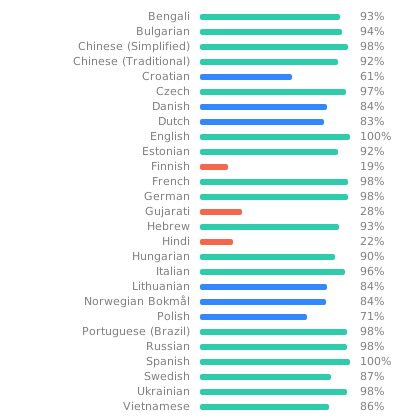
Run from source
This application is built using NodeJs.
Dev Container Setup
The easiest way to begin developing this project is to use a dev container. An introduction to dev containers in VSCode can be found here.
Required Software:
Note, it is possible to use other container software than Docker and IDEs other than VSCode. However, this setup is more complicated and not covered here.
Install the required software on Windows with winget
Note: This requires a PowerShell prompt with winget installed. You should be able to copy and paste the code block to install. If you use an elevated PowerShell prompt, UAC will not pop up during the installs.
winget install -e --id Docker.DockerDesktop; `
winget install -e --id Microsoft.VisualStudioCode
Install the required software on MacOS with homebrew
brew install --cask docker visual-studio-code
Install the required software on Linux with snap
sudo snap install docker; \
sudo snap install code --classic
After installing these packages, you can now install the Remote Development extension for VSCode. After installing this extension open the command pallet (ctrl+shift+p or cmd+shift+p) and select the command >Dev Containers: Rebuild and Reopen in Container. This will cause the development environment container to be built and launched.
You are now ready to start development!
Manual Environment Setup
If you don't want to use the dev container, you can still develop this project. First, you will need to install NodeJs (version 20) and FFmpeg.
Next you will need to create a dev.js file in the project's root directory. This contains configuration information and paths unique to your development environment. You can find an example of this file in .devcontainer/dev.js.
You are now ready to build the client:
npm ci
cd client
npm ci
npm run generate
cd ..
Development Commands
After setting up your development environment, either using the dev container or using your own custom environment, the following commands will help you run the server and client.
To run the server, you can use the command npm run dev. This will use the client that was built when you ran npm run generate in the client directory or when you started the dev container. If you make changes to the server, you will need to restart the server. If you make changes to the client, you will need to run the command (cd client; npm run generate) and then restart the server. By default the client runs at localhost:3333, though the port can be configured in dev.js.
You can also build a version of the client that supports live reloading. To do this, start the server, then run the command (cd client; npm run dev). This will run a separate instance of the client at localhost:3000 that will be automatically updated as you make changes to the client.
If you are using VSCode, this project includes a couple of pre-defined targets to speed up this process. First, if you build the project (ctrl+shift+b or cmd+shift+b) it will automatically generate the client. Next, there are debug commands for running the server and client. You can view these targets using the debug panel (bring it up with (ctrl+shift+d or cmd+shift+d):
Debug server—Run the server.Debug client (nuxt)—Run the client with live reload.Debug server and client (nuxt)—Runs both the preceding two debug targets.


 Audiobookshelf 是一款自托管服务器,用于整理和流式播放你自己的有声书和播客库,提供网页版、Android 和 iOS 客户端。