GitHub Actions Runner Images
Table of Contents
About
This repository contains the source code used to create the VM images for GitHub-hosted runners used for Actions, as well as for Microsoft-hosted agents used for Azure Pipelines.
To build a VM machine from this repo's source, see the instructions.
Available Images
Label scheme
- In general the
-latest label is used for the latest OS image version that is GA.
- Before moving the
-latest label to a new OS version we will announce the change and give sufficient lead time for users to update their workflows.
- The
-xlarge and -large suffixes are unique to macOS images and are only available for GitHub Actions. Learn more about GitHub Actions larger runners.
Announcements
See notable upcoming changes by viewing issues with the Announcement label.
Image Definitions
Beta
The purpose of a Beta is to collect feedback on an image before it is released to GA. The goal of a Beta is to identify and fix any potential issues that exist on that
image. Images are updated on a weekly cadence. Any workflows that run on a beta image do not fall under the customer SLA in place for Actions.
Customers choosing to use Beta images are encouraged to provide feedback in the runner-images repo by creating an issue. A Beta may take on different availability, i.e. public vs private.
GA
A GA (General Availability) image has been through a Beta period and is deemed ready for general use. Images are updated on a weekly cadence. In order to be moved to
GA the image must meet the following criteria:
- Has been through a Beta period (public or private)
- Most major software we install on the image has a compatible
version for the underlying OS and
- All major bugs reported during the Beta period have been addressed.
This image type falls under the customer SLA for actions. GA images are eventually deprecated according to our guidelines as we only support the
latest 2 versions of an OS.
Latest Migration Process
GitHub Actions and Azure DevOps use the -latest YAML label (ex: ubuntu-latest, windows-latest, and macos-latest). These labels point towards the newest stable OS version available.
The -latest migration process is gradual and happens over 1-2 months in order to allow customers to adapt their workflows to the newest OS version. During this process, any workflow using the -latest label, may see changes in the OS version in their workflows or pipelines. To avoid unwanted migration, users can specify a specific OS version in the yaml file (ex: macos-14, windows-2022, ubuntu-22.04).
Image Releases
How to best follow along with changes
Find the latest releases for this repository here.
Subscribe to the releases coming out of this repository, instructions here.
Upcoming changes: A pre-release is created when the deployment of an image has started. As soon as the deployment is finished, the pre-release is converted to a release. If you have subscribed to releases, you will get notified of pre-releases as well.
For high impact changes, we will post these in advance to the GitHub Changelog on our blog and on X.
- Ex: breaking changes, GA or deprecation of images
Cadence
- We typically deploy weekly updates to the software on the runner images.
Software and Image Support
Support Policy
Tools and versions will typically be removed 6 months after they are deprecated or have reached end-of-life
We support (at maximum) 2 GA images and 1 beta image at a time. We begin the deprecation process of the oldest image label once the newest OS image label has been released to GA.
The images generally contain the latest versions of packages installed except for Ubuntu LTS where we mostly rely on the Canonical-provided repositories.
Popular tools can have several versions installed side-by-side with the following strategy:
| Tool name |
Installation strategy |
| Docker images |
not more than 3 latest LTS OS\tool versions. New images or new versions of current images are added using the standard tool request process |
| Java |
all LTS versions |
| Node.js |
3 latest LTS versions |
| Go |
3 latest minor versions |
Python
Ruby |
5 most popular major.minor versions |
| PyPy |
3 most popular major.minor versions |
| .NET Core |
2 latest LTS versions and 1 latest version. For each feature version only latest patch is installed. Note for Ubuntu images see details. |
GCC
GNU Fortran
Clang
GNU C++ |
3 latest major versions |
| Android NDK |
1 latest non-LTS, 2 latest LTS versions |
| Xcode |
- only one major version of Xcode will be supported per macOS version
- all minor versions of the supported major version will be available
- beta and RC versions will be provided "as-is" in the latest available macOS image only no matter of beta/GA status of the image
- when a new patch version is released, the previous patch version will be replaced |
| Xcode Platforms |
- only three major.minor versions of platform tools and simulator runtimes will be available for installed Xcode, including beta/RC versions |
Package managers usage
We use third-party package managers to install software during the image generation process. The table below lists the package managers and the software installed.
[!NOTE]
Third-party repositories are re-evaluated every year to identify if they are still useful and secure.
Image Deprecation Policy
- Images begin the deprecation process of the oldest image label once a new GA OS version has been released.
- Deprecation process begins with an announcement that sets a date for deprecation.
- As it gets closer to the date, GitHub begins doing scheduled brownouts of the image.
- During this time there will be an Announcement pinned in the repo to remind users of the deprecation.
- Finally, GitHub will deprecate the image and it will no longer be available.
Preinstallation Policy
In general, these are the guidelines we follow when deciding what to pre-install on our images:
- Popularity: widely-used tools and ecosystems will be given priority.
- Latest Technology: recent versions of tools will be given priority.
- Deprecation: end-of-life tools and versions will not be added.
- Licensing: MIT, Apache, or GNU licenses are allowed.
- Time & Space on the Image: we will evaluate how much time is saved and how much space is used by having the tool pre-installed.
- Support: If a tool requires the support of more than one version, we will consider the cost of this maintenance.
Default Version Update Policy
- In general, once a new version is installed on the image, we announce the default version update 2 weeks prior to deploying it.
- For potentially dangerous updates, we may extend the timeline up to 1 month between the announcement and deployment.
How to Interact with the Repo
FAQs
What images are available for GitHub Actions and Azure DevOps?
The availability of images for GitHub Actions and Azure DevOps is the same. However, deprecation policies may differ. See documentation for more details:
What image version is used in my build?
Usually, image deployment takes 2-3 days, and documentation in the main branch is only updated when deployment is finished. To find out which image version and what software versions are used in a specific build, see Set up job (GitHub Actions) or Initialize job (Azure DevOps) step log.
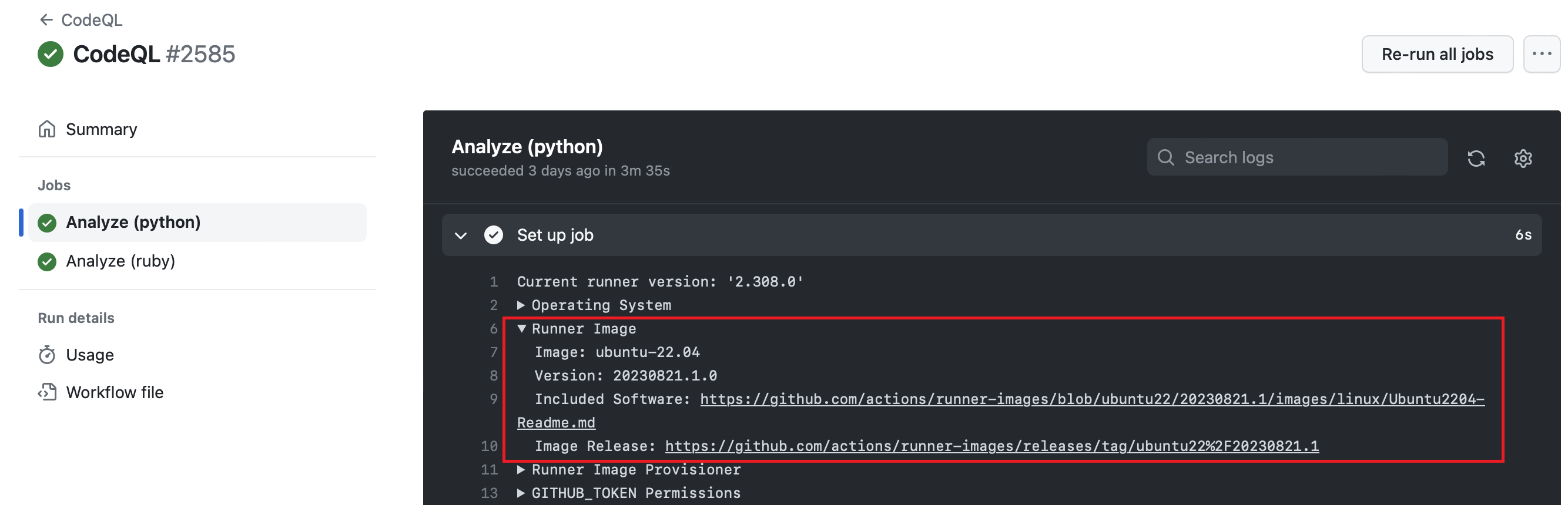
Looking for other Linux distributions?
We do not plan to offer other Linux distributions. We recommend using Docker if you'd like to build using other distributions with the hosted runner images. Alternatively, you can leverage self-hosted runners and fully customize your VM image to your needs.
How do I contribute to the macOS source?
macOS source lives in this repository and is available for everyone. However, macOS image-generation CI doesn't support external contributions yet so we are not able to accept pull-requests for now.
We are in the process of preparing macOS CI to accept contributions. Until then, we appreciate your patience and ask you to continue to make tool requests by filing issues.
How does GitHub determine what tools are installed on the images?
For some tools, we always install the latest at the time of the deployment; for others, we pin the tool to specific version(s). For more details please see the Preinstallation Policy
How do I request that a new tool be pre-installed on the image?
Please create an issue and get an approval from us to add this tool to the image before creating the pull request.
What branch should I use to build custom image?
We strongly encourage customers to build their own images using the main branch.
This repository contains multiple branches and releases that serve as document milestones to reflect what software is installed in the images at certain point of time. Current builds are not idempotent and if one tries to build a runner image using the specific tag it is not guaranteed that the build will succeed.





















 这是 GitHub 用来构建虚拟机镜像的源代码,这些镜像为 GitHub 托管的 Actions 运行器和 Microsoft 托管的 Azure Pipelines 代理提供支持——也就是 Ubuntu、macOS 和 Windows 机器,上面预装好了各种开发工具。