A2UI: Agent-to-User Interface
A2UI is an open-source project, complete with a format
optimized for representing updatable agent-generated
UIs and an initial set of renderers, that allows agents
to generate or populate rich user interfaces.
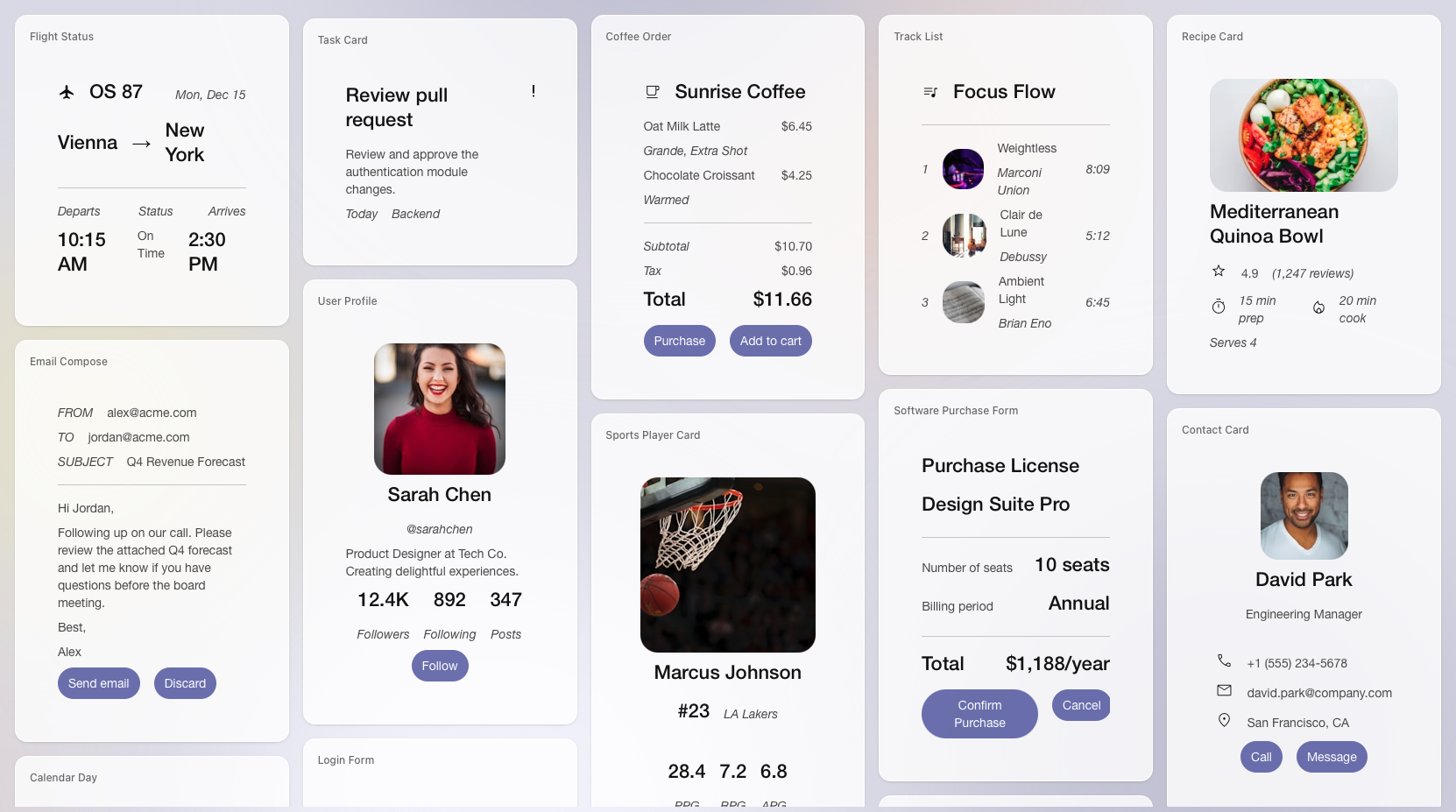
A gallery of A2UI rendered cards, showing a variety of UI compositions that A2UI can achieve.
⚠️ Status: Early stage public preview
Note: A2UI's current production release is v0.9.1, a patch release in
the stable v0.9 protocol family. The v1.0 specification is a release
candidate, while v0.8 is legacy. The specification and implementations are
functional but are still evolving. We are opening the project to foster
collaboration, gather feedback, and solicit contributions (e.g., on client
renderers). Expect changes.
Summary
Generative AI excels at creating text and code, but agents can struggle to
present rich, interactive interfaces to users, especially when those agents
are remote or running across trust boundaries.
A2UI is an open standard and set of libraries that allows agents to
"speak UI." Agents send a declarative JSON format describing the intent of
the UI. The client application then renders this using its own native
component library (Flutter, Angular, Lit, etc.).
This approach ensures that agent-generated UIs are
safe like data, but expressive like code.
High-level philosophy
A2UI was designed to address the specific challenges of interoperable,
cross-platform, generative or template-based UI responses from agents.
The project's core philosophies:
- Security first: Running arbitrary code generated by an LLM may present a
security risk. A2UI is a declarative data format, not executable
code. Your client application maintains a "catalog" of trusted, pre-approved
UI components (e.g., Card, Button, TextField), and the agent can only request
to render components from that catalog.
- LLM-friendly and incrementally updatable: The UI is represented as a flat
list of components with ID references which is easy for LLMs to generate
incrementally, allowing for progressive rendering and a responsive user
experience. An agent can efficiently make incremental changes to the UI based
on new user requests as the conversation progresses.
- Framework-agnostic and portable: A2UI separates the UI structure from
the UI implementation. The agent sends a description of the component tree
and its associated data model. Your client application is responsible for
mapping these abstract descriptions to its native widgets—be it web components,
Flutter widgets, React components, SwiftUI views or something else entirely.
The same A2UI JSON payload from an agent can be rendered on multiple different
clients built on top of different frameworks.
- Flexibility: A2UI also features an open registry pattern that allows
developers to map server-side types to custom client implementations, from
native mobile widgets to React components. By registering a "Smart Wrapper,"
you can connect any existing UI component—including secure iframe containers
for legacy content—to A2UI's data binding and event system. Crucially, this
places security firmly in the developer's hands, enabling them to enforce
strict sandboxing policies and "trust ladders" directly within their custom
component logic rather than relying solely on the core system.
Use cases
Some of the use cases include:
- Dynamic Data Collection: An agent generates a bespoke form (date pickers,
sliders, inputs) based on the specific context of a conversation (e.g.,
booking a specialized reservation).
- Remote Sub-Agents: An orchestrator agent delegates a task to a
remote specialized agent (e.g., a travel booking agent) which returns a
UI payload to be rendered inside the main chat window.
- Adaptive Workflows: Enterprise agents that generate approval
dashboards or data visualizations on the fly based on the user's query.
Architecture
The A2UI flow disconnects the generation of UI from the execution of UI:
- Generation: An Agent (using Gemini or another LLM) generates or uses
a pre-generated
A2UI Response, a JSON payload describing the composition
of UI components and their properties.
- Transport: This message is sent to the client application
(via A2A, AG-UI, etc.).
- Resolution: The Client's A2UI Renderer parses the JSON.
- Rendering: The Renderer maps the abstract components
(e.g.,
type: 'text-field') to the concrete implementation in the client's codebase.
Dependencies
A2UI is designed to be a lightweight format, but it fits into a larger ecosystem:
- Transports: Compatible with A2A Protocol and AG-UI.
- LLMs: Can be generated by any model capable of generating JSON output.
- Host Frameworks: Requires a host application built in a supported framework
(currently: Web or Flutter).
Getting started
Pick the path that matches where you want to start:
| Path |
What you get |
Time |
| 🍜 Quickstart Restaurant Finder Demo |
Full-stack A2UI running locally with a Gemini powered ADK agent and Lit renderer. Learn A2UI end-to-end and customize to your use case. |
~5 min |
| ⚛️ Use A2UI with Any Agent Framework & Harness |
Scaffold an AG-UI app or harness for your framework of choice, then enable A2UI rendering over AG-UI. |
~5 min |
| 🎨 A2UI Composer |
Generate A2UI JSON from a visual editor and paste it into any agent prompt — no install required. |
~1 min |
| 🎬 A2UI Theater |
Step through pre-built A2UI streaming scenarios across Lit, React, and Angular renderers — no install required. |
~1 min |
Restaurant Finder demo — Summary
Prerequisites: Node.js 18+ (with Corepack enabled), uv, and a Gemini API key.
git clone https://github.com/a2ui-project/a2ui.git
cd a2ui
export GEMINI_API_KEY="your_gemini_api_key"

# Enable Corepack (macOS Homebrew users: see tip below)
corepack enable

yarn install
cd samples/client/lit
yarn demo:restaurant
[!TIP]
macOS Homebrew Users: If you previously installed standalone package managers, unlink conflicts before installing Corepack so Corepack can manage versions per-project:
brew unlink yarn pnpm
brew install corepack
corepack enable
These commands install dependencies across workspaces, build the renderers, start the Python agent, and open the client at http://localhost:5173. For step-by-step instructions, alternative demos, and troubleshooting see the full Quickstart.
Use A2UI with Any Agent Framework & Harness — Summary
npx create-ag-ui-app@latest
Use the AG-UI CLI with your framework or harness of choice (Google Chat, ADK, LangGraph, CrewAI, Mastra, Strands, Slack, Teams, etc.), then follow the AG-UI guide to enable A2UI rendering. Some scaffold paths use CopilotKit's A2UI runtime with Next.js under the hood, but the setup surface is AG-UI-first.
Other renderers
For Flutter, check out the GenUI SDK, which uses A2UI under the hood. See docs/public/reference/renderers.md for the full list of client implementations.
Roadmap
We hope to work with the community on the following:
- Spec stabilization: Moving towards a v1.0 specification.
- More renderers: Adding official support for React, Jetpack Compose, iOS (SwiftUI), and more.
- Additional transports: Support for REST and more.
- Additional Agent frameworks: Genkit, LangGraph, and more.
Contribute
A2UI is an Apache 2.0 licensed project. We believe the future of UI is agentic,
and we want to work with you to help build it.
See CONTRIBUTING.md for details on how to get started.

 A2UI 是一套开放协议和代码库,让 AI 智能体发送声明式的 JSON 界面描述,再由客户端应用使用自身的原生组件(如 Flutter、Angular、Lit、React 等)进行渲染,而不是执行智能体生成的代码。