
💡 🎬 Take it further with Seedance 2 — pair GPT Image 2 stills with Seedance for jaw-dropping AI videos, 2000+ prompts to explore 👉 awesome-seedance-2-prompts
🚀 Awesome GPT Image 2 Prompts





🎨 A curated collection of creative prompts for OpenAI's GPT Image 2
⚠️ Copyright Notice: All prompts are collected from the community for educational purposes. If you believe any content infringes on your rights, please open an issue and we will remove it promptly.









-Click%20to%20View-lightgrey)



-Click%20to%20View-lightgrey)


🌐 View in Web Gallery
👉 Browse on YouMind GPT Image 2 Prompts Gallery
Why use our gallery?
| Feature |
GitHub README |
youmind.com Gallery |
| 🎨 Visual Layout |
Linear list |
Beautiful Masonry Grid |
| 🔍 Search |
Ctrl+F only |
Full-text search with filters |
| 🤖 AI One-Click Generation |
- |
AI one-click generation |
| 📱 Mobile |
Basic |
Fully responsive |
| 🏷️ Categories |
- |
Category browsing |
🏷️ Browse by Category
📖 Table of Contents
🤔 What is GPT Image 2?
GPT Image 2 (codename "duct-tape") is OpenAI's next-generation image model. Community testing highlights a leap in these areas:
- 🎯 Pixel-Perfect Text Rendering — Native-quality text in Chinese, English, and Japanese, no typos or warped glyphs
- 🎨 Cross-Image Consistency — The same character, style, or IP stays identical across a series, down to the pixel
- ⚡ Commercial-Grade Illustration — Illustration output is ready to ship without manual polish
- 🌈 True Art Style Induction — Creatively evokes the feeling of a style rather than merely approximating references
- 🔧 Storyboard & Product Series — Ideal for storyboards, IP characters, and multi-panel product visuals
- 📐 Multi-Language Design — Social cards, banners, and posters with accurate multilingual typography in one shot
📚 Learn More: See community testing in our report summary
🚀 Raycast Integration
Some prompts support dynamic arguments using Raycast Snippets syntax. Look for the 🚀 Raycast Friendly badge!
Example:
A quote card with "{argument name="quote" default="Stay hungry, stay foolish"}"
by {argument name="author" default="Steve Jobs"}
When used in Raycast, you can dynamically replace the arguments for quick iterations!
📊 Statistics
| Metric |
Count |
| 📝 Total Prompts |
17311 |
| ⭐ Featured |
6 |
| 🔄 Last Updated |
Thursday, September 10, 2026 at 1:56:16 AM UTC |
🔥 Featured Prompts
⭐ Hand-picked by our team for exceptional quality and creativity
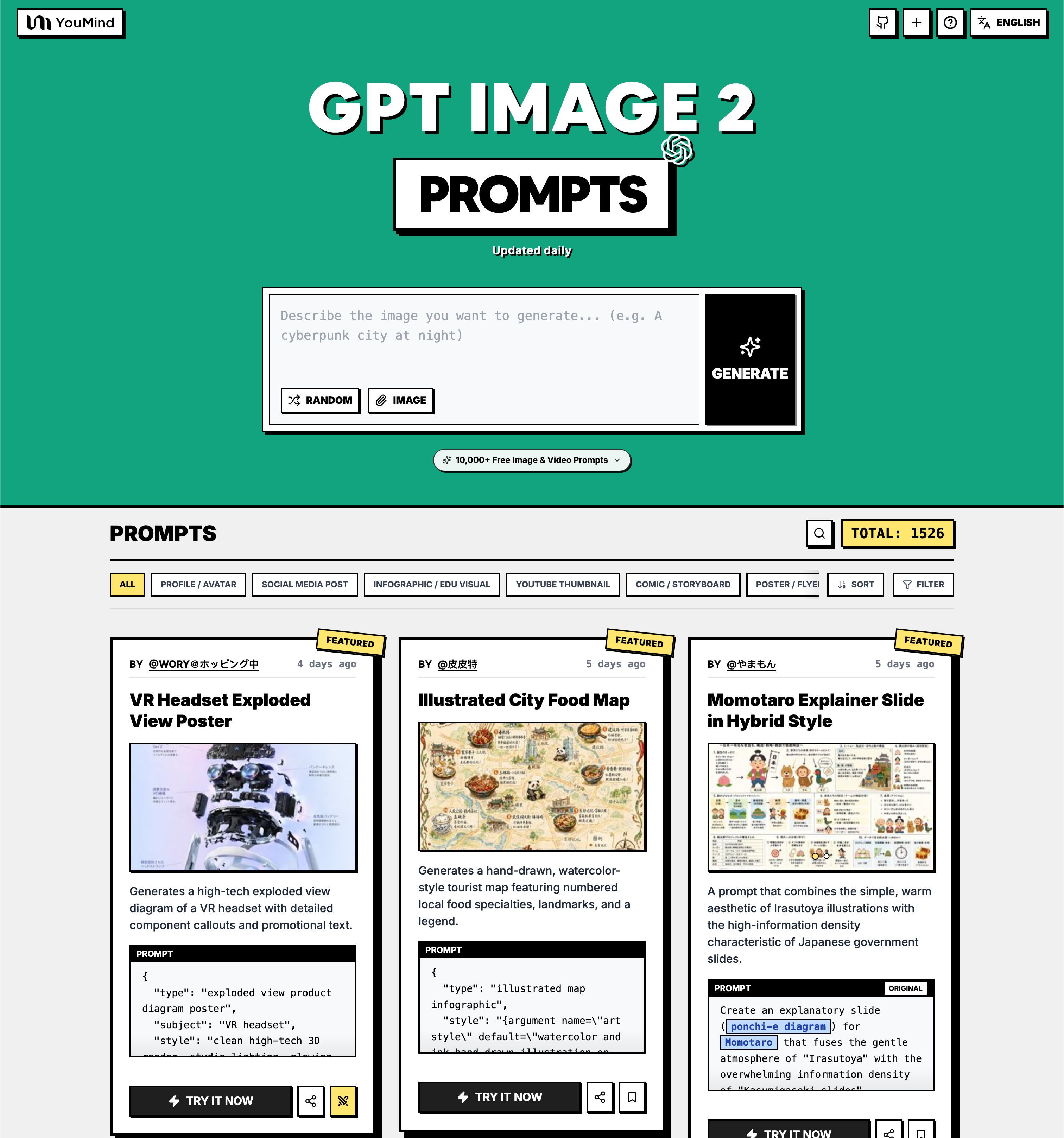
No. 1: VR Headset Exploded View Poster



📖 Description
Generates a high-tech exploded view diagram of a VR headset with detailed component callouts and promotional text.
📝 Prompt
{
  "type": "exploded view product diagram poster",
  "subject": "VR headset",
  "style": "clean high-tech 3D render, studio lighting, glowing accents",
  "background": "{argument name=\"background color\" default=\"soft purple and blue gradient\"}",
  "header": {
    "logo": "∞ {argument name=\"product name\" default=\"Meta Quest 3\"}",
    "subtitle": "{argument name=\"main catchphrase\" default=\"まったく新しい現実を、まったく新しい構造から。\"}"
  },
  "layout": {
    "centerpiece": "vertically stacked exploded view of a VR headset showing 9 distinct layers of internal components: outer shell, camera sensors, motherboard with chip, pancake lenses, internal frame, battery packs, side straps, top strap, and facial interface cushion.",
    "callout_labels": {
      "count": 8,
      "left_side": [
        "Snapdragon® XR2 Gen 2\n圧倒的な処理性能でリアルタイムな体験を。",
        "調整可能なIPD機構\n幅広いユーザーに快適なフィット感を。",
        "精密設計されたヘッドストラップ\n快適さと安定性を追求したエルゴノミクス。"
      ],
      "right_side": [
        "フェイスプレート\n洗練されたデザインと最適な重量バランス。",
        "トラッキングカメラ\n高精度な位置トラッキングと環境認識を実現。",
        "パンケーキレンズ\n薄型設計で広い視野角と鮮明な映像を提供。",
        "高性能バッテリー\n長時間駆動を支える最適化された電源設計。",
        "柔らかなフェイスインターフェース\n長時間でも快適な装着感を実現。"
      ]
    },
    "footer": {
      "left_text_block": {
        "headline": "{argument name=\"bottom headline\" default=\"体験は、構造から進化する。\"}",
        "body": "一つひとつのパーツに、没入体験を支える最先端テクノロジーとこだわりの設計。Meta Quest 3は、未来を感じさせる体験を内部から生み出しています。"
      },
      "right_logo": "∞ Meta"
    }
  }
}
🖼️ Generated Images
Image 1
📌 Details
👉 Try it now →
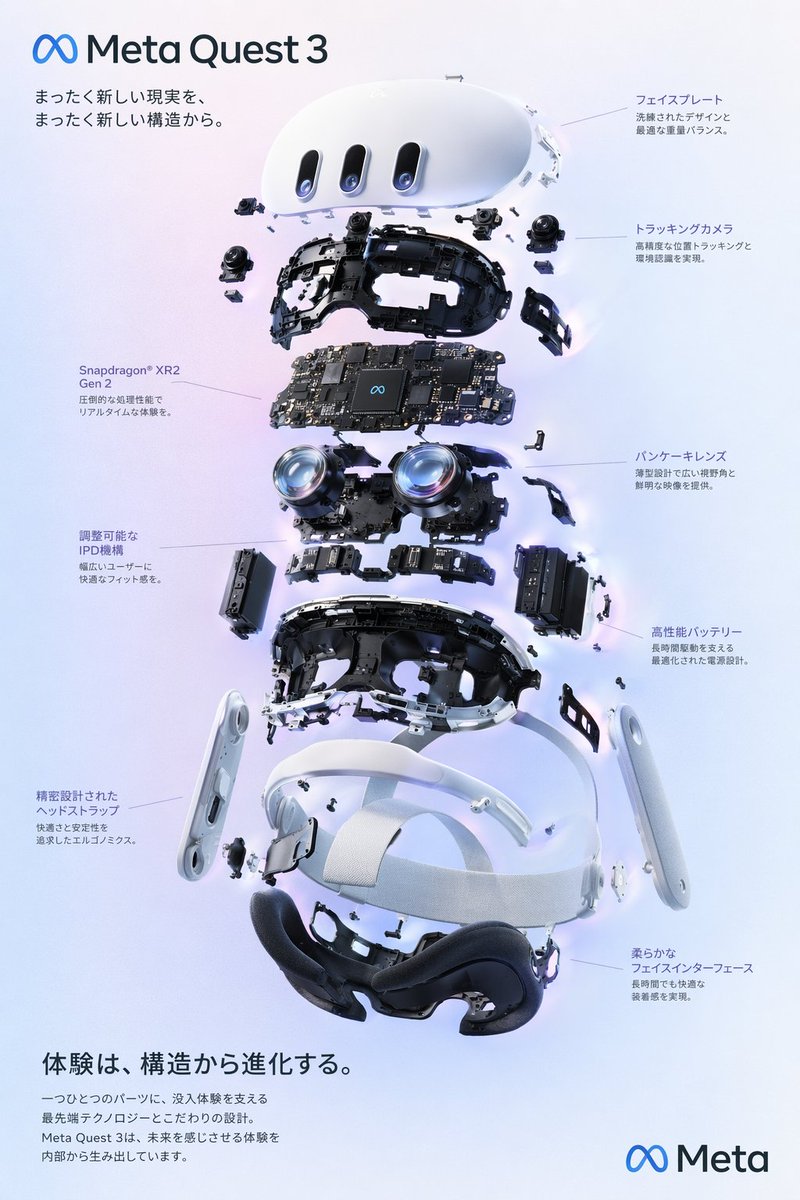
No. 2: Illustrated City Food Map
📖 Description
Generates a hand-drawn, watercolor-style tourist map featuring numbered local food specialties, landmarks, and a legend.
📝 Prompt
{
  "type": "illustrated map infographic",
  "style": "{argument name=\"art style\" default=\"watercolor and ink hand-drawn illustration on vintage parchment\"}",
  "title_section": {
    "text": "{argument name=\"city name\" default=\"成都\"} {argument name=\"map title\" default=\"吃货暴走地图\"}",
    "mascot": "cartoon red chili pepper wearing sunglasses and giving a thumbs up"
  },
  "border": "{argument name=\"border decoration\" default=\"vine of green leaves and red chili peppers\"}",
  "layout": {
    "background": "textured beige parchment paper with yellow roads, blue rivers, and green park areas",
    "sections": [
      {
        "title": "landmarks",
        "count": 6,
        "illustrations": ["traditional pavilion", "traditional monastery", "modern skyscraper with climbing panda", "tall TV tower", "traditional gate", "industrial buildings"],
        "labels": ["人民公园", "文殊院", "IFS", "339电视塔", "宽窄巷子", "东郊记忆"]
      },
      {
        "title": "food_spots",
        "count": 12,
        "illustrations": ["mapo tofu", "dumplings in chili oil", "skewers in pot", "sticky rice balls", "egg baking cake", "nine-grid hotpot", "sweet potato noodles", "cold skewers", "spicy mixed dish", "covered tea bowl", "ice jelly dessert", "spicy rabbit heads"],
        "labels": ["1 陈麻婆豆腐", "2 钟水饺", "3 春熙路", "4 宽窄巷子·三大炮", "5 建设路·叶婆婆蛋烘糕", "6 玉林路·小龙坎火锅", "7 香香巷·肥肠粉", "8 武侯祠大街·钵钵鸡", "9 东郊记忆·冒椒火辣", "10 人民公园·鹤鸣茶社", "11 锦里古街·冰粉", "12 双流老妈兔头"]
      },
      {
        "title": "图例",
        "position": "bottom-right",
        "count": 5,
        "items": ["red dot", "green house", "green tree", "blue line", "yellow double line"],
        "labels": ["美食地点", "地标景点", "公园绿地", "河流湖泊", "主要道路"]
      }
    ],
    "centerpiece": "giant panda sitting and eating bamboo",
    "bottom_right_extras": ["vintage compass rose with N, S, E, W", "disclaimer text '温馨提示:吃辣需谨慎,肠胃要保护~' with a red chili pepper icon"]
  }
}
🖼️ Generated Images
Image 1
📌 Details
👉 Try it now →
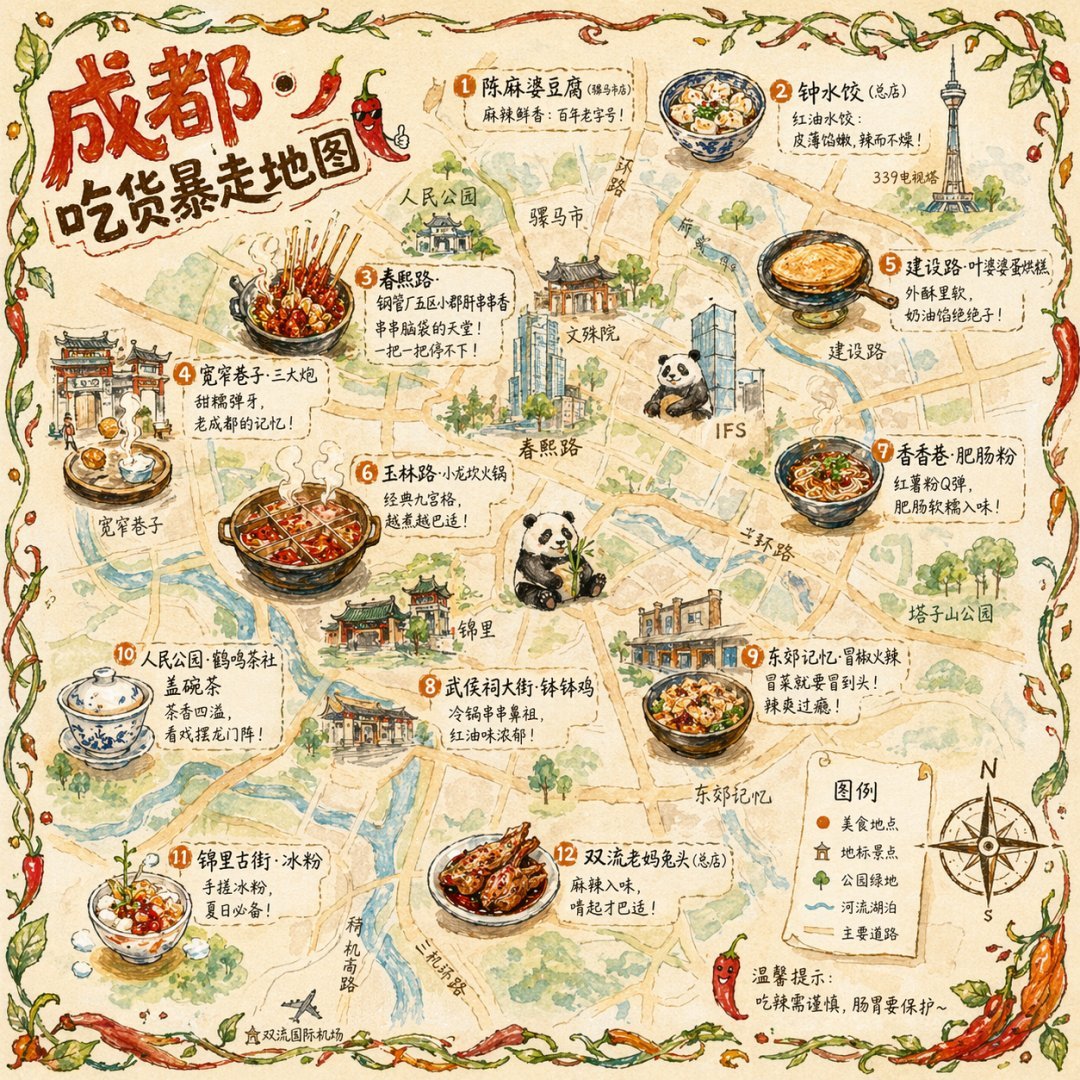
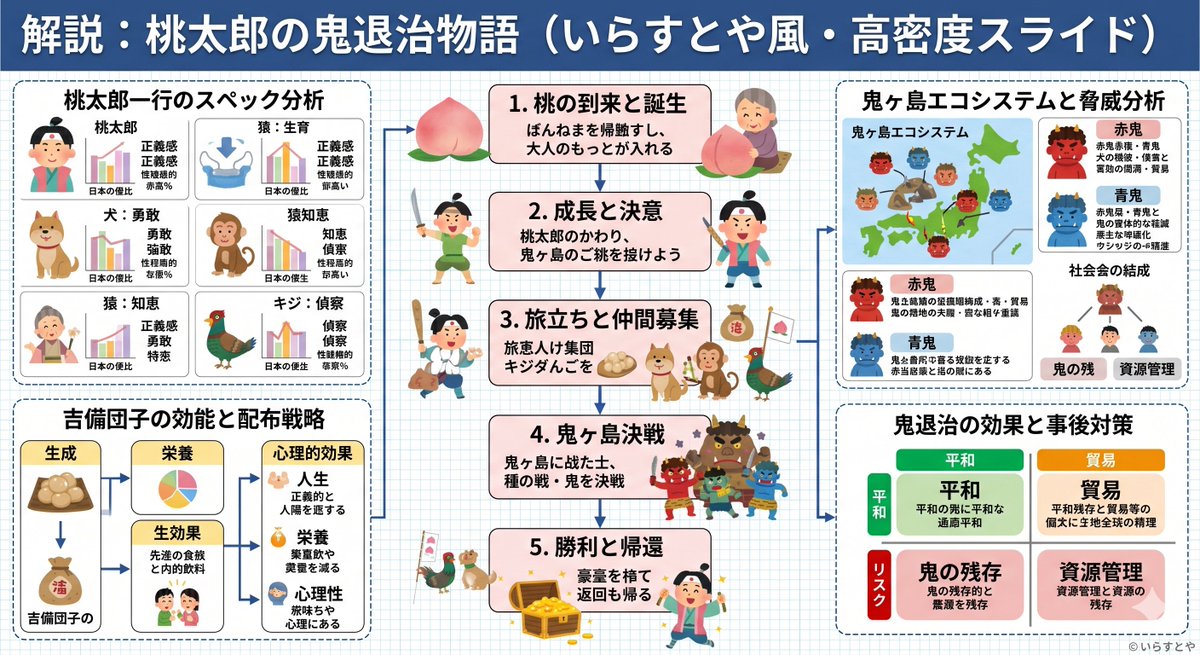
No. 3: Momotaro Explainer Slide in Hybrid Style

📖 Description
A prompt that combines the simple, warm aesthetic of Irasutoya illustrations with the high-information density characteristic of Japanese government slides.
📝 Prompt
Create an explanatory slide ({argument name="format" default="ponchi-e diagram"}) for {argument name="theme" default="Momotaro"} that fuses the gentle atmosphere of "Irasutoya" with the overwhelming information density of "Kasumigaseki slides".
🖼️ Generated Images
Image 1
Image 2
📌 Details
👉 Try it now →
No. 4: E-commerce Live Stream UI Mockup
📖 Description
Generates a realistic social media live stream interface overlaying a portrait, featuring customizable chat messages, gift popups, and a product purchase card.
📝 Prompt
{
  "type": "live stream UI mockup",
  "subject": {
    "description": "portrait of {argument name=\"host name\" default=\"Elon Musk\"}, smiling, wearing a black t-shirt with a white technical schematic graphic",
    "background": "left side shows a screen with '{argument name=\"left background logo\" default=\"SPACEX\"}' text, right side shows a red '{argument name=\"right background logo\" default=\"Tesla T logo\"}' and a dark car"
  },
  "ui_overlay": {
    "top_header": {
      "host_info": "avatar, name '{argument name=\"host name\" default=\"Elon Musk\"}', subtext '55.6万本场点赞', red '关注' button",
      "rank_badge": "gold coin icon with '全站第1名'",
      "viewer_stats": "3 top viewer avatars with '12.3w', '8.6w', '5.7w', total '68.7万', 'X' close button",
      "right_links": "'更多直播 >', '礼物展馆 0/24' with blue '经典' tag"
    },
    "mid_left_gifts": {
      "count": 2,
      "items": [
        "avatar '科技爱好者', '送小心心', heart icon x 1314",
        "avatar '星辰大海', '送火箭', rocket icon x 666"
      ]
    },
    "bottom_left_chat": {
      "system_message": "level 37 badge '宇宙漫游者 加入了直播间'",
      "message_count": 7,
      "messages": [
        "小火箭: 马斯克!未来可期!🚀",
        "future: 特斯拉Model 2什么时候出?",
        "星空梦想家: SpaceX今年能上火星吗?",
        "AI探索者: Neuralink进展如何?",
        "帅气的网友: 马总好!",
        "Mars: 第一次来你的直播,超激动!",
        "用户123: 讲讲AI吧,会取代人类吗?"
      ]
    },
    "bottom_right_product_card": {
      "hot_tag": "orange '热卖 x 1888'",
      "image": "Tesla Cybertruck",
      "title": "{argument name=\"product name\" default=\"特斯拉Cybertruck 电动皮卡\"}",
      "price": "{argument name=\"product price\" default=\"¥ 1,618,000\"}",
      "button": "red '抢' button",
      "floating_animation": "translucent hearts floating up the right edge"
    },
    "bottom_bar": {
      "input_field": "'

 一个免费的社区提示词精选库,面向 OpenAI 的 GPT Image 2 图像模型——收录数千条提示词,配有预览图,支持 16 种语言,按用途、风格和主题分类。