agenctx

Context management for AI coding agents. agenctx.com
What is agenctx?
For integrations, see versioned context and receipt exports.
For search regression checks, see retrieval evaluation.
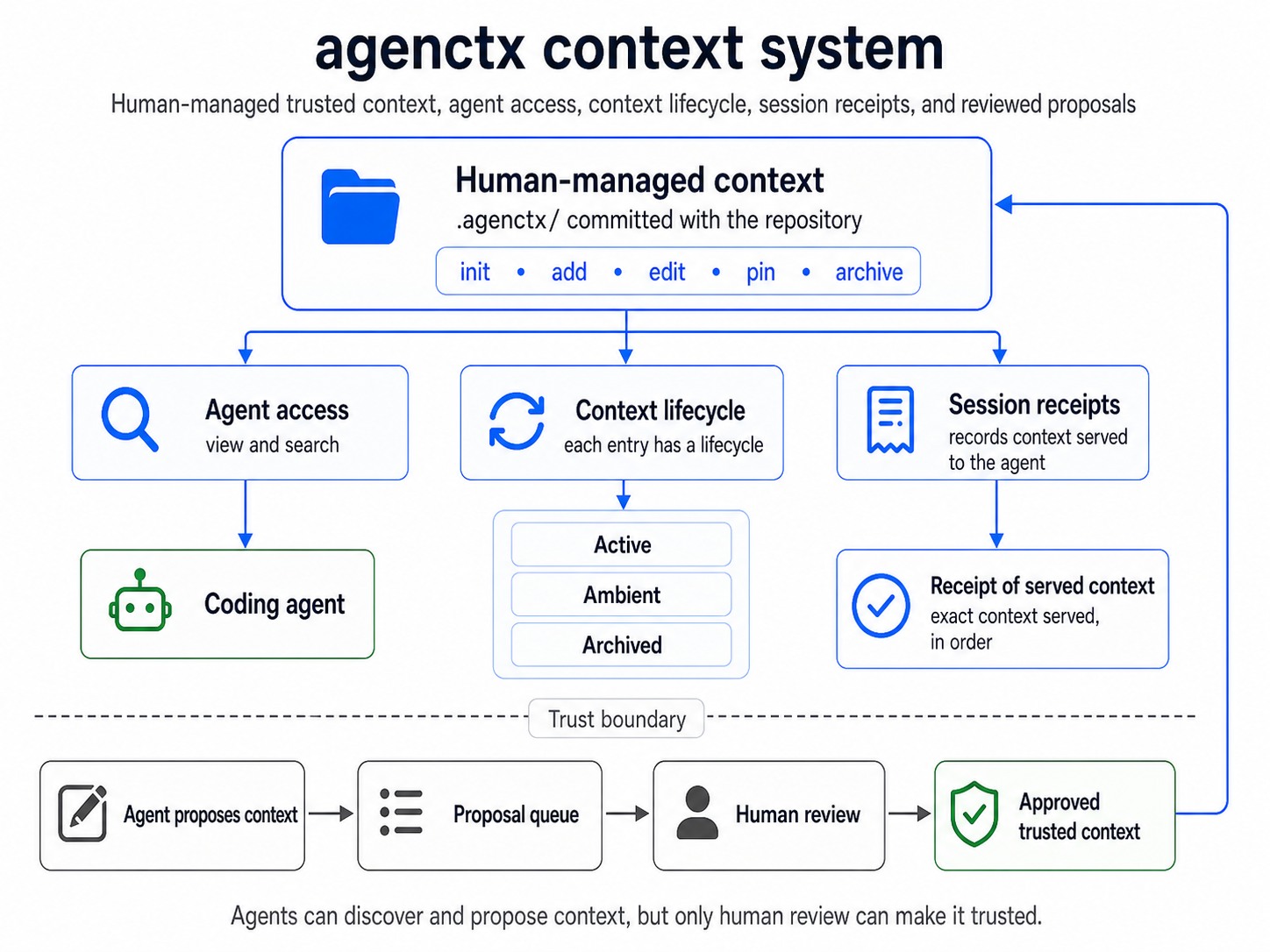
agenctx is a local, version-controlled context management system for AI agents. It gives each repository a shared memory for the rules, decisions, warnings, test requirements, design patterns, security constraints, and other knowledge an agent needs to work safely.
Humans maintain that knowledge inside .agenctx/. Agents discover it through a small generated guide, search the relevant context channel, inspect previews, and open the exact entries they need before acting. The complete store is not copied into every prompt.
This means the repository context can grow with the project without forcing every agent to read all of it on every task. A design task can retrieve design context; a security review can retrieve security context; a testing task can retrieve testing context. Tracked sessions then show exactly what Agenctx served.
agenctx is not another coding agent or a hosted knowledge base. It is the context layer between a repository and the agents working on it. It is local-first, dependency-free, has no telemetry, and requires Node.js 18 or later.
The problem with static agent files
Files such as AGENTS.md, CLAUDE.md, and .cursorrules are useful for short, stable instructions. The problem appears when they become the entire project memory:
- One document starts mixing security rules, design conventions, architecture decisions, testing commands, current hazards, and historical notes.
- Every task receives instructions that may be irrelevant, while the one important rule can be buried deep in the file.
- Old context stays beside current context unless someone remembers to clean it up.
- Equivalent instructions copied across agent-specific files can drift apart.
- Agents have no safe proposal boundary if they can directly rewrite the trusted instructions.
- Git records file changes, but not which exact instructions were discovered or served during an agent session.
AGENTS.md can contain sections, and some tools support directory-specific guides. Agenctx does not pretend otherwise or remove those files. Instead, agenctx dump keeps them as concise navigation guides while the changing project knowledge lives in a structured store with search, lifecycle, review, and delivery receipts.
A simple mental model
Think of a static instruction file as one briefing sheet placed on every agent's desk. It works while the project is small, but the sheet becomes harder to use as more teams keep adding notes.
Agenctx is closer to a project library:
.agenctx/ is the library committed with the repository.- Banners are switchable shelves such as
design, security, testing, and warnings.
view and search are the catalogue.- Opening an entry in full is taking the relevant book from the shelf.
- Lifecycle management is the librarian moving unused material into review and then the archive.
- A session receipt is the checkout record showing exactly what was served and in what order.
- The proposal queue is the acquisitions desk: agents can suggest knowledge, but a human decides what becomes trusted context.
A library can hold far more knowledge than one person needs for one task. In the same way, Agenctx lets project context grow without turning every interaction into one enormous prompt.
How it works
- Humans add trusted context. Entries are stored under built-in or custom banners and committed with the repository.
- Agent guides stay small.
agenctx dump teaches supported agents how to navigate the store instead of duplicating the store inside their instruction files.
- Agents retrieve context deliberately. They browse channels, search deterministic previews, and open relevant entries in full before using them.
- Context stays maintainable. Entries move through active, ambient, and archived states; important entries can be pinned permanently.
- Agent learning is reviewed. An agent may propose at most two entries per session, but proposals remain untrusted until a human approves them.
- Delivery is traceable. A tracked session produces a content-addressed, hash-chained receipt of the exact ordered context Agenctx served.
Local control plane
Open the repository UI from any directory inside an initialized project:
agenctx ui
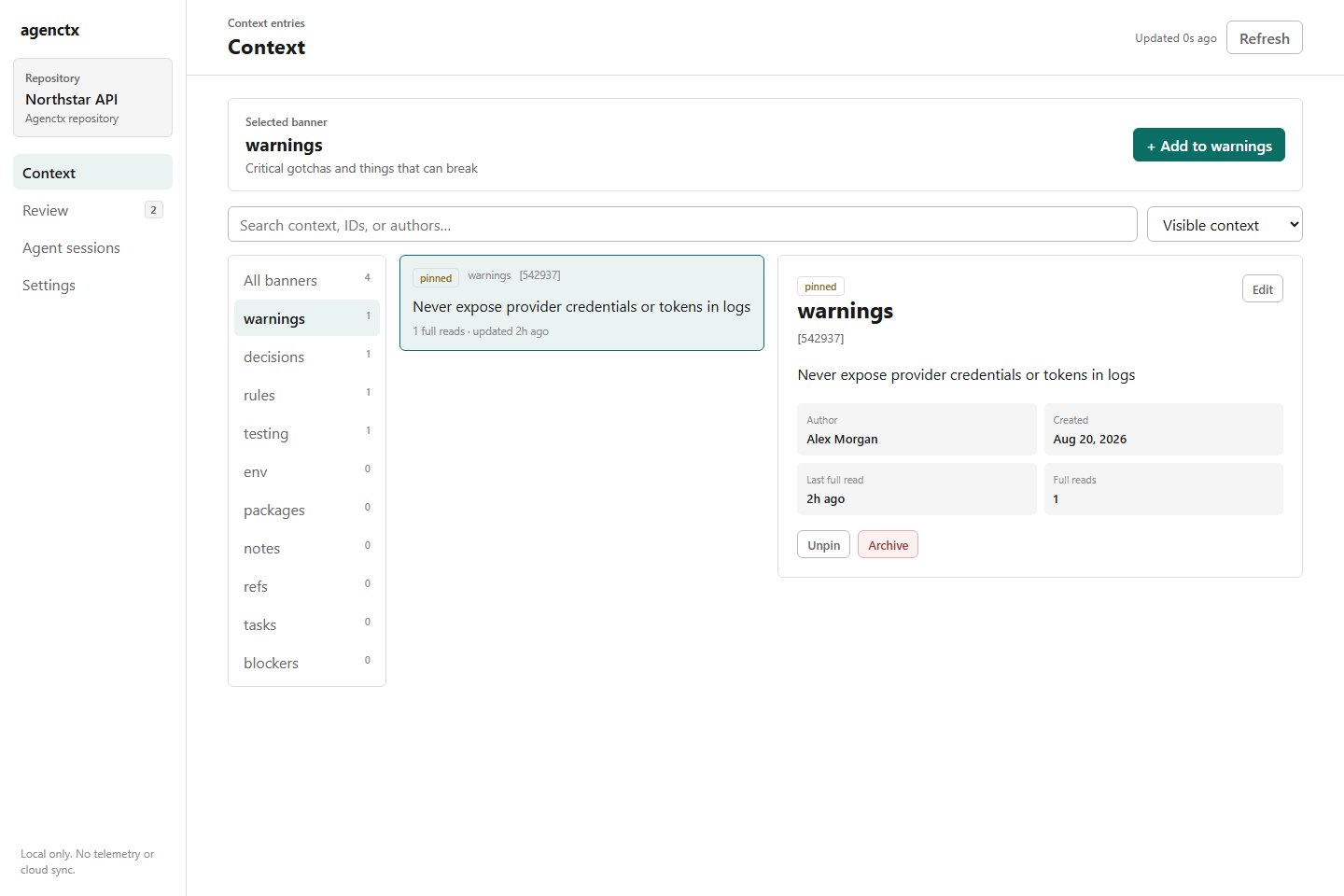
The local control plane is the human interface for the same repository data used by the CLI. Its banner list acts as a context switcher: select a channel to browse, search, and add context only within that domain. The UI also provides agent proposal and ambient review queues, complete session traces, decay settings, and preview/full delivery bars. Humans can edit, pin, archive, restore, approve, and reject context without bypassing the repository audit history.
The server binds only to 127.0.0.1, uses a new launch token for API access, makes no external requests, and refuses stale browser writes when the CLI has changed the same repository data. Use agenctx ui --no-open to print the private launch URL without opening a browser, or agenctx ui --port=4317 to select a local port.
The UI is optional. Agents continue to use the CLI and generated instruction files, so Agenctx also works in terminals, CI, and headless environments.
Install
From npm:
npm install --global agenctx
Directly from GitHub:
npm install --global github:YMuskrat/agentctx
Quick start
Run these commands in your project:
agenctx init
agenctx add warn "Never edit the generated API files"
agenctx add decision "Use SQLite so local development stays self-contained"
agenctx view
agenctx view warnings
agenctx search SQLite
agenctx init creates .agenctx/. Commit that directory so humans and agents share the same project memory.
See it in action
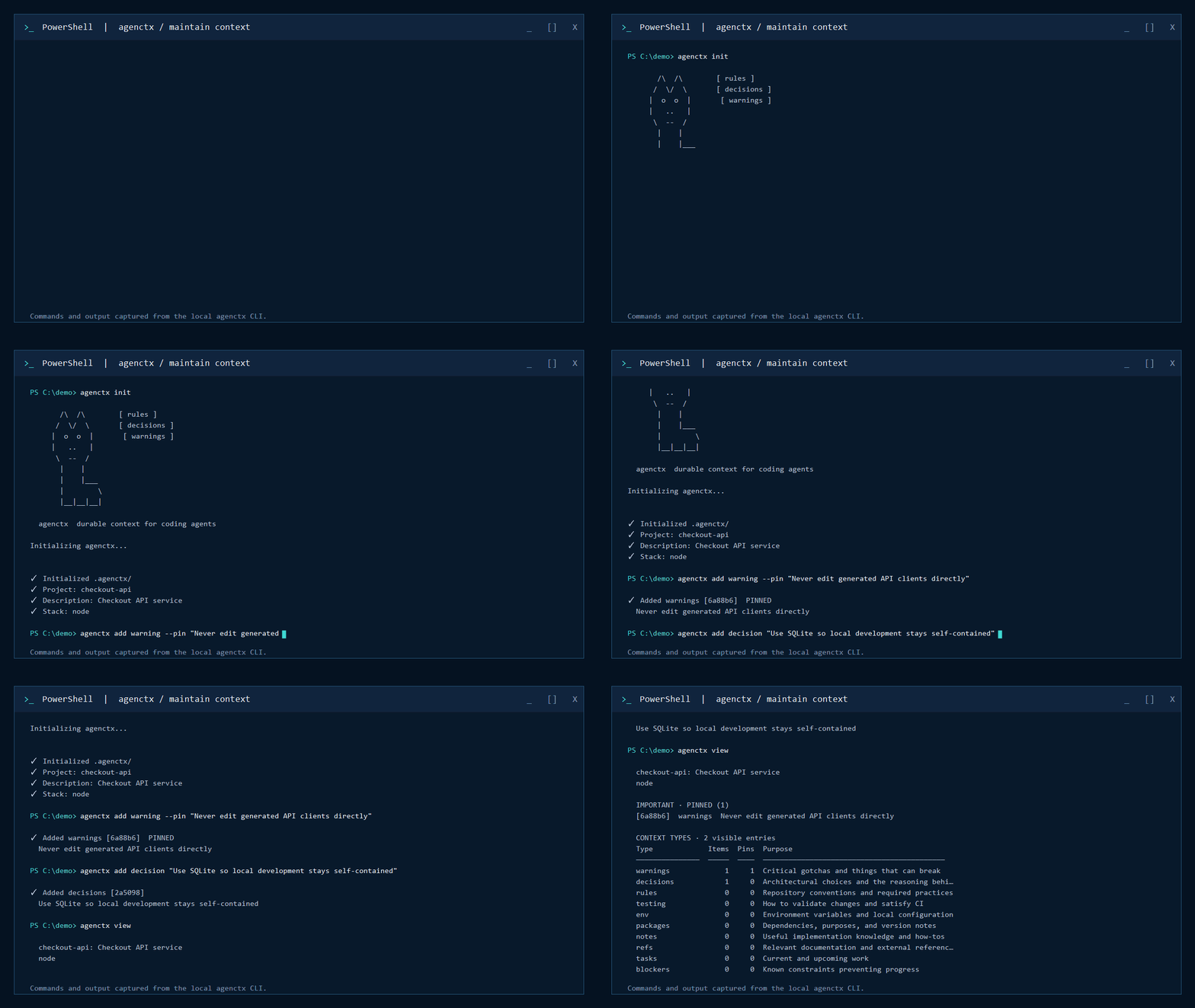
1. Maintain the project context
A maintainer adds knowledge, browses the available context types, updates an existing decision, and pins it for every agent:
2. Generate guides for coding agents
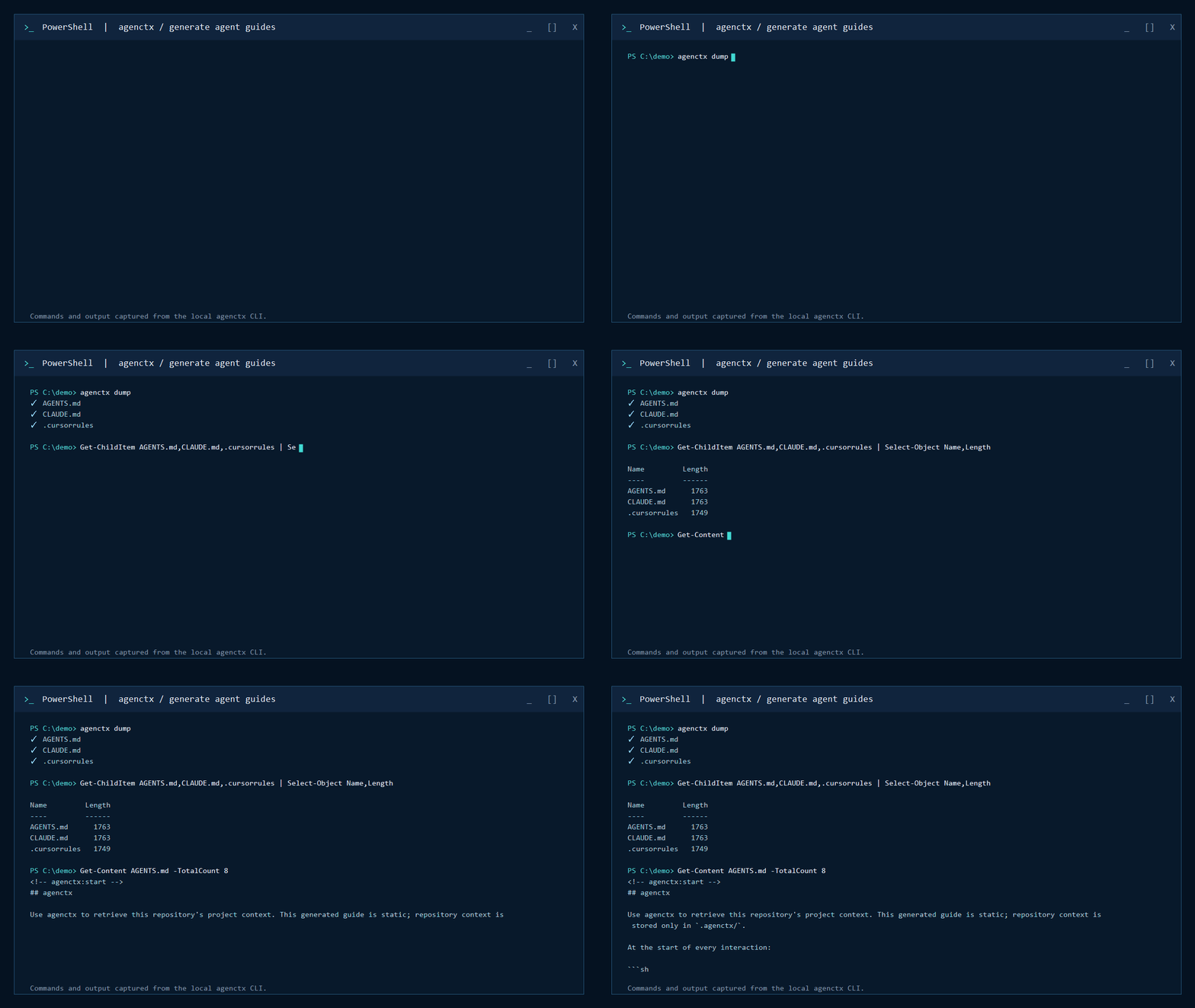
agenctx dump creates concise static guides for OpenAI Codex, Claude, and Cursor. The guides teach agents how to navigate agenctx; project knowledge remains lifecycle-managed inside .agenctx/:
3. Audit an agent trace
Run agenctx status to list every agent receipt as a hash and task name. Then open one with agenctx session show <hash> to see every context response agenctx served during that interaction:
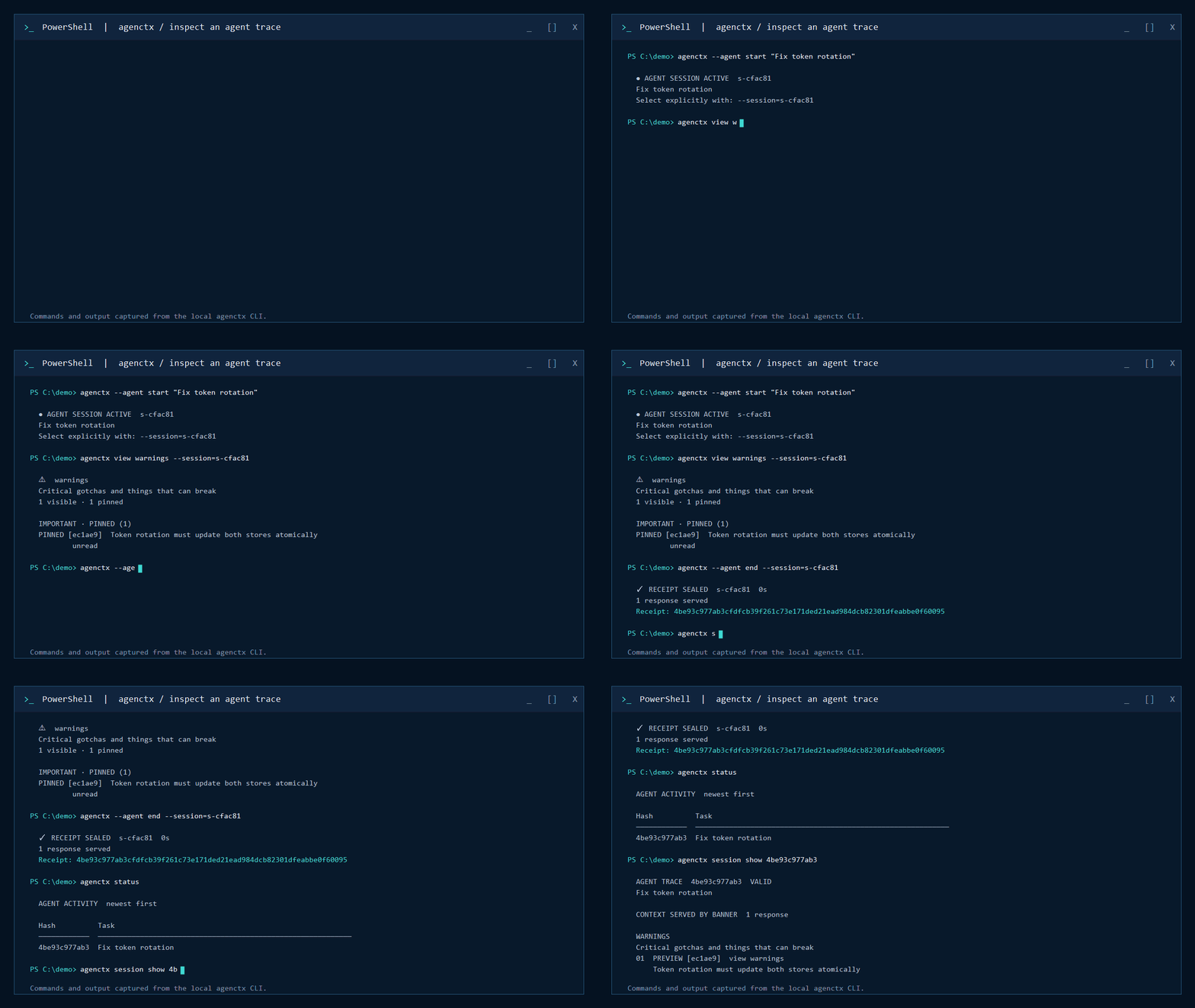
PREVIEW and FULL distinguish how each entry was delivered, while sequence numbers preserve the serving order. The receipt proves what agenctx served, not whether the model understood or followed it.
Switchable context channels
A project rarely has one undifferentiated set of instructions. A design task needs interface patterns and accessibility constraints; a security review needs authentication rules and known hazards. Agenctx banners are named context channels that keep those domains separate while preserving one shared repository memory.
Humans switch channels by selecting a banner in the UI. Agents do the same explicitly through view and banner-filtered search:
agenctx banner add design --description="UI patterns, design tokens, and accessibility constraints"
agenctx banner add security --description="Authentication, secrets, and threat-model constraints"

agenctx add design "Use the eight-point spacing scale"
agenctx add security "Never include provider credentials in logs"

agenctx view design
agenctx search "credentials" --banner=security
An AGENTS.md file can contain sections and some tools support directory-specific guides, but it remains a static document. agenctx dump keeps that file as a concise navigation guide while the changing project knowledge lives in searchable channels with independent lifecycle and delivery history.
Every repository starts with these built-in channels:
| Banner |
What belongs there |
warnings |
Landmines and important gotchas |
decisions |
Architectural choices and their reasoning |
rules |
Coding standards and project conventions |
testing |
Test commands and CI requirements |
env |
Environment and configuration notes |
packages |
Dependency information |
notes |
How-tos and general knowledge |
refs |
Links and external references |
tasks |
Current work |
blockers |
Known constraints |
Entries begin as active. A full read refreshes an entry and adds a bounded retention bonus. Inactive entries move to ambient, where they are hidden by default but remain available for review. A full ambient read reactivates the entry; context that remains ambient through the review window moves to the retained archive. Only pinned entries are permanently protected from automatic transitions.
Run agenctx lifecycle to see the policy, state counts, ambient review queue, retained archive, upcoming transitions, and recent lifecycle history. Use agenctx lifecycle --all to include every active and pinned entry. The default policy keeps unread context active for 30 days, adds 3 days per full read up to a 60-day bonus, and archives context after 60 uninterrupted days in ambient. These values are explicit and configurable under decay in .agenctx/config.json; every automatic transition is recorded in the audit history.
CLI screens use the same visual hierarchy throughout: important pinned context first, then populated context types, then empty types. Read state and full reads are labeled explicitly; command discovery stays in agenctx --help instead of being repeated after every result.
agenctx view is the project directory: it shows the project description, globally pinned context, and every context type with its purpose, entry count, and open command. agenctx view warnings (or any other type) then separates pinned entries from the other active entries.
Repositories can define their own context types without changing the generated agent guides:
agenctx banner add must-see --description="Mandatory context before making changes"
agenctx add must-see "Authentication tokens must rotate atomically"
Useful commands
# Add and read context
agenctx add <banner> "message"
agenctx add <banner> --pin "always remember this"
agenctx edit <id> -m "updated context"
agenctx propose <banner> "durable knowledge discovered by an agent"
agenctx proposals
agenctx approve <proposal-id>
agenctx reject <proposal-id>
agenctx view [banner-or-id]
agenctx feed
agenctx search "keyword" --since=1w

# Manage lifecycle
agenctx lifecycle           # inspect policy, decay, and archive
agenctx lifecycle --all     # include every active and pinned entry
agenctx pin <id>
agenctx unpin <id>
agenctx archive <id>
agenctx restore <id>
agenctx revert <id>
agenctx clear <id>          # remove one entry from live context
agenctx clear <banner>      # empty one context type
agenctx clear all           # empty every context type

# Track exactly what agenctx serves during an agent interaction
agenctx --agent start "task description"
agenctx view --session=<id>
agenctx view <type> --session=<id>
agenctx view <id> --session=<id>
agenctx search "keyword" --banner=<type> --session=<id>
agenctx --agent end --session=<id>
agenctx status
agenctx session show <receipt-hash>

# Refresh detected packages, stack, and environment variables
agenctx sync
Run agenctx --help for the complete command reference.
Agent proposals
During a tracked agent session, an agent may propose at most two pieces of durable repository knowledge. Most sessions should propose nothing. Proposals remain separate from project context and are never served to agents until a human approves them:
agenctx --agent start "fix token rotation"
agenctx propose warning "Token rotation must update both stores atomically" --session=<id>
agenctx --agent end --session=<id>

agenctx proposals
agenctx approve p-a1b2c3
Exact duplicates are rejected, reviews are refused while an agent session is active, and the pending review queue is capped at 20 items. Approved and rejected proposals leave the queue; their review remains in the audit history.
Concurrent agent sessions
Starting a tracked interaction prints a session ID. Pass that ID to later commands so concurrent agents cannot mix their served context:
agenctx --agent start "fix authentication"
# Session: s-a1b2c3

agenctx view warnings --session=s-a1b2c3
agenctx search tokens --session=s-a1b2c3
agenctx --agent end --session=s-a1b2c3
When exactly one session is live, the flag is optional for backward compatibility. When several are live, agenctx refuses to guess. Integrations may set AGENCTX_SESSION_ID instead of passing the flag repeatedly. Use agenctx session list to see live sessions or agenctx session abandon <id> to remove a stale one without sealing a receipt. Live session files are kept under .agenctx/runtime/, which agenctx excludes from Git. Existing .agenctx/session.json files migrate automatically.
clear is intentionally narrower than deleting .agenctx/: it removes entries from the live context while preserving banner definitions, audit history, and sealed agent-session receipts. Destructive clears require terminal confirmation; use --force only for deliberate non-interactive cleanup.
Agent instruction files
Already have a long agent instruction file? Preview a deterministic migration into lifecycle-managed context:
agenctx import AGENTS.md
agenctx import AGENTS.md --apply
The importer maps Markdown sections such as Testing, Architecture, Rules, Warnings, and Configuration to the corresponding banners. Entries remain active and unpinned so a maintainer can review what deserves permanent priority. On apply, a root AGENTS.md, CLAUDE.md, or .cursorrules is preserved exactly under .agenctx/imports/ and replaced with the concise static guide. Use --keep-source to import without replacing it.
Unknown level-two sections can become custom banners, but agenctx never invents their purpose. The importer first shows the complete table and marks unresolved custom sections, then asks whether to describe them now. Declining skips all unresolved custom sections; an empty individual purpose skips that section. A Markdown file can provide the purpose explicitly, and nested headings then become entries in that banner:
## Must See
> Purpose: Mandatory context before changing authentication.

### Token rotation
Tokens must rotate atomically.
Non-interactive imports skip unknown sections without a Purpose: line and report them in the preview. Unknown README sections remain conservative and are skipped unless they explicitly provide a purpose.
README migration is deliberately conservative and explicit:
agenctx import README.md          # preview operational sections only
agenctx import README.md --apply  # README.md remains unchanged
Unrecognized README sections are skipped rather than being turned into context noise. The importer is offline and deterministic; it does not send repository content to a model.
agenctx dump creates three concise agent guides without replacing the rest of their content:
agenctx dump          # AGENTS.md, CLAUDE.md, and .cursorrules
agenctx dump openai   # AGENTS.md (OpenAI Codex)
agenctx dump claude   # CLAUDE.md
agenctx dump cursor   # .cursorrules
These files are deterministic, read-only navigation guides. They never contain repository rules, warnings, custom types, counts, or session data. Agents discover that dynamic information through agenctx view and agenctx search.
When an agent interaction ends, agenctx writes a content-addressed, hash-chained receipt under .agenctx/sessions/. It records each response served in sequence, including entry content hashes, and makes later edits detectable. Use agenctx status to list receipt hashes with their task names and agenctx session show <hash> to inspect the served context grouped by banner.
Use agenctx dump --check in CI or install the optional check-only Git hook:
agenctx init --hook
Project detection
Initialization and sync understand common Node.js, Python, Go, Rust, Java, Ruby, PHP, Docker Compose, and example environment files. Detection is intentionally lightweight and never installs project dependencies.
Data and privacy
All context is stored locally in .agenctx/. The CLI has no telemetry and makes no network requests. Review context before committing it, especially environment descriptions and internal references.
Development
npm test
npm pack --dry-run
The project deliberately uses no runtime dependencies or build step.
Project history
Originally built on March 12, 2026. The first scaffold commit and tagged original prototype snapshot are preserved; public-release work resumed five months later on August 13, 2026.
License
MIT

 agenctx 是一个本地的、受版本控制的上下文管理系统。它为 AI 编程智能体提供一份共享的、结构化的记忆,涵盖代码仓库的规则、决策、警告、测试要求、设计模式和安全约束,而不是把所有内容都堆进一个庞大的静态指令文件里。