






这是什么?
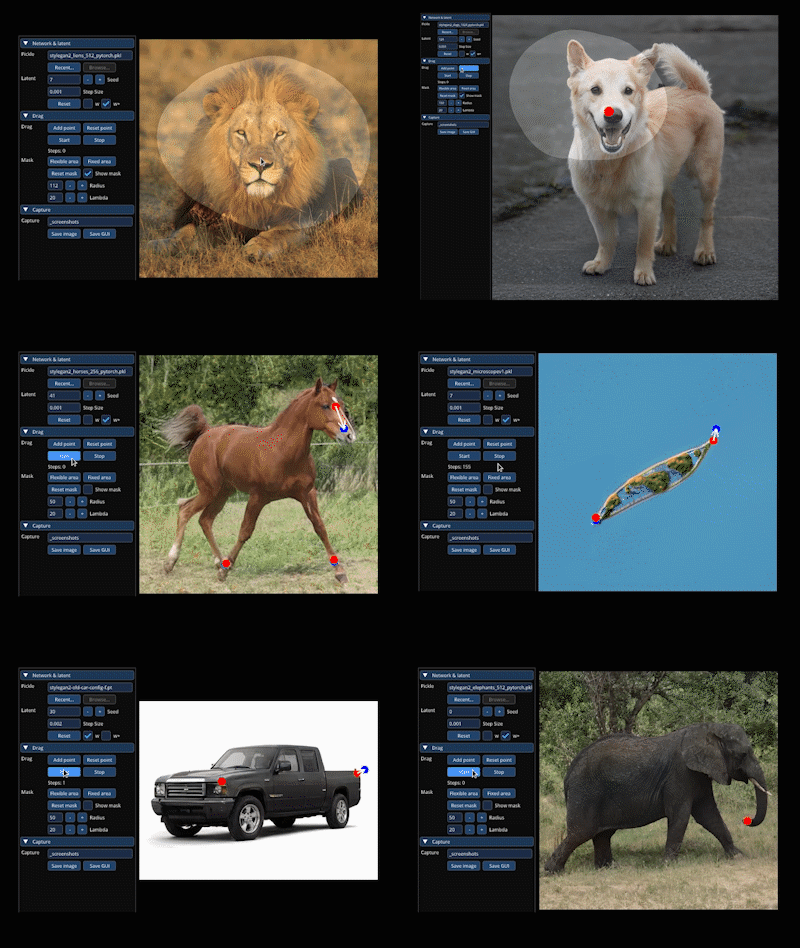
 DragGAN 是 SIGGRAPH 2023 论文的官方实现,你可以交互式地拖动 GAN 生成图像上的点,从而移动或改变图中的物体形状。
DragGAN 是 SIGGRAPH 2023 论文的官方实现,你可以交互式地拖动 GAN 生成图像上的点,从而移动或改变图中的物体形状。这是我可以导入的库,还是独立应用?它是一个独立的研究工具,自带图形界面,还有一个单独的 Gradio 网页演示,基于 StyleGAN2/3 模型构建,并不是可以导入使用的库。
它是一个独立的研究工具,自带图形界面,还有一个单独的 Gradio 网页演示,基于 StyleGAN2/3 模型构建,并不是可以导入使用的库。怎样才能运行 DragGAN?按照 NVlabs/stylegan3 的说明安装基于 CUDA 的依赖,用提供的脚本下载预训练的 StyleGAN2 权重,然后在命令行中启动 DragGAN 图形界面(或 Gradio 演示)。
按照 NVlabs/stylegan3 的说明安装基于 CUDA 的依赖,用提供的脚本下载预训练的 StyleGAN2 权重,然后在命令行中启动 DragGAN 图形界面(或 Gradio 演示)。DragGAN 需要什么硬件?默认需要支持 CUDA 的 GPU;如果使用 Apple Silicon 芯片的 Mac(M1/M2),或者只用 CPU,则有单独的安装方式。
默认需要支持 CUDA 的 GPU;如果使用 Apple Silicon 芯片的 Mac(M1/M2),或者只用 CPU,则有单独的安装方式。我能直接拖动任意照片上的点吗?不能。图形界面只能直接编辑 GAN 生成的图像;要编辑真实照片,你需要先做 GAN 反演(例如使用 PTI),得到匹配的潜在编码。
不能。图形界面只能直接编辑 GAN 生成的图像;要编辑真实照片,你需要先做 GAN 反演(例如使用 PTI),得到匹配的潜在编码。它能在 Windows 和 Mac 上运行,还是只能在装有 Nvidia 显卡的 Linux 上运行?三个系统都支持:有专门的 Windows 运行命令;Gradio 演示在 Windows 和 Linux 上的用法相同;没有 CUDA 的 Mac 可以使用 CPU 或 Apple Silicon 的安装方式。
三个系统都支持:有专门的 Windows 运行命令;Gradio 演示在 Windows 和 Linux 上的用法相同;没有 CUDA 的 Mac 可以使用 CPU 或 Apple Silicon 的安装方式。我能把 DragGAN 用于商业用途吗?不能。DragGAN 算法本身采用 CC-BY-NC(仅限非商业用途)许可,任何使用都必须保留输出结果上的 'AI Generated' 水印;其余代码混用了 Nvidia 源代码许可证。
不能。DragGAN 算法本身采用 CC-BY-NC(仅限非商业用途)许可,任何使用都必须保留输出结果上的 'AI Generated' 水印;其余代码混用了 Nvidia 源代码许可证。DragGAN 自带哪些预训练模型?有一个脚本可以下载预训练的 StyleGAN2 权重,你还可以另外下载 StyleGAN-Human 和 Landscapes HQ(LHQ)的权重,尝试其他领域。
有一个脚本可以下载预训练的 StyleGAN2 权重,你还可以另外下载 StyleGAN-Human 和 Landscapes HQ(LHQ)的权重,尝试其他领域。为什么输出结果需要 'AI Generated' 水印?许可证要求,任何使用或衍生该代码的行为都必须保留将生成图像标记为 'AI Generated' 的水印功能。
许可证要求,任何使用或衍生该代码的行为都必须保留将生成图像标记为 'AI Generated' 的水印功能。有 Docker 方案吗?有。提供了基于 NGC PyTorch 仓库的 Docker 镜像,用于运行 Gradio 可视化工具,但大约需要 25GB 的磁盘空间。
有。提供了基于 NGC PyTorch 仓库的 Docker 镜像,用于运行 Gradio 可视化工具,但大约需要 25GB 的磁盘空间。What are similar projects?pytorch-CycleGAN-and-pix2pix, CycleGAN, pix2pix, lama, stylegan2, GFPGAN, Deep-Live-Cam, Bringing-Old-Photos-Back-to-Life
pytorch-CycleGAN-and-pix2pix, CycleGAN, pix2pix, lama, stylegan2, GFPGAN, Deep-Live-Cam, Bringing-Old-Photos-Back-to-LifeWhich topics is it in?image-manipulation, generative-adversarial-network, gan, gradio, image-editing, interactive, image-generation, apple-silicon, artificial-intelligence, nvidia, computer-vision, cuda
image-manipulation, generative-adversarial-network, gan, gradio, image-editing, interactive, image-generation, apple-silicon, artificial-intelligence, nvidia, computer-vision, cuda