MiMoCode

MiMo Code: Where Models and Agents Co-Evolve
中文 | English
Website | Blog
MiMoCode is a terminal-native AI coding assistant. It can read and write code, run commands, manage Git, and use a persistent memory system to keep a deep understanding of your project across sessions while continuously improving itself.
MiMo Desktop Beta Invitation: Apply for the international beta
Xiaomi MiMo Desktop Beta
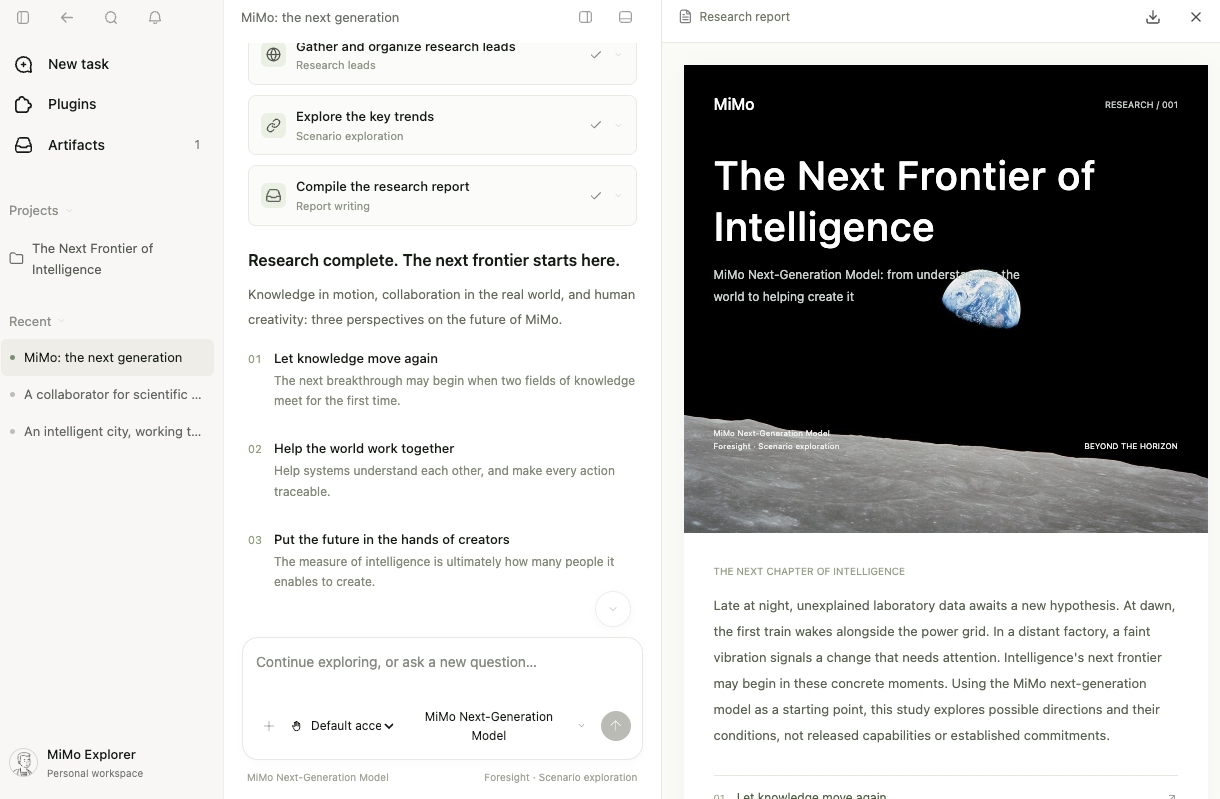
Xiaomi MiMo Desktop is built for real-world work: one conversation can handle office work, design, coding, and multimodal creation, while multiple conversations can divide work and collaborate. The desktop app is powered by MiMo Code as its core engine, bringing its terminal-native intelligence to desktop workflows.
- Smart orchestration: evaluates task type and cost, then dynamically selects models, frameworks, and tools; complex tasks can run across multiple agents in parallel.
- Continuous iteration: drag in files in multiple formats, create PPTs, webpages, 3D assets, and apps, preview and operate on results in-session, edit selected regions precisely, and roll back versions.
- Controlled long-task cost: routes between standard and flagship models, edits only the required regions, and supports up to 99% same-session and 95% cross-session cache hit rates.
- Browser control: opens webpages, retrieves information, fills forms, and checks key interactions after generating webpages.
- Computer control (international version only): reads the screen and operates mouse and keyboard across apps; Record & Replay lets you reuse recorded workflows with natural language.
After beta approval, users can access limited-time, limited-quantity trials of the new MiMo-X-Pro-Preview and MiMo-X-Flash-Preview models.
MiMoCode supports connecting to any mainstream LLM provider API.
Quick Start
# One-line install (macOS / Linux)
curl -fsSL https://mimo.xiaomi.com/install | bash

# One-line install (Windows PowerShell)
powershell -ep Bypass -c "irm https://mimo.xiaomi.com/install.ps1 | iex"

# Or install via npm (all platforms)
npm install -g @mimo-ai/cli

# Run
mimo
The first launch guides you through configuration automatically. Supported options:
- Xiaomi MiMo Platform — OAuth login
- Codex (ChatGPT Pro/Plus) — OpenAI OAuth login
- Import from Claude Code — migrate existing authentication in one step
- Provider list — connect catalog providers by API key, or OAuth where supported (e.g. xAI/Grok)
- Custom Provider — add any OpenAI-compatible API in the TUI
WSL: clipboard issues
If you encounter garbled text when copying on WSL, install xsel:
sudo apt install xsel
macOS: rendering issues in the default terminal
MiMoCode does not support the built-in macOS Terminal (Terminal.app). If the interface is misaligned, flickers, or has other rendering issues, use iTerm2 or the VS Code integrated terminal instead:
brew install --cask iterm2
TUI lag and visual animation issues
If the TUI lags when run directly over SSH, render it locally and run only the MiMoCode server on the remote host. Start the server from the remote project directory:
# Remote host
mimo serve --port 4096

# Local host: create the SSH port forward
ssh -N -L 4096:127.0.0.1:4096 user@remote-host

# Local host: connect from another terminal
mimo attach http://127.0.0.1:4096
If decorative animation is causing the lag, run /vivid, or configure Vivid visuals in the ctrl+p command palette, to switch between Vivid and Minimal visuals as needed.
Windows: garbled CJK (Chinese/Japanese/Korean) output in the shell
On Windows with a non-UTF-8 system locale (e.g. zh-CN, whose active code page is 936/GBK),
command output containing CJK characters may appear garbled (mojibake). MiMoCode forces
UTF-8 output for spawned PowerShell/cmd subprocesses. If you still encounter garbled output
in cases this does not yet cover, enable Windows' system-wide UTF-8 support:
Settings → Time & language → Language & region → Administrative language settings →
Change system locale → check "Beta: Use Unicode UTF-8 for worldwide language support" →
reboot.
This switches the active code page (ACP) to UTF-8 (65001) for all programs, so subprocesses
no longer inherit the legacy code page. Note it is a system-wide Beta toggle and may cause
some older non-Unicode programs to display incorrectly, so treat it as a workaround.
MiMo Ecosystem
Beyond MiMoCode, Xiaomi MiMo models also work in other agents and coding tools like Cursor, Cline, and Zed.
awesome-mimo-agent collects setup guides for using MiMo in those tools — worth a look if you want to try MiMo elsewhere. Contributions welcome: open a PR to add your own setup.
Core Features
Multiple Agents
| Agent |
Description |
| build |
Default. Full tool permissions for development |
| plan |
Read-only analysis mode for code exploration and solution design |
| compose |
Orchestration mode for specs-driven development and skill-driven workflows |
Press Tab to switch between primary agents. Subagents are created by the system as needed. After the first message the mode locks: Build and Plan can still switch between each other, but Compose is isolated once entered — keeping the skill/tool set fixed from session start significantly improves tool-call reliability.
For frontier models (Fable/Sol-class), the recommended way to run compose-style work is the build agent with the /compose-next skill — see Compose Mode.
Persistent Memory
Cross-session memory powered by SQLite FTS5 full-text search:
- Project memory (
MEMORY.md) — persistent project knowledge, rules, and architecture decisions
- Session checkpoint (
checkpoint.md) — structured state snapshots maintained automatically by the checkpoint-writer subagent
- Scratch notes (
notes.md) — temporary note area for agents
- Task progress (
tasks/<id>/progress.md) — per-task logs
Memory is injected automatically when a session resumes, so the agent does not need to relearn project context.
Intelligent Context Management
- Automatic checkpoints — decides when to save session state based on the model context window
- Context reconstruction — when context approaches the limit, rebuilds it from the latest checkpoint, project memory, task progress, and retained recent messages so the agent can continue the current task
- Budgeted injection — uses a token budget to control how much checkpoint, memory, and notes content enters context, with importance ranking
- Adjustable compaction point —
/context-limit (or compaction.max_context) makes a model compact earlier than its own window, per model
Compacting earlier than the model window (/context-limit)
Compaction normally fires just below the model's context window. Run /context-limit to
pick a smaller working budget for the current model — 200K / 300K / 500K / 1M or a
custom value — stored per model as compaction.max_context:
{
  "compaction": {
    "max_context": {
      "openai/gpt-5.6": "272K", // token count, "300K", "1M", or "50%" of the window
      "anthropic/*": "300K" // wildcards allowed, longest pattern wins
    }
  }
}
The value is always clamped to what the provider actually accepts, so it can only lower the
compaction point, never raise it. 0 restores the model's own window.
Why you might want it:
- Cost tiers. OpenAI prices GPT-5.6 prompts above 272K input at 2x input and 1.5x output
for the whole request.
- The advertised window is not always what you get. The same model can have a different
usable window depending on how you reach it — a ChatGPT/Codex subscription, a direct API
key, or a reseller such as OpenRouter — so a catalog figure of 1M does not mean your route
serves 1M.
- Quality and latency. Very long contexts are slower and, past a point, not better.
mimo models <provider> prints, per model, the window MiMoCode resolved and the token count
where it will compact. The prompt footer uses that same number as its denominator
(33.0K/260K↓ (13%) — the ↓ means a budget is in force), and /status breaks it down.
Task Tracking
A tree-shaped task system (T1, T1.1, T1.2, …) that integrates automatically with the checkpoint system, so task progress is preserved when sessions resume.
Subagent System
The primary agent can create subagents on demand. Subagents share the current session context and can work in parallel, with lifecycle tracking, cancellation, and background execution.
Goal / Stop Condition
The /goal command sets a stopping condition for a session. When the agent tries to stop, an independent judge model evaluates the conversation to decide whether the condition is truly satisfied — preventing premature "optimistic stops" during autonomous work.
Compose Mode
Compose is MiMoCode's structured workflow for specs-driven development, orchestrating the full lifecycle from spec to shipped code.
The recommended way to use it is the /compose-next skill on the build agent: a single self-contained contract covering grill → workspace → spec → implement → verify → review → finalize → finish, with feature documents at docs/compose/spec/<feature>.md under the workspace root. It is designed for frontier models (Fable/Sol-class), which internalize most of the workflow and work best from one compact contract.
The legacy path is the dedicated compose agent (switch with Tab), which orchestrates fourteen built-in skills for planning, execution, code review, TDD, debugging, verification, and merging — a step-by-step curriculum that remains useful for weaker models.
Workflows
Workflows are deterministic JavaScript scripts that orchestrate multiple agents in a sandboxed runtime. Unlike agent conversations, workflows encode fixed phase sequences with bounded retries and automatic parallelization — fire-and-forget execution with no user interaction required.
MiMoCode ships with four built-in workflows:
| Workflow |
Phases |
Description |
compose |
Brainstorm → Design → Implement → Verify → Review → Report → Merge |
Full development pipeline. Auto-parallelizes independent tasks into isolated git worktrees, applies TDD per task, chains structured output between phases. Best for well-defined tasks that decompose into independent subtasks. |
deep-research |
Brief → Plan → Research → Reflect → Write → Review |
Multi-source deep research report generator. Plans independent research angles, runs parallel sub-agents to collect cited findings, reflects on gaps, writes a single coherent Markdown report, then cold-reviews citations. Convergent: resumable via file checkpoints. |
fact-check |
Plan → Search → Extract → Group → Crosscheck → Report |
Adversarial fact verification. Runs parallel web searches, extracts checkable facts, groups duplicates, then cross-checks each with a 3-juror adversarial vote. Best for precise claims ("Is X true?"). |
research-experiment |
Baseline → Loop → Audit → Report |
Autonomous optimization loop for a mechanically verifiable metric. Establishes a baseline, iterates through hypothesize → implement → evaluate → keep/revert, audits for metric gaming, and produces a reproducible result log. Requires a fixed-budget evaluation command and an explicit editable-file scope. |
The compose workflow complements the interactive path: use the workflow when requirements are clear and tasks split cleanly (deterministic, parallel, non-interactive); use the build agent with /compose-next (or the legacy compose agent) when you need to redirect mid-flow or inject judgment between steps (conversational, interactive).
Custom workflows: Place a .js file in .mimocode/workflows/ or .claude/workflows/ to define your own, or override a built-in by using the same name (e.g. .mimocode/workflows/compose.js).
Builtin Skills
Skills are reusable instruction sets that teach agents how to handle specific tasks (e.g. generating PDFs, writing academic papers, searching arXiv). For a new task, MiMoCode searches available non-Compose skills by exact name, localized alias, and BM25 relevance. High-confidence matches are loaded automatically; uncertain matches are ranked for the agent to assess. In the TUI, type / to browse the autocomplete list or invoke a skill directly with /<skill-name> — mentioning two or more skills in a single message auto-loads them and injects a multi-skill orchestration plan.
MiMoCode bundles the following builtin skills:
| Skill |
Description |
arxiv |
Search, read, cite, and analyze arXiv papers |
claude-code |
Delegate coding, testing, review, and Git tasks to the Claude Code CLI |
codex |
Run and troubleshoot the Codex CLI in headless automation, CI, containers, and remote environments |
compose-next |
Recommended spec→ship feature delivery workflow; invoke only when explicitly requested by the user |
data-analytics |
Analyze product and business data through reusable workflows for data quality, KPIs, dashboards, reports, notebooks, and market sizing |
deep-research |
Produce cited, multi-source research reports with parallel subagents and built-in web tools |
design-blueprint |
Produce a design blueprint (DESIGN.md + Decision Trace) before mocking up visuals |
docx-official |
Produce, read, and transform Word (.docx) files |
evolve |
Total self-modification — rewrite any layer of the agent: tools, behavior hooks, knowledge, workflows, even the UI |
frontend-design |
Visual design guidance for UI work |
html-to-video-pipeline |
HTML-to-MP4 rendering via headless browser + ffmpeg |
learn-everything |
Turn documents, URLs, or topics into adaptive courses with exercises, feedback, and progress tracking |
loop |
Schedule recurring prompts on a fixed cadence |
mimocode-docs |
Self-documenting reference for MiMoCode features, commands, providers, and configuration |
modern-python-toolchain |
Set up modern Python projects with uv, Ruff, and Pyright |
pdf-official |
Produce, read, fill, and transform PDF files |
pptx-official |
Author and manipulate PowerPoint (.pptx) decks |
product-design |
Explore, audit, implement, and QA product and UX designs through focused workflows |
research-paper-writing |
Write and polish academic papers (ML/CV/NLP style) |
sales |
Support sales research, meeting preparation, account prioritization, deal strategy, forecasting, and CRM workflows |
skill-creator |
Interactive guide for creating and improving agent skills |
super-research |
Run long-horizon, auditable research, experiments, benchmarks, diagnostics, reproductions, and citation checks |
xlsx-official |
Build, clean, and transform spreadsheets (.xlsx/.csv) |
claude-code and codex are exposed only when the claude and codex executables, respectively, are installed. Other skills may still require task-specific tools described in their instructions.
Overriding a builtin skill: Create a skill with the same name in your project (.mimocode/skills/<name>/SKILL.md) or personal skill directory (~/.claude/skills/, ~/.opencode/skills/, etc.). User skills discovered later in the scan order override builtins with the same name.
Disabling builtin skills via environment variables
| Variable |
Effect |
MIMOCODE_DISABLE_BUILTIN_SKILLS=true |
Disable all builtin skills |
MIMOCODE_DISABLE_OFFICIAL_SKILLS=true |
Disable only the office/media skills: docx-official, pdf-official, pptx-official, xlsx-official, html-to-video-pipeline |
MIMOCODE_DISABLE_SLASH_SKILLS=true |
Hide skills from TUI / autocomplete without disabling them |
The first two options remove the corresponding skills from the agent's available skill list entirely — they will not appear in context and cannot be invoked. MIMOCODE_DISABLE_SLASH_SKILLS affects only TUI autocomplete; the skills remain available to agents.
Real-time streaming voice input powered by TenVAD and MiMo ASR. Activate with /voice, then speak — audio is segmented by pauses and transcribed incrementally into the input. Available for MiMo logged-in users. Requires sox (brew install sox on macOS, other platforms similar).
WSLg audio setup
sudo apt install -y sox pulseaudio libasound2-plugins
export PULSE_SERVER=unix:/mnt/wslg/PulseServer
SSH remote audio (Mac → remote host)
# Mac (local)
brew install pulseaudio
pulseaudio --load="module-native-protocol-tcp auth-ip-acl=127.0.0.1" --exit-idle-time=-1 --daemonize
# Add to ~/.ssh/config: RemoteForward 4713 127.0.0.1:4713

# Remote host
apt install -y pulseaudio pulseaudio-utils sox
export PULSE_SERVER=tcp:127.0.0.1:4713
# Verify: pactl info
Non-MiMo voice providers (OpenRouter, internal API, etc.)
Voice input can route through other OpenAI-compatible providers via the voice config field. The ASR model (mimo-v2.5-asr) is only available on MiMo's platform; voice control mode (mimo-v2.5) is available on OpenRouter and compatible relay platforms.
OpenRouter (voice control only):
Use /connect to sign in to OpenRouter, then add to your config:
{
  "voice": {
    "control_model": "openrouter/xiaomi/mimo-v2.5"
  }
}
Internal / self-hosted relay (both ASR and voice control):
{
  "provider": {
    "internal": {
      "options": {
        "baseURL": "https://your-api-gateway.example.com/v1",
        "apiKey": "sk-..."
      },
      "models": {
        "xiaomi/mimo-v2.5-asr": { "name": "MiMo-V2.5-ASR" },
        "xiaomi/mimo-v2.5": { "name": "MiMo-V2.5" }
      }
    }
  },
  "voice": {
    "asr_model": "internal/xiaomi/mimo-v2.5-asr",
    "control_model": "internal/xiaomi/mimo-v2.5"
  }
}
Custom providers must register at least one model in their models field to be recognized. The model names in voice.*_model are sent directly to the API — they don't need to match the registered model keys exactly.
Note: Models registered under a custom provider will appear in the model selection list. Don't use ASR-only models (e.g. mimo-v2.5-asr) as your primary coding model.
Dream & Distill
/dream — scans recent session traces, extracts persistent knowledge into project memory, and removes outdated entries/distill — discovers repeated manual workflows in recent work and packages high-confidence candidates into reusable s

 MiMoCode 是一款原生运行在终端中的 AI 编程助手,可以读写代码、执行命令、管理 Git,并在多次会话之间保存项目的持久记忆,同时持续自我改进。