






Что это такое?
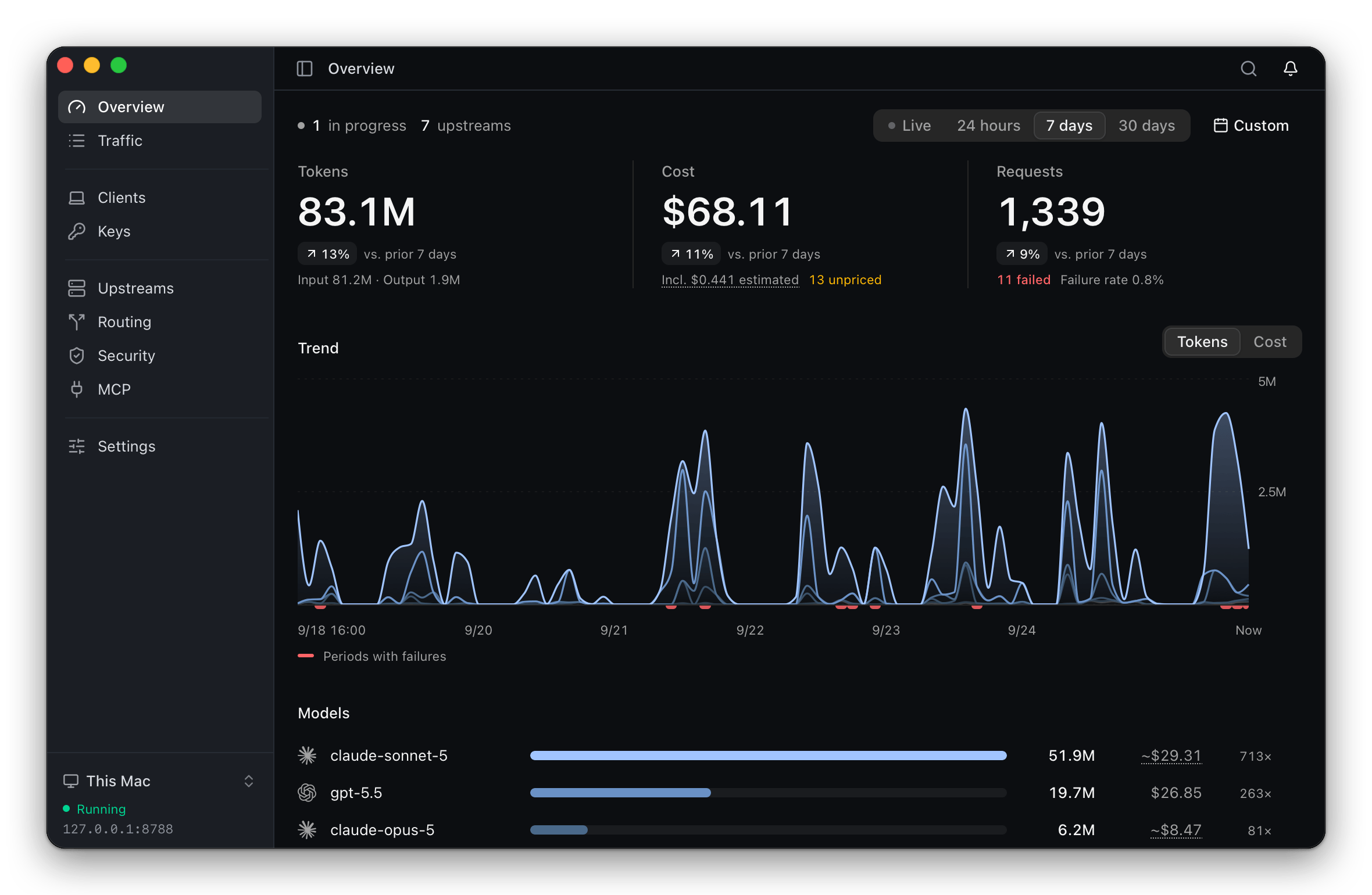
 ThinkWatch Lite — это локальный шлюз, который стоит между ИИ-клиентами для кодинга (Claude Code, Codex и другими) и их вышестоящими провайдерами, позволяя переключать провайдеров и модели без перенастройки каждого клиента, а также отслеживает стоимость запросов и блокирует вредоносные вызовы инструментов.
ThinkWatch Lite — это локальный шлюз, который стоит между ИИ-клиентами для кодинга (Claude Code, Codex и другими) и их вышестоящими провайдерами, позволяя переключать провайдеров и модели без перенастройки каждого клиента, а также отслеживает стоимость запросов и блокирует вредоносные вызовы инструментов.Это облачный сервис или он работает на моей машине?Это настольное приложение со значком в системном трее; шлюз (ThinkWatch Core) поставляется в комплекте с приложением. Ядро также можно запустить удалённо на Linux-сервере, а приложение будет подключаться к нему по зашифрованному управляющему каналу.
Это настольное приложение со значком в системном трее; шлюз (ThinkWatch Core) поставляется в комплекте с приложением. Ядро также можно запустить удалённо на Linux-сервере, а приложение будет подключаться к нему по зашифрованному управляющему каналу.Как его установить и подключить к нему свои ИИ-клиенты?Установите через Homebrew cask на macOS, через .exe-установщик на Windows или через curl-скрипт/.AppImage на Linux. Затем поддерживаемые клиенты вроде Claude Code, Codex, Zed и Aider в один шаг направляются на шлюз, при этом изменение конфига показывается заранее, а исходный файл резервируется для лёгкого восстановления.
Установите через Homebrew cask на macOS, через .exe-установщик на Windows или через curl-скрипт/.AppImage на Linux. Затем поддерживаемые клиенты вроде Claude Code, Codex, Zed и Aider в один шаг направляются на шлюз, при этом изменение конфига показывается заранее, а исходный файл резервируется для лёгкого восстановления.Мне по-прежнему нужны собственные API-ключи провайдеров?Да — вы используете свои вышестоящие аккаунты: API-ключи, Amazon Bedrock, ChatGPT, Z.ai, релеи вроде OpenRouter или локальные модели, а шлюз при необходимости преобразует между форматами API Anthropic, OpenAI и Gemini.
Да — вы используете свои вышестоящие аккаунты: API-ключи, Amazon Bedrock, ChatGPT, Z.ai, релеи вроде OpenRouter или локальные модели, а шлюз при необходимости преобразует между форматами API Anthropic, OpenAI и Gemini.Можно ли пользоваться установщиком сразу из коробки?Не полностью: приложение не подписано Apple или Microsoft, поэтому при первом запуске нужен один дополнительный ручной шаг, описанный в руководстве по установке; после этого оно обновляется само (или через Homebrew, если установлено так).
Не полностью: приложение не подписано Apple или Microsoft, поэтому при первом запуске нужен один дополнительный ручной шаг, описанный в руководстве по установке; после этого оно обновляется само (или через Homebrew, если установлено так).Видит ли релей мои настоящие API-ключи?Нет — исходящая редактура заменяет API-ключи, приватные ключи, JWT, пароли в строках подключения и другие чувствительные значения на плейсхолдеры до того, как запрос покинет вашу машину, поэтому релей никогда не получает настоящие учётные данные.
Нет — исходящая редактура заменяет API-ключи, приватные ключи, JWT, пароли в строках подключения и другие чувствительные значения на плейсхолдеры до того, как запрос покинет вашу машину, поэтому релей никогда не получает настоящие учётные данные.Что делает функция «upstream check-up» (проверка провайдеров)?Он сравнивает каждый провайдер, обслуживающий одну и ту же модель, с остальными и помечает ответы, где называется другая модель, сообщается об объёме входных токенов заметно выше или ниже нормы или видны низкие показания промпт-кэша; для контекста указываются размеры выборок.
Он сравнивает каждый провайдер, обслуживающий одну и ту же модель, с остальными и помечает ответы, где называется другая модель, сообщается об объёме входных токенов заметно выше или ниже нормы или видны низкие показания промпт-кэша; для контекста указываются размеры выборок.Может ли он просканировать мои MCP-серверы и скиллы на предмет рисков?Да, он выводит в одном списке MCP-серверы тринадцати клиентов, помечая сторонние серверы, и проверяет конфигурацию клиентов, скиллы, хуки и инструкции проектов на скрытые символы, промпт-инъекции, опасные команды и чрезмерно широкие разрешения.
Да, он выводит в одном списке MCP-серверы тринадцати клиентов, помечая сторонние серверы, и проверяет конфигурацию клиентов, скиллы, хуки и инструкции проектов на скрытые символы, промпт-инъекции, опасные команды и чрезмерно широкие разрешения.Можно запустить ядро на удалённом сервере вместо локального запуска?Да, ядро шлюза может работать на Linux-сервере, а настольное приложение на вашем ноутбуке подключается к нему по зашифрованному управляющему каналу.
Да, ядро шлюза может работать на Linux-сервере, а настольное приложение на вашем ноутбуке подключается к нему по зашифрованному управляющему каналу.Какие ИИ-клиенты поддерживаются из коробки?Claude Code, Claude Desktop, Codex, opencode, Pi, oh-my-pi, Grok Build, Qwen Code, Hermes Agent, Zed, Aider и DeepSeek Harness настраиваются автоматически в один шаг; Cursor, Continue и Antigravity CLI требуют ручной настройки по приложённым инструкциям.
Claude Code, Claude Desktop, Codex, opencode, Pi, oh-my-pi, Grok Build, Qwen Code, Hermes Agent, Zed, Aider и DeepSeek Harness настраиваются автоматически в один шаг; Cursor, Continue и Antigravity CLI требуют ручной настройки по приложённым инструкциям.What are similar projects?casbin-gateway, bifrost, OmniRoute, 9router, opencodex, busbar, headroom, evenfire
casbin-gateway, bifrost, OmniRoute, 9router, opencodex, busbar, headroom, evenfireWhich topics is it in?usage-tracking, llm-observability, llm-proxy, prompt-injection, cost-tracking, ai-gateway, llm-gateway, token-usage, api-gateway, tauri, openai-compatible, model-context-protocol
usage-tracking, llm-observability, llm-proxy, prompt-injection, cost-tracking, ai-gateway, llm-gateway, token-usage, api-gateway, tauri, openai-compatible, model-context-protocol