
CubeSandbox
Instant, Concurrent, Secure & Lightweight Sandbox Service for AI Agents










中文文档 ·
Quick Start ·
Documentation ·
Changelog ·
X(Twitter) ·
Top Contributor Program ·
Submit Use Case
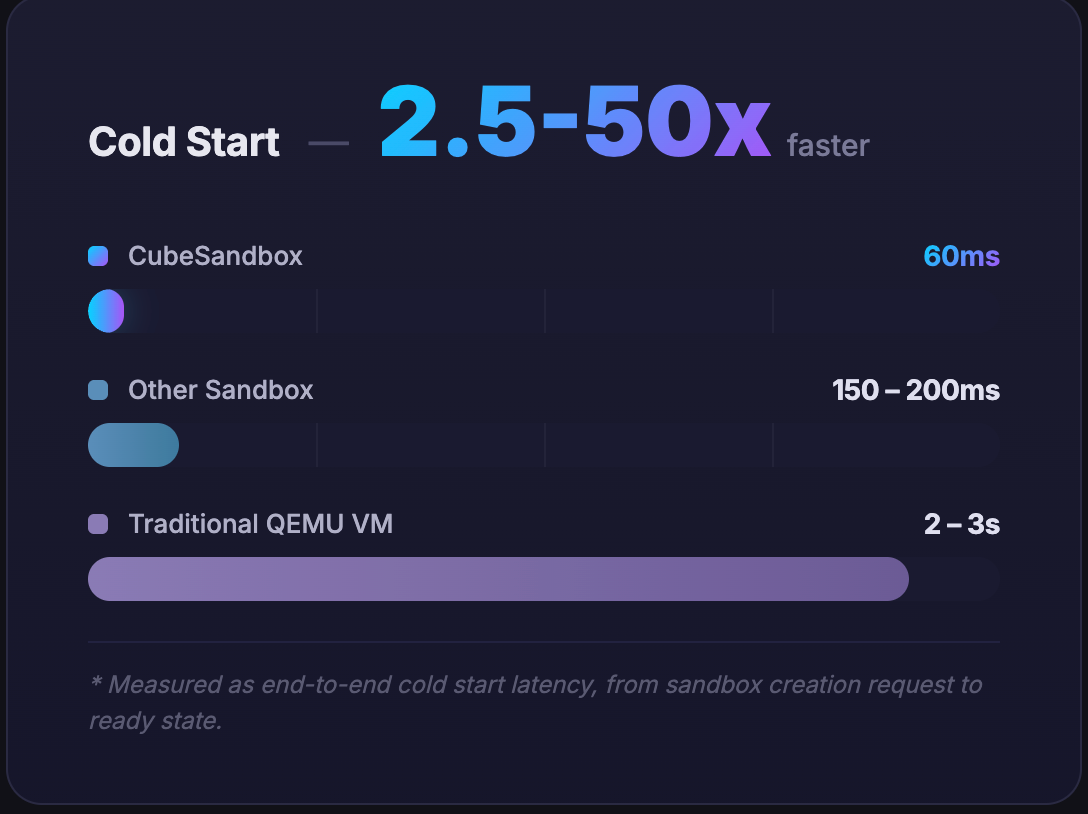
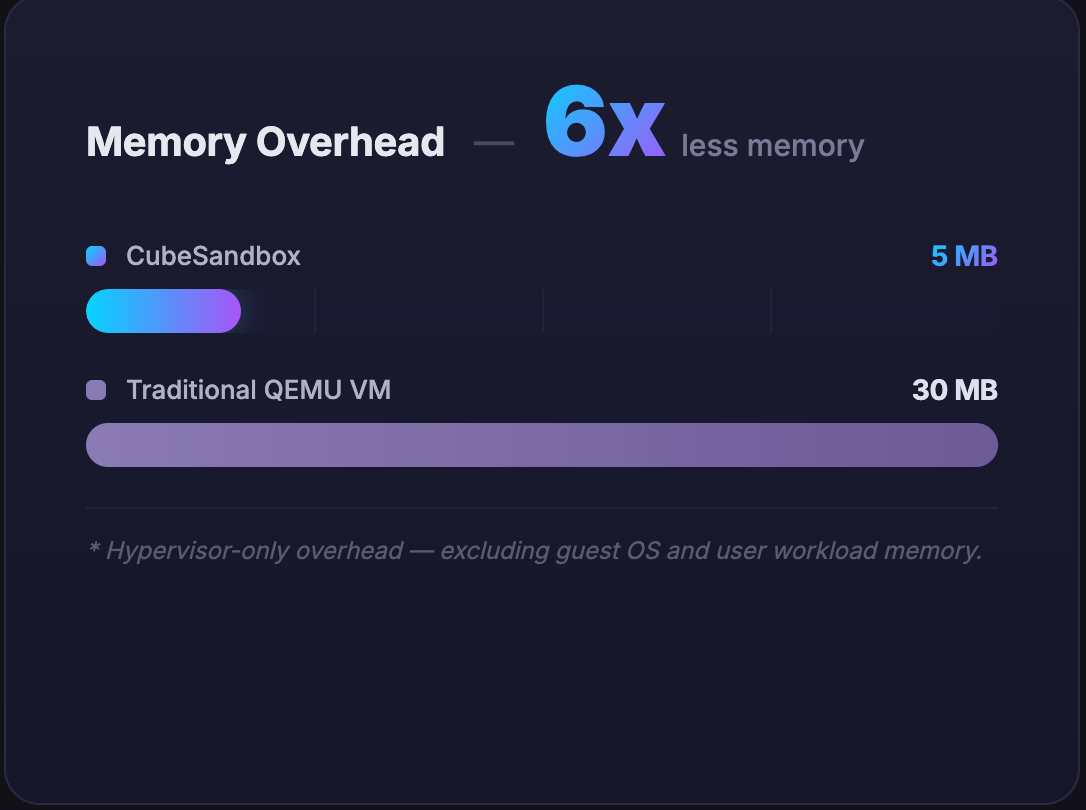
Cube Sandbox is a high-performance, out-of-the-box secure sandbox service built on RustVMM and KVM. It supports both single-node deployment and easy scaling to multi-node clusters. It is compatible with the E2B SDK and can create a hardware-isolated, fully serviceable sandbox in under 60ms with less than 5MB of memory overhead.
📰 News

|
v0.7: Cross-node pause/resume, control plane & ops separation, faster sandbox networking
Cross-node pause/resume — with an S3 backend, suspend a sandbox on one node and resume it on another, or create sandboxes from snapshots (preview)
Control plane & operations separation — node management moves into CubeOps with multi-replica deployment and the new cubeopscli
Changelog →
|

|
v0.6: K8s deploy, Volume framework, template aliases
K8s deploy — Deploy Cube control-plane components and compute nodes on Kubernetes
Volume framework — E2B-compatible Volume framework that lets users plug in custom backend storage
Template aliases — Set an alias when creating a template, and create sandboxes by specifying that alias.
Changelog → ·
K8s deploy → ·
Volume plugin →
|

|
v0.5: AutoPause, Terraform deployer, ARM64 & network policy hardening
AutoPause/AutoResume — idle sandboxes auto-suspend and wake on the next request. Terraform one-click cluster deploy ARM64 native full-stack support network policy hardening — per-sandbox traffic tokens, policy-routing egress.
Changelog → ·
Terraform deploy →
|

|
v0.4: Safer egress, easier ops
Credential vault — Agents call external APIs as usual; keys never enter the sandbox. Dashboard — version matrix and template health checks; see at a glance whether templates need rebuilding after upgrades.
Changelog → ·
Security proxy guide → ·
WebUI guide →
|

|
Snapshot, Clone & Rollback at hundred-millisecond granularity
CubeSandbox 0.3.0 introduces the CubeCoW Copy-on-Write snapshot engine, enabling event-level snapshots, instant cloning, and rollback to any saved state.
Changelog →
|

|
🎉 Initial open-source release
Cube Sandbox is now open source! Millisecond boot, hardware-level isolation, E2B-compatible sandbox for AI Agents.
Changelog →
|
Product Highlights
⚡ Ultra-fast Startup
Resource pooling and snapshot cloning skip all cold-start overhead. Average <60ms cold start — sandbox creation faster than a blink.
Quick start →
|
🔒 Hardware Isolation
Every sandbox runs a dedicated OS kernel in its own MicroVM.
Architecture →
|
🔌 E2B SDK Compatible
Compatible with E2B SDK interface. Switch from E2B Cloud seamlessly by changing one environment variable — zero client code changes.
Examples →
|
📦 High-density Deployment
<5MB overhead per sandbox enables thousands of instances per server via kernel sharing and Copy-on-Write (CoW). Supports automatic sandbox pause and resume, further improving deployment density and cost optimization.
Quick start →
|
🛡️ Network Security
eBPF-based inter-sandbox isolation and egress filtering at kernel level; built-in L7 security proxy enables per-domain/path/method policies with automatic credential injection — secrets never visible to sandbox code.
Security proxy guide →
|
📸 Flexible State Management
High-frequency snapshot and rollback at hundred-millisecond granularity. Create checkpoints on running sandboxes, roll back to any saved state at any time, or fork from a specific state to explore in parallel.
v0.3 changelog →
|
💾 Volume Framework
E2B-compatible Volume framework that lets users plug in custom backend storage solutions. Volumes have an independent lifecycle and can be shared across sandboxes.
Volume plugin →
|
🚀 Production Deployment
Deploy production clusters on Tencent Cloud with one click using Terraform. Also supports deployment on standard Kubernetes clusters (preview).
Terraform deploy → ·
K8s deploy →
|
💪 ARM Architecture Support
Full native ARM64 support across compilation, build, and deployment workflows.
Bare-metal deploy →
|
Demos
|
|
|
|
|
|
Installation & Demo
|
Performance Test
|
RL (SWE-Bench)
|
Snapshot · Clone · Rollback
|
Benchmarks
In the context of AI Agent code execution, CubeSandbox achieves the perfect balance of security and performance:
| Metric |
Docker Container |
Traditional VM |
CubeSandbox |
| Isolation Level |
Low (Shared Kernel Namespaces) |
High (Dedicated Kernel) |
Extreme (Dedicated Kernel + eBPF) |
Boot Speed
*Full-OS boot duration |
200ms |
Seconds |
Sub-millisecond (<60ms) |
| Memory Overhead |
Low (Shared Kernel) |
High (Full OS) |
Ultra-low (Aggressively stripped, <5MB) |
| Deployment Density |
High |
Low |
Extreme (Thousands per node) |
| E2B SDK Compatible |
/ |
/ |
✅ Drop-in |
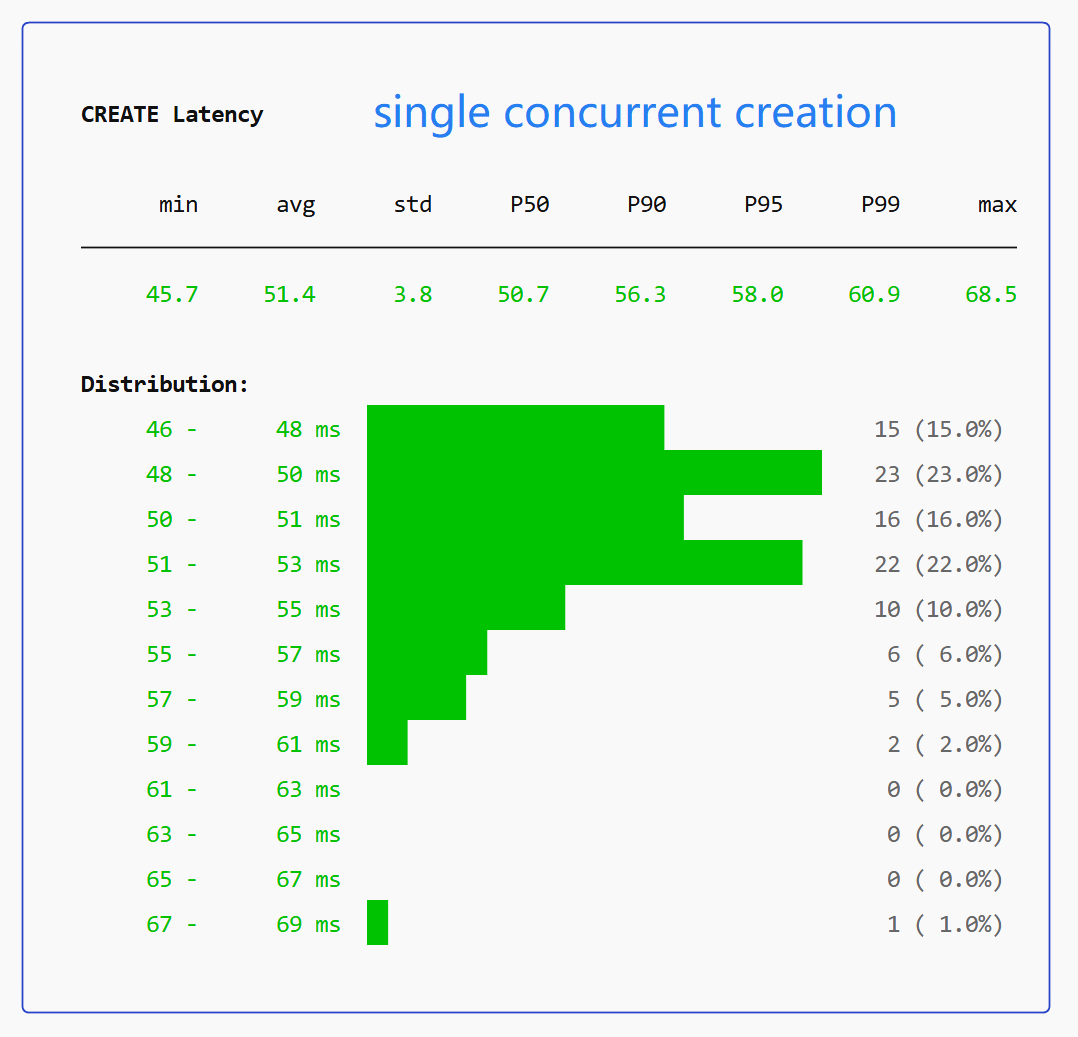
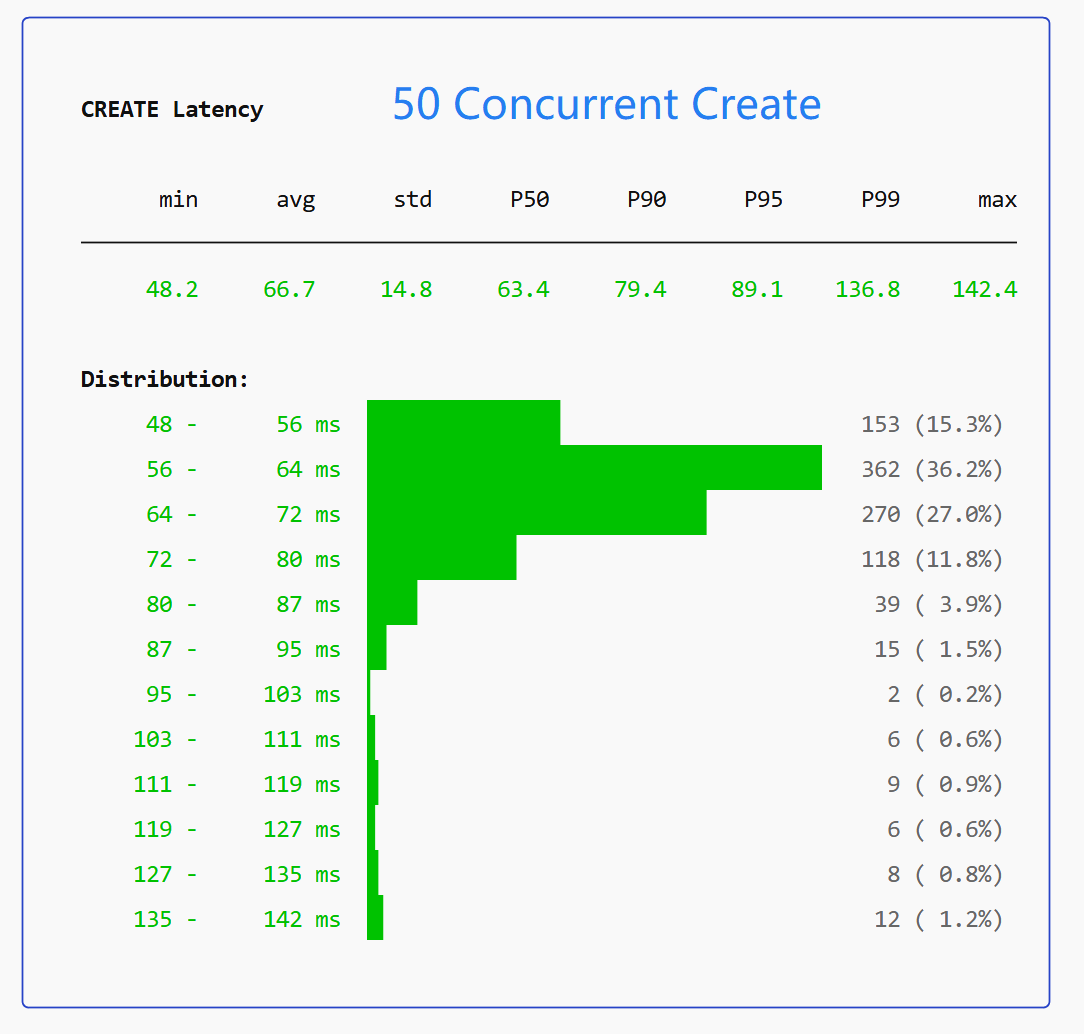
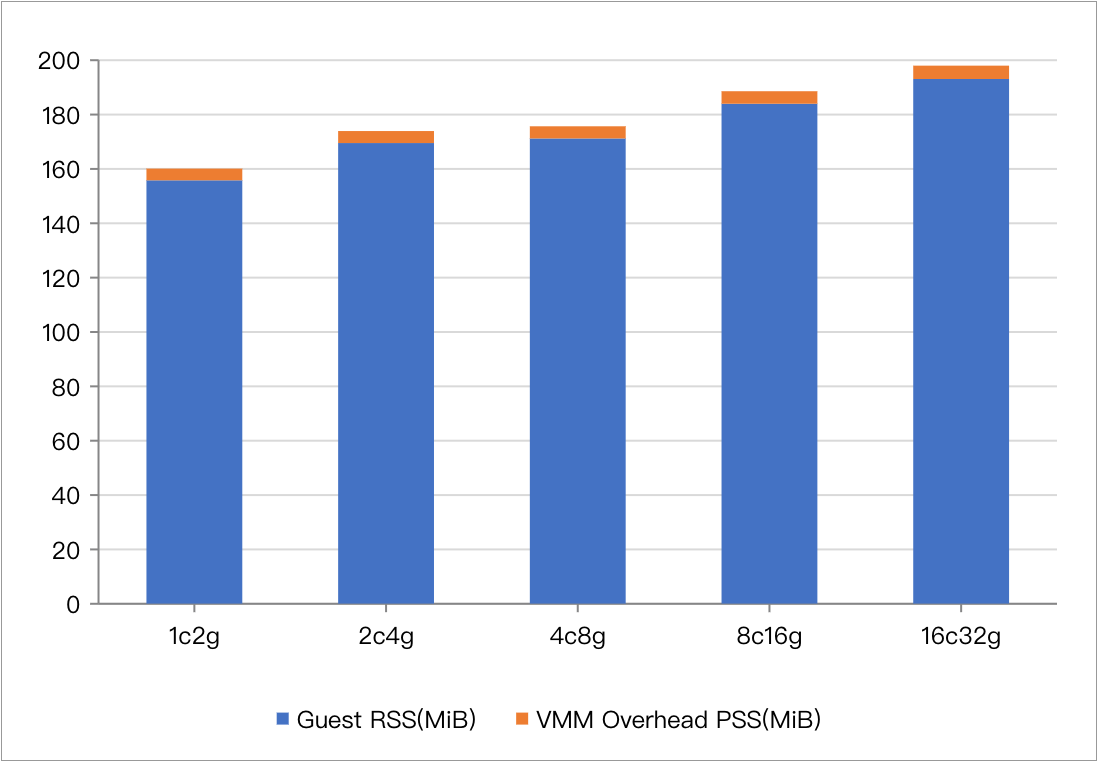
- Cold start benchmarked on bare-metal. 60ms at single concurrency; under 50 concurrent creations, avg 67ms, P95 90ms, P99 137ms — consistently sub-150ms.
- Memory overhead measured with sandbox specs ≤ 32GB. Larger configurations may see a marginal increase.
For detailed metrics on startup latency and resource overhead, see the Core Operations Performance Benchmark Report (bare metal) and the PVM Cloud Server Benchmark Report.
|
|
|
|
Sub-150ms sandbox delivery under both single and high-concurrency workloads
|
CubeSandbox base memory footprint across various instance sizes
(*Blue: Sandbox specifications; Orange: Base memory overhead). Note that memory consumption increases only marginally as instance sizes scale up.
|
Quick Start
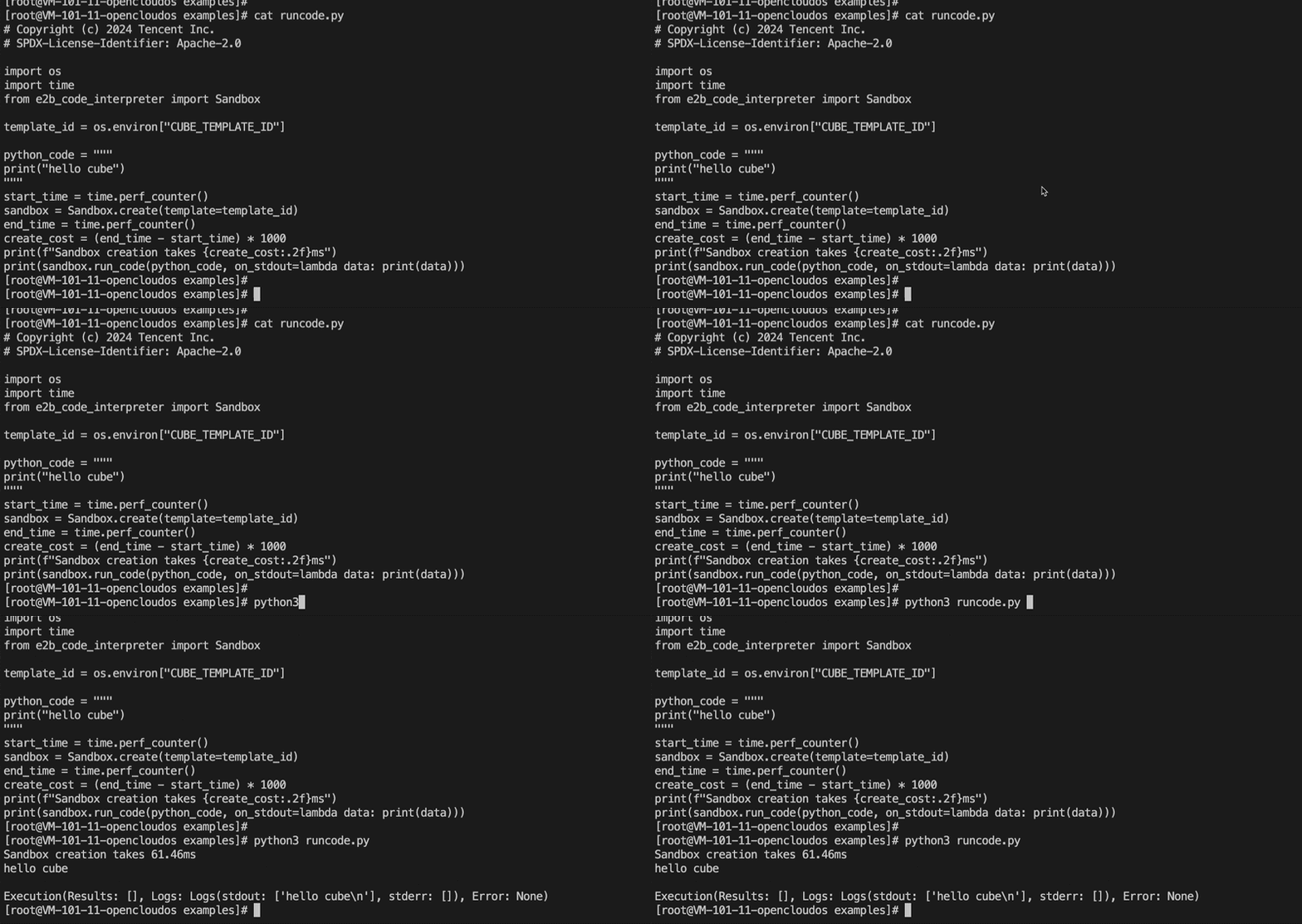
⚡ Millisecond-level startup — watch the fast-start flow above.
Cube Sandbox requires an x86_64 Linux environment with KVM support.
The guide walks you through everything in four steps — provisioning a server, installing Cube Sandbox, creating a sandbox template, and running your first agent code. No source build needed, up and running in minutes.
Choose your deployment path:
First thing after install: open the Web console

🖥️ Visual management — from overview to creating a sandbox and streaming logs, all in your browser.
After one-click deployment, open in your browser:
http://<control-node IP>:12088
Recommended three steps:
- Check overview — Open Overview, confirm nodes are Ready and capacity looks healthy
- Prepare a template — Install an official preset from Template Store; skip if you already have a
READY template under Templates
- Create a sandbox — Sandboxes → + New sandbox, pick a
READY template, and view live logs on the detail page within seconds
See the full WebUI console guide.
Deep Dive
Architecture
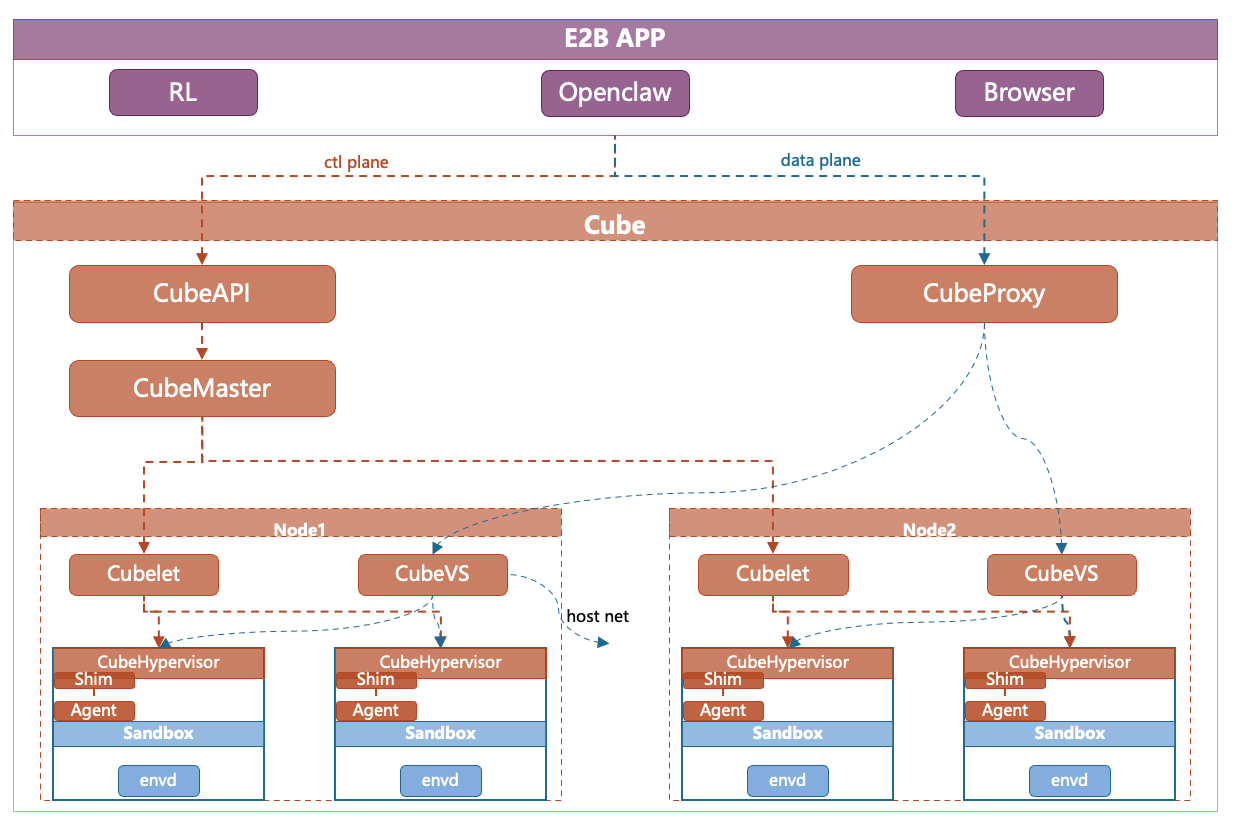
| Component |
Responsibility |
| CubeAPI |
High-concurrency REST API Gateway (Rust), compatible with E2B. Swap the URL for seamless migration. |
| CubeMaster |
Cluster orchestrator. Receives API requests and dispatches them to corresponding Cubelets. Manages resource scheduling and cluster state. |
| CubeProxy |
Reverse proxy, compatible with the E2B protocol, routing requests to the appropriate sandbox instances. |
| Cubelet |
Compute node local scheduling component. Manages the complete lifecycle of all sandbox instances on the node. |
| CubeVS |
eBPF-based virtual switch, providing kernel-level network isolation and security policy enforcement. |
| CubeEgress |
OpenResty-based egress security gateway: L7 domain filtering, credential injection, and access auditing; works with CubeVS kernel policies so sandbox traffic cannot bypass inspection. |
| CubeHypervisor & CubeShim |
Virtualization layer — CubeHypervisor manages KVM MicroVMs, CubeShim implements the containerd Shim v2 API to integrate sandboxes into the container runtime. |
👉 For more details, please read the Architecture Design Document and CubeVS Network Model.
We welcome contributions of all kinds—whether it's a bug report, feature suggestion, documentation improvement, or code submission!
- 🐞 Found a Bug or have questions? Submit an issue on GitHub Issues.
- 💡 Have an Idea? Join the conversation in GitHub Discussions.
- 🛠️ Want to Code? Check out our <a href="./CONTRIBUTING.md" target="

 CubeSandbox 是一种高性能、安全的沙箱服务,用于运行不受信任的 AI 智能体代码。它基于 RustVMM 和 KVM 构建,采用硬件隔离的 MicroVM。