macOS
MacOS inside a Docker container.
Features ✨
- Runs macOS inside a Docker container
- Automatic download of the installation files
- Web-based viewer for controlling the VM
- Near-native performance with KVM acceleration
- Customizable CPU, memory, and storage allocation
- Dynamic memory allocation with memory ballooning
- USB passthrough and host folder sharing
- Supports NAT, user-mode, macvlan, and macvtap networking
Usage 🐳
Docker Compose:
services:
  macos:
    image: dockurr/macos
    container_name: macos
    environment:
      VERSION: "15"
    devices:
      - /dev/kvm
      - /dev/net/tun
    cap_add:
      - NET_ADMIN
    ports:
      - 8006:8006
      - 5900:5900/tcp
      - 5900:5900/udp
    volumes:
      - ./macos:/storage
    restart: always
    stop_grace_period: 2m
Docker CLI:
docker run -it --rm --name macos -e "VERSION=14" -p 8006:8006 --device=/dev/kvm --device=/dev/net/tun --cap-add NET_ADMIN -v "${PWD:-.}/macos:/storage" --stop-timeout 120 docker.io/dockurr/macos
Kubernetes:
kubectl apply -f https://raw.githubusercontent.com/dockur/macos/refs/heads/master/kubernetes.yml
GitHub Codespaces:

Requirements ⚙️
- Docker or Podman on a Linux host with KVM support.
- Docker Desktop or Podman (Desktop) on Windows 11 with nested virtualization enabled.
- An AVX2-capable processor, such as Intel Haswell (4th-generation Core) or AMD Zen (Ryzen 1000 series) or newer.
- At least 4 GB of available RAM.
- At least 32 GB of free disk space.
[!NOTE]
Docker Desktop on Linux, macOS, and Windows 10 does not currently provide KVM access to containers and is therefore not supported.
FAQ 💬
How do I use it?
Very simple! These are the steps:
Start the container and connect to port 8006 using your web browser.
After the recovery image is downloaded, a black screen with a progress bar will appear while macOS downloads the remaining installation files.
Once the download is complete, the macOS recovery menu will appear.
Choose Disk Utility and then select the largest Apple Inc. VirtIO Block Media disk.
Click the Erase button to format the disk to APFS, and give it any name you like.
Close the current window and proceed the installation by clicking Reinstall macOS.
When prompted where you want to install it, select the disk you created previously.
After all files are copied, select your region, language, and keyboard settings.
When the Migration Assistant wants to transfer data, select Not now (bottom left).
On the Apple ID screen, select Set Up Later (bottom left) and then proceed using Skip.
On the Create a Computer Account screen, fill in a username and password and Continue.
Enjoy your brand new machine, and don't forget to star this repo!
How do I select the version of macOS?
By default, macOS 15 (Sequoia) will be installed, but you can add the VERSION environment variable in order to specify an alternative:
environment:
  VERSION: "13"
Select from the values below:
| Value |
Version |
Name |
15 |
macOS 15 |
Sequoia |
14 |
macOS 14 |
Sonoma |
13 |
macOS 13 |
Ventura |
12 |
macOS 12 |
Monterey |
11 |
macOS 11 |
Big Sur |
[!NOTE]
You can also select macOS 26 (Tahoe), but that is not recommended yet, as it runs very slow for some unknown reason.
How do I change the storage location?
To change the storage location, include the following bind mount in your compose file:
volumes:
  - ./macos:/storage
Replace the example path ./macos with the desired storage folder or named volume.
How do I change the size of the disk?
To expand the default size of 64 GB, add the DISK_SIZE setting to your compose file and set it to your preferred capacity:
environment:
  DISK_SIZE: "256G"
[!TIP]
This can also be used to resize an existing disk to a larger capacity without any data loss.
However, afterwards you will need to run the following two commands from the terminal in macOS:
diskutil repairDisk disk2
diskutil apfs resizeContainer disk3 0
to allocate this additional space.
How do I change the amount of CPU or RAM?
By default, macOS will be allowed to use a single CPU core and 4 GB of RAM.
If you want to adjust this, you can specify the desired amount using the following environment variables:
environment:
  RAM_SIZE: "8G"
  CPU_CORES: "4"
[!IMPORTANT]
On AMD systems, avoid assigning multiple CPU cores or more than 8 GB of RAM initially. Depending on the specific AMD CPU model, multiple cores may reduce performance or cause instability, while more than 8 GB of RAM may cause the installation to freeze at the country selection step. Increase the RAM only after installation, and the core count only after macOS has been running reliably for several hours.
Intel processors offer much better macOS compatibility, so multiple cores and more RAM can be assigned from the start without causing these issues.
How do I enable audio?
Audio is disabled by default. To stream it to the browser, add the following environment variable:
environment:
  AUDIO: "Y"
Then enable Audio under Settings → Advanced in the web viewer. The stream is only active while this option is enabled, so it uses no extra bandwidth otherwise.
How do I share files with the host?
To share files with the host, add the following volume to your compose file:
volumes:
  - ./example:/shared
Then start macOS and execute the following command:
sudo -S mount_9p shared
In Finder’s menu bar, click on “Go – Computer” to access this shared folder, it will show the contents of ./example.
How do I assign an individual IP address to the container?
By default, the container uses bridge networking, which shares the IP address with the host.
If you want to assign an individual IP address to the container, you can create a macvlan network as follows:
docker network create -d macvlan \
    --subnet=192.168.0.0/24 \
    --gateway=192.168.0.1 \
    --ip-range=192.168.0.100/28 \
    -o parent=eth0 vlan
Be sure to modify these values to match your local subnet.
Once you have created the network, change your compose file to look as follows:
services:
  macos:
    container_name: macos
    ..<snip>..
    networks:
      vlan:
        ipv4_address: 192.168.0.100

networks:
  vlan:
    external: true
An added benefit of this approach is that you won't have to perform any port mapping anymore, since all ports will be exposed by default.
[!IMPORTANT]
This IP address won't be accessible from the Docker host due to the design of macvlan, which doesn't permit communication between the two. If this is a concern, you need to create a second macvlan as a workaround.
How can macOS acquire an IP address from my router?
After configuring the container for macvlan, it is possible for macOS to become part of your home network by requesting an IP from your router, just like your other devices.
To enable this mode, in which the container and macOS will have separate IP addresses, add the following lines to your compose file:
environment:
  DHCP: "Y"
devices:
  - /dev/vhost-net
device_cgroup_rules:
  - 'c *:* rwm'
How do I pass through a disk?
You can pass through disk devices or partitions directly by adding them to your compose file in this way:
devices:
  - /dev/sdb:/disk1
  - /dev/sdc1:/disk2
Use /disk1 if you want it to become your main drive, and use /disk2 and higher to add them as secondary drives.
How do I pass through a USB device?
To pass through a USB device, first look up its vendor and product IDs via the lsusb command, then add them to your compose file like this:
environment:
  ARGUMENTS: "-device usb-host,vendorid=0x1234,productid=0x1234"
devices:
  - /dev/bus/usb
How do I enable dynamic memory allocation?
By default, the VM is allocated the full amount of RAM configured via RAM_SIZE for its entire lifetime.
However, you can enable memory ballooning if you want the container to dynamically reclaim unused guest RAM based on host memory pressure.
Are these all available options?
No. For a complete overview of all supported settings, see the environment variables page.
How do I verify that KVM is available?
First, make sure your platform and container runtime meet the requirements listed above.
On a Linux host, install cpu-checker and run:
sudo apt install cpu-checker
sudo kvm-ok
A working configuration should report:
KVM acceleration can be used
You can also verify that the KVM device exists:
ls -l /dev/kvm
If KVM is unavailable, check whether:
- Hardware virtualization (
Intel VT-x or AMD-V) is enabled in your BIOS or UEFI.
- Nested virtualization is enabled when the host itself is a virtual machine.
- Your VPS or cloud provider supports nested virtualization.
If kvm-ok succeeds but the container still reports that KVM is unavailable, you can temporarily add privileged: true to your Compose file to rule out a permission or device-access issue.
How do I run Windows in a container?
You can use dockur/windows for that. It shares many of the same features, and even has completely automatic installation.
How do I run a Linux desktop in a container?
You can use qemus/qemu in that case.
Is this project legal?
Yes, this project contains only open-source code and does not distribute macOS itself. Neither does it try to circumvent any copyright protection measures.
However, by installing Apple's macOS, you must accept their end-user license agreement, which does not permit installation on non-official hardware. So only run this container on hardware sold by Apple, as any other use will be a violation of their terms and conditions.
Acknowledgements 🙏
Special thanks to seitenca, this project would not exist without her invaluable work.
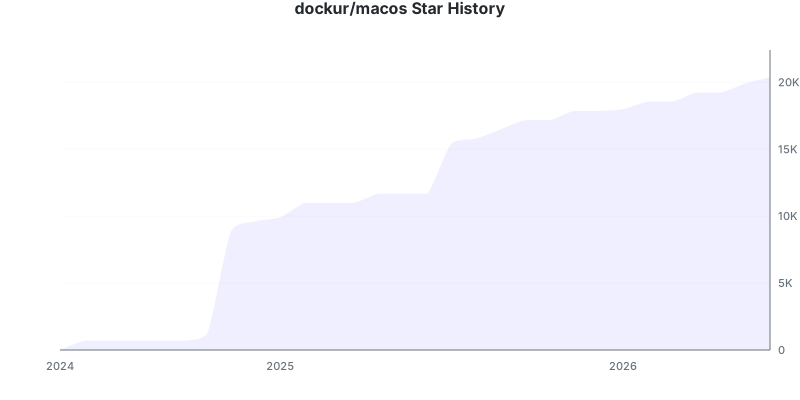
Stars 🌟
Disclaimer ⚖️
Only run this container on Apple hardware, any other use is not permitted by their EULA. The product names, logos, brands, and other trademarks referred to within this project are the property of their respective trademark holders. This project is not affiliated, sponsored, or endorsed by Apple Inc.




 dockur/macos lets you run a full macOS virtual machine inside a Docker container, complete with a web-based viewer so you can control it right from your browser.