



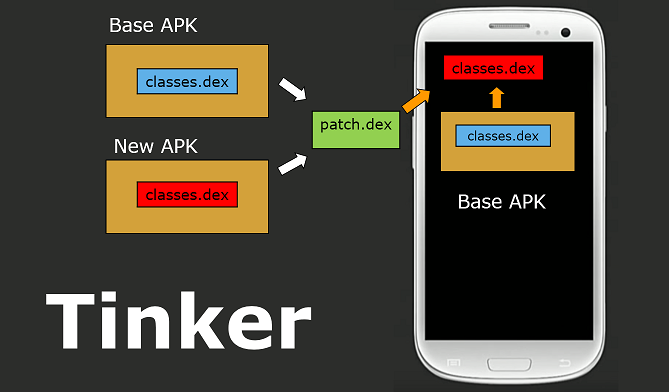
What is this?
 Tinker is a hot-fix library for Android that lets you push dex, native library and resource updates to users without making them reinstall the APK.
Tinker is a hot-fix library for Android that lets you push dex, native library and resource updates to users without making them reinstall the APK.Is this a standalone app or something I add to my project?It is a library plus a Gradle plugin (tinker-gradle-plugin) that you integrate into an existing Android app build.
It is a library plus a Gradle plugin (tinker-gradle-plugin) that you integrate into an existing Android app build.How do I add Tinker to my app?Add tinker-gradle-plugin to your root build.gradle, apply the plugin and add dependencies in app/build.gradle, move your Application subclass logic into a SampleApplicationLike class, and make your real Application class extend TinkerApplication with a no-arg constructor.
Add tinker-gradle-plugin to your root build.gradle, apply the plugin and add dependencies in app/build.gradle, move your Application subclass logic into a SampleApplicationLike class, and make your real Application class extend TinkerApplication with a no-arg constructor.Do I need anything else besides adding the plugin?You need an Android Application class you can restructure, and optionally tinker-android-anno to auto-generate the Application wiring; Proguard config is handled automatically by the plugin.
You need an Android Application class you can restructure, and optionally tinker-android-anno to auto-generate the Application wiring; Proguard config is handled automatically by the plugin.What can't Tinker hot-fix?Tinker cannot update AndroidManifest.xml (e.g. adding new components), has issues on some Samsung devices running Android 21, and Google Play's Developer Distribution Agreement blocks dynamic APK updates there.
Tinker cannot update AndroidManifest.xml (e.g. adding new components), has issues on some Samsung devices running Android 21, and Google Play's Developer Distribution Agreement blocks dynamic APK updates there.What platform does this target?Android apps only, built via Java/Gradle.
Android apps only, built via Java/Gradle.What is the Ark support mentioned in the README?Ark is a compilation mode where patches are built via a command-line tool and packaged as an APK containing both classes.dex (for standard Android) and a .so file (for Ark), with the Ark compilation itself handled by the Ark compiler team.
Ark is a compilation mode where patches are built via a command-line tool and packaged as an APK containing both classes.dex (for standard Android) and a .so file (for Ark), with the Ark compilation itself handled by the Ark compiler team.Can I build and package patches without Gradle?Yes, tinker-cli is supported as an alternative to the Gradle plugin, and patch configuration can be set via a tinkerconfig.xml file.
Yes, tinker-cli is supported as an alternative to the Gradle plugin, and patch configuration can be set via a tinkerconfig.xml file.What are similar projects?MVPArms, ARouter, androidannotations, glide, Android-PickerView, QMUI_Android, okhttp-OkGo, MPAndroidChart
MVPArms, ARouter, androidannotations, glide, Android-PickerView, QMUI_Android, okhttp-OkGo, MPAndroidChartWhich topics is it in?android-library, wechat, mobile-app, bsd, china, java, mobile, android, framework, chinese, library, open-source
android-library, wechat, mobile-app, bsd, china, java, mobile, android, framework, chinese, library, open-source