Mars



-%20iOS%20%7C%20OS%20X%20%7C%20Android(ndkr20)%20%7C%20Windows(vs2015)%20-brightgreen.svg)
(中文版本请参看这里)
Mars is a cross-platform infrastructure component developed by WeChat Mobile Team.
It has been proved to be effective by billions of WeChat users.
- Cross platform, easy to deploy if you are developing multi-platform or multi-business application.
- Suitable for small amount data transmission
- Mobile platform friendly, low power and traffic consumption
- A network solution fit for mobile application
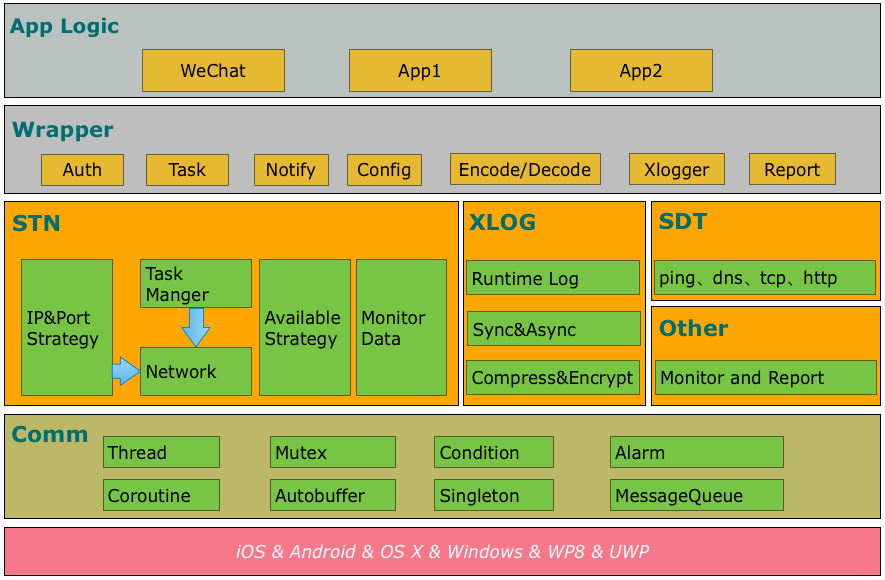
- comm: common library, including socket, thread, message queue, coroutine, etc.
- Xlog: a reliable log component with high-performance.
- SDT: a network detection component.
- STN: a signaling network component, the major part of Mars.
Samples
Start with sample usage here.
Getting started
python scripts only support python3.10 or higher
Choose Android or iOS/OS X or Windows.
You can use either mars-wrapper or mars-core. We recommend you to use mars-wrapper when you just want to build a sample or demo, while mars-core is preferred to be used in your APP.
Add dependencies by adding the following lines to your app/build.gradle.
dependencies {
    compile 'com.tencent.mars:mars-wrapper:1.2.5'
}
OR
Add dependencies by adding the following lines to your app/build.gradle.
dependencies {
    compile 'com.tencent.mars:mars-core:1.2.5'
}
OR
If you just want to user xlog, add dependencies by adding the following lines to your app/build.gradle.
note: xlog is included in mars-core and mars-wrapper.
dependencies {
    compile 'com.tencent.mars:mars-xlog:1.2.5'
}
If you read here, make sure you have added dependencies of mars-wrapper, mars-core or mars-xlog.
Initialize Xlog when your APP starts. Remember to use an exclusive folder to save the log files, no other files are acceptable in the folder since they would be removed by the cleansing function in Xlog automatically.
When multiple processes is used in your app, make sure that each process owns its exclusive log file.
System.loadLibrary("c++_shared");
System.loadLibrary("marsxlog");

final String SDCARD = Environment.getExternalStorageDirectory().getAbsolutePath();
final String logPath = SDCARD + "/marssample/log";

// this is necessary, or may crash for SIGBUS
final String cachePath = this.getFilesDir() + "/xlog"

//init xlog
Xlog xlog = new Xlog();
Log.setLogImp(xlog);

if (BuildConfig.DEBUG) {
    Log.setConsoleLogOpen(true);
  	Log.appenderOpen(Xlog.LEVEL_DEBUG, Xlog.AppednerModeAsync, "", logPath, logFileName, 0);
} else {
    Log.setConsoleLogOpen(false);
  	Log.appenderOpen(Xlog.LEVEL_INFO, Xlog.AppednerModeAsync, "", logPath, logFileName, 0);
}
Uninitialized Xlog when your app exits
Log.appenderClose();
If you add dependencies of mars-core to your project, you need to initialize and release STN.
Initialize STN before you use it
// set callback
AppLogic.setCallBack(stub);
StnLogic.setCallBack(stub);
SdtLogic.setCallBack(stub);

// Initialize the Mars PlatformComm
Mars.init(getApplicationContext(), new Handler(Looper.getMainLooper()));

// Initialize the Mars
StnLogic.setLonglinkSvrAddr(profile.longLinkHost(), profile.longLinkPorts());
StnLogic.setShortlinkSvrAddr(profile.shortLinkPort());
StnLogic.setClientVersion(profile.productID());
Mars.onCreate(true);

BaseEvent.onForeground(true);
StnLogic.makesureLongLinkConnected();
Firstly, you should call the setCallBack interface, and secondly, the Mars.init. Then, to initialize the Mars, there is to need to strictly follow the orders of the four commands. Finally, after Mars are initialized, onForeground and makesureLongLinkConnect can be called.
Destroy STN or exit your app:
Mars.onDestroy();
Network change:
BaseEvent.onNetworkChange()
If you add dependencies of mars-wrapper to your project, you just need initialize STN and no need uninitialized.
MarsServiceProxy.init(this, getMainLooper(),null);
No matter which way of dependencies you used, you must pay attention to these.
The state (background or foreground) of the APP is changed:
BaseEvent.onForeground(boolean);
The account of the APP is changed:
StnLogic.reset();
If you want to modify the encryption algorithm of Xlog, the packer/unpacker of longlink/shortlink, or you want to define the other components by yourself, refer here
Compile
python build_ios.py
or
python build_osx.py
- Add mars.framework as a dependency of your project.
- Rename files in mars/libraries/mars_android_sdk/jni with .rewriteme extension to .cc extension.
- Add header files in mars/libraries/mars_android_sdk/jni and source files from step 2 into your project.
Initialize Xlog when your app starts. Remember to use an exclusive folder to save the log files, no other files are acceptable in the folder since they would be removed by the cleansing function in Xlog automatically.
NSString* logPath = [[NSSearchPathForDirectoriesInDomains(NSDocumentDirectory, NSUserDomainMask, YES) objectAtIndex:0] stringByAppendingString:@"/log"];

// set do not backup for logpath
const char* attrName = "com.apple.MobileBackup";
u_int8_t attrValue = 1;
setxattr([logPath UTF8String], attrName, &attrValue, sizeof(attrValue), 0, 0);

// init xlogger
#if DEBUG
xlogger_SetLevel(kLevelDebug);
appender_set_console_log(true);
#else
xlogger_SetLevel(kLevelInfo);
appender_set_console_log(false);
#endif
XLogConfig config;
config.mode_ = kAppenderAsync;
config.logdir_ = [logPath UTF8String];
config.nameprefix_ = "Test";
config.pub_key_ = "";
config.compress_mode_ = kZlib;
config.compress_level_ = 0;
config.cachedir_ = "";
config.cache_days_ = 0;
appender_open(config);
Close xlog in function "applicationWillTerminate"
appender_close();
Initialize STN before you use it:
- (void)setCallBack {
    mars::stn::SetCallback(mars::stn::StnCallBack::Instance());
    mars::app::SetCallback(mars::app::AppCallBack::Instance());
}

- (void) createMars {
    mars::baseevent::OnCreate();
}

- (void)setClientVersion:(UInt32)clientVersion {
    mars::stn::SetClientVersion(clientVersion);
}

- (void)setShortLinkDebugIP:(NSString *)IP port:(const unsigned short)port {
    std::string ipAddress([IP UTF8String]);
    mars::stn::SetShortlinkSvrAddr(port, ipAddress);
}

- (void)setShortLinkPort:(const unsigned short)port {
    mars::stn::SetShortlinkSvrAddr(port);
}

- (void)setLongLinkAddress:(NSString *)string port:(const unsigned short)port debugIP:(NSString *)IP {
    std::string ipAddress([string UTF8String]);
    std::string debugIP([IP UTF8String]);
    std::vector<uint16_t> ports;
    ports.push_back(port);
    mars::stn::SetLonglinkSvrAddr(ipAddress,ports,debugIP);
}

- (void)setLongLinkAddress:(NSString *)string port:(const unsigned short)port {
    std::string ipAddress([string UTF8String]);
    std::vector<uint16_t> ports;
    ports.push_back(port);
    mars::stn::SetLonglinkSvrAddr(ipAddress,ports);
}

- (void)reportEvent_OnForeground:(BOOL)isForeground {
    mars::baseevent::OnForeground(isForeground);
}

- (void)makesureLongLinkConnect {
    mars::stn::MakesureLonglinkConnected();
}
Firstly, you should call the setCallBack interface, and secondly, the Mars.init. Then, to initialize the Mars, there is to need to strictly follow the orders of the four commands. Finally, after Mars are initialized, onForeground and makesureLongLinkConnect can be called.
If you want to destroy STN or exit App:
- (void)destroyMars {
    mars::baseevent::OnDestroy();
}
When the App's state of background or foreground is changed:
- (void)reportEvent_OnForeground:(BOOL)isForeground {
    mars::baseevent::OnForeground(isForeground);
}
Network change:
- (void)reportEvent_OnNetworkChange {
    mars::baseevent::OnNetworkChange();
}
Install Visual Studio 2015.
Compile
python build_windows.py
- Add mars.lib as a dependency of your project.
- Rename files in mars/libraries/mars_android_sdk/jni with .rewriteme extension to .cc extension.
- Add header files in mars/libraries/mars_android_sdk/jni and source files from step 2 into your project.
Initialize Xlog when your app starts. Remember to use an exclusive folder to save the log files, no other files are acceptable in the folder since they would be removed by the cleansing function in Xlog automatically.
std::string logPath = ""; //use your log path
std::string pubKey = ""; //use you pubkey for log encrypt

// init xlog
#if DEBUG
xlogger_SetLevel(kLevelDebug);
appender_set_console_log(true);
#else
xlogger_SetLevel(kLevelInfo);
appender_set_console_log(false);
#endif
appender_open(kAppenderAsync, logPath.c_str(), "Test", 0, pubKey.c_str());
Uninitialized xlog before your app exits
appender_close();
Initialize STN before you use it:
void setShortLinkDebugIP(const std::string& _ip, unsigned short _port)
{
	mars::stn::SetShortlinkSvrAddr(_port, _ip);
}
void setShortLinkPort(unsigned short _port)
{
	mars::stn::SetShortlinkSvrAddr(_port, "");
}
void setLongLinkAddress(const std::string& _ip, unsigned short _port, const std::string& _debug_ip)
{
	vector<uint16_t> ports;
	ports.push_back(_port);
	mars::stn::SetLonglinkSvrAddr(_ip, ports, _debug_ip);
}

void Init()
{
	mars::stn::SetCallback(mars::stn::StnCallBack::Instance());
	mars::app::SetCallback(mars::app::AppCallBack::Instance());
	mars::baseevent::OnCreate();

	//todo
	//mars::stn::SetClientVersion(version);
	//setShortLinkDebugIP(...)
	//setLongLinkAddress(...)

	mars::baseevent::OnForeground(true);
	mars::stn::MakesureLonglinkConnected();
}
Firstly, you should call the setCalBack interface, and secondly, the Mars.init. Then, to initialize the Mars, there is to need to strictly follow the orders of the four commands. Finally, after Mars are initialized, onForeground and makesureLongLinkConnect can be called.
If you want to destroy STN or exit App:
mars::baseevent::OnDestroy();
Support
Any problem?
- Learn more from mars/sample.
- Read the source code.
- Read the wiki or FAQ for help.
- Contact us for help.
Contributing
For more information about contributing issues or pull requests, see our Mars Contributing Guide.
License
Mars is under the MIT license. See the LICENSE file for details.

Mars 是微信官方的跨平台跨业务的终端基础组件。
- comm:可以独立使用的公共库,包括 socket、线程、消息队列、协程等;
- xlog:高可靠性高性能的运行期日志组件;
- SDT: 网络诊断组件;
- STN: 信令分发网络模块,也是 Mars 最主要的部分。
Samples
sample 的使用请参考这里。
Getting started
python >= 3,10
接入 Android 或者 iOS/OS X 或者 Windows 。
gradle 接入我们提供了两种接入方式:mars-wrapper 或者 mars-core。如果你只是想做个 sample 推荐使用 mars-wrapper,可以快速开发;但是如果你想把 mars 用到你的 app 中的话,推荐使用 mars-core,可定制性更高。
在 app/build.gradle 中添加 mars-wrapper 的依赖:
dependencies {
    compile 'com.tencent.mars:mars-wrapper:1.2.5'
}
或者
在 app/build.gradle 中添加 mars-core 的依赖:
dependencies {
    compile 'com.tencent.mars:mars-core:1.2.5'
}
或者
如果只想使用 xlog,可以只加 xlog 的依赖(mars-core,mars-wrapper 中都已经包括 xlog):
dependencies {
    compile 'com.tencent.mars:mars-xlog:1.2.5'
}
接着往下操作之前,请先确保你已经添加了 mars-wrapper 或者 mars-core 或者 mars-xlog 的依赖
在程序启动加载 Xlog 后紧接着初始化 Xlog。但要注意如果你的程序使用了多进程,不要把多个进程的日志输出到同一个文件中,保证每个进程独享一个日志文件。而且保存 log 的目录请使用单独的目录,不要存放任何其他文件防止被 xlog 自动清理功能误删。
System.loadLibrary("c++_shared");
System.loadLibrary("marsxlog");

final String SDCARD = Environment.getExternalStorageDirectory().getAbsolutePath();
final String logPath = SDCARD + "/marssample/log";

// this is necessary, or may crash for SIGBUS
final String cachePath = this.getFilesDir() + "/xlog"

//init xlog
Xlog.XLogConfig logConfig = new Xlog.XLogConfig();
logConfig.mode = Xlog.AppednerModeAsync;
logConfig.logdir = logPath;
logConfig.nameprefix = logFileName;
logConfig.pubkey = "";
logConfig.compressmode = Xlog.ZLIB_MODE;
logConfig.compresslevel = 0;
logConfig.cachedir = "";
logConfig.cachedays = 0;
if (BuildConfig.DEBUG) {
    logConfig.level = Xlog.LEVEL_VERBOSE;
    Xlog.setConsoleLogOpen(true);
} else {
    logConfig.level = Xlog.LEVEL_INFO;
    Xlog.setConsoleLogOpen(false);
}

Log.setLogImp(new Xlog());
程序退出时关闭日志:
Log.appenderClose();
如果你是把 mars-core 作为依赖加入到你的项目中的话,你需要显式的初始化和反初始化 STN
在使用 STN 之前进行初始化
// set callback
AppLogic.setCallBack(stub);
StnLogic.setCallBack(stub);
SdtLogic.setCallBack(stub);

// Initialize the Mars PlatformComm
Mars.init(getApplicationContext(), new Handler(Looper.getMainLooper()));

// Initialize the Mars
StnLogic.setLonglinkSvrAddr(profile.longLinkHost(), profile.longLinkPorts());
StnLogic.setShortlinkSvrAddr(profile.shortLinkPort());
StnLogic.setClientVersion(profile.productID());
Mars.onCreate(true);
BaseEvent.onForeground(true);

StnLogic.makesureLongLinkConnected();
初始化顺序不一定要严格遵守上述代码的顺序,但在初始化时首先要调用 setCallBack 接口 (callback 文件的编写可以参考 demo),再调用 Mars.init,最后再调用 onForeground 和 makesureLongLinkConnect,中间顺序可以随意更改。注意:STN 默认是后台,所以初始化 STN 后需要主动调用一次BaseEvent.onForeground(true)
需要释放 STN 或者退出程序时:
Mars.onDestroy();
网络切换时:
BaseEvent.onNetworkChange()
如果你是把 mars-wrapper 作为依赖加入到你的项目中,你只需要显式的初始化 STN,不需要反初始化(因为 mars-wrapper 会进行反初始化)
MarsServiceProxy.init(this, getMainLooper(),null);
不管你是使用 mars-wrapper 还是 mars-core,你都需要特别注意以下事件:
前后台切换:
BaseEvent.onForeground(boolean);
应用的账号信息更改:
StnLogic.reset();
如果你想修改 Xlog 的加密算法或者长短连的加解包部分甚至更改组件的其他部分,可以参考这里
编译
python build_ios.py
or
python build_osx.py
把 mars.framework 作为依赖加入到你的项目中,把mars/libraries/mars_android_sdk/jni 目录的后缀名为 rewriteme 的文件名删掉".rewriteme"和头文件一起加入到你的项目中。
在程序启动加载 Xlog 后紧接着初始化 Xlog。但要注意保存 log 的目录请使用单独的目录,不要存放任何其他文件防止被 xlog 自动清理功能误删。
NSString* logPath = [[NSSearchPathForDirectoriesInDomains(NSDocumentDirectory, NSUserDomainMask, YES) objectAtIndex:0] stringByAppendingString:@"/log"];

// set do not backup for logpath
const char* attrName = "com.apple.MobileBackup";
u_int8_t attrValue = 1;
setxattr([logPath UTF8String], attrName, &attrValue, sizeof(attrValue), 0, 0);

// init xlogger
#if DEBUG
xlogger_SetLevel(kLevelDebug);
appender_set_console_log(true);
#else
xlogger_SetLevel(kLevelInfo);
appender_set_console_log(false);
#endif

XLogConfig config;
config.mode_ = kAppenderAsync;
config.logdir_ = [logPath UTF8String];
config.nameprefix_ = "Test";
config.pub_key_ = "";
config.compress_mode_ = kZlib;
config.compress_level_ = 0;
config.cachedir_ = "";
config.cache_days_ = 0;
appender_open(config);
在函数 "applicationWillTerminate" 中反初始化 Xlog
appender_close();
在你用 STN 之前初始化:
- (void)setCallBack {
    mars::stn::SetCallback(mars::stn::StnCallBack::Instance());
    mars::app::SetCallback(mars::app::AppCallBack::Instance());
}

- (void) createMars {
    mars::baseevent::OnCreate();
}

- (void)setClientVersion:(UInt32)clientVersion {
    mars::stn::SetClientVersion(clientVersion);
}

- (void)setShortLinkDebugIP:(NSString *)IP port:(const unsigned short)port {
    std::string ipAddress([IP UTF8String]);
    mars::stn::SetShortlinkSvrAddr(port, ipAddress);
}

- (void)setShortLinkPort:(const unsigned short)port {
    mars::stn::SetShortlinkSvrAddr(port);
}

- (void)setLongLinkAddress:(NSString *)string port:(const unsigned short)port debugIP:(NSString *)IP {
    std::string ipAddress([string UTF8String]);
    std::string debugIP([IP UTF8String]);
    std::vector<uint16_t> ports;
    ports.push_back(port);
    mars::stn::SetLonglinkSvrAddr(ipAddress,ports,debugIP);
}

- (void)setLongLinkAddress:(NSString *)string port:(const unsigned short)port {
    std::string ipAddress([string UTF8String]);
    std::vector<uint16_t> ports;
    ports.push_back(port);
    mars::stn::SetLonglinkSvrAddr(ipAddress,ports);
}

- (void)reportEvent_OnForeground:(BOOL)isForeground {
    mars::baseevent::OnForeground(isForground);
}

- (void)makesureLongLinkConnect {
    mars::stn::MakesureLonglinkConnected();
}
初始化顺序不一定要严格遵守上述代码的顺序,但在初始化时首先要调用 setCallBack 接口 (callback 文件的编写可以参考 demo),再调用 Mars.init,最后再调用 onForeground 和 makesureLongLinkConnect,中间顺序可以随意更改。注意:STN 默认是后台,所以初始化 STN 后需要主动调用一次BaseEvent.onForeground(true)
需要释放 STN 或者退出程序时:
- (void)destroyMars {
    mars::baseevent::OnDestroy();
}
前后台切换时:
- (void)reportEvent_OnForeground:(BOOL)isForeground {
    mars::baseevent::OnForeground(isForeground);
}
网络切换时:
- (void)reportEvent_OnNetworkChange {
    mars::baseevent::OnNetworkChange();
}
安装Visual Studio 2015
编译
python build_windows.py
把 mars.lib作为依赖加入到你的项目中,把mars/libraries/mars_android_sdk/jni 目录的后缀名为 rewriteme 的文件名删掉".rewriteme"和头文件一起加入到你的项目中。
在程序启动加载 Xlog 后紧接着初始化 Xlog。但要注意保存 log 的目录请使用单独的目录,不要存放任何其他文件防止被 xlog 自动清理功能误删。
std::string logPath = ""; //use your log path
std::string pubKey = ""; //use you pubkey for log encrypt

// init xlog
#if DEBUG
xlogger_SetLevel(kLevelDebug);
appender_set_console_log(true);
#else
xlogger_SetLevel(kLevelInfo);
appender_set_console_log(false);
#endif
appender_open(kAppenderAsync, logPath.c_str(), "Test", 0,  pubKey.c_str());
在程序退出前反初始化 Xlog
appender_close();
在你用 STN 之前初始化:
void setShortLinkDebugIP(const std::string& _ip, unsigned short _port)
{
	mars::stn::SetShortlinkSvrAddr(_port, _ip);
}
void setShortLinkPort(unsigned short _port)
{
	mars::stn::SetShortlinkSvrAddr(_port, "");
}
void setLongLinkAddress(const std::string& _ip, unsigned short _port, const std::string& _debug_ip)
{
	vector<uint16_t> ports;
	ports.push_back(_port);
	mars::stn::SetLonglinkSvrAddr(_ip, ports, _debug_ip);
}

void Init()
{
	mars::stn::SetCallback(mars::stn::StnCallBack::Instance());
	mars::app::SetCallback(mars::app::AppCallBack::Instance());
	mars::baseevent::OnCreate();

	//todo
	//mars::stn::SetClientVersion(version);
	//setShortLinkDebugIP(...)
	//setLongLinkAddress(...)

	mars::baseevent::OnForeground(true);
	mars::stn::MakesureLonglinkConnected();
}
初始化顺序不一定要严格遵守上述代码的顺序,但在初始化时首先要调用 setCallBack 接口 (callback 文件的编写可以参考 demo),再调用 Mars.init,最后再调用 onForeground 和 makesureLongLinkConnect,中间顺序可以随意更改。注意:STN 默认是后台,所以初始化 STN 后需要主动调用一次BaseEvent.onForeground(true)
需要释放 STN 或者退出程序时:
mars::baseevent::OnDestroy();
Support
还有其他问题?
- 参看 mars/sample;
- 阅读 源码;
- 阅读 wiki 或者 FAQ;
- 联系我们。
Contributing
关于 Mars 分支管理、issue 以及 pr 规范,请阅读 Mars Contributing Guide。
License
Mars 使用的 MIT 协议,详细请参考 LICENSE。
信息公示
- SDK名称:Mars
- 版本号:0.2.0
- 开发者:深圳市腾讯计算机系统有限公司
- 主要功能:Mars 是微信官方的跨平台跨业务的终端基础组件。支持iOS、macOS 和Android。Mars 针对移动网络的特点进行了优化,最终提供了高性能的网络功能。
- Mars 使用说明
- Mars 个人信息保护规则

 Mars 是微信移动团队打造的跨平台网络组件库——这套基础设施已经过微信数十亿用户的验证。它把针对移动端优化的网络、日志和网络诊断能力打包在一起,方便嵌入到你自己的应用中。