
Technitium DNS Server
Self host a DNS server for privacy & security
Block ads & malware at DNS level for your entire network!
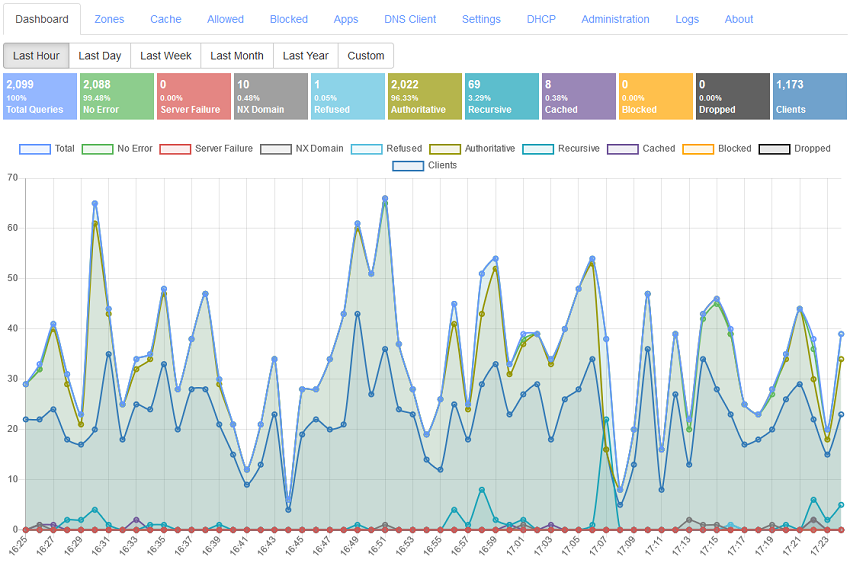
Technitium DNS Server is an open source authoritative as well as recursive DNS server that can be used for self hosting a DNS server for privacy & security. It works out-of-the-box with no or minimal configuration and provides a user friendly web console accessible using any modern web browser.
Nobody really bothers about domain name resolution since it works automatically behind the scenes and is complex to understand. Most computer software use the operating system's DNS resolver that usually query the configured ISP's DNS server using UDP protocol. This way works well for most people but, your ISP can see and control what website you can visit even when the website employ HTTPS security. Not only that, some ISPs can redirect, block or inject content into websites you visit even when you use a different DNS provider like Google DNS or Cloudflare DNS. Having Technitium DNS Server configured to use DNS-over-TLS, DNS-over-HTTPS, or DNS-over-QUIC forwarders, these privacy & security issues can be mitigated very effectively.
Be it a home network or an organization's network, having a locally running DNS server gives you more insights into your network and helps to understand it better using the DNS logs and stats. It improves overall performance since most queries are served from the DNS cache making web sites load faster by not having to wait for frequent DNS resolutions. It also gives you an additional control over your network allowing you to block domain names network wide and also allows you to route your DNS traffic securely using encrypted DNS protocols.

Features
- Works on Windows, Linux, macOS and Raspberry Pi.
- Docker image available on Docker Hub.
- Installs in just a minute and works out-of-the-box with zero configuration.
- Block ads & malware using one or more block list URLs.
- Supports working as an authoritative as well as a recursive DNS server.
- Includes built-in Clustering feature to allow managing two or more DNS Server instances from a single admin web console.
- Supports Single Sign-On (SSO) with OpenID Connect (OIDC).
- Supports LDAP authentication.
- High performance DNS server based on async IO that can serve millions of requests per minute even on a commodity desktop PC hardware (load tested on Intel i7-8700 CPU with more than 100,000 request/second over Gigabit Ethernet).
- Self host DNS-over-TLS, DNS-over-HTTPS, and DNS-over-QUIC DNS services on your network.
- DNS-over-HTTPS implementation supports HTTP/1.1, HTTP/2, and HTTP/3 transport protocols.
- Supports DNS over PROXY protocol version 1 and 2 for both UDP and TCP transports.
- Use public DNS resolvers like Cloudflare, Google, Quad9, or AdGuard with DNS-over-TLS, DNS-over-HTTPS, or DNS-over-QUIC protocols as forwarders.
- Support for latency based name server selection algorithm that works with concurrency feature for both recursive resolution and forwarders.
- Advanced caching with features like Serve Stale and Prefetch.
- Persistent caching feature that saves cache to disk when DNS Server restarts.
- DNS rebinding attack protection feature available with DNS Rebinding Protection App.
- DNSSEC validation support with RSA, ECDSA & EdDSA algorithms for recursive resolver, forwarders, and conditional forwarders with NSEC and NSEC3 support.
- DNSSEC support for all supported DNS transport protocols including encrypted DNS protocols.
- DANE TLSA RFC 6698 record type support. This includes support for automatically generating the hash values using certificates in PEM format.
- SVCB & HTTPS RFC 9460 record type support.
- URI RFC 7553 record type support.
- SSHFP RFC 4255 record type support.
- CNAME cloaking feature to block domain names that resolve to CNAME which are blocked.
- QNAME minimization support in recursive resolver RFC 9156.
- QNAME case randomization support for UDP transport protocol draft-vixie-dnsext-dns0x20-00.
- DNAME record RFC 6672 support.
- ANAME proprietary record support to allow using CNAME like feature at zone apex (CNAME flattening). Supports multiple ANAME records at both zone apex and sub domains.
- APP proprietary record support that allows custom DNS Apps to directly handle DNS requests and return a custom DNS response based on any business logic.
- Support for features like Split Horizon and Geolocation based responses using DNS Apps feature.
- Support for REGEX based block lists with different block lists for different client IP addresses or subnet using Advanced Blocking DNS App.
- Primary, Secondary, Stub, and Conditional Forwarder zone support.
- Static stub zone support implemented in Conditional Forwarder zone to force a domain name to resolve via given name servers using NS records.
- Supports Catalog Zones RFC 9432.
- Supports record aging where the records with expiry set are automatically removed from the zone.
- Bulk conditional forwarding support using Advanced Forwarding DNS App.
- DNSSEC signed zones support with RSA, ECDSA & EdDSA algorithms.
- DNSSEC support for both NSEC and NSEC3.
- Zone transfer with AXFR and IXFR RFC 1995 and DNS NOTIFY RFC 1996 support.
- Zone transfer over TLS (XFR-over-TLS) RFC 9103 support.
- Zone transfer over QUIC (XFR-over-QUIC) RFC 9250 support.
- Support for zone validation using ZONEMD records RFC 8976 for Secondary zones.
- Dynamic DNS Updates RFC 2136 support with security policy.
- Secret key transaction authentication (TSIG) RFC 8945 support for zone transfers.
- EDNS(0) RFC6891 support.
- EDNS Client Subnet (ECS) RFC 7871 support for recursive resolution and forwarding.
- Extended DNS Errors RFC 8914 support.
- EDNS EXPIRE option RFC 7314 support.
- DNS64 function RFC 6147 support for use by IPv6 only clients using the DNS64 App.
- Support to host DNSBL / RBL block lists RFC 5782.
- Multi-user role based access with non-expiring API token support.
- Self host your domain names on your own DNS Server.
- Wildcard sub domain support.
- Enable/disable zones and records to allow testing with ease.
- Built-in DNS Client with option to import responses to local zone.
- Supports out-of-order DNS request processing for DNS-over-TCP and DNS-over-TLS protocols RFC 7766.
- Built-in DHCP Server that can work for multiple networks.
- IPv6 support in DNS Server core.
- HTTP & SOCKS5 proxy support which can be configured to route DNS over Tor Network or use Cloudflare's hidden DNS resolver.
- Admin web console for easy configuration using any web browser with support for Dark Mode.
- Built in HTTP API to allow 3rd party apps to control and configure the DNS Server.
- Supports TOTP based Two-factor authentication (2FA).
- Built-in system logging and query logging.
- Open source cross-platform .NET 10 implementation hosted on GitHub.
Supported RFCs
Read the complete list of RFCs supported by the DNS Server.
Installation
Archive
You can download binaries for the previous releases of the DNS Server from the archive.
Build Instructions
You can build the DNS Server from source and install it manually by following the Build Instructions.
Docker Environment Variables
Technitium DNS Server supports environment variables to allow initializing the config when the DNS Server starts for the first time. Read the environment variable documentation for complete details.
API Documentation
The DNS Server HTTP API allows any 3rd party app or script to configure the DNS Server. The HTTP API is used by the web console and thus all the actions that the web console does can be performed via the API. Read the HTTP API documentation for complete details.
Help Topics
Read the latest online help topics which contains the DNS Server user manual and covers frequently asked questions.
Support
For support, send an email to [email protected]. For any issues, feedback, or feature request, create an issue on GitHub.
Join /r/technitium on Reddit.
Donate
Make contribution to Technitium and help making new software, updates, and features possible.
Donate Now!
Blog Posts

 Technitium DNS Server 是一个开源的自托管 DNS 服务器,既可以作为权威服务器,也可以作为递归解析器使用。它的主打用途是在 DNS 层面为整个家庭或组织网络拦截广告和恶意软件,所有配置都可以在网页控制台中完成。