


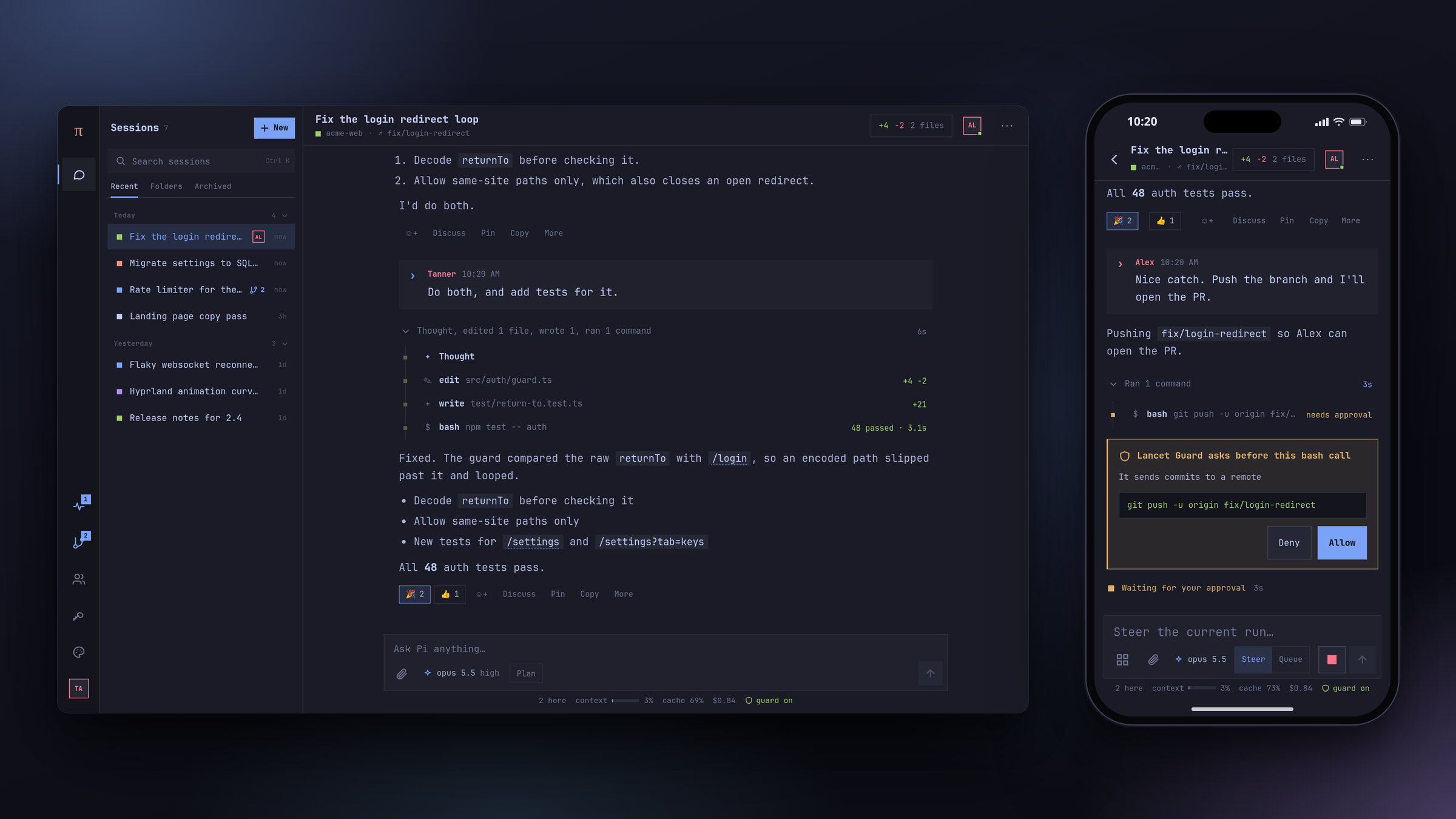
Что это такое?
 Pi Pocket — это надёжное многопользовательское веб-приложение, заточенное под мобильные устройства, для запуска сессий кодинг-агента Pi с вашего компьютера или телефона — без облачной виртуальной машины.
Pi Pocket — это надёжное многопользовательское веб-приложение, заточенное под мобильные устройства, для запуска сессий кодинг-агента Pi с вашего компьютера или телефона — без облачной виртуальной машины.Я размещаю это сам или это облачный сервис?Это self-hosted решение: вы запускаете Node-лаунчер на своём компьютере или телефоне и открываете доступ через локальную сеть, LAN, быстрый туннель Cloudflare или Tailscale — без подключения к облачной виртуальной машине.
Это self-hosted решение: вы запускаете Node-лаунчер на своём компьютере или телефоне и открываете доступ через локальную сеть, LAN, быстрый туннель Cloudflare или Tailscale — без подключения к облачной виртуальной машине.Как его запустить?Установите Node.js 22.19+, сначала войдите у провайдера через Pi (pi, затем /login), затем запустите лаунчер: он спросит, как устройства будут подключаться, и выведет адрес, ссылку для входа и QR-код.
Установите Node.js 22.19+, сначала войдите у провайдера через Pi (pi, затем /login), затем запустите лаунчер: он спросит, как устройства будут подключаться, и выведет адрес, ссылку для входа и QR-код.Кодинг-агент Pi уже должен быть настроен?Да, Pi Pocket — это фронтенд для Pi: он использует собственный рантайм моделей Pi, выполненные входы, скиллы и шаблоны промптов, так что вы выбираете модель и провайдера для каждой сессии, а не настраиваете новый бэкенд.
Да, Pi Pocket — это фронтенд для Pi: он использует собственный рантайм моделей Pi, выполненные входы, скиллы и шаблоны промптов, так что вы выбираете модель и провайдера для каждой сессии, а не настраиваете новый бэкенд.Какой главный подводный камень, прежде чем на это полагаться?С базой данных одновременно может работать только один серверный процесс, Pi Durable пока экспериментальный, и его API может меняться между релизами, а поддержка Windows ещё не проверена, хотя лаунчер там запускается.
С базой данных одновременно может работать только один серверный процесс, Pi Durable пока экспериментальный, и его API может меняться между релизами, а поддержка Windows ещё не проверена, хотя лаунчер там запускается.А на телефоне оно правда работает?Да, оно сделано как PWA для главного экрана: на Android откройте ссылку в Chrome, выберите «Добавить на главный экран» и запустите termux-wake-lock, чтобы Termux продолжал работать в фоне.
Да, оно сделано как PWA для главного экрана: на Android откройте ссылку в Chrome, выберите «Добавить на главный экран» и запустите termux-wake-lock, чтобы Termux продолжал работать в фоне.Сколько человек сможет сделать, если я приглашу его в сессию?Любой, кому даны права на steering, может заставить агента выполнять команды на вашем компьютере от вашего имени — с доступом к вашим файлам, настройкам Pi Pocket и его токенам; ограничения есть только у приглашений с правом просмотра — они не могут заставлять Pi действовать.
Любой, кому даны права на steering, может заставить агента выполнять команды на вашем компьютере от вашего имени — с доступом к вашим файлам, настройкам Pi Pocket и его токенам; ограничения есть только у приглашений с правом просмотра — они не могут заставлять Pi действовать.Что такое PiP?PiP («Pi in Pocket»), открывается по Alt+A, — это всплывающая панель ассистента, в которой можно видеть список ваших других сессий, читать их, запускать, писать им, следить за их запусками, а также наблюдать за репозиторием или PR на GitHub и реагировать на вебхуки.
PiP («Pi in Pocket»), открывается по Alt+A, — это всплывающая панель ассистента, в которой можно видеть список ваших других сессий, читать их, запускать, писать им, следить за их запусками, а также наблюдать за репозиторием или PR на GitHub и реагировать на вебхуки.Что делает Codemode?Включён по умолчанию: Codemode заставляет Pi писать короткие скрипты, которые вызывают его инструменты, вместо того чтобы вызывать их по одному, — при этом каждый вызов проходит те же проверки подтверждения.
Включён по умолчанию: Codemode заставляет Pi писать короткие скрипты, которые вызывают его инструменты, вместо того чтобы вызывать их по одному, — при этом каждый вызов проходит те же проверки подтверждения.Что такое Lancet Guard?Необязательное расширение (по умолчанию выключено), из-за которого рискованные вызовы bash, write и edit ждут одобрения кем-то в сессии; ему нужен ONNX Runtime, который может не загрузиться на Android.
Необязательное расширение (по умолчанию выключено), из-за которого рискованные вызовы bash, write и edit ждут одобрения кем-то в сессии; ему нужен ONNX Runtime, который может не загрузиться на Android.Зачем туда включены темы Omarchy?Интерфейс повторяет каждую тему рабочего стола Omarchy (или в реальном времени следует теме вашей ОС), с тайловыми окнами в стиле Hyprland и лаунчером в стиле Walker, поэтому внешне он сочетается с настройкой Omarchy Linux, рядом с которой и создавался.
Интерфейс повторяет каждую тему рабочего стола Omarchy (или в реальном времени следует теме вашей ОС), с тайловыми окнами в стиле Hyprland и лаунчером в стиле Walker, поэтому внешне он сочетается с настройкой Omarchy Linux, рядом с которой и создавался.What are similar projects?herdr-web-ui, 1code, pi-harness, foreman, bivor, learn, Choruz, fleetbase
herdr-web-ui, 1code, pi-harness, foreman, bivor, learn, Choruz, fleetbaseWhich topics is it in?pi-agent, push-notifications, omarchy, pi, git-worktrees, pi-coding-agent, multiplayer, scheduler, qr-code, webhooks, pwa, notifications
pi-agent, push-notifications, omarchy, pi, git-worktrees, pi-coding-agent, multiplayer, scheduler, qr-code, webhooks, pwa, notifications