[!IMPORTANT]
Cloning this repository can take a long time!
You probably just want to start with the latest version, not its whole history since 2018.
Therefore you probably want to use git clone --depth 1 ... to save significant time.
[!NOTE]
With the exception of issues and PRs regarding changes to
hosts/data/StevenBlack/hosts, all other issues regarding the content of the
produced hosts files should be made with the appropriate data source that
contributed the content in question. The contact information for all of the data
sources can be found in the hosts/data/ directory.










Unified hosts file with base extensions
This repository consolidates several reputable hosts files, and merges them
into a unified hosts file with duplicates removed. A variety of tailored hosts
files are provided.
Therefore this repository is a hosts file aggregator.

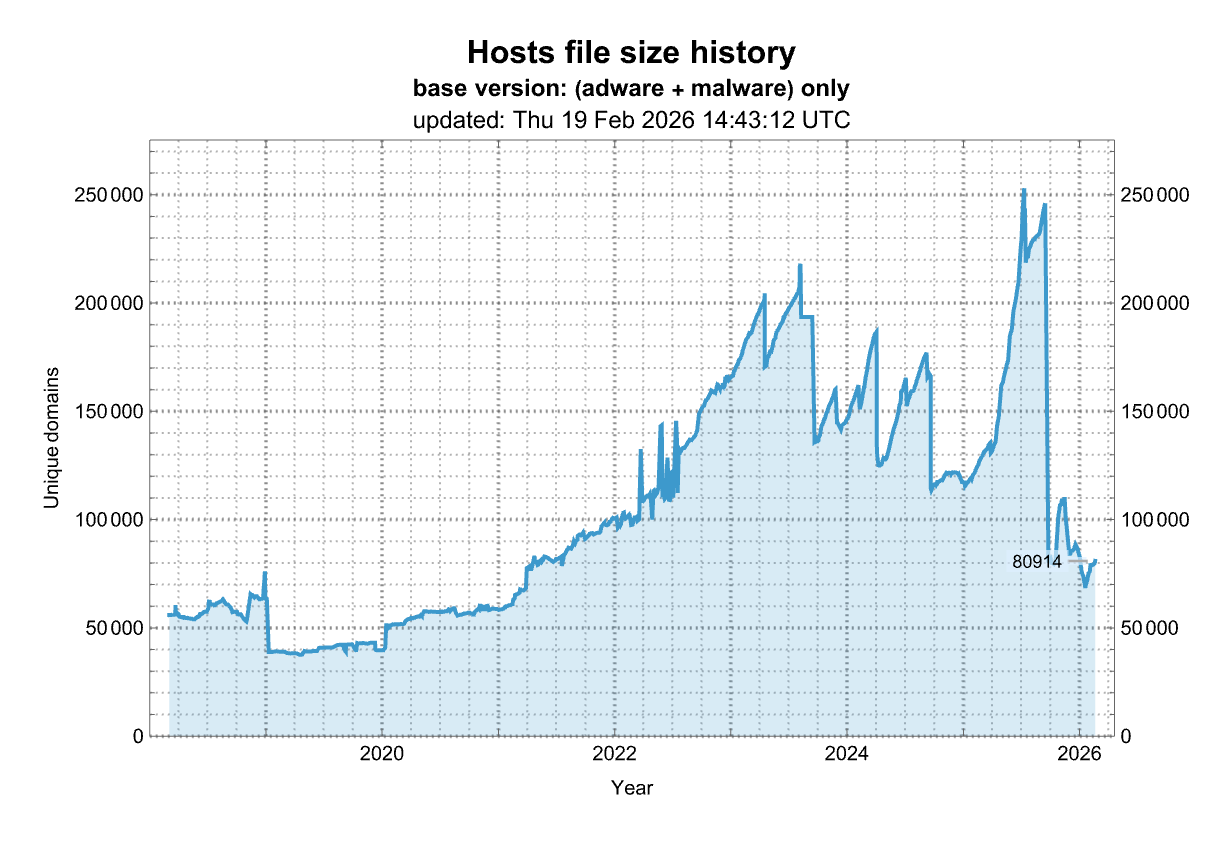
List of all hosts file variants
This repository offers
31 different host file variants,
in addition to the base variant, with and without the unified hosts included.
The Non GitHub mirror is the link to use for some hosts file managers like
Hostsman for Windows that don't work
with GitHub download links.
| Host file recipe |
Readme |
Raw hosts |
Unique domains |
Non GitHub mirror |
| Unified hosts = (adware + malware) |
Readme |
link |
80,169 |
link |
| Unified hosts + fakenews |
Readme |
link |
82,638 |
link |
| fakenews |
Readme |
link |
2,187 |
link |
| Unified hosts + gambling |
Readme |
link |
87,083 |
link |
| gambling |
Readme |
link |
6,644 |
link |
| Unified hosts + porn |
Readme |
link |
156,503 |
link |
| porn |
Readme |
link |
76,771 |
link |
| Unified hosts + social |
Readme |
link |
84,227 |
link |
| social |
Readme |
link |
3,808 |
link |
| Unified hosts + fakenews + gambling |
Readme |
link |
89,270 |
link |
| fakenews + gambling |
Readme |
link |
8,837 |
link |
| Unified hosts + fakenews + porn |
Readme |
link |
158,690 |
link |
| fakenews + porn |
Readme |
link |
78,964 |
link |
| Unified hosts + fakenews + social |
Readme |
link |
86,414 |
link |
| fakenews + social |
Readme |
link |
6,001 |
link |
| Unified hosts + gambling + porn |
Readme |
link |
163,135 |
link |
| gambling + porn |
Readme |
link |
83,415 |
link |
| Unified hosts + gambling + social |
Readme |
link |
90,859 |
link |
| gambling + social |
Readme |
link |
10,452 |
link |
| Unified hosts + porn + social |
Readme |
link |
160,277 |
link |
| porn + social |
Readme |
link |
80,577 |
link |
| Unified hosts + fakenews + gambling + porn |
Readme |
link |
165,322 |
link |
| fakenews + gambling + porn |
Readme |
link |
85,608 |
link |
| Unified hosts + fakenews + gambling + social |
Readme |
link |
93,046 |
link |
| fakenews + gambling + social |
Readme |
link |
12,645 |
link |
| Unified hosts + fakenews + porn + social |
Readme |
link |
162,464 |
link |
| fakenews + porn + social |
Readme |
link |
82,770 |
link |
| Unified hosts + gambling + porn + social |
Readme |
link |
166,909 |
link |
| gambling + porn + social |
Readme |
link |
87,221 |
link |
| Unified hosts + fakenews + gambling + porn + social |
Readme |
link |
169,096 |
link |
| fakenews + gambling + porn + social |
Readme |
link |
89,362 |
link |
Expectation: These unified hosts files should serve all devices, regardless
of OS.
Sources of hosts data unified in this variant
Updated hosts files from the following locations are always unified and
included:
| Host file source |
Home page |
Raw hosts |
License |
Issues |
Description |
| Steven Black's ad-hoc list |
link |
raw |
MIT |
issues |
Additional sketch domains as I come across them. |
| AdAway |
link |
raw |
CC BY 3.0 |
issues |
AdAway is an open source ad blocker for Android using the hosts file. |
| add.2o7Net |
link |
raw |
MIT |
issues |
2o7Net tracking sites based on hostsfile.org content. |
| add.Dead |
link |
raw |
MIT |
issues |
Dead sites based on hostsfile.org content. |
| add.Risk |
link |
raw |
MIT |
issues |
Risk content sites based on hostsfile.org content. |
| add.Spam |
link |
raw |
MIT |
issues |
Spam sites based on hostsfile.org content. |
| Mitchell Krog's - Badd Boyz Hosts |
link |
raw |
MIT |
issues |
Sketchy domains and Bad Referrers from my Nginx and Apache Bad Bot and Spam Referrer Blockers |
| hostsVN |
link |
raw |
MIT |
issues |
Hosts block ads of Vietnamese |
| KADhosts |
link |
raw |
CC BY-SA 4.0 |
issues |
Fraud/adware/scam websites. |
| minecraft-hosts |
link |
raw |
CC0-1.0 |
issues |
Minecraft related tracker hosts |
| MVPS hosts file |
link |
raw |
CC BY-NC-SA 4.0 |
issues |
The purpose of this site is to provide the user with a high quality custom HOSTS file. |
| Dan Pollock – someonewhocares |
link |
raw |
non-commercial with attribution |
issues |
How to make the internet not suck (as much). |
| Tiuxo hostlist - ads |
link |
raw |
CC BY 4.0 |
issues |
Categorized hosts files for DNS based content blocking |
| UncheckyAds |
link |
raw |
MIT |
issues |
Windows installers ads sources sites based on https://unchecky.com/ content. |
| URLHaus |
link |
raw |
CC0 |
issues |
A project from abuse.ch with the goal of sharing malicious URLs. |
| yoyo.org |
link |
raw |
|
issues |
Blocking with ad server and tracking server hostnames. |
Extensions
The unified hosts file is optionally extensible. Extensions are used to include
domains by category. Currently, we offer the following categories: fakenews,
social, gambling, and porn.
Extensions are optional, and can be combined in various ways with the base hosts
file. The combined products are stored in the
alternates
folder.
Data for extensions are stored in the
extensions
folder. You manage extensions by curating this folder tree, where you will find
the data for fakenews, social, gambling, and porn extension data that we
maintain and provide for you.
Generate your own unified hosts file
You have three options to generate your own hosts file. You can use our
container image, build your own image, or do it in your own environment. Option
#1 is easiest if you have Linux with Docker installed.
Option 1: Use our container image (Linux only)
This will replace your /etc/hosts.
We assume you have Docker available on your host. Just run the following
command. Set extensions to your preference.
docker run --pull always --rm -it -v /etc/hosts:/etc/hosts \
ghcr.io/stevenblack/hosts:latest updateHostsFile.py --auto \
--replace --extensions gambling porn
If you want to add custom hosts or a whitelist, create either or both files as
per the instructions and add the
following arguments before ghcr.io/stevenblack/hosts:latest depending on
which you wish to use.
-v "path/to/myhosts:/hosts/myhosts" \
-v "path/to/whitelist:/hosts/whitelist" \
You can rerun this exact command later to update based on the latest available
hosts (for example, add it to a weekly cron job).
Option 2: Generate your own container image
We provide the
Dockerfile used
by the previous step, which you can use to create a container image with
everything you need. The container will contain Python 3 and all its dependency
requirements, and a copy of the latest version of this repository.
Build the Docker container from the root of this repo like this:
docker build --no-cache . -t stevenblack-hosts
Or without cloning (directly from GitHub):
docker build --no-cache https://github.com/StevenBlack/hosts.git -t stevenblack-hosts
Then run your command as such:
docker run --rm -it stevenblack-hosts updateHostsFile.py
This will create the hosts file, and remove it with the container when done,
so not very useful. You can use the example in option #1 to add volumes so
files on your host are replaced.
Option 3: Generate it in your own environment
To generate your own amalgamated hosts files you will need Python 3.6 or later.
First, install the dependencies with:
pip3 install --user -r requirements.txt
Note we recommend the --user flag which installs the required dependencies
at the user level. More information about it can be found on pip
documentation.
Option 4: Generate it in Google Colab
Spin up a free remote Google Colab environment.
Common steps regardless of your development environment
To run unit tests, in the top-level directory, run:
python3 testUpdateHostsFile.py
The updateHostsFile.py script will generate a unified hosts file based on the
sources in the local data/ subfolder. The script will prompt you whether it
should fetch updated versions (from locations defined by the update.json text
file in each source's folder). Otherwise, it will use the hosts file that's
already there.
python3 updateHostsFile.py [--auto] [--replace] [--ip nnn.nnn.nnn.nnn] [--extensions ext1 ext2 ext3]
Command line options
--help, or -h: display help.
--auto, or -a: run the script without prompting. When --auto is invoked,
- Hosts data sources, including extensions, are updated.
- No extensions are included by default. Use the
--extensions or -e flag to
include any you want.
- Your active hosts file is not replaced unless you include the
--replace
flag.
--backup, or -b: Make a backup of existing hosts file(s) as you generate
over them.
--extensions <ext1> <ext2> <ext3>, or -e <ext1> <ext2> <ext3>: the names of
subfolders below the extensions folder containing additional category-specific
hosts files to include in the amalgamation. Example: --extensions porn or
-e social porn.
--flush-dns-cache, or -f: skip the prompt for flushing the DNS cache. Only
active when --replace is also active.
--ip nnn.nnn.nnn.nnn, or -i nnn.nnn.nnn.nnn: the IP address to use as the
target. Default is 0.0.0.0.
--keepdomaincomments, or -k: true (default) or false, keep the comments
that appear on the same line as domains. The default is true.
--noupdate, or -n: skip fetching updates from hosts data sources.
--output <subfolder>, or -o <subfolder>: place the generated source file in
a subfolder. If the subfolder does not exist, it will be created.
--replace, or -r: trigger replacing your active hosts
--skipstatichosts, or -s: false (default) or true, omit the standard
section at the top, containing lines like 127.0.0.1 localhost. This is useful
for configuring proximate DNS services on the local network.
--nogendata, or -g: false (default) or true, skip the generation of the
readmeData.json file used for generating readme.md files. This is useful if you
are generating host files with additional whitelists or blacklists and want to
keep your local checkout of this repo unmodified.
--nounifiedhosts: false (default) or true, do not include the unified hosts
file in the final hosts file. Usually used together with --extensions.
--compress, or -c: false (default) or true, Compress the hosts file
ignoring non-necessary lines (empty lines and comments) and putting multiple
domains in each line. Reducing the number of lines of the hosts file improves
the performances under Windows (with DNS Client service enabled).
--minimise, or -m: false (default) or true, like --compress, but puts
each domain on a separate line. This is necessary because many implementations
of URL blockers that rely on hosts files do not conform to the standard which
allows multiple hosts on a single line.
--blacklist <blacklistfile>, or -x <blacklistfile>: Append the given
blacklist file in hosts format to the generated hosts file.
--whitelist <whitelistfile>, or -w <whitelistfile>: Use the given whitelist
file to remove hosts from the generated hosts file.
How do I control which sources are unified?
Add one or more additional sources, each in a subfolder of the data/ folder,
and specify the url key in its update.json file.
Add one or more optional extensions, which originate from subfolders of the
extensions/ folder. Again the url in update.json controls where this
extension finds its updates.
Create an optional blacklist file. The contents of this file (containing a
listing of additional domains in hosts file format) are appended to the
unified hosts file during the update process. A sample blacklist is included,
and may be modified as you need.
- NOTE: The
blacklist is not tracked by git, so any changes you make won't be
overridden when you git pull this repo from origin in the future.
How do I include my own custom domain mappings?
If you have custom hosts records, place them in file myhosts. The contents of
this file are prepended to the unified hosts file during the update process.
The myhosts file is not tracked by git, so any changes you make won't be
overridden when you git pull this repo from origin in the future.
How do I prevent domains from being included?
The domains you list in the whitelist file are excluded from the final hosts
file.
The whitelist uses partial matching. Therefore if you whitelist
google-analytics.com, that domain and all its subdomains won't be merged into
the final hosts file.
The whitelist is not tracked by git, so any changes you make won't be
overridden when you git pull this repo from origin in the future.
How can I contribute hosts records?
If you discover sketchy domains you feel should be included here, here are some
ways to contribute them.
The best way to get new domains included is to submit an issue to any of the
data providers whose home pages are
listed here.
This is best because once you submit new domains, they will be curated and
updated by the dedicated folks who maintain these sources.
Option 2: Fork this repository, add your domains to Steven Black's personal data file, and submit a pull request
Fork this hosts this repo and add your links to
https://github.com/StevenBlack/hosts/blob/master/data/StevenBlack/hosts.
Then, submit a pull request.
WARNING: this is less desirable than Option 1 because the ongoing curation
falls on us. So this creates more work for us.
Option 3: create your own hosts list as a repo on GitHub
If you're able to curate your own collection of sketchy domains, then curate
your own hosts list. Then signal the existence of your repo as
a new issue and we may include
your new repo into the collection of sources we pull whenever we create new
versions.
What is a hosts file?
A hosts file, named hosts (with no file extension), is a plain-text file used
by all operating systems to map hostnames to IP addresses.
In most operating systems, the hosts file is preferential to DNS. Therefore
if a domain name is resolved by the hosts file, the request never leaves your
computer.
Having a smart hosts file goes a long way towards blocking malware, adware,
and other irritants.
For example, to nullify requests to some doubleclick.net servers, adding these
lines to your hosts file will do it:
# block doubleClick's servers
0.0.0.0 ad.ae.doubleclick.net
0.0.0.0 ad.ar.doubleclick.net
0.0.0.0 ad.at.doubleclick.net
0.0.0.0 ad.au.doubleclick.net
0.0.0.0 ad.be.doubleclick.net
# etc...
We recommend using 0.0.0.0 instead of 127.0.0.1
Traditionally most host files use 127.0.0.1, the loopback address, to
establish an IP connection to the local machine.
We prefer to use 0.0.0.0, which is defined as a non-routable meta-address used
to designate an invalid, unknown, or non-applicable target.
Using 0.0.0.0 is empirically faster, possibly because there's no wait for a
timeout resolution. It also does not interfere with a web server that may be
running on the local PC.
Why not use 0 instead of 0.0.0.0?
We tried that. Using 0 doesn't work universally.
Location of your hosts file
To modify your current hosts file, look for it in the following places and
modify it with a text editor.
- macOS (until 10.14.x macOS Mojave), iOS, Android, Linux:
/etc/hosts
file.
- macOS Catalina:
/private/etc/hosts file.
- Windows:
%SystemRoot%\system32\drivers\etc\hosts file.
Gentoo
Gentoo users may find
sb-hosts
in ::pf4public Gentoo overlay
NixOS
To install hosts file on your machine add the following into your
configuration.nix:
{
  networking.extraHosts = let
    hostsPath = https://raw.githubusercontent.com/StevenBlack/hosts/master/hosts;
    hostsFile = builtins.fetchurl hostsPath;
  in builtins.readFile "${hostsFile}";
}
- NOTE: Change
hostsPath if you need other versions of hosts file.
- NOTE: The call to
fetchurl is impure. Use fetchFromGitHub with the exact
commit if you want to always get the same result.
Nix Flake
NixOS installations which are managed through flakes can directly use the flake.nix in this repository as an input.
It contains a nixosModule that can be used to install the hosts file locally, as well as a package containing config files for the Unbound DNS server to be used as blocklists.
{
  inputs = {
    nixpkgs.url = "github:NixOS/nixpkgs?ref=$YOUR-REF";
    hosts = {
      url = "github:StevenBlack/hosts"; # or a fork/mirror
      inputs.nixpkgs.follows = "nixpkgs";
    };
  };

  outputs = { self, nixpkgs, hosts }: {
    nixosConfigurations.my-hostname = {
      system = "<architecture>";
      modules = [
        # nixosModule to install hosts file locally:
        hosts.nixosModule
        {
          networking.stevenBlackHosts = {
            enable = true;
            # optionally:
            # enableIPv6 = true;
            # blockFakenews = true;
            # blockGambling = true;
            # blockPorn = true;
            # blockSocial = true;
          };
        }

        # configure unbound to use config as blocklist:
        {
          {
            services.unbound = {
              enable = true;
              settings.server.include = [
                "${hosts.packages.${system}.unbound}/hosts"
                # alternates are also available, e.g. /fakenews, /fakenews-gambling etc.
              ];
            };
          }
        }
      ];
    };
  };
}
Updating hosts file on Windows
(NOTE: See also some third-party Hosts managers, listed below.)
For older versions of Windows
On Linux and macOS, run the Python script. On Windows more work is required due
to compatibility issues so it's preferable to run the batch file as follows:
updateHostsWindows.bat
This file MUST be run in command prompt with administrator privileges in the
repository directory. In addition to updating the hosts file, it can also
replace the existing hosts file, and reload the DNS cache. It goes without
saying that for this to work, you must be connected to the internet.
To open a command prompt as administrator in the repository's directory, do the
following:
- Windows XP: Start → Run →
cmd
- Windows Vista, 7: Start Button → type
cmd → right-click Command Prompt →
"Run as Administrator"
- Windows 8: Start → Swipe Up → All Apps → Windows System → right-click
Command Prompt → "Run as Administrator"
- Windows 10: Start Button → type
cmd → right-click Command Prompt → "Run
as Administrator"
For new versions of Windows
On modern versions of Windows (10 and especially 11) not all features of the
aforementioned batch script work (specifically checking if the current shell has
administrative priviliges) and therefore a more modern approach is recommended.
The provided updateHostsWindows.ps1 is a Powershell 5.1 script that does the
same thing as the batch script, but without the need for the python script, with
added options, and uses only built-in commands (self-contained). As with the
batch file it MUST be ran with administrative privildges, but it can
relaunch itself if not.
To run execute the script type:
.\updateHostsWindows.ps1
into any available Windows command line and for detailed information type:
Get-Help .\updateHostsWindows.ps1 -Full
Newer Windows comes with several issues (that can be overcome) and for more
information and solutions please visit the home of this script here.
You can also refer to the "Third-Party Hosts Managers" section for further
recommended solutions from third parties.
Warning: Using this hosts file in Windows may require disabling DNS Cache service
Windows has issues with larger hosts files. Recent changes in security within
Windows 10 denies access to changing services via other tools except registry
hacks. Use the disable-dnscache-service-win.cmd file to make proper changes to
the Windows registry. You will need to reboot your device once that's done. See
the
the comments within the cmd file
for more details.
Disabling the DNS Cache Service can cause issues with services and applications like WSL and it's possible to compress the hosts file and negate the need to disable the DNS caching service. You can try the C++ Windows command line tool at Hosts Compress - Windows (the recommended method) or the PowerShell compression script and check out the guide located at the Hosts Compression Scripts repository.
Reloading hosts file
Your operating system will cache DNS lookups. You can either reboot or run the
following commands to manually flush your DNS cache once the new hosts file is
in place.
The Google Chrome browser may require manually cleaning up its DNS Cache on
chrome://net-internals/#dns page to thereafter see the changes in your hosts
file. See: https://superuser.com/questions/723703
Windows
Open a command prompt with administrator privileges and run this command:
ipconfig /flushdns
Linux
Open a Terminal and run with root privileges:
Debian/Ubuntu sudo service network-manager restart
Linux Mint sudo /etc/init.d/dns-clean start
Linux with systemd: sudo systemctl restart network.service
Fedora Linux: sudo systemctl restart NetworkManager.service
Arch Linux/Manjaro with Network Manager:
sudo systemctl restart NetworkManager.service
Arch Linux/Manjaro with Wicd: sudo systemctl restart wicd.service
RHEL/Centos: sudo /etc/init.d/network restart
FreeBSD: sudo service nscd restart
To enable the nscd daemon initially, it is recommended that you run the
following commands:
sudo sysrc nscd_enable="YES"
sudo service nscd start
Then modify the hosts line in your /etc/nsswitch.conf file to the
following:
hosts: cache files dns
NixOS: The nscd.service is automatically restarted when the option
networking.extraHosts was changed.
Others: Consult
this Wikipedia article.
macOS
As described in this article,
open a Terminal and run:
sudo dscacheutil -flushcache;sudo killall -HUP mDNSResponder
Release management
This repository uses release-it, an
excellent CLI release tool for GitHub repos and npm packages, to automate
creating releases. This is why
the
package.json
and
.release-it.json
files are bundled.
Goals of this unified hosts file
The goals of this repo are to:
- automatically combine high-quality lists of hosts,
- provide situation-appropriate extensions,
- de-dupe the resultant combined list,
- and keep the resultant file reasonably sized.
A high-quality source is defined here as one that is actively curated. A hosts
source should be frequently updated by its maintainers with both additions and
removals. The larger the hosts file, the higher the level of curation is
expected.
It is expected that this unified hosts file will serve both desktop and mobile
devices under a variety of operating systems.
Third-Party Hosts Managers
- Unified Hosts AutoUpdate
(for Windows): The Unified Hosts AutoUpdate package is purpose-built for this
unified hosts project as well as in active development by community members.
You can install and uninstall any blacklist and keep it automatically up to
date, and can be placed in a shared network location and deployed across an
organization via group policies. And since it is in active development by
community members, your bug reports, feature requests, and other feedback are
most welcome.
- ViHoMa is a Visual Hosts file Manager,
written in Java, by Christian Martínez. Check it out!
- SaneHosts (for macOS): A native hosts file manager with profile-based blocking, Touch ID protection, and support for 200+ curated blocklists. Open source.
Interesting Applications
- Hosts-BL is a simple
tool to handle hosts file black lists. It can remove comments, remove
duplicates, compress to 9 domains per line, add IPv6 entries. In addition, it
can also convert black lists to multiple other black list formats compatible
with other software, such as dnsmasq, DualServer, RPZ, Privoxy, and Unbound,
to name a few.
- Host Minder is a simple
GUI that allows you to easily update your /etc/hosts file to one of four
consolidated hosts files from StevenBlack/hosts. It is provided as a deb
package and comes pre-installed on UbuntuCE.
- Maza ad blocking is a bash
script that automatically updates host file. You can also update a fresh copy.
And each time it generates a dnsmasq-compatible configuration file. Fast
installation, compatible with MacOS, Linux and BSD.
- Hostile is a nifty command line utility
to easily add or remove domains from your hosts file. If our hosts files are
too aggressive for you, you can use
hostile to remove domains, or you can
use hostile in a bash script to automate a post process each time you
download fresh versions of hosts.
- macOS Scripting for Configuration, Backup and Restore
helps customizing, re-installing and using macOS. It also provides a
script
to install and update the hosts file using this project on macOS. In
combination with a
launchd
it updates the hosts file every x days (default is 4). To install both,
download the GitHub repo and run the
install script
from the directory one level up.
- Pi-hole is a network-wide DHCP server and ad blocker
that runs on Raspberry Pi.
Pi-hole uses this repository as one of its sources.
- Block ads and malware via local BIND9 DNS server
(for Debian, Raspbian & Ubuntu): Set up a local DNS server with a
/etc/bind/named.conf.blocked file, sourced from here.
- Block ads, malware, and deploy parental controls via local DualServer DNS/DHCP server
(for BSD, Windows & Linux): Set up a blacklist for everyone on your network
using the power of the unified hosts reformatted for DualServer. And if you're
on Windows, this project also maintains an update script to make updating
DualServer's blacklist even easier.
- Blocking ads and malwares with unbound
–
Unbound
is a validating, recursive, and caching DNS resolver.
- dnsmasq conversion script
This GitHub gist has a short shell script (bash, will work on any 'nix) and
uses
wget & awk present in most distros, to fetch a specified hosts file
and convert it to the format required by dnsmasq. Supports IPv4 and IPv6.
Designed to be used as either a shell script, or can be dropped into
/etc/cron.weekly (or wherever suits). The script is short and easily edited,
also has a short document attached with notes on dnsmasq setup.
- BlackHosts - Command Line Installer/Updater
This is a cross-platform command line utility to help install/update hosts
files found at this repository.
- Hosts Compression Scripts These are various scripts to help compress hosts files (by the author of BlackHosts).
- Hosts Compress - Windows This is a C++ Windows command line tool to help compress hosts files (by the author of BlackHosts and Hosts Compression Scripts). This is highly recommended over the scripts as it is exponentially faster.
- dnscrypt-proxy
provides a tool to build block lists from local and remote lists in common
formats.
- Control D
offers a public anycast network hosted mirror of the Unified (Adware + Malware) blocklist:
- Legacy DNS:
76.76.2.35, 76.76.10.35, 2606:1a40::35, 2606:1a40:1::35
- DNS-over-HTTPS/TLS/DOQ:
https://freedns.controld.com/x-stevenblack, x-stevenblack.freedns.controld.com
Contribute
Please read our
Contributing Guide.
Among other things, this explains how we organize files and folders in this
repository.
We are always interested in discovering well-curated sources of hosts. If you
find one, please open an issue to
draw our attention.
Before you create or respond to any issue, please read our
code of conduct.
Logo by @Tobaloidee Thank you!.

 一个由社区维护的聚合项目,把许多口碑良好的 hosts 文件合并成一份统一的屏蔽清单,并去掉重复条目——基础版本合并了广告软件和恶意软件两类名单,共含 80,169 条条目。