


autoprompt-skill README

The project's README from github.com/Spielewoy/autoprompt-skill. As one markdown file: README.md.

Autoprompt Skill: pink clouds and flying geese

Autoprompt is a coding-agent workflow that cuts failures by 45% by reviewing, fixing, and rechecking its work.

Terminal-Bench 2.1: plus 14.61 points Latest release Eleven supported providers License MIT

English | 中文 | 한국어 | Español | العربية

Contents

Install · Benchmarks · Invocation · Run controls · Workflow · Agents · Examples · FAQ · License

Install

Use the CLI below, or download an installer from GitHub Releases.

1. Install the CLI

npm install -g https://github.com/Spielewoy/autoprompt-skill/releases/download/v2.0.0/autoprompt-skill-2.0.0.tgz

2. Launch the installer

autoprompt

3. Install

Choose your coding agent, confirm its path, and install. N means enter another path.

For another CLI or IDE, choose Custom coding agent and use the compatibility guide.

Install from source
git clone https://github.com/Spielewoy/autoprompt-skill
cd autoprompt-skill
npm install -g .
autoprompt

Requirements

Support

Status Coding agent Tested version Key
Working Claude Code 2.1.263 claude
Working Codex 0.148.0 codex
Working OpenCode 1.18.29 opencode
Working Kilo Code 7.5.15 kilo
Working VS Code 1.136.1 vscode
Working Prime Agent 0.7.2 prime
Working Oh My Pi 18.1.14 omp
Working DeepSeek Harness 0.1.2-rc.1 deepseek
Working Reasonix 1.30.0 reasonix
Working Hermes Agent 0.21.1 hermes
Working Grok Build 1.0.13 grok

These versions passed Linux runs. Model and platform availability varies by provider.

See support and audit notes.

Check, update, or remove an installation

Replace PROVIDER with a key from the support table, such as claude, codex, or prime.

Benchmarks

These are version 1 benchmarks. Version 2 benchmarks will follow.

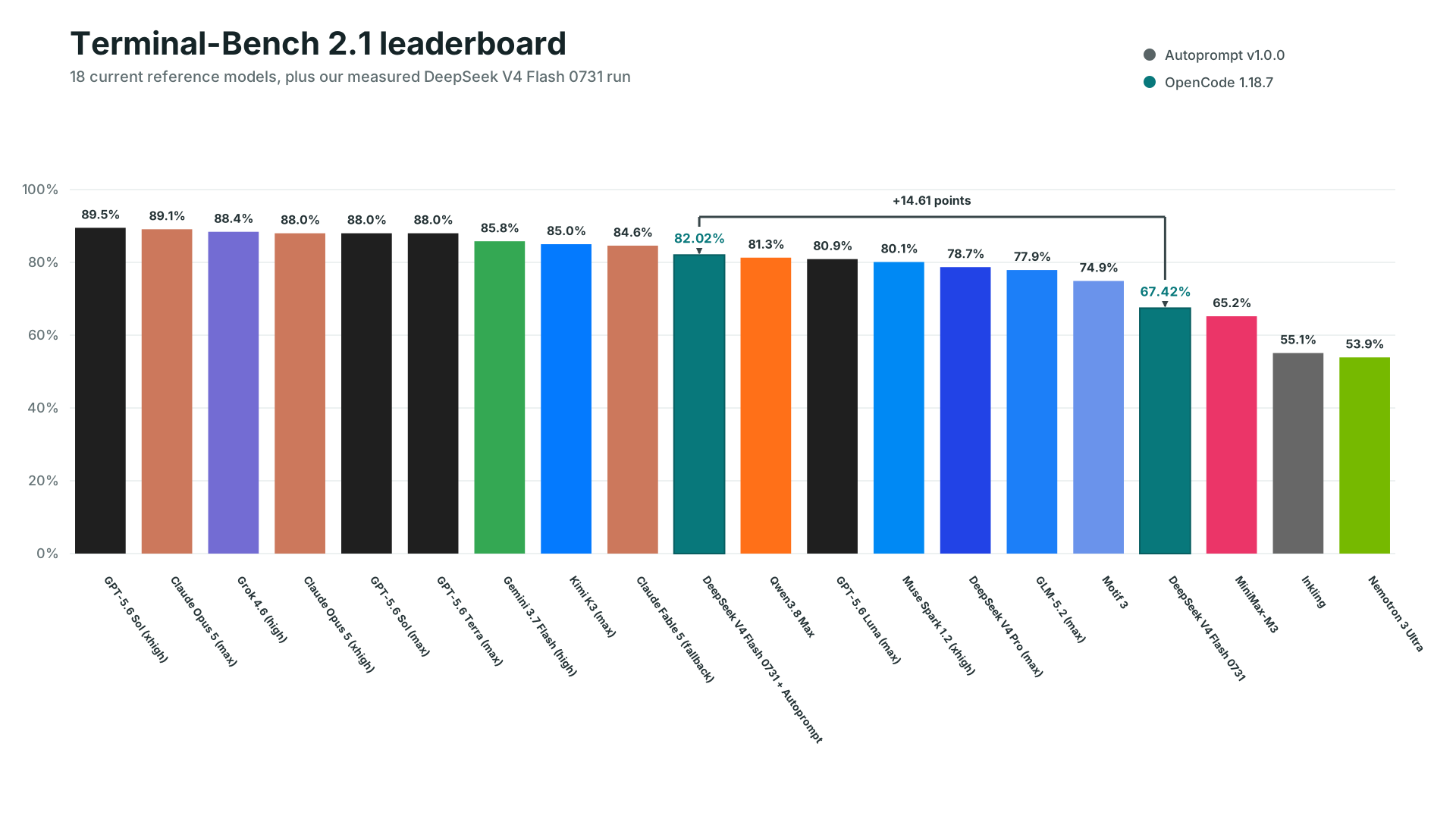
Terminal-Bench 2.1 leaderboard with 18 Artificial Analysis reference scores and measured DeepSeek V4 Flash 0731 scores with and without Autoprompt.

Measured OpenCode comparison

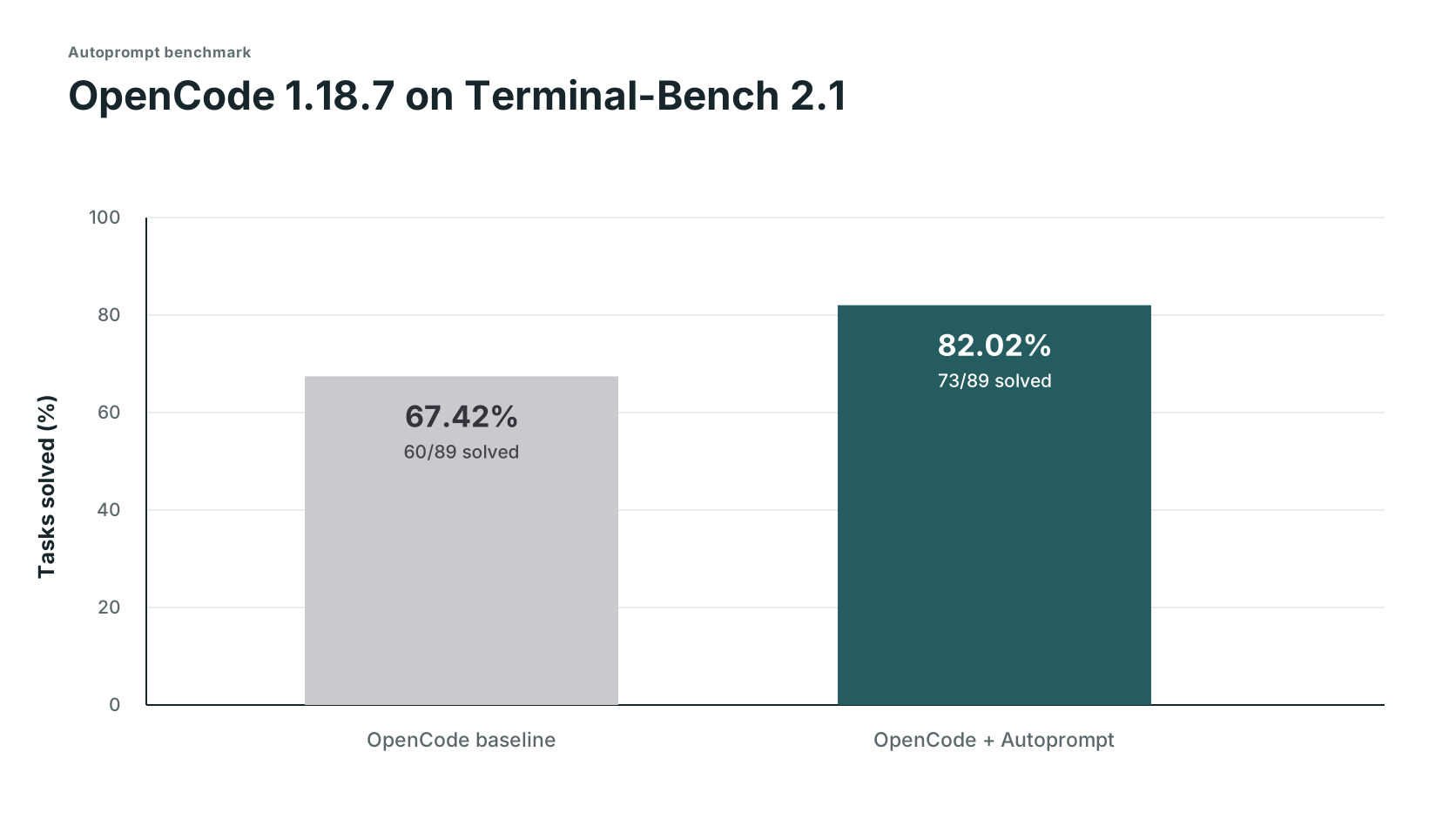
OpenCode 1.18.7 on Terminal-Bench 2.1: OpenCode solved 60 of 89 tasks and OpenCode with Autoprompt solved 73 of 89 tasks.

Track Solved Score Failed
OpenCode 60/89 67.42% 29
OpenCode + Autoprompt 73/89 82.02% 16
Change +13 solves +14.61 points 45% fewer

DeepSeek's 82.7% used its own test setup, so it is a reference point, not a comparable third run. Read the setup and evidence boundaries, or request another benchmark.

Expected trade-off: about 3x the time and 2x the tokens.

Timing and token logs were not retained, so these are planning estimates based on user experience reports, not measured benchmark results. The measured result was 29 to 16 failures (45% fewer) in this run, which translates to about 2x fewer mistakes. Note: for very small tasks, this may differ significantly.

Anatomy of an invocation

autoprompt activate PROVIDER --target /absolute/project -- "<goal>"
Part What it does
PROVIDER A key from the support table, such as claude, codex, or grok.
--target The project to work on. Omit it to use the current directory.
-- Separates launcher options from the request.
<goal> The result you want, constraints, and how to check success.
path= Optional auto, direct, light, or roadmap, before the quoted goal. See work paths.
autoprompt activate codex -- path=light "add retries and test the edge cases"

Run controls

The same controls apply to all eleven providers. Custom model setup

Control What it does
--concurrency tokensaver Runs at most six subagents at once.
--concurrency wide Starts ready, independent work up to the host limit.
--concurrency custom --max-subs N Sets your own concurrency limit.
configure PROVIDER --agents off Uses the provider's configured model.
configure PROVIDER --agents MODEL Selects one model. Add --effort LEVEL where supported.
configure PROVIDER --agents auto --model-map FILE Chooses from a measured model registry. A comma-separated model list also requires --model-map.

Pass concurrency controls after --, before the quoted goal:

autoprompt activate codex -- --concurrency custom --max-subs 4 "add retries and tests"
autoprompt configure claude --agents provider/model --effort low

How it works

Autoprompt workflow: choose a route, plan, build, check, and finish

The agents

Autoprompt agents: run coordinator, workers, independent checkers, and coordinators for larger jobs

Examples

Goal Prompt
Fix autoprompt activate claude -- "fix the registration race and add a regression test"
Build autoprompt activate codex -- --concurrency wide "build the booking flow from API to checkout"
Research autoprompt activate hermes -- "compare job queues against this codebase and recommend one"
Limit parallel work autoprompt activate grok -- --concurrency custom --max-subs 4 "migrate every model"

Run these commands from your project, or supply --target /absolute/project before --.

FAQ

Does Autoprompt mean I literally do not have to prompt?

No. Give it a clear goal, constraints, and success criteria. Autoprompt handles the execution loop, so you do not have to prompt every step. Details

How autonomous is Autoprompt?

It can scope, implement, test, review, repair, and verify a goal. It stops for choices that change the result, actions that need your authority, or blockers it cannot safely resolve. Details

What are the layers for?

The layers separate coordination, management, execution, and independent judgment. That separation keeps one agent from planning, approving, and verifying its own work. Details

What are the paths?

path=auto selects a route for the task. direct starts focused work, light adds a short plan, and roadmap organizes dependent work before execution. Every path includes independent verification. Details

What do concurrency, models, and paths control?

--concurrency and --max-subs set parallel work limits. configure --agents selects models, and path= selects how work is planned and coordinated. Details

Why does Autoprompt not start in the background?

Because it changes cost, time, and workflow. Start it explicitly with autoprompt activate PROVIDER -- "<goal>".

License

MIT. Copyright 2026 Spielewoy.

Community: Contributors, Contributing, Code of Conduct, Security, and Support.

Contributors

johnatag · rollingdice · AincradBot · lunar-me · fatinghenji · c8dhjp4tyv-bit · Alexis-Fiolleau-LaPoste-BGPN

autoprompt-skill (Spielewoy/autoprompt-skill)

Searching Database…

这是什么?Autoprompt 是一个编码智能体工作流/技能,它包裹你现有的 AI 编码智能体(Claude Code、Codex 等),加入审查-修复-复检循环,在它自己的基准测试中把任务失败率降低约 45%。
它是另一个独立的 AI 智能体,还是驱动我已有的编码智能体?它是一个接入你已有编码智能体(Claude Code、Codex、OpenCode、VS Code 等)的 CLI:你选择已安装的智能体,它确认路径,然后把自己安装在其之上。
怎么安装并开始使用?安装 Autoprompt CLI,运行其安装程序选择并确认你的编码智能体,然后用 “autoprompt activate PROVIDER -- "你的目标"” 调用它;也可以不走 CLI 路线,改用 GitHub Releases 上的安装包。
运行之前需要装好什么?需要 Node.js 20 或更新版本、Python 3.11+(以 python3 或 python 命令可用)并装有 PyYAML,以及 macOS 或 Linux 上的 Bash 4.3+;只有通过 GitHub 检出方式安装时才需要 Git。
失败率减少 45% 的说法有什么附加条件?实测的 45% 来自一次内部 OpenCode 基准测试(解决 73/89 对 60/89),并非普遍保证,而且代价大约是单独运行智能体的 3 倍时间和 2 倍 token;除此之外的时间/token 数据都只是规划估算,并没有保留日志。
它实际能配合哪些编码智能体?列出了 11 个在 Linux 上测试过的服务商:Claude Code、Codex、OpenCode、Kilo Code、VS Code、Prime Agent、Oh My Pi、DeepSeek Harness、Reasonix、Hermes Agent 和 Grok Build;其他 CLI/IDE 需要走“自定义编码智能体”兼容路径。
工作路径(auto、direct、light、roadmap)实际控制什么?它们决定任务如何规划:direct 直接投入专注工作,light 增加一个简短计划,roadmap 在执行前组织好有依赖关系的工作,auto 则自动选择其中一种;每条路径最后都会进行独立验证。
怎么控制同时运行的子智能体数量?用 --concurrency tokensaver 把上限设为六个子智能体,用 --concurrency wide 把所有就绪的任务都跑到主机上限,或用 --concurrency custom --max-subs N 自行设定数量。
Autoprompt 为什么不干脆在后台自动运行?因为它会改变成本、耗时和工作流程,所以你必须用 “autoprompt activate PROVIDER -- "目标"” 明确启动它,而不是让它自行启动。
这些相互独立的智能体分层是干什么用的?它们把协调、管理、执行和独立判断分配给不同的智能体,让干活的智能体和批准、验证工作的智能体不是同一个。
Creator
Spielewoy
Size
172.5 MB
Stars
1.2K
Age
2mo
Commits · 90 Days