






1.2K ·GitHub
Что это?
 Autoprompt — это workflow/навык для агентов-кодировщиков, который оборачивает вашего существующего ИИ-агента (Claude Code, Codex и т. д.) и добавляет цикл «проверка—исправление—перепроверка», снижая число проваленных задач примерно на 45% по его собственному бенчмарку.
Autoprompt — это workflow/навык для агентов-кодировщиков, который оборачивает вашего существующего ИИ-агента (Claude Code, Codex и т. д.) и добавляет цикл «проверка—исправление—перепроверка», снижая число проваленных задач примерно на 45% по его собственному бенчмарку.Это отдельный ИИ-агент или он управляет моим существующим агентом?Это CLI, встраивающийся в агента-кодировщика, который у вас уже есть (Claude Code, Codex, OpenCode, VS Code и т. д.): вы выбираете установленного агента, он подтверждает путь и устанавливается поверх него.
Это CLI, встраивающийся в агента-кодировщика, который у вас уже есть (Claude Code, Codex, OpenCode, VS Code и т. д.): вы выбираете установленного агента, он подтверждает путь и устанавливается поверх него.Как установить и начать пользоваться?Установите Autoprompt CLI, запустите его установщик, чтобы выбрать и подтвердить агента-кодировщика, затем вызывайте его командой 'autoprompt activate PROVIDER -- "ваша цель"'; вместо пути через CLI доступен также установщик с GitHub Releases.
Установите Autoprompt CLI, запустите его установщик, чтобы выбрать и подтвердить агента-кодировщика, затем вызывайте его командой 'autoprompt activate PROVIDER -- "ваша цель"'; вместо пути через CLI доступен также установщик с GitHub Releases.Что должно быть установлено перед запуском?Node.js 20 или новее, Python 3.11+ (под именем python3 или python) с PyYAML и Bash 4.3+ на macOS или Linux; Git нужен только при установке методом клонирования с GitHub.
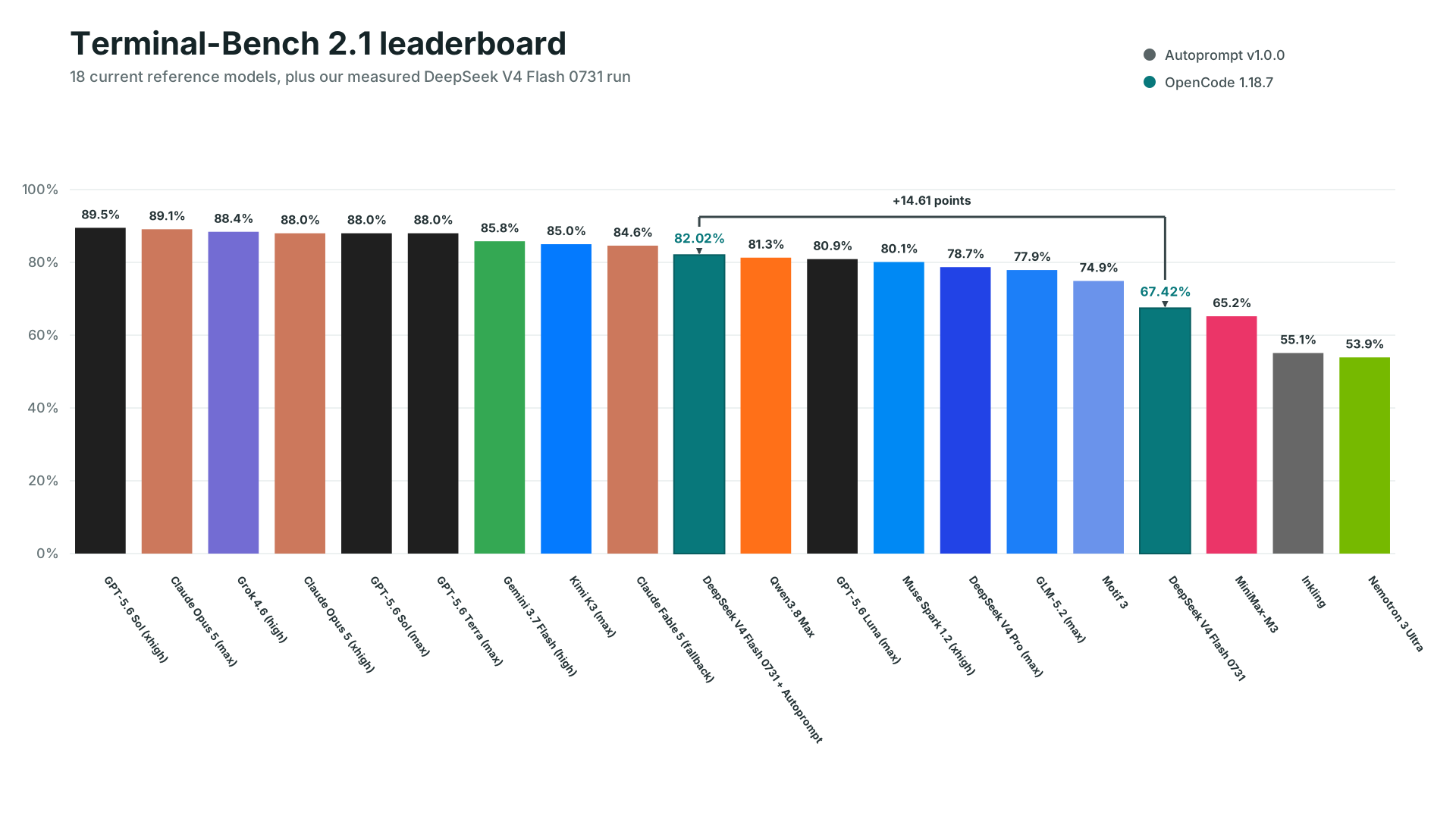
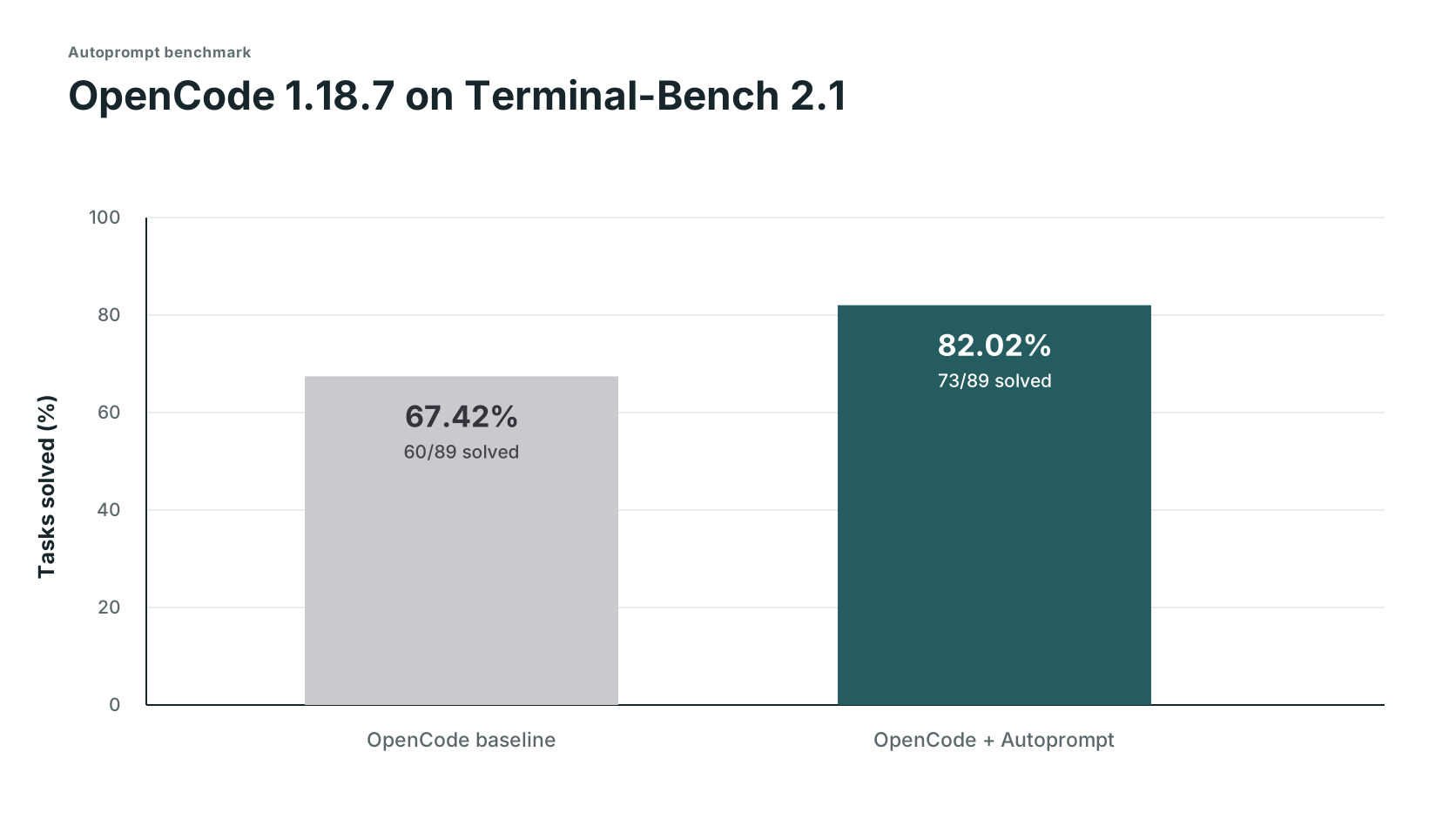
Node.js 20 или новее, Python 3.11+ (под именем python3 или python) с PyYAML и Bash 4.3+ на macOS или Linux; Git нужен только при установке методом клонирования с GitHub.В чём подвох заявления о снижении числа провалов на 45%?Измеренные 45% получены из одного внутреннего прогона бенчмарка OpenCode (73/89 против 60/89 решённых задач), это не универсальная гарантия, а стоит это примерно в 3 раза больше времени и в 2 раза больше токенов, чем запуск агента в одиночку; остальные цифры времени/токенов — оценочные, а не сохранённые логи.
Измеренные 45% получены из одного внутреннего прогона бенчмарка OpenCode (73/89 против 60/89 решённых задач), это не универсальная гарантия, а стоит это примерно в 3 раза больше времени и в 2 раза больше токенов, чем запуск агента в одиночку; остальные цифры времени/токенов — оценочные, а не сохранённые логи.С какими агентами-кодировщиками он реально работает?Одиннадцать провайдеров указаны как протестированные на Linux: Claude Code, Codex, OpenCode, Kilo Code, VS Code, Prime Agent, Oh My Pi, DeepSeek Harness, Reasonix, Hermes Agent и Grok Build; другим CLI/IDE нужен путь совместимости «Custom coding agent».
Одиннадцать провайдеров указаны как протестированные на Linux: Claude Code, Codex, OpenCode, Kilo Code, VS Code, Prime Agent, Oh My Pi, DeepSeek Harness, Reasonix, Hermes Agent и Grok Build; другим CLI/IDE нужен путь совместимости «Custom coding agent».Что на самом деле контролируют рабочие пути (auto, direct, light, roadmap)?Они задают, как планируется задача: direct сразу ныряет в сфокусированную работу, light добавляет короткий план, roadmap выстраивает зависимую работу до выполнения, а auto выбирает один из них автоматически; каждый путь в конце всё равно проходит независимую проверку.
Они задают, как планируется задача: direct сразу ныряет в сфокусированную работу, light добавляет короткий план, roadmap выстраивает зависимую работу до выполнения, а auto выбирает один из них автоматически; каждый путь в конце всё равно проходит независимую проверку.Как управлять количеством одновременно работающих субагентов?Используйте --concurrency tokensaver, чтобы ограничить шестью субагентами, --concurrency wide, чтобы запускать всё готовое вплоть до лимита хоста, или --concurrency custom --max-subs N, чтобы задать своё число.
Используйте --concurrency tokensaver, чтобы ограничить шестью субагентами, --concurrency wide, чтобы запускать всё готовое вплоть до лимита хоста, или --concurrency custom --max-subs N, чтобы задать своё число.Почему Autoprompt не запускается сам автоматически в фоне?Потому что это меняет стоимость, время и ваш рабочий процесс, поэтому вы всегда запускаете его явно командой 'autoprompt activate PROVIDER -- "цель"', а не он стартует сам.
Потому что это меняет стоимость, время и ваш рабочий процесс, поэтому вы всегда запускаете его явно командой 'autoprompt activate PROVIDER -- "цель"', а не он стартует сам.Зачем нужны отдельные слои агентов?Они распределяют координацию, управление, выполнение и независимое суждение между разными агентами, чтобы агент, выполняющий работу, не был тем же, кто её одобряет и проверяет.
Они распределяют координацию, управление, выполнение и независимое суждение между разными агентами, чтобы агент, выполняющий работу, не был тем же, кто её одобряет и проверяет.What are similar projects?superpowers-zh, pstack-claude, claude_codex_bridge, agentcraft, cc-wf-studio, openrig, compound-engineering-plugin, foreman
superpowers-zh, pstack-claude, claude_codex_bridge, agentcraft, cc-wf-studio, openrig, compound-engineering-plugin, foremanWhich topics is it in?automated-testing, test-driven-development, agentic-workflows, subagents, multi-agent-systems, github-copilot, code-review, ai-coding, autonomous-agents, opencode, workflow-automation, orchestration
automated-testing, test-driven-development, agentic-workflows, subagents, multi-agent-systems, github-copilot, code-review, ai-coding, autonomous-agents, opencode, workflow-automation, orchestration