





1.2K ·GitHub
What is this?
 Autoprompt is a coding-agent workflow/skill that wraps your existing AI coding agent (Claude Code, Codex, etc.) and adds a review-fix-recheck loop, cutting task failures by about 45% in its own benchmark.
Autoprompt is a coding-agent workflow/skill that wraps your existing AI coding agent (Claude Code, Codex, etc.) and adds a review-fix-recheck loop, cutting task failures by about 45% in its own benchmark.Is this a separate AI agent, or does it drive my existing coding agent?It is a CLI that plugs into a coding agent you already have (Claude Code, Codex, OpenCode, VS Code, etc.): you pick your installed agent, it confirms the path, and installs itself on top of it.
It is a CLI that plugs into a coding agent you already have (Claude Code, Codex, OpenCode, VS Code, etc.): you pick your installed agent, it confirms the path, and installs itself on top of it.How do I install and start using it?Install the Autoprompt CLI, run its installer to pick and confirm your coding agent, then invoke it with 'autoprompt activate PROVIDER -- "your goal"'; a GitHub Releases installer is also available instead of the CLI route.
Install the Autoprompt CLI, run its installer to pick and confirm your coding agent, then invoke it with 'autoprompt activate PROVIDER -- "your goal"'; a GitHub Releases installer is also available instead of the CLI route.What do I need installed before running it?Node.js 20 or newer, Python 3.11+ (as python3 or python) with PyYAML, and Bash 4.3+ on macOS or Linux; Git is only needed if you install via the GitHub checkout method.
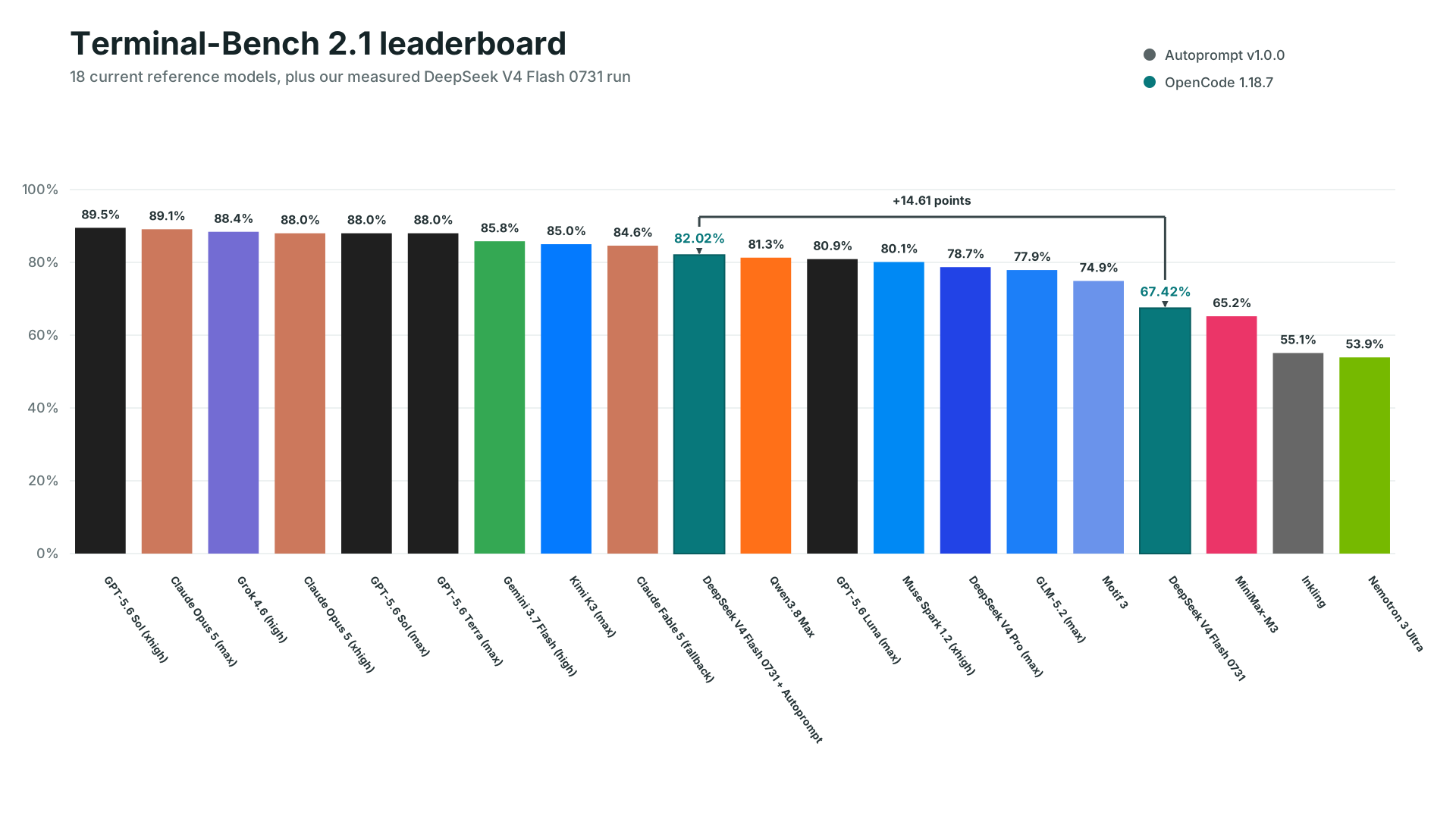
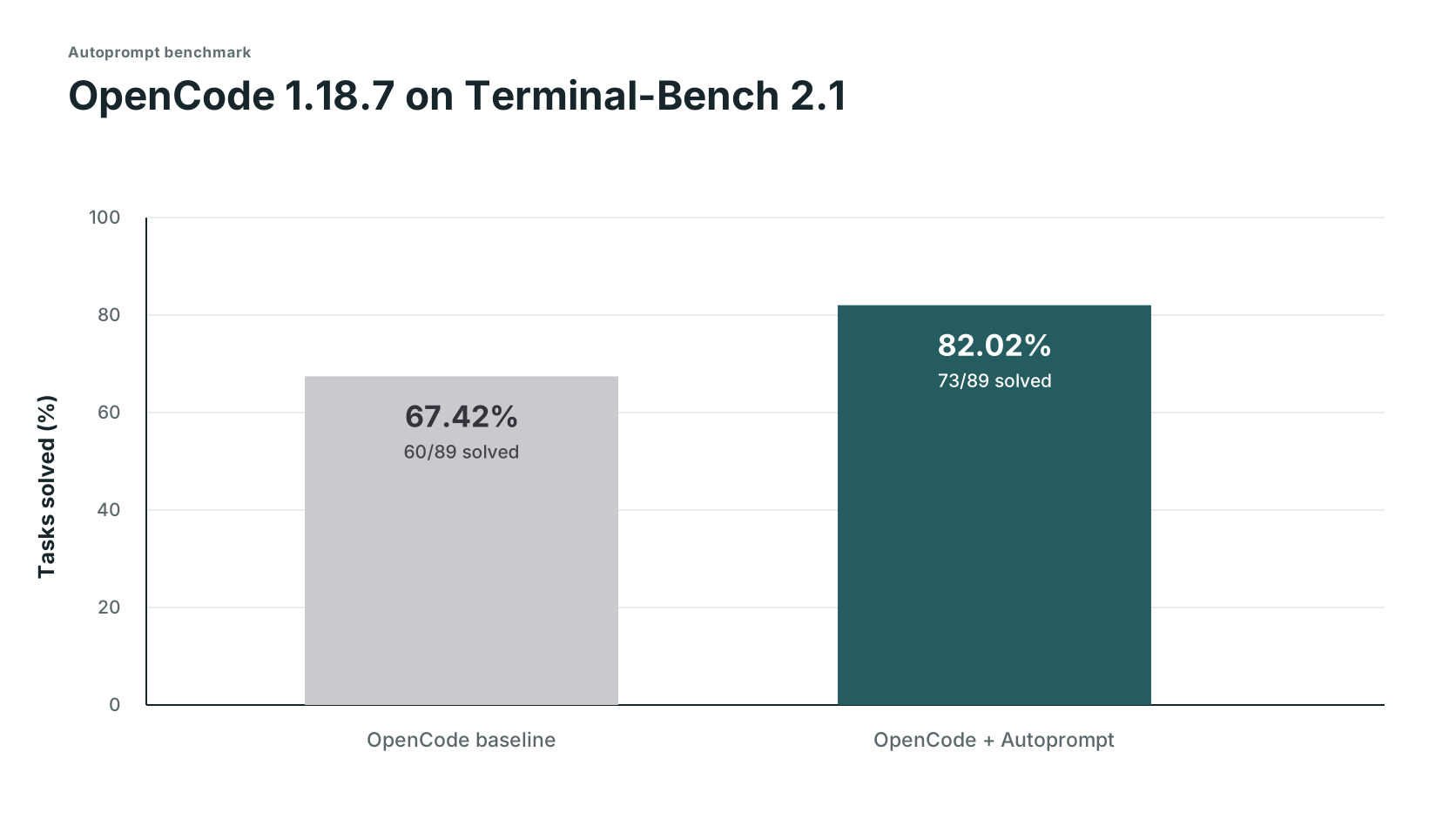
Node.js 20 or newer, Python 3.11+ (as python3 or python) with PyYAML, and Bash 4.3+ on macOS or Linux; Git is only needed if you install via the GitHub checkout method.What's the catch behind the 45% fewer failures claim?The measured 45% comes from one internal OpenCode benchmark run (73/89 vs 60/89 solved), not a universal guarantee, and it costs roughly 3x the time and 2x the tokens of running the agent alone; timing/token figures beyond that are planning estimates, not retained logs.
The measured 45% comes from one internal OpenCode benchmark run (73/89 vs 60/89 solved), not a universal guarantee, and it costs roughly 3x the time and 2x the tokens of running the agent alone; timing/token figures beyond that are planning estimates, not retained logs.Which coding agents does it actually work with?Eleven providers are listed as tested on Linux: Claude Code, Codex, OpenCode, Kilo Code, VS Code, Prime Agent, Oh My Pi, DeepSeek Harness, Reasonix, Hermes Agent, and Grok Build; other CLIs/IDEs need the 'Custom coding agent' compatibility path.
Eleven providers are listed as tested on Linux: Claude Code, Codex, OpenCode, Kilo Code, VS Code, Prime Agent, Oh My Pi, DeepSeek Harness, Reasonix, Hermes Agent, and Grok Build; other CLIs/IDEs need the 'Custom coding agent' compatibility path.What do the work paths (auto, direct, light, roadmap) actually control?They set how a task is planned: direct dives straight into focused work, light adds a short plan, roadmap organizes dependent work before execution, and auto picks one of these automatically; every path still ends with independent verification.
They set how a task is planned: direct dives straight into focused work, light adds a short plan, roadmap organizes dependent work before execution, and auto picks one of these automatically; every path still ends with independent verification.How do I control how many subagents run at once?Use --concurrency tokensaver to cap it at six subagents, --concurrency wide to run everything that's ready up to the host limit, or --concurrency custom --max-subs N to set your own number.
Use --concurrency tokensaver to cap it at six subagents, --concurrency wide to run everything that's ready up to the host limit, or --concurrency custom --max-subs N to set your own number.Why doesn't Autoprompt just run automatically in the background?Because it changes cost, time, and your workflow, so you always start it explicitly with 'autoprompt activate PROVIDER -- "goal"' rather than it kicking off on its own.
Because it changes cost, time, and your workflow, so you always start it explicitly with 'autoprompt activate PROVIDER -- "goal"' rather than it kicking off on its own.What are the separate agent layers for?They split coordination, management, execution, and independent judgment across different agents so that the agent doing the work isn't the same one approving and verifying it.
They split coordination, management, execution, and independent judgment across different agents so that the agent doing the work isn't the same one approving and verifying it.What are similar projects?superpowers-zh, pstack-claude, claude_codex_bridge, agentcraft, cc-wf-studio, openrig, compound-engineering-plugin, foreman
superpowers-zh, pstack-claude, claude_codex_bridge, agentcraft, cc-wf-studio, openrig, compound-engineering-plugin, foremanWhich topics is it in?automated-testing, test-driven-development, agentic-workflows, subagents, multi-agent-systems, github-copilot, code-review, ai-coding, autonomous-agents, opencode, workflow-automation, orchestration
automated-testing, test-driven-development, agentic-workflows, subagents, multi-agent-systems, github-copilot, code-review, ai-coding, autonomous-agents, opencode, workflow-automation, orchestration