



FigGenie-paper-diagram-skill README

The project's README from github.com/Sleepy-Avacado/FigGenie-paper-diagram-skill. As one markdown file: README.md.

FigGenie-Skill: a paragraph from a paper on the left becomes a camera-ready architecture figure on the right

Draw camera-ready figures for top-venue papers.

Claude Code plugin Codex skill Agent Skills standard Output: SVG, PDF, PPTX License: MIT

Examples | Why FigGenie | Quick start | Features | 中文说明

🏆
Top-Conf
Style
✏️
Editable
📐
SVG
📄
PDF
📊
PPTX
🧮
Formulas
🀄
Chinese
🕹️
Interactive
Editor
✅ ✅ ✅ ✅ ✅ ✅ ✅ 🚧
✅ available now | 🚧 coming soon

Examples

The figures below are examples drawn by FigGenie Skill. It draws editable vector graphics, not bitmaps from an image-generation model, so you can open them in Illustrator, PowerPoint and similar tools and keep editing. Chinese text and formulas are supported too. The systems, components and numbers in the figures are invented.

Architecture figures
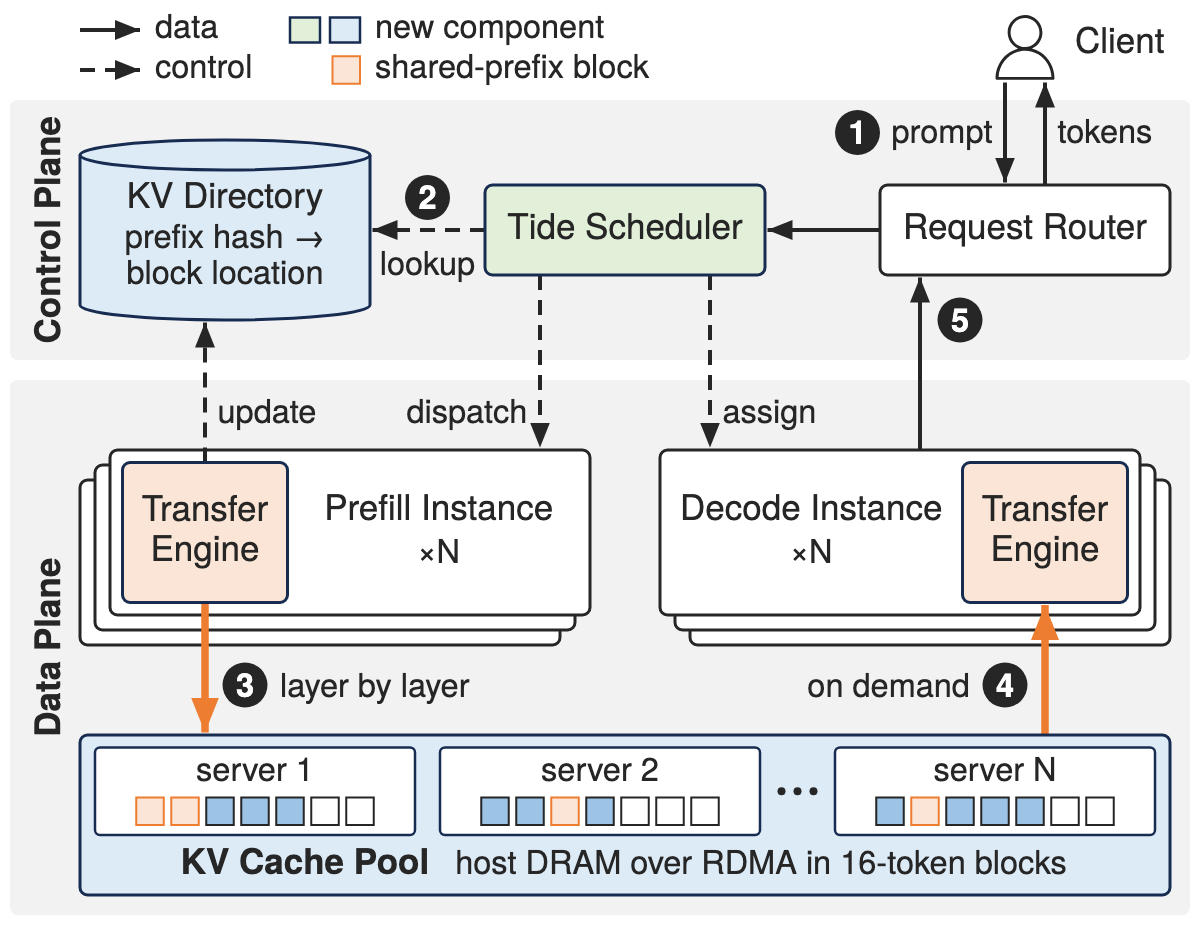
Tidepool architecture: a control plane with Request Router, Tide Scheduler and KV Directory above a data plane of prefill and decode instances whose Transfer Engines stream KV blocks into a pooled KV cache
SVG / PDF / PPTX
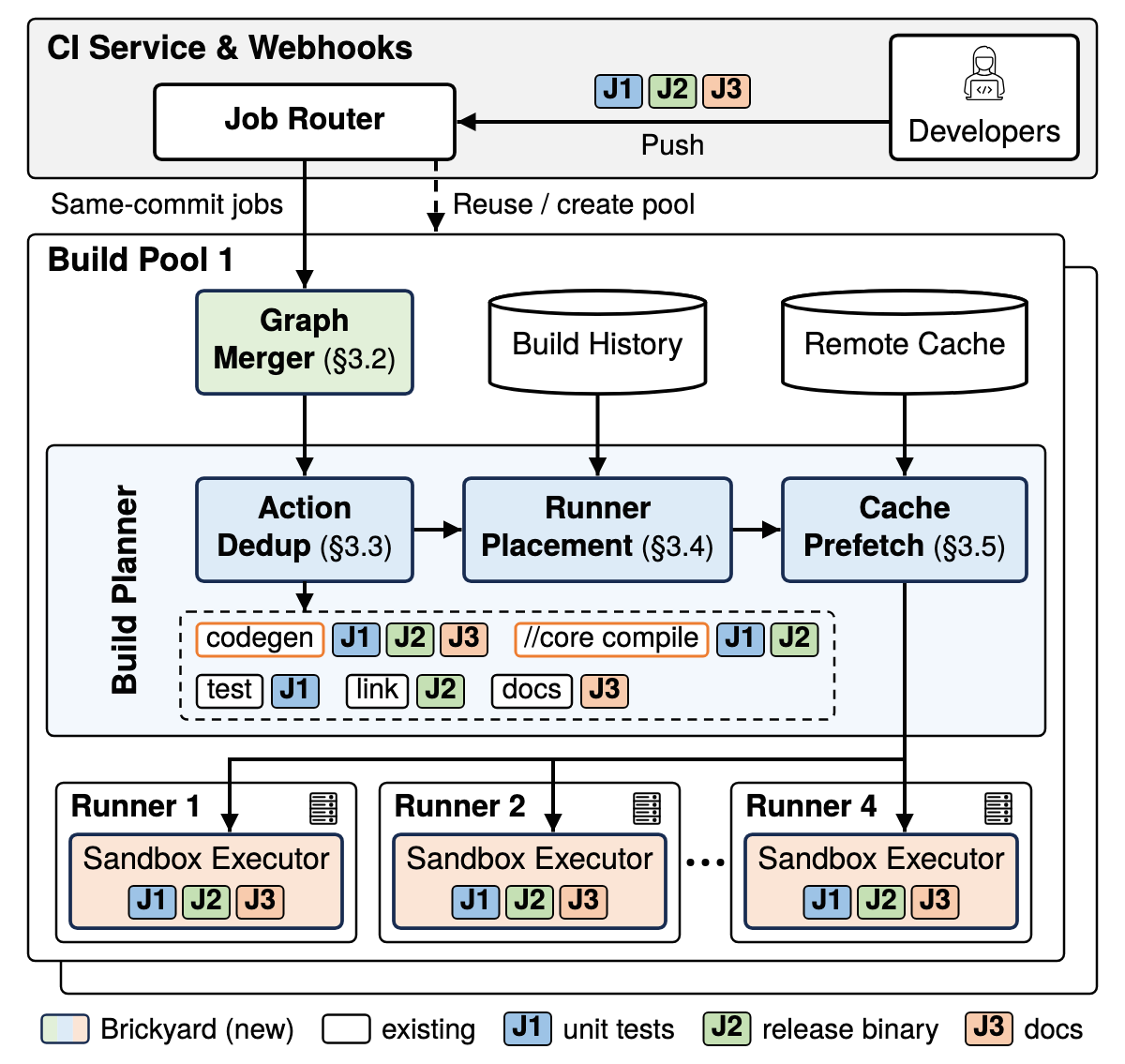
Brickyard architecture: a CI service band above a build pool with a Graph Merger, a three-stage Build Planner and runners with sandbox executors; jobs J1 to J3 are tracked by colour
SVG / PDF / PPTX
Mechanism figures
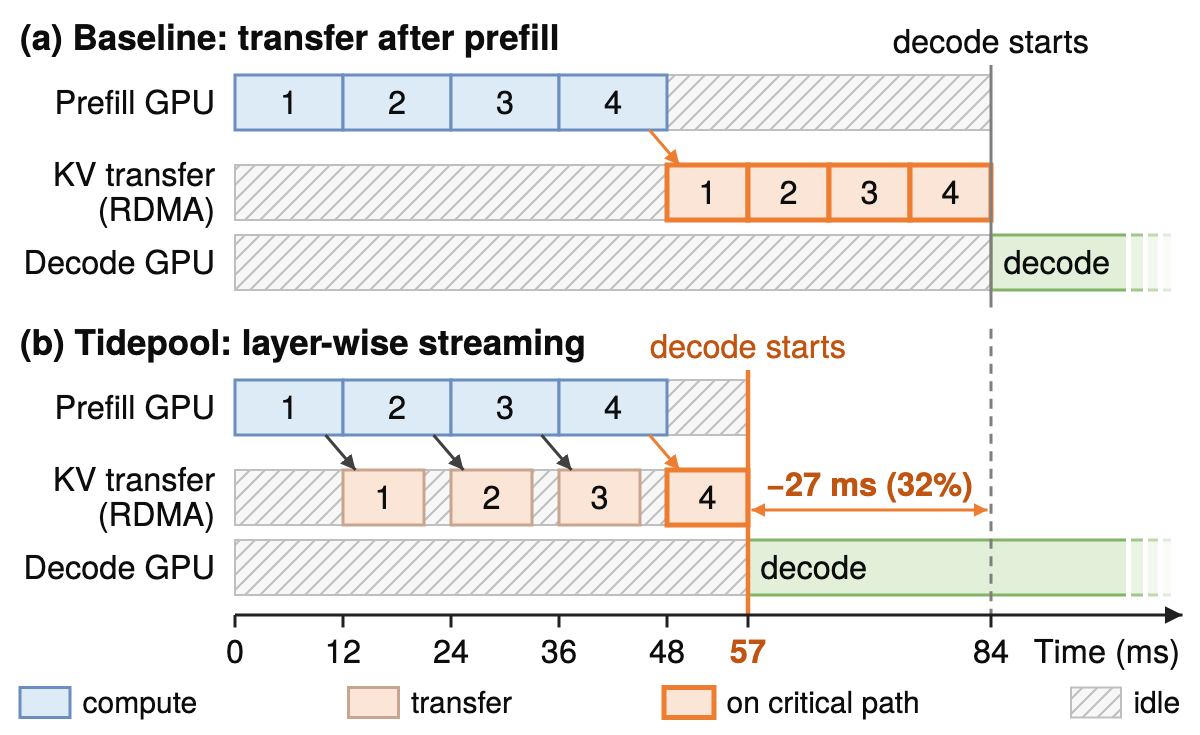
Tidepool mechanism: two Gantt panels comparing transfer after prefill, where decode starts at 84 ms, with layer-wise streaming, where decode starts at 57 ms; idle time is hatched and the transfers on the critical path are outlined
SVG / PDF / PPTX
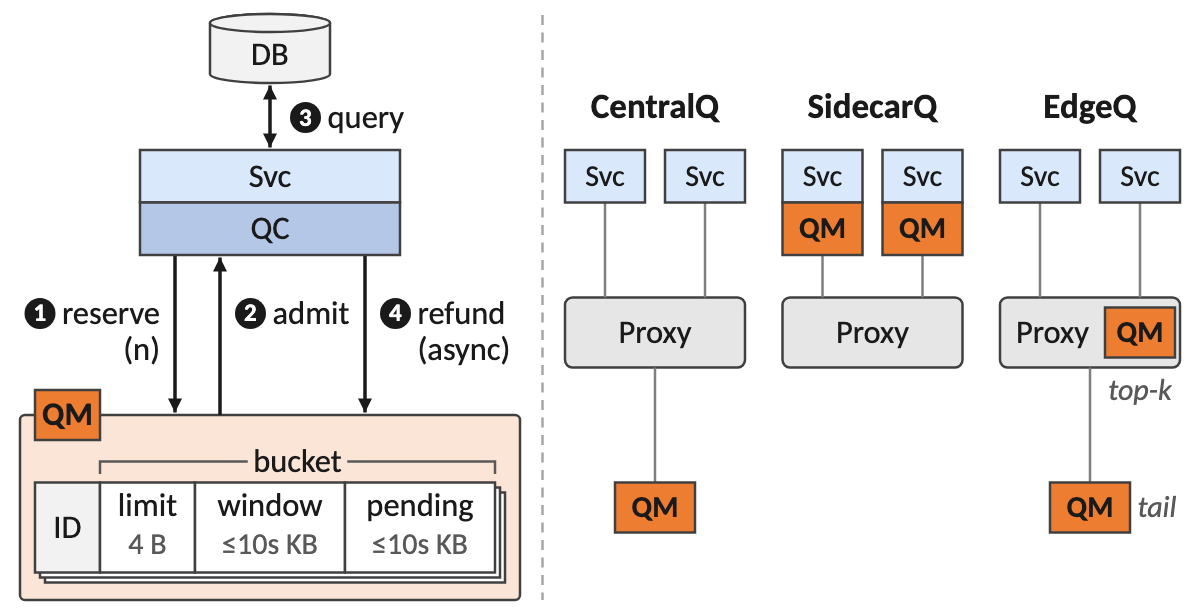
Quota admission: on the left a service and its quota client reserve quota from the quota manager, are admitted, query the database and refund, with the quota manager's per-tenant bucket record opened up; on the right three placements of the quota manager, CentralQ, SidecarQ and EdgeQ
SVG / PDF / PPTX

Why FigGenie

Learned from 12,577 top-venue figures

We collected the figures of every OSDI, NSDI, SOSP and ASPLOS paper from 2023 to 2026, rated 2,041 of them by hand, and measured what separates the good ones from the rest.

Corpus Size
Papers 1,113 from OSDI, NSDI, SOSP and ASPLOS, 2023 to 2026
Figures indexed 12,577
Rated by hand 2,041
Distilled into 20 layout templates, 5 mechanism families, 21 palettes, 485 annotated exemplars and 2,853 reusable parts

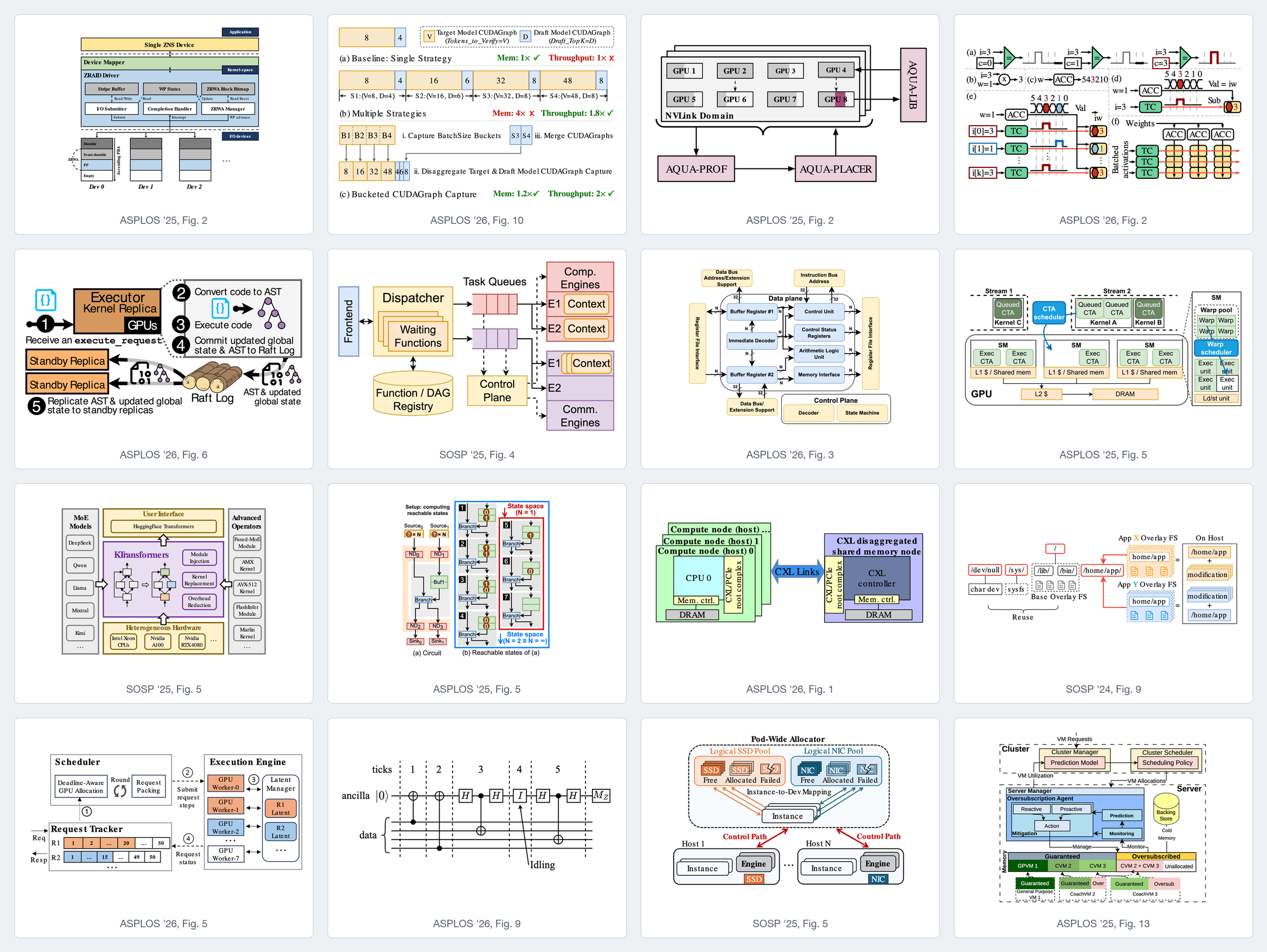
A collage of 16 architecture and mechanism figures from ASPLOS and SOSP papers
16 figures from the corpus, taken from papers published under CC BY 4.0. Each figure belongs to its authors; see CREDITS.md.

How it draws

The workflow: your material, a brief you confirm, spec and plan, draw and check in a loop of render, lint, look and fix, then deliver SVG, PDF, PNG, PPTX and a caption for you to review; changes asked in plain words go back to the drawing step

Quick start

Simply drop the URL of this repo into your AI agent and ask it to install the skill:

Install this skill and set up its dependencies: https://github.com/Sleepy-Avacado/FigGenie

Or install it manually:

Claude Code: install the plugin.

/plugin marketplace add Sleepy-Avacado/FigGenie
/plugin install figgenie@figgenie

Codex and other agents: FigGenie is a plain Agent Skill, a folder with a SKILL.md, scripts and references. Any agent that loads skills, runs shell commands and can look at a PNG can use it.

git clone https://github.com/Sleepy-Avacado/FigGenie.git
mkdir -p ~/.agents/skills
ln -s "$PWD/FigGenie/skills/figgenie-paper-diagram" ~/.agents/skills/figgenie-paper-diagram

Older Codex releases read skills from ~/.codex/skills instead.

Requirements: Python 3 and a headless Chromium for rendering and linting.

pip install lxml pillow playwright fonttools
playwright install chromium

Optional: Node.js 18+ for TeX formulas (MathJax installs itself on first use), and pip install python-pptx for the PowerPoint export (native equations there also need Office's mathml2omml.xsl).

Features

Feature What you get
Figure kinds Architecture figures in 20 layout templates. Mechanism figures in five families: comparison, evolution, logic, walkthrough and anatomy, with worked examples in real values.
Outputs An SVG with fonts embedded and every element named, a PDF cut to the figure's size for LaTeX, a PNG preview and a caption draft. An editable PowerPoint deck on request.
Content Vector TeX formulas, Chinese and other CJK labels, icons from a 2,853-part library, and bitmaps such as screenshots or photos.
Workflow A brief before drawing, a lint and visual self-check after every edit, changes in plain words, and critiques or redraws of existing figures.

Editable in PowerPoint. On request, the finished figure becomes a deck with one native shape per primitive, at the same coordinates as the SVG.

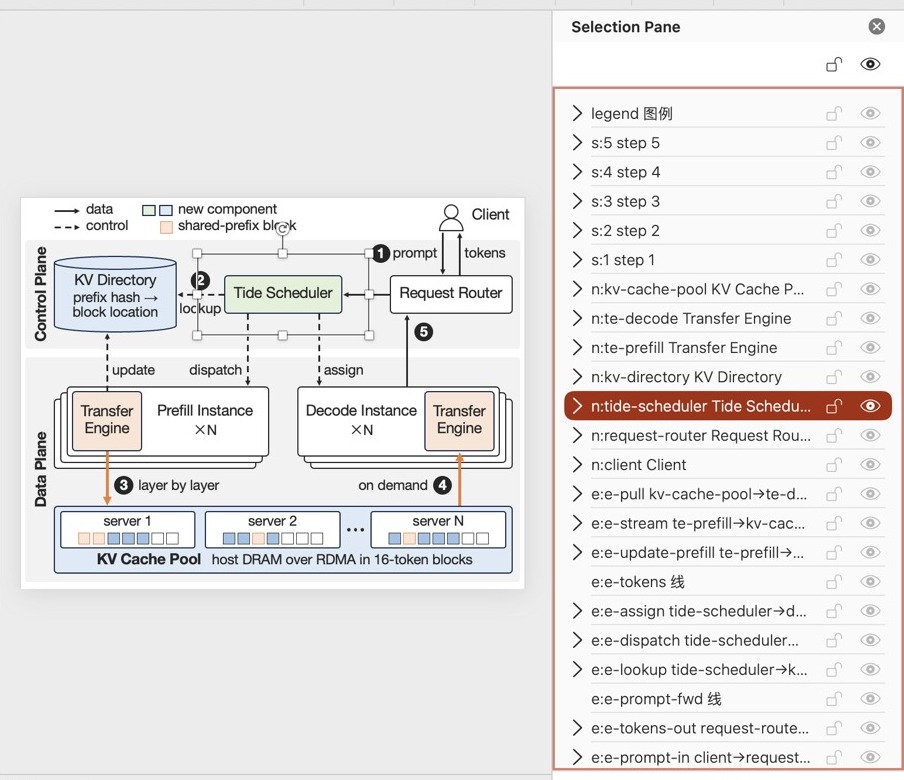
PowerPoint selection pane listing groups named after the figure's element ids
Every element is a group named after its id in the spec.
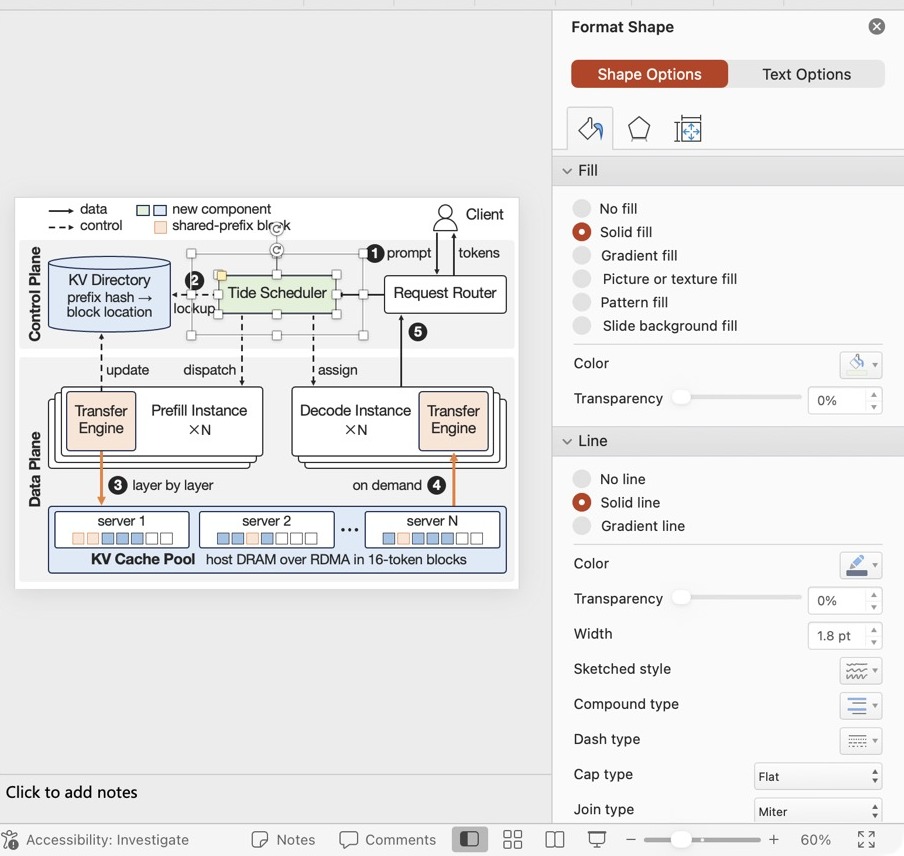
PowerPoint Format Shape pane for a selected box, showing its solid fill and line
Boxes are native shapes with their own fill and line.
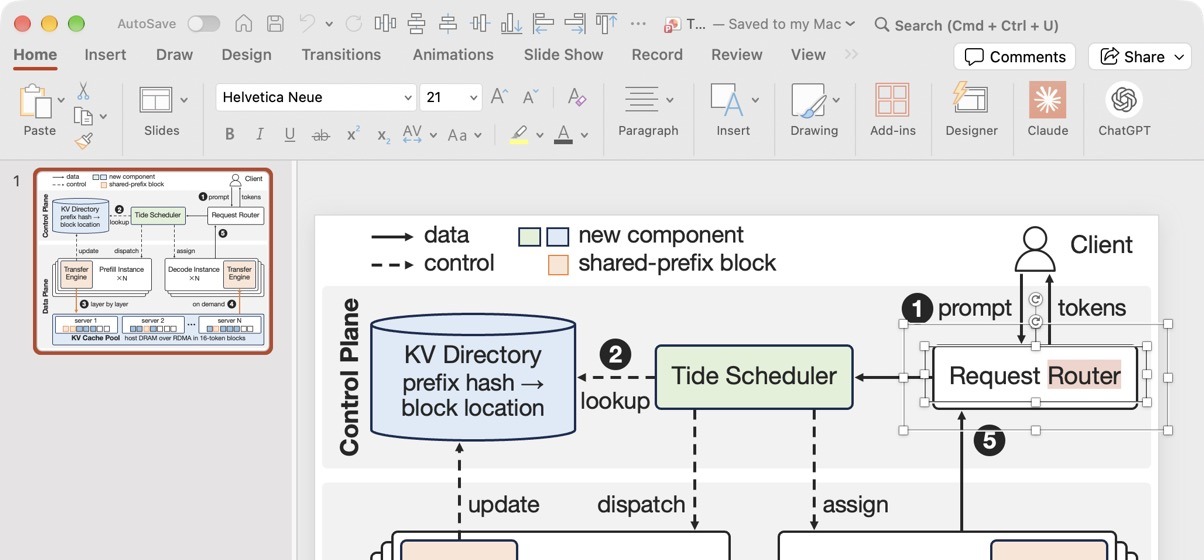
Editing the text of a label in PowerPoint, with the Helvetica Neue font shown in the ribbon
Labels are live text in the figure's own font.

Roadmap

Acknowledgements

FigGenie learned from the figures of the authors whose papers make up the corpus; the figures remain theirs. The collage above is credited figure by figure in CREDITS.md. Fonts: TeX Gyre, Latin Modern, Source Sans, Inter, Roboto, Arimo, Tinos, Carlito and DejaVu. Formulas: MathJax. Rendering: Playwright and Chromium.

Removal requests. If you are an author of a figure used in this repository and want it removed, email [email protected] or open an issue at https://github.com/Sleepy-Avacado/FigGenie/issues. We will take it down.

License

The code and documentation are released under the MIT License. Two things are not covered by it:

FigGenie-paper-diagram-skill (Sleepy-Avacado/FigGenie-paper-diagram-skill)

Searching Database…

这是什么?FigGenie 是一个 Agent Skill(智能体技能),能为研究论文绘制可直接投稿的顶级会议风格图表,输出可编辑的矢量文件(SVG、PDF),还可以选择生成可编辑的 PowerPoint 演示文稿。
这是独立应用,还是我的 AI 智能体使用的东西?它就是一个普通的 Agent Skill:一个包含 SKILL.md、脚本和参考文件的文件夹,不是你自己启动的应用。任何能加载技能、运行 shell 命令并查看 PNG 的智能体都可以使用它,比如 Claude Code 或 Codex。
要让它真正渲染图表,需要安装什么?渲染和 lint 检查需要 Python 3 和无头 Chromium。Node.js 18+ 是可选项,用于 TeX 公式(MathJax 会在首次使用时自行安装);导出 PowerPoint 需要 python-pptx。
README 里展示的东西现在都能用吗?PPTX 导出需要额外的 pip 安装,原生公式还需要 Office 的 mathml2omml.xsl 文件。对 AI 会议图表风格(NeurIPS、ICML 等)的支持和交互式编辑器仍在路线图中,尚未提供。
它是为谁打造的?面向系统领域的研究人员和论文作者,他们需要出版级质量、可编辑的图示,而不是手绘或 AI 生成的位图图像。
MIT 许可证覆盖哪些内容?代码和文档采用 MIT 许可证,但从已发表论文中取用的图表/部分仍归原作者所有,捆绑的字体保留各自独立的许可证。
它能画哪几类图?20 种布局模板的架构图,以及五大类机制图:对比、演进、逻辑、流程走查和解剖。
FigGenie 如何确保图表真的好看?它的布局规则基于从 OSDI、NSDI、SOSP 和 ASPLOS 论文(2023-2026)收集的 12,577 张图中的 2,041 张人工评分图表测量得出。一个 linter 会在无头浏览器中检查每个框的尺寸,智能体还会在交付图表前对渲染结果进行视觉审查。
它能处理中文文本和数学公式吗?能,它支持通过 MathJax 渲染的矢量 TeX 公式,也支持图表中的中文和其他 CJK 标签。
这和让图像生成模型画一张图有什么不同?FigGenie 生成的是每个元素都命名的可编辑矢量图形,而不是位图,因此结果之后可以在 Illustrator 或 PowerPoint 等工具中打开和编辑。
Size
105.8 MB
Stars
167
Updated
CommitOct 10
Age
16d
Commits · 90 Days