
QymCAD
A parametric associative CAD on a B-rep kernel
Sketch → part → assembly. One program, one project file, no cloud and no subscription.
cad.qymis.tech
English · Русский
What it is
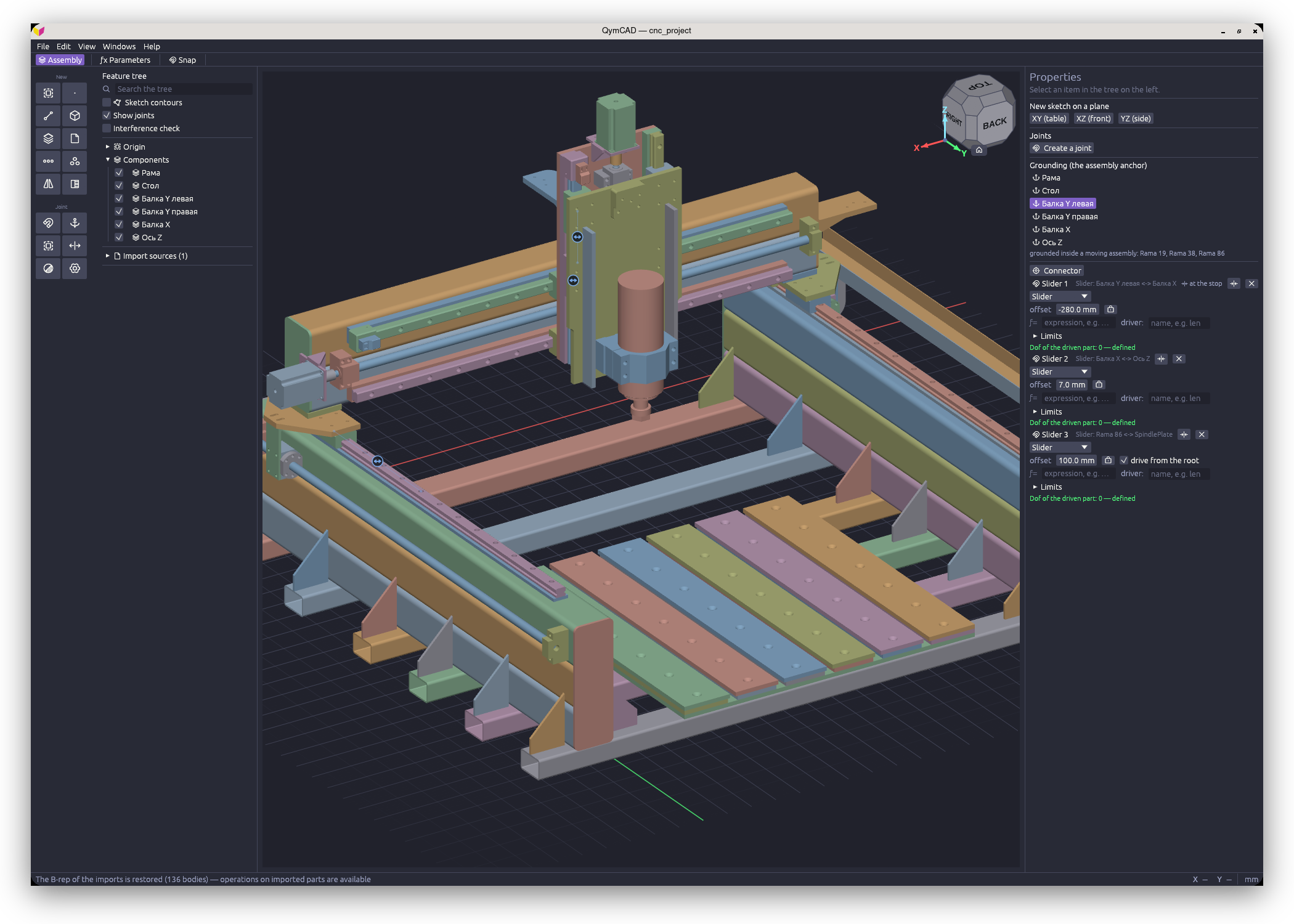
QymCAD is a desktop CAD for mechanical parts and assemblies: housings, brackets, mechanisms, printed
and milled work.
A sketch becomes a solid by extruding, revolving or sweeping; the solid takes holes, fillets, a shell,
patterns. Parts come together into an assembly through joints — revolute, slider, rigid. The model is
parametric: change a dimension in any operation and everything below it in the timeline rebuilds, the
assembly included.
The geometry is exact and solid (B-rep), computed by the OpenCASCADE
kernel — the same one FreeCAD runs on. Hence precise surfaces instead of meshes, correct fillets and
exchange through STEP with other CAD systems.
The interface is available in English and Russian.
Status
A development build. The program works and is fit for real parts, but it is updated daily.
- The document format changes with no backward compatibility. A file saved by an earlier version
may not open. For such files there is the
convert_qcad.py script (see below).
- The CNC (CAM) module does not work. The settings do carry a “Machining” tab (CAM) checkbox, but
what is behind it is groundwork: part of the code came from an earlier version and is not
maintained. The module returns for the stable alpha.
- The macOS build carries no Apple signature. macOS marks a downloaded application as quarantined
and refuses to open it, saying it is damaged - it is not. The mark is cleared once, with one command,
written out step by step in the notes inside the archive. Apple Silicon only; there is no Intel build.
Features
Sketching. Lines, arcs, circles, ellipses, splines, polygons, slots, text. Constraints and
dimensions are solved together; dimensions are parametric (w/2, sin(a)). There is construction
geometry and the projection of a body's edges into the sketch.
Parts. Extrude, revolve, sweep, loft, fillet (including a variable radius set at vertices),
chamfer, shell, draft, holes (plain, counterbored, countersunk), thicken, patch, stitch, trim, split
of faces and of a body, face copy and face push, linear and circular patterns, mirror, booleans, and
the primitives: box, cylinder, sphere, cone, torus, prism. Threads are built from a real helical
profile with run-outs.
Assemblies. Parts and sub-assemblies, joints (rigid, revolute, slider, cylindrical, planar, ball,
pin-slot, parallel), limits and drives, degrees of freedom, an interference check. A sketch can be
placed on the face of a neighbouring part as an associative reference: change the neighbour and the
dependent part rebuilds.
Exchange. STEP (import and export), STL (import and export), DXF and SVG (import and export of
sketches). Either the whole project or a single part or sub-assembly picked in the tree can be written
out.
Installation
The builds are in Releases. No extra libraries are needed: OpenCASCADE and the
dependencies are inside the package.
Windows 10/11 x64 — qymcad-win64.zip. Unpack anywhere and run qymcad.exe.
Linux — qymcad-*.AppImage, a single file. Requires glibc 2.35 or newer: Ubuntu 22.04+,
Debian 12+, Fedora 36+, Arch.
chmod +x qymcad-*.AppImage
./qymcad-*.AppImage
macOS 12+ (Apple Silicon) — qymcad-*-macos-arm64.zip. Unpack it and read README.txt lying beside
the application: the build carries no Apple signature, so the quarantine mark has to be cleared once,
before the first launch. It takes one command and is written out step by step.
Help
The built-in help opens with F1. The articles, with illustrations, live in docs/help.
Project files
A document is saved as .qcad. The format changes directly, with no compatibility layer; documents
from earlier versions are brought forward by a separate script:
python3 convert_qcad.py part.qcad # converts in place, keeping part.qcad.bak beside it
The script brings a document forward from any earlier version in one pass and is idempotent.
Building from source
Linux — just pkg-linux, Docker required. Windows — MSVC with the kernel built from source. macOS — the
kernel from source as well, then packaging/macos/bundle.sh. The details are in
packaging/README.md.
Contributing
See CONTRIBUTING.md.
Licence
The code is distributed under AGPL-3.0-or-later: a fork and any derived build stay under
the same licence with open sources.
The OpenCASCADE kernel comes under LGPL-2.1 with an exception and is linked dynamically; the fonts
and the icons come under licences of their own. All of it is listed in
THIRD-PARTY-NOTICES.md, and that file is placed beside the program in every
package.
QymIs Tech — qymis.tech. Author: Denis Kazachenkov.

 QymCAD 是一款面向机械零件和装配体的桌面参数化 CAD 应用,基于真正的 B-rep 内核(OpenCASCADE)构建。草图通过拉伸、旋转或扫掠生成实体,零件再通过接头组合成装配体。