
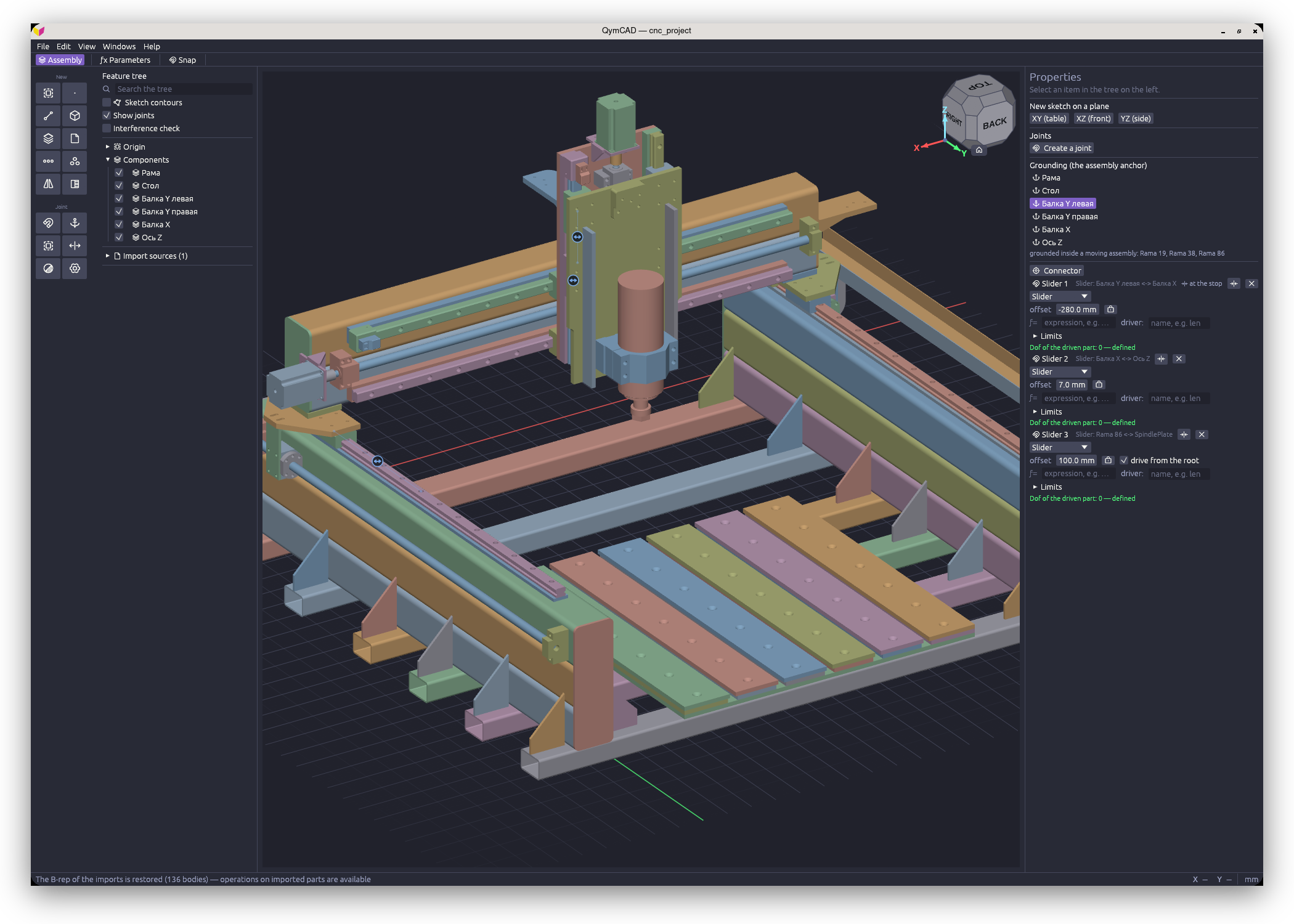
Что это такое?
 QymCAD — настольное CAD-приложение для параметрического моделирования механических деталей и сборок, построенное на настоящем B-rep-ядре (OpenCASCADE). Эскизы превращаются в тела выдавливанием, вращением или протягиванием, а детали объединяются в сборки через сопряжения (joints).
QymCAD — настольное CAD-приложение для параметрического моделирования механических деталей и сборок, построенное на настоящем B-rep-ядре (OpenCASCADE). Эскизы превращаются в тела выдавливанием, вращением или протягиванием, а детали объединяются в сборки через сопряжения (joints).Чем это отличается от моделлеров на основе мешей?Здесь вычисляется точная твердотельная B-rep-геометрия на ядре OpenCASCADE — том же движке, что использует FreeCAD, — что даёт точные поверхности, корректные скругления и настоящий обмен через STEP вместо работы с мешами.
Здесь вычисляется точная твердотельная B-rep-геометрия на ядре OpenCASCADE — том же движке, что использует FreeCAD, — что даёт точные поверхности, корректные скругления и настоящий обмен через STEP вместо работы с мешами.Есть ли требования к версии ОС?Windows — 10/11 x64. Linux — glibc 2.35 или новее (Ubuntu 22.04+, Debian 12+, Fedora 36+, Arch). macOS — версия 12+ и только Apple Silicon, поскольку сборки для Intel нет.
Windows — 10/11 x64. Linux — glibc 2.35 или новее (Ubuntu 22.04+, Debian 12+, Fedora 36+, Arch). macOS — версия 12+ и только Apple Silicon, поскольку сборки для Intel нет.Насколько это стабильно для повседневной работы?Это dev-сборка, обновляемая ежедневно: формат файлов .qcad меняется без обратной совместимости (для старых файлов нужен идущий в комплекте скрипт convertqcad.py), а модуль CAM/Machining, показанный в настройках, на самом деле пока не работает.
Это dev-сборка, обновляемая ежедневно: формат файлов .qcad меняется без обратной совместимости (для старых файлов нужен идущий в комплекте скрипт convertqcad.py), а модуль CAM/Machining, показанный в настройках, на самом деле пока не работает.Работает ли сборка под macOS на Intel-маках?Нет. Сборка под macOS поддерживает только Apple Silicon и не подписана Apple, поэтому macOS помещает её в карантин при первом скачивании; карантинная метка снимается одной командой в терминале, описание которой есть в архиве.
Нет. Сборка под macOS поддерживает только Apple Silicon и не подписана Apple, поэтому macOS помещает её в карантин при первом скачивании; карантинная метка снимается одной командой в терминале, описание которой есть в архиве.Какие форматы файлов можно использовать для обмена моделями с другими CAD-системами?STEP для полного импорта/экспорта с другими CAD-инструментами, STL для 3D-печати и DXF/SVG для импорта и экспорта эскизов.
STEP для полного импорта/экспорта с другими CAD-инструментами, STL для 3D-печати и DXF/SVG для импорта и экспорта эскизов.Могут ли детали оставаться связанными друг с другом внутри сборки?Да: эскиз можно разместить на грани соседней детали как ассоциативную ссылку, и тогда зависимая деталь автоматически перестраивается при изменении этого соседа.
Да: эскиз можно разместить на грани соседней детали как ассоциативную ссылку, и тогда зависимая деталь автоматически перестраивается при изменении этого соседа.Какие операции моделирования деталей она поддерживает?Выдавливание, вращение, протягивание (sweep), лофтинг, скругление с переменным радиусом, фаска, оболочка, уклон, несколько типов отверстий, булевы операции, линейные/круговые массивы, зеркальное отражение и настоящие винтовые резьбы со сбегом.
Выдавливание, вращение, протягивание (sweep), лофтинг, скругление с переменным радиусом, фаска, оболочка, уклон, несколько типов отверстий, булевы операции, линейные/круговые массивы, зеркальное отражение и настоящие винтовые резьбы со сбегом.Проверяет ли она, сталкиваются ли собранные детали?Да, сборки поддерживают сопряжения (вращательные, ползунные, жёсткие и другие), отслеживание степеней свободы и встроенную проверку пересечений.
Да, сборки поддерживают сопряжения (вращательные, ползунные, жёсткие и другие), отслеживание степеней свободы и встроенную проверку пересечений.What are similar projects?FreeCAD, text-to-cad, ingetrazo, solidcraft, microduck-replica, OpenCADStudio, MANPADS-System-Launcher-and-Rocket, openscad
FreeCAD, text-to-cad, ingetrazo, solidcraft, microduck-replica, OpenCADStudio, MANPADS-System-Launcher-and-Rocket, openscadWhich topics is it in?mechanical-engineering, stl, manufacturing, 3d-modeling, 3d-printing, cad, engineering, appimage, offline-first, svg, graphics, app
mechanical-engineering, stl, manufacturing, 3d-modeling, 3d-printing, cad, engineering, appimage, offline-first, svg, graphics, app