Planning with Files 
The planning skill your agent cannot ignore.
Not a prompt it might follow. A hook that fires every turn, a plan on disk that survives /clear, and 3 out of 3 blind A/B wins to show it works.
Your agent's context window dies. The plan does not.
Persistent file-based planning for AI coding agents and long-running agent tasks: the skill keeps task_plan.md, findings.md, and progress.md on disk. Activated lifecycle hooks inject selected project planning context, so the plan survives context loss, /clear, crashes, and compaction. Automatic recovery reads project files only. Reading same-project local agent session records for aggregate counts or bounded replay requires an explicit catchup mode. Installs across 60+ agents via the Agent Skills standard, with native plugins for Claude Code, Codex CLI, Pi and Hermes Agent.




-2da44e?style=flat)


See it survive /clear ·
Install ·
Long-running tasks ·
Hermes Agent ·
Multi-agent ·
The numbers
Proof, comparisons and the repository reference are further down · Full install guide
Before and after /clear
Every coding agent loses its working memory when the context window resets. The plan does not have to die with it.
Without planning files
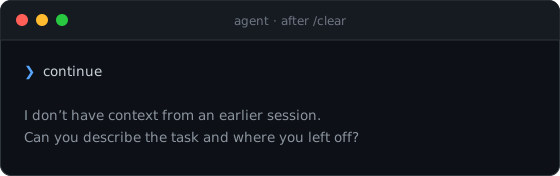
The agent re-reads the repo, asks you to restate the goal, and rediscovers work it already finished.
With planning-with-files
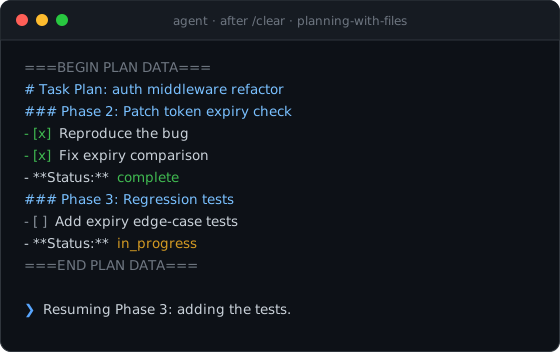
The transcript is illustrative; the ===BEGIN PLAN DATA=== block is the skill's real injection format, written into context by the UserPromptSubmit hook from task_plan.md on disk. In the project's internal recovery benchmark, a fresh session with the files on disk resumed in 5.0 turns on average against 13.3 for a raw agent (internal v1, author-run; method and limits in docs/evals.md). That benchmark used the earlier default transcript-catchup behavior. Current automatic recovery uses project files only, so the figure is historical evidence rather than a fresh measurement of the current default.
| At a glance |
|
| Plan files |
3 |
| Agents covered |
60+ |
| Pass rate (with skill) |
96.7% |
| Test suite |
706 tests |
Survives /clear |
yes |
Built for long-running agent tasks
[!IMPORTANT]
Most harnesses ship a to-do list that lives inside the context window. planning-with-files ships a plan that lives on disk, is re-injected every turn, is hash-attested, and can hold the agent's stop until the plan reports complete.
That is the difference between an agent that forgets after /clear, compaction or a crash and one that resumes at the current phase. In the project's own measurements the plan on disk turned a 13.3-turn re-orientation into 5.0 turns, and the skill won 3 of 3 blind A/B comparisons (numbers and limits). Every mechanism below is a file on disk plus a hook, so it works the same on hour ten as on turn one.
| What breaks long agent runs |
What the skill does about it |
The context window is wiped by /clear, compaction, or a crash |
The plan is re-read from disk on the next turn; SessionStart, UserPromptSubmit and PreCompact hooks carry the current phase back in |
| Goal drift after 50+ tool calls |
The plan head is re-injected every turn; PWF_INJECT=smart keeps the goal, the next step and the active phase in the window late in a long plan |
| The agent declares "done" early |
Gated mode: the Stop gate holds the stop only while an in_progress phase remains, with a block cap and stall detection so an incomplete plan alone never traps a session |
| The plan is silently rewritten by a tool result, a collaborator, or a bug |
SHA-256 attestation: a plan body that no longer matches the approved hash is refused at injection with [PLAN TAMPERED] |
| Two sessions overwrite each other's phases |
The parallel-write guard reports when checked items or completed phases go down between turns |
| Autonomous loops burn tokens on recitation |
Autonomous mode drops the per-tool-call recitation and replaces the raw progress tail with a fixed-shape ledger summary; injection is KV-cache stable and one hook fire costs about 289 ms |
| Hooks that quietly stop firing |
/plan-doctor self-checks resolution, injection, attestation, install surfaces and per-fire latency |
Everything in that table is opt-in per plan and byte-identical to the previous behavior when no mode marker is set. Details: v3 Long-Running Agent Features and docs/long-running-agent-tasks.md.
The Problem
Claude Code and most AI agents suffer from:
- Volatile memory: the TodoWrite list disappears on context reset
- Goal drift: after 50+ tool calls, the original goals get crowded out
- Hidden errors: failures are not tracked, so the same mistakes repeat
- Context stuffing: everything crammed into the window instead of stored
The Solution: 3-File Pattern
For every complex task, create THREE files:
task_plan.md      → Track phases and progress
findings.md       → Store research and findings
progress.md       → Session log and test results
The Core Principle
Context Window = RAM (volatile, limited)
Filesystem = Disk (persistent, unlimited)

→ Anything important gets written to disk.
In your project, exactly this lands on disk and nothing else:
your-project/
├── task_plan.md   ← phases + checkboxes; the resume point after /clear
├── findings.md    ← research notes and decisions, appended as you go
└── progress.md    ← session log and test results
Parallel tasks get isolated directories instead: .planning/YYYY-MM-DD-slug/ with the same three files, selected via .active_plan (v2.36.0+). Plain markdown, gitignored by default, no runtime state anywhere else.
Why This Skill?
On December 29, 2025, Meta acquired Manus for $2 billion. In just 8 months, Manus went from launch to $100M+ revenue. Their secret? Context engineering.
"Markdown is my 'working memory' on disk. Since I process information iteratively and my active context has limits, Markdown files serve as scratch pads for notes, checkpoints for progress, building blocks for final deliverables."
— Manus AI
This skill packages that exact pattern for your coding agent.
The Manus Principles
| Principle |
Implementation |
| Filesystem as memory |
Store in files, not context |
| Plan recitation |
Re-read plan before decisions (hooks) |
| Error persistence |
Log failures in plan file |
| Goal tracking |
Checkboxes show progress |
| Completion verification |
Stop hook checks all phases |
Quick Install
Claude Code, plugin route (ships everything: skill, hooks, slash commands):
/plugin marketplace add OthmanAdi/planning-with-files
/plugin install planning-with-files@planning-with-files
Every other agent, one line, 60+ agents via the Agent Skills standard:
npx skills add OthmanAdi/planning-with-files --skill planning-with-files -g
npm, to pin an exact version into a project or vendor it:
npm install planning-with-files
The package carries SKILL.md, scripts/ and templates/, so this is the route for locking a version into a repo's dependencies or copying the skill in yourself. It does not register hooks on its own.
Pi Coding Agent, same npm package, wired up for you (skill, extension, status bar):
pi install npm:planning-with-files
Hermes Agent (Nous Research), native plugin plus skill bundle, CLI and Desktop:
hermes skills install OthmanAdi/planning-with-files/.hermes/skills/planning-with-files --yes
hermes plugins install OthmanAdi/planning-with-files/.hermes/plugins/planning-with-files
hermes plugins enable planning-with-files
OpenCode, native plugin plus the skill (the npx skills add command above lands in ~/.agents/skills/, which OpenCode reads):
{ "plugin": ["opencode-planning-with-files"] }
in opencode.json or ~/.config/opencode/opencode.json; OpenCode installs it on the next start.
Under a minute. Safe to re-run. Trigger it by typing /plan (plugin) or asking the agent to "plan this task"; the skill also self-triggers on multi-step tasks.
What each route actually ships:
| Route |
Skill + scripts + templates |
Slash commands |
Hooks |
| Claude Code plugin |
yes |
yes |
yes |
npx skills add |
yes |
no |
frontmatter hooks, see note |
npm install |
yes, under node_modules/ |
no |
no, copy the skill in yourself |
pi install npm: |
yes |
yes, Pi commands |
yes, via the Pi extension |
hermes plugins install |
yes, with the skill bundle |
yes, /pwf, /pwf-status |
yes, plugin hooks incl. the gate |
OpenCode opencode.json plugin |
yes, with the skill |
yes, /pwf, /pwf-status (two copied command files) |
yes, plugin hooks incl. the gate |
| ClawHub / manual copy |
yes |
no |
frontmatter hooks, see note |
Skill-route installs can end up silently hook-less (project trust not accepted, or frontmatter hooks not registering on project-level installs). The hooks are the differentiating mechanism, so if they matter to you, use the plugin route, then verify with /plan-doctor. Full matrix and the two silent killers: docs/installation.md.
Install acting up? Open your agent and say: "Read docs/installation.md and docs/troubleshooting.md from OthmanAdi/planning-with-files and fix my install." Then run /plan-doctor.
🌐 Available in 5 other languages
🇸🇦 العربية / Arabic
npx skills add OthmanAdi/planning-with-files --skill planning-with-files-ar -g
🇩🇪 Deutsch / German
npx skills add OthmanAdi/planning-with-files --skill planning-with-files-de -g
🇪🇸 Español / Spanish
npx skills add OthmanAdi/planning-with-files --skill planning-with-files-es -g
🇨🇳 中文版 / Chinese (Simplified)
npx skills add OthmanAdi/planning-with-files --skill planning-with-files-zh -g
🇹🇼 正體中文版 / Chinese (Traditional)
npx skills add OthmanAdi/planning-with-files --skill planning-with-files-zht -g
These are real translations, not an English body with a translated description: the SKILL.md prose, the templates, and the user-facing output of check-complete, init-session and session-catchup are all localized. The status tokens stay literal English (**Status:** complete) on purpose, because check-complete.sh matches them with grep -F, so translating them would disable the completion gate.
Since v3.10.0 the variants also ship the full script surface: attestation, the Stop gate, the ledger, phase status and plan-doctor used to be canonical-only, which quietly made every non-English install a subset install. Full details, including what changed on the plugin route in v3.11.0, are in docs/languages.md.
They live under skills/i18n/, one directory deeper than the canonical skill. The install commands above are unchanged, because npx skills add resolves --skill by skill name across the whole repository. The Claude Code plugin scan reads skills/*/SKILL.md without recursing, so the plugin route registers the canonical skill alone and no longer carries five extra descriptions in every session's system prompt. On that route the /plan-ar, /plan-de, /plan-es, /plan-zh and /plan-zht commands read the translated skill from disk instead of invoking it by name.
Prefer /planning-with-files with no prefix?
Copy the skill to your local folder:
macOS/Linux:
cp -r ~/.claude/plugins/cache/planning-with-files/planning-with-files/*/skills/planning-with-files ~/.claude/skills/
Windows (PowerShell):
Copy-Item -Recurse -Path "$env:USERPROFILE\.claude\plugins\cache\planning-with-files\planning-with-files\*\skills\planning-with-files" -Destination "$env:USERPROFILE\.claude\skills\"
Enhanced Support: per-IDE setup guides
| IDE |
Installation Guide |
Integration |
| Claude Code |
Installation |
Plugin + SKILL.md + Hooks |
| Cursor |
Cursor Setup |
Skills + hooks.json |
| GitHub Copilot |
Copilot Setup |
Hooks (incl. errorOccurred) |
| Mastra Code |
Mastra Setup |
Skills + Hooks |
| Gemini CLI |
Gemini Setup |
Skills + Hooks |
| Kiro |
Kiro Setup |
Agent Skills |
| Codex |
Codex Setup |
Skills + Hooks |
| Hermes Agent |
Hermes Setup |
Skill + native plugin (tools, /pwf, pre_llm_call, post_tool_call, pre_verify gate), CLI and Desktop |
| CodeBuddy |
CodeBuddy Setup |
Skills + Hooks |
| FactoryAI Droid |
Factory Setup |
Skills + Hooks |
| OpenCode |
OpenCode Setup |
Native plugin opencode-planning-with-files (chat.message injection, write reminders, compaction flush, session.idle gate, pwf_* tools, /pwf commands) + skill |
Standard Agent Skills: discovery paths
Note: If your IDE uses the legacy Rules system instead of Skills, see the legacy-rules-support branch.
Sandbox runtimes
| Runtime |
Status |
Guide |
Notes |
| BoxLite |
✅ Documented |
BoxLite Setup |
Run Claude Code + planning-with-files inside hardware-isolated micro-VMs |
BoxLite is a sandbox runtime, not an IDE. Skills load via ClaudeBox, BoxLite's official Claude Code integration layer.
❓ FAQ
How do I stop my coding agent from losing its plan after /clear or a crash?
The plan lives on disk in task_plan.md, findings.md, and progress.md, not only in the context window. At the start of each turn the UserPromptSubmit hook re-injects selected active-plan context, and after a /clear or a new session the skill re-reads project files from disk. This automatic path does not inspect agent transcript stores.
Agent memory tools (vector stores, knowledge graphs) help an agent recall facts from past sessions. planning-with-files manages active execution state: the phases, status, dependencies, and completion check for the task the agent is working on right now. The problem it solves is planning continuity, not retrieval, and the two are complementary.
How does this prevent context rot?
Context rot is the drift that sets in as the context window fills and earlier instructions get crowded out. Because the plan is re-injected at the start of each turn from disk, the goals and phase status stay in the model's attention window as the conversation grows. This is an implementation of what Anthropic calls structured note-taking: write durable state to files ou


 A skill for AI coding agents that keeps the plan on disk in three markdown files — taskplan.md, findings.md and progress.md — and re-injects it every turn, so it survives /clear, crashes and context compaction.