





OpenSwiftUI README

The project's README from github.com/OpenSwiftUIProject/OpenSwiftUI. As one markdown file: README.md.

OpenSwiftUI

OpenSwiftUI

codecov

OpenSwiftUI is an open source implementation of Apple's SwiftUI

The project is for the following purposes:

And the API design and documentation is to stay as compatible with the original SwiftUI API as possible.

[!TIP] "Why join the navy if you can be a pirate?" — Steve Jobs

:)

Currently, this project is in early development.

The full API documentation is available on the OpenSwiftUI documentation site.

Notes

this project is for learning and research purposes only.

If you choose to use this project, you do so at your own risk and are responsible for compliance with any applicable laws.

The author of this project is not responsible for any consequences that may arise from your use of this project.

[!WARNING] This package use a lot of hidden API and private framework on Apple platform.

Please DO NOT use this package in Apple's production environment(eg. App Store).

Otherwize it may break your build or crash your app at any future SDK/OS update.

Usage

Integration Guide

To integrate OpenSwiftUI into your own Xcode project, see INTEGRATION.md for detailed step-by-step instructions.

Example Application

See Example folder and try it with ExampleApp

[!IMPORTANT] Clone OpenAttributeGraph in the same directory before running the example.

See Example/README.md for more detail.

Build

The current suggested toolchain to build the project is Swift 6.3.3 / Xcode 26.6.

Build without testing framework

./Scripts/build

Build with Library Evolution

./Scripts/openswiftui_swiftinterface

[!NOTE] This project's configuration is heavily based on many environment variables.

You can use the following tools on macOS platform to manage the environment variable more easily.

  • EnvPane: A macOS preference pane for environment variables
  • MenuHelper: A Finder Extension App to improve your efficiency.
  • launchctl via Scripts/sync_launchagent.sh

Supported platforms

The table below describes the current level of support that OpenSwiftUI has for various platforms:

Darwin Platform Status

Test Type CI Status
SwiftUI Compatibility Compatibility tests
UI Tests UI Tests

Platform Support

Platform CI Status Support Status Build Test Deploy Owner
macOS macOS ⭐️⭐️⭐️ *[^1] ✅ ✅ ✅ @Kyle-Ye, @Mx-Iris
iOS iOS ⭐️⭐️⭐️⭐️ *[^2] ✅ ✅ ✅[^5] @Kyle-Ye
Ubuntu 22.04 Ubuntu ⭐️⭐️ *[^3] ✅ ✅ ✅[^3] @Kyle-Ye
visionOS None ⭐️ *[^4] ✅ Not tested in CI ✅[^4] @Kyle-Ye
Android None Not supported yet ❌ ❌ ❌
Windows None Not supported yet ❌ ❌ ❌
Embedded None Preview[^6] ✅ ✅ ✅ @Kyle-Ye

[^1]: AppKit integration is partially implemented.

[^2]: UIKit integration is partially implemented.

[^3]: Build, test, and deployment with the stdout renderer are supported. Linux UI framework integration is not available yet.

[^4]: visionOS Simulator support is experimental and has no CI coverage. Physical device support has not been verified.

[^5]: iOS Simulator is supported. iOS device builds require the Compute backend. Apple's AttributeGraph backend is limited to the simulator because required device symbols are missing.

[^6]: Build and host tests are supported on the embed/folotoy branch. For the ESP32-C3 deployment example, see OpenSwiftUI on ESP32-C3.

[!NOTE] The cross-platform OpenAttributeGraph is not fully implemented.

The Linux stdout example uses the Compute backend to run its view graph.

[!NOTE] To request platform ownership, please first contribute to the target platform and then contact the project owner.

Current supported feature

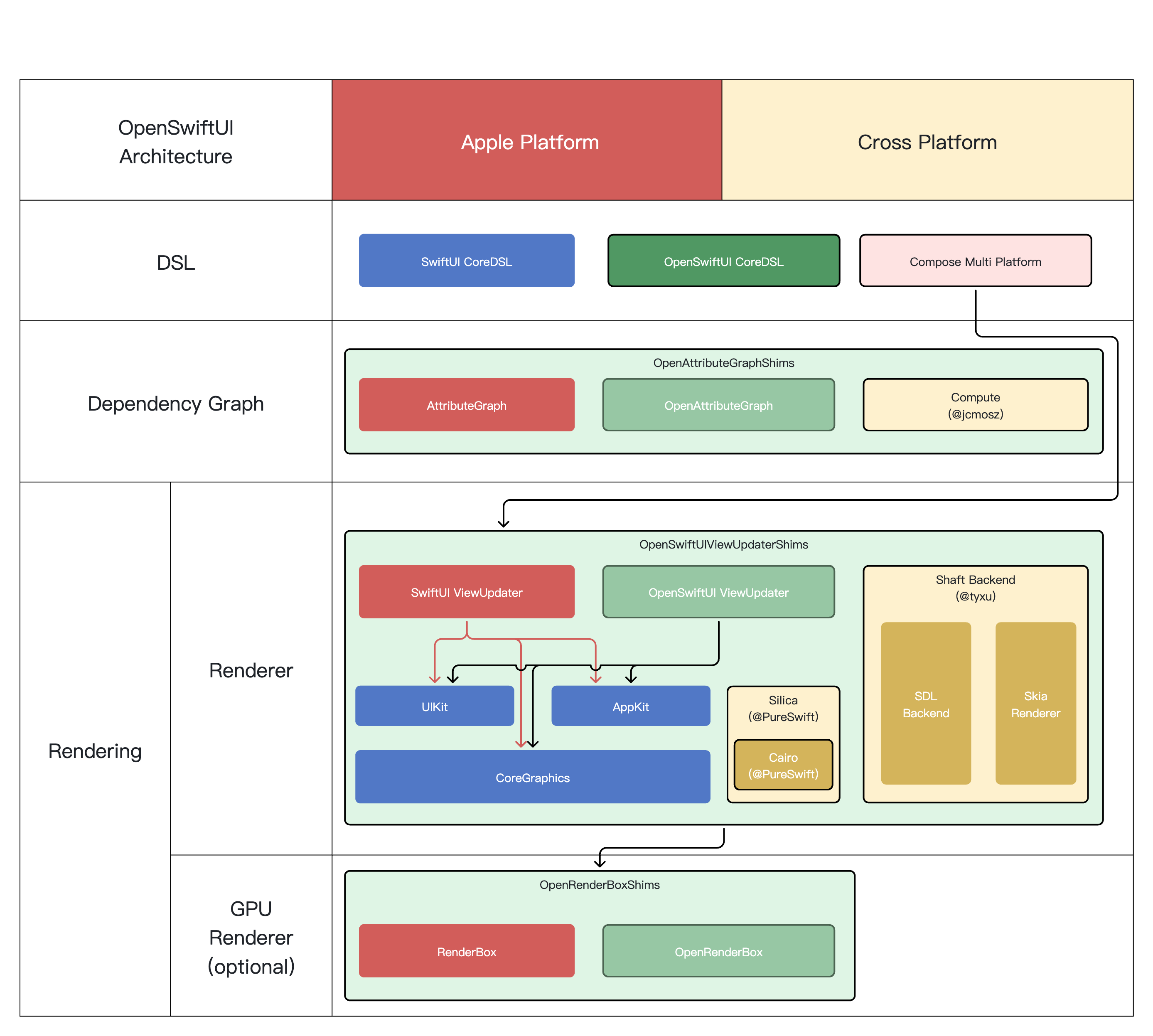
Architecture

OpenSwiftUI Architecture

Products

Versioned documentation

The documentation site is built with VersionedDocC and automatically tracks main and recent release series. It provides version switching, build dates, and API change comparisons.

Build and preview the site locally with:

Scripts/preview-documentation.sh

See Docs/Documentation.md for configuration, caching, and release details.

Contributing

Contributions are welcome. See CONTRIBUTING.md for development setup, testing guidance, and pull request expectations.

Disclaimer

SwiftUI is a trademark of Apple Inc. This project is not affiliated with, endorsed by, or connected to Apple Inc. in any way. OpenSwiftUI is an independent open-source implementation created for educational and research purposes.

License

This project is licensed under the MIT License. See the LICENSE file for details.

For third-party licenses and acknowledgements, see CREDITS.md.

Star History

Star History Chart

OpenSwiftUI (OpenSwiftUIProject/OpenSwiftUI)

Searching Database…

这是什么?苹果 SwiftUI 的开源实现。目标是:在 Linux 和 Windows 等非苹果平台上构建图形界面应用,并在苹果平台上诊断和调试 SwiftUI 的问题,同时尽可能保持与 SwiftUI 的 API 兼容。
它是一个我要运行的工具,还是我用来开发应用的框架?是框架,不是应用:一个 Swift 包,需要集成到你自己的 Xcode 项目里。这个仓库还附带 OpenSwiftUIExtension(额外的 API 集合)和 OpenSwiftUIBridge,用于把其他 DSL 框架逐步迁移过来。
我怎么试用它?按照 INTEGRATION.md 的分步指南把它添加到你的 Xcode 项目中,然后运行 Example 文件夹里的 ExampleApp —— 注意要先把 OpenAttributeGraph 克隆到同一目录下,否则示例跑不起来。
构建它需要安装什么?推荐的工具链是 Swift 6.3.3 配合 Xcode 26.6。在 macOS 上,构建配置还高度依赖环境变量,README 建议用 EnvPane 这类工具或自带的 launchctl 脚本来管理它们。
我能基于它发布正式应用吗?不能 —— 它还处于早期开发阶段,在苹果平台上使用了隐藏 API 和私有框架,未来任何 SDK 或系统更新都可能破坏你的构建或导致崩溃。它仅供学习和研究使用,风险自负。
它目前真正能构建和运行在哪些平台上?iOS 支持最好,其次是 macOS。Ubuntu 22.04 目前只能通过 stdout 渲染器运行 —— 还没有集成任何 Linux 界面框架;visionOS 属于实验性支持,Windows 和 Android 尚不支持,嵌入式平台处于预览阶段。
它重新实现了苹果的框架,许可证方面安全吗?它采用 MIT 许可证。项目方强调这是独立实现,与苹果没有隶属关系,也未获得苹果认可,而且 SwiftUI 仍是苹果的商标 —— 使用风险自负。
它目前实际能渲染什么?Color、Image 和 Path 渲染、布局系统、动画系统、onAppear/onDisappear 修饰符以及基本的几何效果。Text 目前还比较基础:输出在 macOS 的 stdout 渲染器上可以工作,而非 Darwin 平台的文字排版尚未支持。
它和我现有的 SwiftUI 代码兼容性如何?官方目标就是尽可能与原版 SwiftUI API 保持兼容,OpenSwiftUI 本身也被描述为一个 SwiftUI 源码兼容框架。由于项目还处于早期开发阶段,预期只能覆盖一部分功能,而不是开箱即用的替代品。
它能在真机 iPhone 上运行,还是只能在模拟器里?开箱即用只能跑模拟器:苹果的 AttributeGraph 后端仅限于模拟器,因为缺少真机所需的符号,所以要构建到真实的 iOS 设备上,得改用 Compute 后端。
为什么示例需要把 OpenAttributeGraph 克隆在旁边?OpenAttributeGraph 是提供跨平台 AttributeGraph 视图图后端的配套项目,目前尚未完全实现 —— Linux 的 stdout 示例运行在 Compute 后端上。运行示例时,它必须和 OpenSwiftUI 位于同一目录下。
Size
12.6 MB
Stars
2.5K
Age
3y
Commits · 90 Days