








2.5K ·GitHub
What is this?
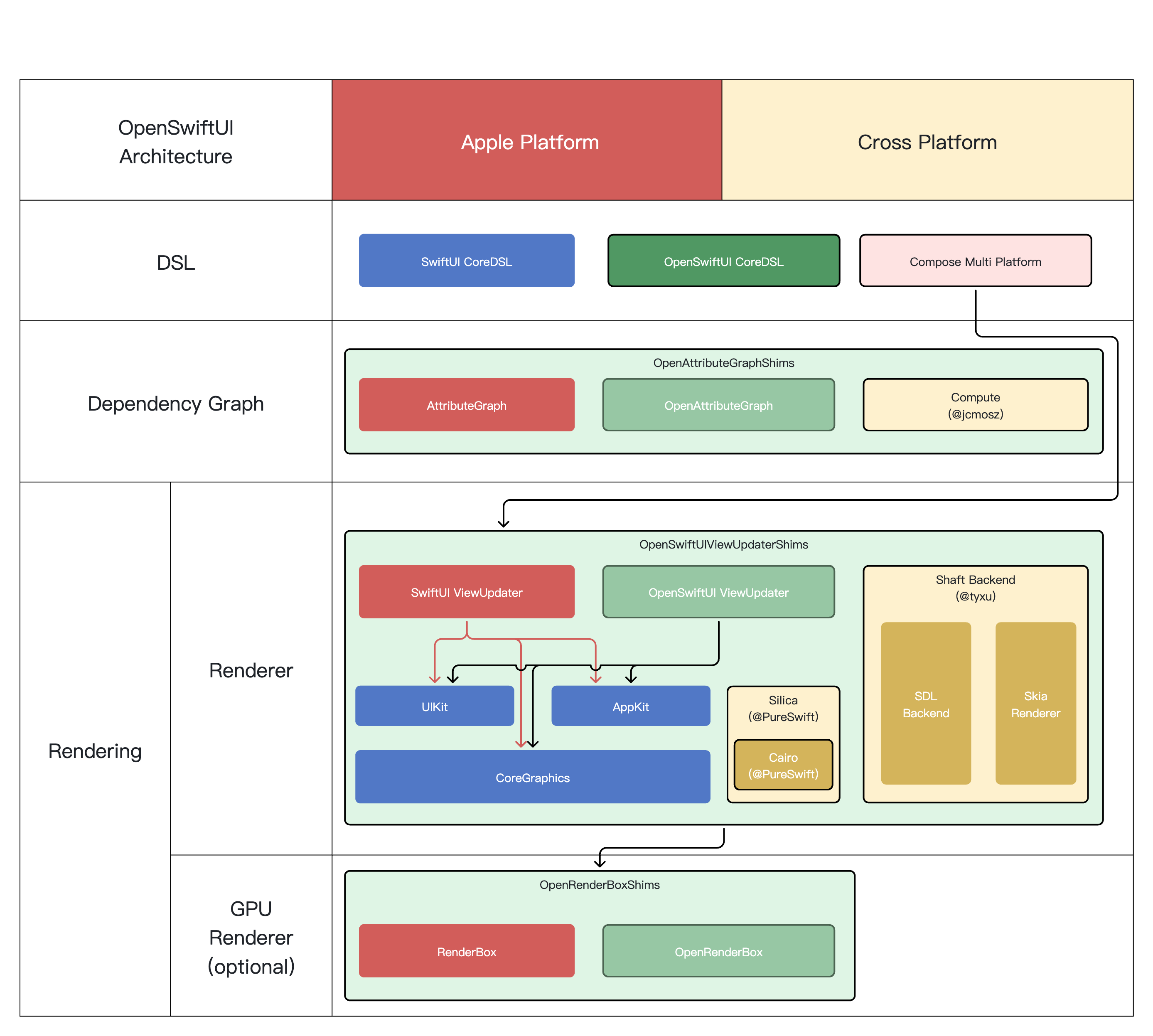
 An open source implementation of Apple's SwiftUI. Goals: build GUI apps on non-Apple platforms like Linux and Windows, and diagnose and debug SwiftUI issues on Apple platforms, staying as API-compatible with SwiftUI as possible.
An open source implementation of Apple's SwiftUI. Goals: build GUI apps on non-Apple platforms like Linux and Windows, and diagnose and debug SwiftUI issues on Apple platforms, staying as API-compatible with SwiftUI as possible.Is it a tool I run, or a framework I build my app with?A framework, not an app: a Swift package you integrate into your own Xcode project. The repo also ships OpenSwiftUIExtension (extra API collections) and OpenSwiftUIBridge for migrating other DSL frameworks over incrementally.
A framework, not an app: a Swift package you integrate into your own Xcode project. The repo also ships OpenSwiftUIExtension (extra API collections) and OpenSwiftUIBridge for migrating other DSL frameworks over incrementally.How do I try it out?Add it to your Xcode project following the step-by-step INTEGRATION.md guide, then run the ExampleApp in the Example folder — cloning OpenAttributeGraph into the same directory first or the example won't run.
Add it to your Xcode project following the step-by-step INTEGRATION.md guide, then run the ExampleApp in the Example folder — cloning OpenAttributeGraph into the same directory first or the example won't run.What do I need installed to build it?The suggested toolchain is Swift 6.3.3 with Xcode 26.6. On macOS the build configuration also relies heavily on environment variables, which the README suggests managing with tools like EnvPane or a bundled launchctl script.
The suggested toolchain is Swift 6.3.3 with Xcode 26.6. On macOS the build configuration also relies heavily on environment variables, which the README suggests managing with tools like EnvPane or a bundled launchctl script.Could I ship a production app built on it?No — it is in early development and uses hidden APIs and private frameworks on Apple platforms, so it may break your build or crash on any future SDK/OS update. It is meant for learning and research only, at your own risk.
No — it is in early development and uses hidden APIs and private frameworks on Apple platforms, so it may break your build or crash on any future SDK/OS update. It is meant for learning and research only, at your own risk.Which platforms can it actually build and run on today?iOS is best supported, then macOS. Ubuntu 22.04 works only with a stdout renderer so far — no Linux UI framework integration yet; visionOS is experimental, Windows and Android are not supported yet, and embedded is a preview.
iOS is best supported, then macOS. Ubuntu 22.04 works only with a stdout renderer so far — no Linux UI framework integration yet; visionOS is experimental, Windows and Android are not supported yet, and embedded is a preview.Is it safe license-wise, given it re-implements an Apple framework?It is MIT licensed. The project stresses it is an independent implementation, not affiliated with or endorsed by Apple, and SwiftUI remains Apple's trademark — you use it at your own risk.
It is MIT licensed. The project stresses it is an independent implementation, not affiliated with or endorsed by Apple, and SwiftUI remains Apple's trademark — you use it at your own risk.What can it actually render today?Color, Image and Path rendering, a layout system, an animation system, onAppear/onDisappear modifiers and basic geometry effects. Text is basic so far: output works in the macOS stdout renderer, while non-Darwin text layout is not supported yet.
Color, Image and Path rendering, a layout system, an animation system, onAppear/onDisappear modifiers and basic geometry effects. Text is basic so far: output works in the macOS stdout renderer, while non-Darwin text layout is not supported yet.How compatible is it with my existing SwiftUI code?The stated goal is to stay as compatible with the original SwiftUI API as possible, and OpenSwiftUI itself is described as a SwiftUI source compatibility framework. Since the project is in early development, expect partial coverage rather than a drop-in replacement.
The stated goal is to stay as compatible with the original SwiftUI API as possible, and OpenSwiftUI itself is described as a SwiftUI source compatibility framework. Since the project is in early development, expect partial coverage rather than a drop-in replacement.Does it run on a physical iPhone or only in the simulator?Only the simulator out of the box: Apple's AttributeGraph backend is limited to the simulator because required device symbols are missing, so building for a real iOS device requires the Compute backend instead.
Only the simulator out of the box: Apple's AttributeGraph backend is limited to the simulator because required device symbols are missing, so building for a real iOS device requires the Compute backend instead.Why does the example need OpenAttributeGraph cloned next to it?OpenAttributeGraph is the companion project providing the cross-platform AttributeGraph view-graph backend, and it is not fully implemented yet — the Linux stdout example runs on the Compute backend. It must sit in the same directory as OpenSwiftUI when you run the example.
OpenAttributeGraph is the companion project providing the cross-platform AttributeGraph view-graph backend, and it is not fully implemented yet — the Linux stdout example runs on the Compute backend. It must sit in the same directory as OpenSwiftUI when you run the example.What are similar projects?CodeEdit, IQKeyboardManager, Kingfisher, SwiftUI-Agent-Skill, omarchy-apple-dev, SnapKit, animated-tab-bar, OpenYoink
CodeEdit, IQKeyboardManager, Kingfisher, SwiftUI-Agent-Skill, omarchy-apple-dev, SnapKit, animated-tab-bar, OpenYoink