






170 ·GitHub
What is this?
 OmniScientist is an open, omni-modal AI scientist that runs on your own machine. Point it at a folder of data and a research direction, and it forms a hypothesis, writes and runs its own analysis code, reads the resulting figures, and drafts a paper whose every number traces back to a real execution record.
OmniScientist is an open, omni-modal AI scientist that runs on your own machine. Point it at a folder of data and a research direction, and it forms a hypothesis, writes and runs its own analysis code, reads the resulting figures, and drafts a paper whose every number traces back to a real execution record.Is it a desktop app, a CLI, or something else?It ships as a desktop app plus a Claude Code skill, both built from one codebase; the terminal CLI edition existed but was discontinued as of v0.2.1. The 'engine/' folder is the reference implementation used for scriptable, reproducible runs.
It ships as a desktop app plus a Claude Code skill, both built from one codebase; the terminal CLI edition existed but was discontinued as of v0.2.1. The 'engine/' folder is the reference implementation used for scriptable, reproducible runs.How do I get it running?Either download the desktop app for your platform (macOS Apple Silicon, Linux .deb, Windows installer) or paste the agent install snippet into Claude Code, Cursor, Codex or any shell-capable agent and add the Claude Code skill zip.
Either download the desktop app for your platform (macOS Apple Silicon, Linux .deb, Windows installer) or paste the agent install snippet into Claude Code, Cursor, Codex or any shell-capable agent and add the Claude Code skill zip.Which models and API keys do I need to configure?You set a backbone model (deepseek-v4-flash or any OpenAI-compatible endpoint) and a perception sidecar for images/video/point clouds (claude-sonnet-5 by default, or DeepSeek's vision model on the same key). Keys are saved from the settings dialog in the desktop app or stored in ~/.omnisci/env.
You set a backbone model (deepseek-v4-flash or any OpenAI-compatible endpoint) and a perception sidecar for images/video/point clouds (claude-sonnet-5 by default, or DeepSeek's vision model on the same key). Keys are saved from the settings dialog in the desktop app or stored in ~/.omnisci/env.Is this ready for everyday use?The project calls itself early software at version 0.2.1 with interfaces still moving; the terminal CLI edition is already discontinued, and Intel Macs aren't pre-built so you have to build from source.
The project calls itself early software at version 0.2.1 with interfaces still moving; the terminal CLI edition is already discontinued, and Intel Macs aren't pre-built so you have to build from source.Who is this aimed at?Researchers and data analysts who want an agent to explore raw multimodal data (images, waveforms, video, point clouds, tables) and produce a provenance-backed draft paper rather than just chat answers.
Researchers and data analysts who want an agent to explore raw multimodal data (images, waveforms, video, point clouds, tables) and produce a provenance-backed draft paper rather than just chat answers.Which operating systems are supported?The desktop app is released for macOS (Apple Silicon), Linux (x64 .deb and arm64), and Windows (x64 installer); Intel Macs require building from source.
The desktop app is released for macOS (Apple Silicon), Linux (x64 .deb and arm64), and Windows (x64 installer); Intel Macs require building from source.Where do my API keys and data go?Credentials live in a local env file (~/.omnisci/env or %USERPROFILE%\.omnisci\env), are parsed strictly as data, and are stripped from the environment at startup so the agent's own analysis code never sees them. Outbound traffic is otherwise limited to your chosen model endpoint, a once-a-day GitHub release check, and dependency downloads from PyPI/tectonic.
Credentials live in a local env file (~/.omnisci/env or %USERPROFILE%\.omnisci\env), are parsed strictly as data, and are stripped from the environment at startup so the agent's own analysis code never sees them. Outbound traffic is otherwise limited to your chosen model endpoint, a once-a-day GitHub release check, and dependency downloads from PyPI/tectonic.How does OmniScientist make sure the numbers in the paper are real?A provenance gate checks the execution record rather than the draft: it only admits a claimed number once that exact value has appeared in some run's stdout, and null results get routed back to re-ideation.
A provenance gate checks the execution record rather than the draft: it only admits a claimed number once that exact value has appeared in some run's stdout, and null results get routed back to re-ideation.Are the citations in the generated paper trustworthy?Citations are resolved live against OpenAlex and Crossref, so every one carries a real DOI instead of a hallucinated reference.
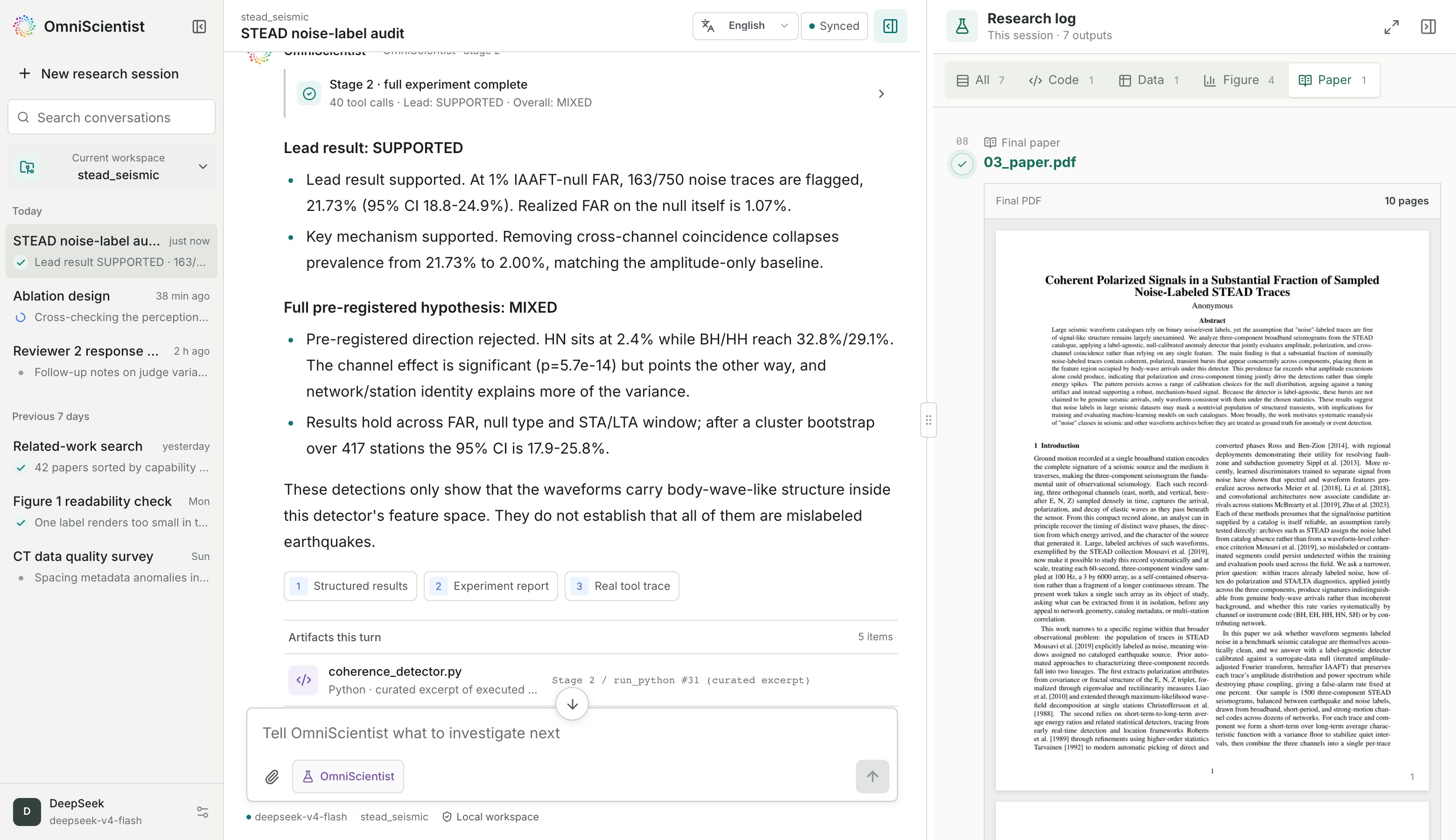
Citations are resolved live against OpenAlex and Crossref, so every one carries a real DOI instead of a hallucinated reference.What did one of the sample papers actually discover?In a demo run on STEAD seismic data, the agent found that 21.7% of traces labeled as pure 'noise' actually carried coherent polarized signal at a 1% false-alarm rate, testing this against a self-generated surrogate null distribution.
In a demo run on STEAD seismic data, the agent found that 21.7% of traces labeled as pure 'noise' actually carried coherent polarized signal at a 1% false-alarm rate, testing this against a self-generated surrogate null distribution.What is the workspace interface like?It's a local web app served at 127.0.0.1 with no external deployment; closing the browser tab doesn't stop a run, since research keeps going in the background and resumes on next launch.
It's a local web app served at 127.0.0.1 with no external deployment; closing the browser tab doesn't stop a run, since research keeps going in the background and resumes on next launch.What are similar projects?easyread, DeepAnalyze, open-science, openscience, unsloth, get-it, open-codesign, openpencil
easyread, DeepAnalyze, open-science, openscience, unsloth, get-it, open-codesign, openpencilWhich topics is it in?science, arxiv, bun, multimodal, academic-research, openai-compatible, data-science, skill, pdf, deepseek, anthropic, local-first
science, arxiv, bun, multimodal, academic-research, openai-compatible, data-science, skill, pdf, deepseek, anthropic, local-first