StyleGAN — Official TensorFlow Implementation




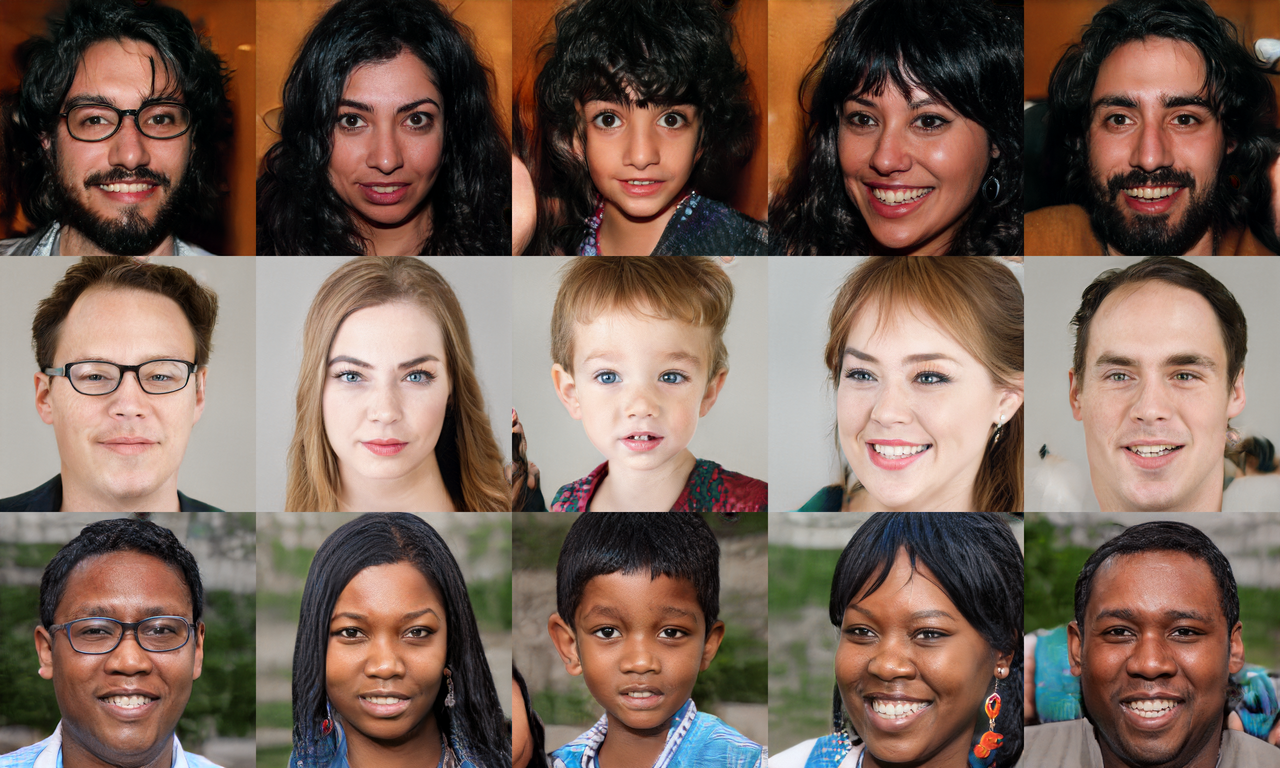 Picture: These people are not real – they were produced by our generator that allows control over different aspects of the image.
This repository contains the official TensorFlow implementation of the following paper:
A Style-Based Generator Architecture for Generative Adversarial Networks
Tero Karras (NVIDIA), Samuli Laine (NVIDIA), Timo Aila (NVIDIA)
https://arxiv.org/abs/1812.04948
Abstract: We propose an alternative generator architecture for generative adversarial networks, borrowing from style transfer literature. The new architecture leads to an automatically learned, unsupervised separation of high-level attributes (e.g., pose and identity when trained on human faces) and stochastic variation in the generated images (e.g., freckles, hair), and it enables intuitive, scale-specific control of the synthesis. The new generator improves the state-of-the-art in terms of traditional distribution quality metrics, leads to demonstrably better interpolation properties, and also better disentangles the latent factors of variation. To quantify interpolation quality and disentanglement, we propose two new, automated methods that are applicable to any generator architecture. Finally, we introduce a new, highly varied and high-quality dataset of human faces.
For business inquiries, please visit our website and submit the form: NVIDIA Research Licensing
★★★ NEW: StyleGAN2-ADA-PyTorch is now available; see the full list of versions here ★★★
Resources
Material related to our paper is available via the following links:
Additional material can be found on Google Drive:
Licenses
All material, excluding the Flickr-Faces-HQ dataset, is made available under Creative Commons BY-NC 4.0 license by NVIDIA Corporation. You can use, redistribute, and adapt the material for non-commercial purposes, as long as you give appropriate credit by citing our paper and indicating any changes that you've made.
For license information regarding the FFHQ dataset, please refer to the Flickr-Faces-HQ repository.
inception_v3_features.pkl and inception_v3_softmax.pkl are derived from the pre-trained Inception-v3 network by Christian Szegedy, Vincent Vanhoucke, Sergey Ioffe, Jonathon Shlens, and Zbigniew Wojna. The network was originally shared under Apache 2.0 license on the TensorFlow Models repository.
vgg16.pkl and vgg16_zhang_perceptual.pkl are derived from the pre-trained VGG-16 network by Karen Simonyan and Andrew Zisserman. The network was originally shared under Creative Commons BY 4.0 license on the Very Deep Convolutional Networks for Large-Scale Visual Recognition project page.
vgg16_zhang_perceptual.pkl is further derived from the pre-trained LPIPS weights by Richard Zhang, Phillip Isola, Alexei A. Efros, Eli Shechtman, and Oliver Wang. The weights were originally shared under BSD 2-Clause "Simplified" License on the PerceptualSimilarity repository.
System requirements
- Both Linux and Windows are supported, but we strongly recommend Linux for performance and compatibility reasons.
- 64-bit Python 3.6 installation. We recommend Anaconda3 with numpy 1.14.3 or newer.
- TensorFlow 1.10.0 or newer with GPU support.
- One or more high-end NVIDIA GPUs with at least 11GB of DRAM. We recommend NVIDIA DGX-1 with 8 Tesla V100 GPUs.
- NVIDIA driver 391.35 or newer, CUDA toolkit 9.0 or newer, cuDNN 7.3.1 or newer.
Using pre-trained networks
A minimal example of using a pre-trained StyleGAN generator is given in pretrained_example.py. When executed, the script downloads a pre-trained StyleGAN generator from Google Drive and uses it to generate an image:
> python pretrained_example.py
Downloading https://drive.google.com/uc?id=1MEGjdvVpUsu1jB4zrXZN7Y4kBBOzizDQ .... done

Gs                              Params    OutputShape          WeightShape
---                             ---       ---                  ---
latents_in                      -         (?, 512)             -
...
images_out                      -         (?, 3, 1024, 1024)   -
---                             ---       ---                  ---
Total                           26219627

> ls results
example.png # https://drive.google.com/uc?id=1UDLT_zb-rof9kKH0GwiJW_bS9MoZi8oP
A more advanced example is given in generate_figures.py. The script reproduces the figures from our paper in order to illustrate style mixing, noise inputs, and truncation:
> python generate_figures.py
results/figure02-uncurated-ffhq.png     # https://drive.google.com/uc?id=1U3r1xgcD7o-Fd0SBRpq8PXYajm7_30cu
results/figure03-style-mixing.png       # https://drive.google.com/uc?id=1U-nlMDtpnf1RcYkaFQtbh5oxnhA97hy6
results/figure04-noise-detail.png       # https://drive.google.com/uc?id=1UX3m39u_DTU6eLnEW6MqGzbwPFt2R9cG
results/figure05-noise-components.png   # https://drive.google.com/uc?id=1UQKPcvYVeWMRccGMbs2pPD9PVv1QDyp_
results/figure08-truncation-trick.png   # https://drive.google.com/uc?id=1ULea0C12zGlxdDQFNLXOWZCHi3QNfk_v
results/figure10-uncurated-bedrooms.png # https://drive.google.com/uc?id=1UEBnms1XMfj78OHj3_cx80mUf_m9DUJr
results/figure11-uncurated-cars.png     # https://drive.google.com/uc?id=1UO-4JtAs64Kun5vIj10UXqAJ1d5Ir1Ke
results/figure12-uncurated-cats.png     # https://drive.google.com/uc?id=1USnJc14prlu3QAYxstrtlfXC9sDWPA-W
The pre-trained networks are stored as standard pickle files on Google Drive:
# Load pre-trained network.
url = 'https://drive.google.com/uc?id=1MEGjdvVpUsu1jB4zrXZN7Y4kBBOzizDQ' # karras2019stylegan-ffhq-1024x1024.pkl
with dnnlib.util.open_url(url, cache_dir=config.cache_dir) as f:
    _G, _D, Gs = pickle.load(f)
    # _G = Instantaneous snapshot of the generator. Mainly useful for resuming a previous training run.
    # _D = Instantaneous snapshot of the discriminator. Mainly useful for resuming a previous training run.
    # Gs = Long-term average of the generator. Yields higher-quality results than the instantaneous snapshot.
The above code downloads the file and unpickles it to yield 3 instances of dnnlib.tflib.Network. To generate images, you will typically want to use Gs – the other two networks are provided for completeness. In order for pickle.load() to work, you will need to have the dnnlib source directory in your PYTHONPATH and a tf.Session set as default. The session can initialized by calling dnnlib.tflib.init_tf().
There are three ways to use the pre-trained generator:
Use Gs.run() for immediate-mode operation where the inputs and outputs are numpy arrays:
# Pick latent vector.
rnd = np.random.RandomState(5)
latents = rnd.randn(1, Gs.input_shape[1])

# Generate image.
fmt = dict(func=tflib.convert_images_to_uint8, nchw_to_nhwc=True)
images = Gs.run(latents, None, truncation_psi=0.7, randomize_noise=True, output_transform=fmt)
The first argument is a batch of latent vectors of shape [num, 512]. The second argument is reserved for class labels (not used by StyleGAN). The remaining keyword arguments are optional and can be used to further modify the operation (see below). The output is a batch of images, whose format is dictated by the output_transform argument.
Use Gs.get_output_for() to incorporate the generator as a part of a larger TensorFlow expression:
latents = tf.random_normal([self.minibatch_per_gpu] + Gs_clone.input_shape[1:])
images = Gs_clone.get_output_for(latents, None, is_validation=True, randomize_noise=True)
images = tflib.convert_images_to_uint8(images)
result_expr.append(inception_clone.get_output_for(images))
The above code is from metrics/frechet_inception_distance.py. It generates a batch of random images and feeds them directly to the Inception-v3 network without having to convert the data to numpy arrays in between.
Look up Gs.components.mapping and Gs.components.synthesis to access individual sub-networks of the generator. Similar to Gs, the sub-networks are represented as independent instances of dnnlib.tflib.Network:
src_latents = np.stack(np.random.RandomState(seed).randn(Gs.input_shape[1]) for seed in src_seeds)
src_dlatents = Gs.components.mapping.run(src_latents, None) # [seed, layer, component]
src_images = Gs.components.synthesis.run(src_dlatents, randomize_noise=False, **synthesis_kwargs)
The above code is from generate_figures.py. It first transforms a batch of latent vectors into the intermediate W space using the mapping network and then turns these vectors into a batch of images using the synthesis network. The dlatents array stores a separate copy of the same w vector for each layer of the synthesis network to facilitate style mixing.
The exact details of the generator are defined in training/networks_stylegan.py (see G_style, G_mapping, and G_synthesis). The following keyword arguments can be specified to modify the behavior when calling run() and get_output_for():
truncation_psi and truncation_cutoff control the truncation trick that that is performed by default when using Gs (ψ=0.7, cutoff=8). It can be disabled by setting truncation_psi=1 or is_validation=True, and the image quality can be further improved at the cost of variation by setting e.g. truncation_psi=0.5. Note that truncation is always disabled when using the sub-networks directly. The average w needed to manually perform the truncation trick can be looked up using Gs.get_var('dlatent_avg').
randomize_noise determines whether to use re-randomize the noise inputs for each generated image (True, default) or whether to use specific noise values for the entire minibatch (False). The specific values can be accessed via the tf.Variable instances that are found using [var for name, var in Gs.components.synthesis.vars.items() if name.startswith('noise')].
When using the mapping network directly, you can specify dlatent_broadcast=None to disable the automatic duplication of dlatents over the layers of the synthesis network.
Runtime performance can be fine-tuned via structure='fixed' and dtype='float16'. The former disables support for progressive growing, which is not needed for a fully-trained generator, and the latter performs all computation using half-precision floating point arithmetic.
Preparing datasets for training
The training and evaluation scripts operate on datasets stored as multi-resolution TFRecords. Each dataset is represented by a directory containing the same image data in several resolutions to enable efficient streaming. There is a separate *.tfrecords file for each resolution, and if the dataset contains labels, they are stored in a separate file as well. By default, the scripts expect to find the datasets at datasets/<NAME>/<NAME>-<RESOLUTION>.tfrecords. The directory can be changed by editing config.py:
result_dir = 'results'
data_dir = 'datasets'
cache_dir = 'cache'
To obtain the FFHQ dataset (datasets/ffhq), please refer to the Flickr-Faces-HQ repository.
To obtain the CelebA-HQ dataset (datasets/celebahq), please refer to the Progressive GAN repository.
To obtain other datasets, including LSUN, please consult their corresponding project pages. The datasets can be converted to multi-resolution TFRecords using the provided dataset_tool.py:
> python dataset_tool.py create_lsun datasets/lsun-bedroom-full ~/lsun/bedroom_lmdb --resolution 256
> python dataset_tool.py create_lsun_wide datasets/lsun-car-512x384 ~/lsun/car_lmdb --width 512 --height 384
> python dataset_tool.py create_lsun datasets/lsun-cat-full ~/lsun/cat_lmdb --resolution 256
> python dataset_tool.py create_cifar10 datasets/cifar10 ~/cifar10
> python dataset_tool.py create_from_images datasets/custom-dataset ~/custom-images
Training networks
Once the datasets are set up, you can train your own StyleGAN networks as follows:
- Edit train.py to specify the dataset and training configuration by uncommenting or editing specific lines.
- Run the training script with
python train.py.
- The results are written to a newly created directory
results/<ID>-<DESCRIPTION>.
- The training may take several days (or weeks) to complete, depending on the configuration.
By default, train.py is configured to train the highest-quality StyleGAN (configuration F in Table 1) for the FFHQ dataset at 1024×1024 resolution using 8 GPUs. Please note that we have used 8 GPUs in all of our experiments. Training with fewer GPUs may not produce identical results – if you wish to compare against our technique, we strongly recommend using the same number of GPUs.
Expected training times for the default configuration using Tesla V100 GPUs:
| GPUs |
1024×1024 |
512×512 |
256×256 |
| 1 |
41 days 4 hours |
24 days 21 hours |
14 days 22 hours |
| 2 |
21 days 22 hours |
13 days 7 hours |
9 days 5 hours |
| 4 |
11 days 8 hours |
7 days 0 hours |
4 days 21 hours |
| 8 |
6 days 14 hours |
4 days 10 hours |
3 days 8 hours |
Evaluating quality and disentanglement
The quality and disentanglement metrics used in our paper can be evaluated using run_metrics.py. By default, the script will evaluate the Fréchet Inception Distance (fid50k) for the pre-trained FFHQ generator and write the results into a newly created directory under results. The exact behavior can be changed by uncommenting or editing specific lines in run_metrics.py.
Expected evaluation time and results for the pre-trained FFHQ generator using one Tesla V100 GPU:
| Metric |
Time |
Result |
Description |
| fid50k |
16 min |
4.4159 |
Fréchet Inception Distance using 50,000 images. |
| ppl_zfull |
55 min |
664.8854 |
Perceptual Path Length for full paths in Z. |
| ppl_wfull |
55 min |
233.3059 |
Perceptual Path Length for full paths in W. |
| ppl_zend |
55 min |
666.1057 |
Perceptual Path Length for path endpoints in Z. |
| ppl_wend |
55 min |
197.2266 |
Perceptual Path Length for path endpoints in W. |
| ls |
10 hours |
z: 165.0106
w: 3.7447 |
Linear Separability in Z and W. |
Please note that the exact results may vary from run to run due to the non-deterministic nature of TensorFlow.
Acknowledgements
We thank Jaakko Lehtinen, David Luebke, and Tuomas Kynkäänniemi for in-depth discussions and helpful comments; Janne Hellsten, Tero Kuosmanen, and Pekka Jänis for compute infrastructure and help with the code release.

 NVIDIA 官方的 StyleGAN TensorFlow 实现。StyleGAN 是一种生成对抗网络,可以合成照片级逼真的图像——最出名的就是生成 1024x1024 的人脸,而这些人并不存在——并且能直观地控制姿态、身份等属性。