

stylegan README

The project's README from github.com/NVlabs/stylegan. As one markdown file: README.md.

StyleGAN — Official TensorFlow Implementation

Python 3.6 TensorFlow 1.10 cuDNN 7.3.1 License CC BY-NC

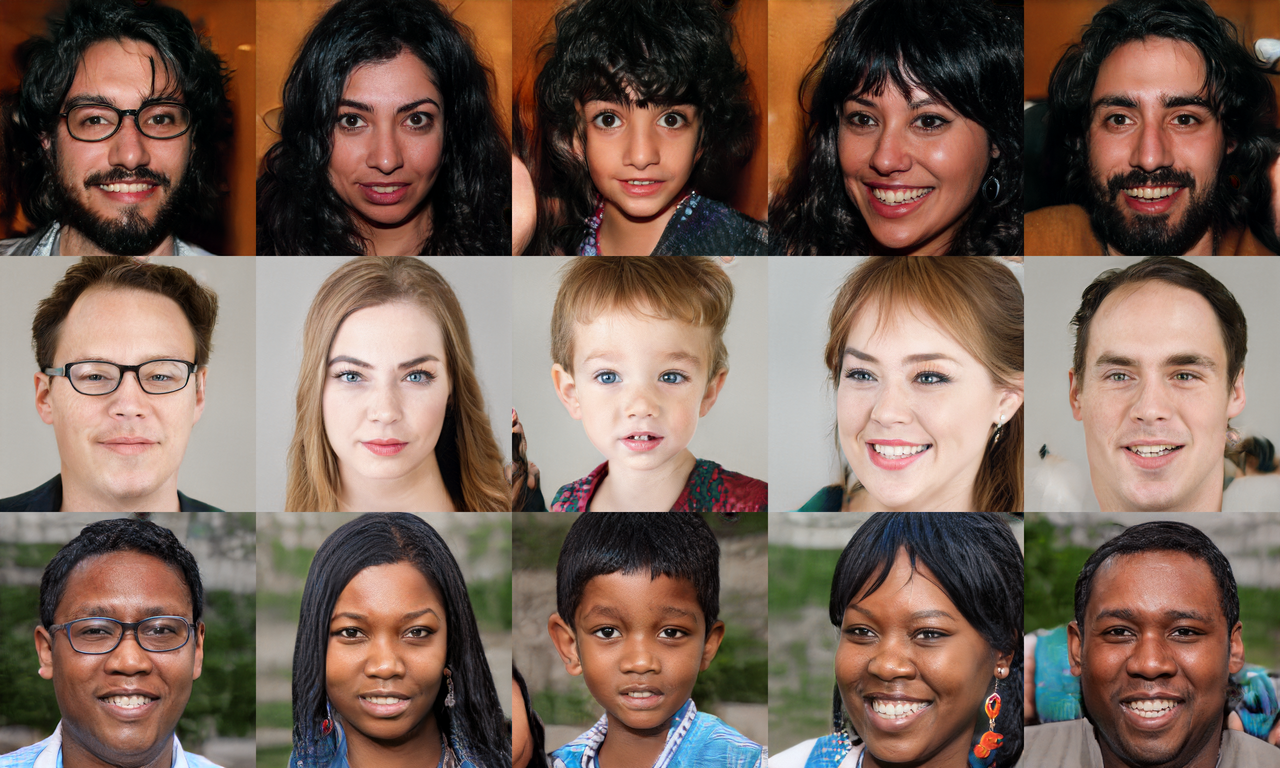
Teaser image Picture: These people are not real – they were produced by our generator that allows control over different aspects of the image.

This repository contains the official TensorFlow implementation of the following paper:

A Style-Based Generator Architecture for Generative Adversarial Networks
Tero Karras (NVIDIA), Samuli Laine (NVIDIA), Timo Aila (NVIDIA)
https://arxiv.org/abs/1812.04948

Abstract: We propose an alternative generator architecture for generative adversarial networks, borrowing from style transfer literature. The new architecture leads to an automatically learned, unsupervised separation of high-level attributes (e.g., pose and identity when trained on human faces) and stochastic variation in the generated images (e.g., freckles, hair), and it enables intuitive, scale-specific control of the synthesis. The new generator improves the state-of-the-art in terms of traditional distribution quality metrics, leads to demonstrably better interpolation properties, and also better disentangles the latent factors of variation. To quantify interpolation quality and disentanglement, we propose two new, automated methods that are applicable to any generator architecture. Finally, we introduce a new, highly varied and high-quality dataset of human faces.

For business inquiries, please visit our website and submit the form: NVIDIA Research Licensing

★★★ NEW: StyleGAN2-ADA-PyTorch is now available; see the full list of versions here ★★★

Resources

Material related to our paper is available via the following links:

Additional material can be found on Google Drive:

Path Description
StyleGAN Main folder.
├  stylegan-paper.pdf High-quality version of the paper PDF.
├  stylegan-video.mp4 High-quality version of the result video.
├  images Example images produced using our generator.
│  ├  representative-images High-quality images to be used in articles, blog posts, etc.
│  └  100k-generated-images 100,000 generated images for different amounts of truncation.
│     ├  ffhq-1024x1024 Generated using Flickr-Faces-HQ dataset at 1024×1024.
│     ├  bedrooms-256x256 Generated using LSUN Bedroom dataset at 256×256.
│     ├  cars-512x384 Generated using LSUN Car dataset at 512×384.
│     └  cats-256x256 Generated using LSUN Cat dataset at 256×256.
├  videos Example videos produced using our generator.
│  └  high-quality-video-clips Individual segments of the result video as high-quality MP4.
├  ffhq-dataset Raw data for the Flickr-Faces-HQ dataset.
└  networks Pre-trained networks as pickled instances of dnnlib.tflib.Network.
   ├  stylegan-ffhq-1024x1024.pkl StyleGAN trained with Flickr-Faces-HQ dataset at 1024×1024.
   ├  stylegan-celebahq-1024x1024.pkl StyleGAN trained with CelebA-HQ dataset at 1024×1024.
   ├  stylegan-bedrooms-256x256.pkl StyleGAN trained with LSUN Bedroom dataset at 256×256.
   ├  stylegan-cars-512x384.pkl StyleGAN trained with LSUN Car dataset at 512×384.
   ├  stylegan-cats-256x256.pkl StyleGAN trained with LSUN Cat dataset at 256×256.
   └  metrics Auxiliary networks for the quality and disentanglement metrics.
      ├  inception_v3_features.pkl Standard Inception-v3 classifier that outputs a raw feature vector.
      ├  vgg16_zhang_perceptual.pkl Standard LPIPS metric to estimate perceptual similarity.
      ├  celebahq-classifier-00-male.pkl Binary classifier trained to detect a single attribute of CelebA-HQ.
      └ ⋯ Please see the file listing for remaining networks.

Licenses

All material, excluding the Flickr-Faces-HQ dataset, is made available under Creative Commons BY-NC 4.0 license by NVIDIA Corporation. You can use, redistribute, and adapt the material for non-commercial purposes, as long as you give appropriate credit by citing our paper and indicating any changes that you've made.

For license information regarding the FFHQ dataset, please refer to the Flickr-Faces-HQ repository.

inception_v3_features.pkl and inception_v3_softmax.pkl are derived from the pre-trained Inception-v3 network by Christian Szegedy, Vincent Vanhoucke, Sergey Ioffe, Jonathon Shlens, and Zbigniew Wojna. The network was originally shared under Apache 2.0 license on the TensorFlow Models repository.

vgg16.pkl and vgg16_zhang_perceptual.pkl are derived from the pre-trained VGG-16 network by Karen Simonyan and Andrew Zisserman. The network was originally shared under Creative Commons BY 4.0 license on the Very Deep Convolutional Networks for Large-Scale Visual Recognition project page.

vgg16_zhang_perceptual.pkl is further derived from the pre-trained LPIPS weights by Richard Zhang, Phillip Isola, Alexei A. Efros, Eli Shechtman, and Oliver Wang. The weights were originally shared under BSD 2-Clause "Simplified" License on the PerceptualSimilarity repository.

System requirements

Using pre-trained networks

A minimal example of using a pre-trained StyleGAN generator is given in pretrained_example.py. When executed, the script downloads a pre-trained StyleGAN generator from Google Drive and uses it to generate an image:

> python pretrained_example.py
Downloading https://drive.google.com/uc?id=1MEGjdvVpUsu1jB4zrXZN7Y4kBBOzizDQ .... done

Gs                              Params    OutputShape          WeightShape
---                             ---       ---                  ---
latents_in                      -         (?, 512)             -
...
images_out                      -         (?, 3, 1024, 1024)   -
---                             ---       ---                  ---
Total                           26219627

> ls results
example.png # https://drive.google.com/uc?id=1UDLT_zb-rof9kKH0GwiJW_bS9MoZi8oP

A more advanced example is given in generate_figures.py. The script reproduces the figures from our paper in order to illustrate style mixing, noise inputs, and truncation:

> python generate_figures.py
results/figure02-uncurated-ffhq.png     # https://drive.google.com/uc?id=1U3r1xgcD7o-Fd0SBRpq8PXYajm7_30cu
results/figure03-style-mixing.png       # https://drive.google.com/uc?id=1U-nlMDtpnf1RcYkaFQtbh5oxnhA97hy6
results/figure04-noise-detail.png       # https://drive.google.com/uc?id=1UX3m39u_DTU6eLnEW6MqGzbwPFt2R9cG
results/figure05-noise-components.png   # https://drive.google.com/uc?id=1UQKPcvYVeWMRccGMbs2pPD9PVv1QDyp_
results/figure08-truncation-trick.png   # https://drive.google.com/uc?id=1ULea0C12zGlxdDQFNLXOWZCHi3QNfk_v
results/figure10-uncurated-bedrooms.png # https://drive.google.com/uc?id=1UEBnms1XMfj78OHj3_cx80mUf_m9DUJr
results/figure11-uncurated-cars.png     # https://drive.google.com/uc?id=1UO-4JtAs64Kun5vIj10UXqAJ1d5Ir1Ke
results/figure12-uncurated-cats.png     # https://drive.google.com/uc?id=1USnJc14prlu3QAYxstrtlfXC9sDWPA-W

The pre-trained networks are stored as standard pickle files on Google Drive:

# Load pre-trained network.
url = 'https://drive.google.com/uc?id=1MEGjdvVpUsu1jB4zrXZN7Y4kBBOzizDQ' # karras2019stylegan-ffhq-1024x1024.pkl
with dnnlib.util.open_url(url, cache_dir=config.cache_dir) as f:
    _G, _D, Gs = pickle.load(f)
    # _G = Instantaneous snapshot of the generator. Mainly useful for resuming a previous training run.
    # _D = Instantaneous snapshot of the discriminator. Mainly useful for resuming a previous training run.
    # Gs = Long-term average of the generator. Yields higher-quality results than the instantaneous snapshot.

The above code downloads the file and unpickles it to yield 3 instances of dnnlib.tflib.Network. To generate images, you will typically want to use Gs – the other two networks are provided for completeness. In order for pickle.load() to work, you will need to have the dnnlib source directory in your PYTHONPATH and a tf.Session set as default. The session can initialized by calling dnnlib.tflib.init_tf().

There are three ways to use the pre-trained generator:

  1. Use Gs.run() for immediate-mode operation where the inputs and outputs are numpy arrays:

    # Pick latent vector.
    rnd = np.random.RandomState(5)
    latents = rnd.randn(1, Gs.input_shape[1])
    
    # Generate image.
    fmt = dict(func=tflib.convert_images_to_uint8, nchw_to_nhwc=True)
    images = Gs.run(latents, None, truncation_psi=0.7, randomize_noise=True, output_transform=fmt)
    

    The first argument is a batch of latent vectors of shape [num, 512]. The second argument is reserved for class labels (not used by StyleGAN). The remaining keyword arguments are optional and can be used to further modify the operation (see below). The output is a batch of images, whose format is dictated by the output_transform argument.

  2. Use Gs.get_output_for() to incorporate the generator as a part of a larger TensorFlow expression:

    latents = tf.random_normal([self.minibatch_per_gpu] + Gs_clone.input_shape[1:])
    images = Gs_clone.get_output_for(latents, None, is_validation=True, randomize_noise=True)
    images = tflib.convert_images_to_uint8(images)
    result_expr.append(inception_clone.get_output_for(images))
    

    The above code is from metrics/frechet_inception_distance.py. It generates a batch of random images and feeds them directly to the Inception-v3 network without having to convert the data to numpy arrays in between.

  3. Look up Gs.components.mapping and Gs.components.synthesis to access individual sub-networks of the generator. Similar to Gs, the sub-networks are represented as independent instances of dnnlib.tflib.Network:

    src_latents = np.stack(np.random.RandomState(seed).randn(Gs.input_shape[1]) for seed in src_seeds)
    src_dlatents = Gs.components.mapping.run(src_latents, None) # [seed, layer, component]
    src_images = Gs.components.synthesis.run(src_dlatents, randomize_noise=False, **synthesis_kwargs)
    

    The above code is from generate_figures.py. It first transforms a batch of latent vectors into the intermediate W space using the mapping network and then turns these vectors into a batch of images using the synthesis network. The dlatents array stores a separate copy of the same w vector for each layer of the synthesis network to facilitate style mixing.

The exact details of the generator are defined in training/networks_stylegan.py (see G_style, G_mapping, and G_synthesis). The following keyword arguments can be specified to modify the behavior when calling run() and get_output_for():

Preparing datasets for training

The training and evaluation scripts operate on datasets stored as multi-resolution TFRecords. Each dataset is represented by a directory containing the same image data in several resolutions to enable efficient streaming. There is a separate *.tfrecords file for each resolution, and if the dataset contains labels, they are stored in a separate file as well. By default, the scripts expect to find the datasets at datasets/<NAME>/<NAME>-<RESOLUTION>.tfrecords. The directory can be changed by editing config.py:

result_dir = 'results'
data_dir = 'datasets'
cache_dir = 'cache'

To obtain the FFHQ dataset (datasets/ffhq), please refer to the Flickr-Faces-HQ repository.

To obtain the CelebA-HQ dataset (datasets/celebahq), please refer to the Progressive GAN repository.

To obtain other datasets, including LSUN, please consult their corresponding project pages. The datasets can be converted to multi-resolution TFRecords using the provided dataset_tool.py:

> python dataset_tool.py create_lsun datasets/lsun-bedroom-full ~/lsun/bedroom_lmdb --resolution 256
> python dataset_tool.py create_lsun_wide datasets/lsun-car-512x384 ~/lsun/car_lmdb --width 512 --height 384
> python dataset_tool.py create_lsun datasets/lsun-cat-full ~/lsun/cat_lmdb --resolution 256
> python dataset_tool.py create_cifar10 datasets/cifar10 ~/cifar10
> python dataset_tool.py create_from_images datasets/custom-dataset ~/custom-images

Training networks

Once the datasets are set up, you can train your own StyleGAN networks as follows:

  1. Edit train.py to specify the dataset and training configuration by uncommenting or editing specific lines.
  2. Run the training script with python train.py.
  3. The results are written to a newly created directory results/<ID>-<DESCRIPTION>.
  4. The training may take several days (or weeks) to complete, depending on the configuration.

By default, train.py is configured to train the highest-quality StyleGAN (configuration F in Table 1) for the FFHQ dataset at 1024×1024 resolution using 8 GPUs. Please note that we have used 8 GPUs in all of our experiments. Training with fewer GPUs may not produce identical results – if you wish to compare against our technique, we strongly recommend using the same number of GPUs.

Expected training times for the default configuration using Tesla V100 GPUs:

GPUs 1024×1024 512×512 256×256
1 41 days 4 hours 24 days 21 hours 14 days 22 hours
2 21 days 22 hours 13 days 7 hours 9 days 5 hours
4 11 days 8 hours 7 days 0 hours 4 days 21 hours
8 6 days 14 hours 4 days 10 hours 3 days 8 hours

Evaluating quality and disentanglement

The quality and disentanglement metrics used in our paper can be evaluated using run_metrics.py. By default, the script will evaluate the Fréchet Inception Distance (fid50k) for the pre-trained FFHQ generator and write the results into a newly created directory under results. The exact behavior can be changed by uncommenting or editing specific lines in run_metrics.py.

Expected evaluation time and results for the pre-trained FFHQ generator using one Tesla V100 GPU:

Metric Time Result Description
fid50k 16 min 4.4159 Fréchet Inception Distance using 50,000 images.
ppl_zfull 55 min 664.8854 Perceptual Path Length for full paths in Z.
ppl_wfull 55 min 233.3059 Perceptual Path Length for full paths in W.
ppl_zend 55 min 666.1057 Perceptual Path Length for path endpoints in Z.
ppl_wend 55 min 197.2266 Perceptual Path Length for path endpoints in W.
ls 10 hours z: 165.0106
w: 3.7447
Linear Separability in Z and W.

Please note that the exact results may vary from run to run due to the non-deterministic nature of TensorFlow.

Acknowledgements

We thank Jaakko Lehtinen, David Luebke, and Tuomas Kynkäänniemi for in-depth discussions and helpful comments; Janne Hellsten, Tero Kuosmanen, and Pekka Jänis for compute infrastructure and help with the code release.

stylegan (NVlabs/stylegan)

Searching Database…

14.4K ·GitHub
Что это такое?Официальная реализация StyleGAN от NVIDIA на TensorFlow — генеративно-состязательная сеть, которая синтезирует фотореалистичные изображения, и прежде всего знаменита лицами размером 1024x1024 несуществующих людей, с понятным управлением атрибутами вроде позы и внешности.
Это готовое приложение или код, который нужно запускать самому?Это исследовательский код, а не приложение: скрипты на Python плюс предобученные сети, сохранённые как pickle-файлы. Скрипты вроде 'pretrained_example.py' запускаются из командной строки — ни графического интерфейса, ни установщика нет.
Как сгенерировать первое изображение?Запустите 'pretrained_example.py': он скачает предобученный генератор с Google Drive и создаст изображение. Чтобы обучить свою сеть, конвертируйте датасет в TFRecords с помощью 'dataset_tool.py', отредактируйте 'train.py' и запустите его.
Что нужно установить, чтобы всё заработало?64-битный Python 3.6 (рекомендуется Anaconda3) с TensorFlow 1.10.0 или новее и поддержкой GPU, а также numpy 1.14.3+, драйвер NVIDIA 391.35+, CUDA 9.0+ и cuDNN 7.3.1+.
Что меня ждёт, если я захочу обучить свою модель?Готовьтесь к дням или неделям работы GPU: стандартная конфигурация 1024x1024 для FFHQ рассчитана на 8 GPU, а одной V100 понадобится около 41 дня. На меньшем числе GPU результат может ещё и не совпасть с тем, что в статье.
Работает на Windows или только на Linux?Поддерживаются и Linux, и Windows, но NVIDIA настоятельно рекомендует Linux ради производительности и совместимости.
Нужен ли интернет, чтобы пользоваться предобученными моделями?Да, хотя бы один раз: сети хранятся как pickle-файлы на Google Drive, и примерный скрипт скачивает одну из них при первом запуске. После этого генерация идёт локально на вашем GPU.
Могу ли я использовать это или созданные изображения в коммерческих целях?Нет — всё, кроме датасета FFHQ, распространяется по лицензии Creative Commons BY-NC 4.0: использование, распространение и переработка разрешены только в некоммерческих целях, со ссылкой на статью. У FFHQ отдельная собственная лицензия.
Насколько мощная нужна видеокарта?Производительная NVIDIA GPU минимум с 11 ГБ видеопамяти. Авторы обучали на Tesla V100 и рекомендуют DGX-1 с восемью такими картами; генерация с предобученными моделями гораздо легче, чем обучение.
Чем StyleGAN отличается от более ранних GAN-генераторов?Он берёт приёмы из style transfer: вспомогательная сеть (mapping network) превращает латентный вектор размерности 512 в стили для отдельных слоёв, поэтому атрибуты высокого уровня (поза, внешность) автоматически отделяются от случайных деталей (веснушки, волосы). Это даёт управление на каждом масштабе и более плавную интерполяцию, а в статье также представлен датасет лиц FFHQ и две автоматические метрики — качества интерполяции и разобщённости признаков.
Какие предобученные модели входят в проект?Pickle-файлы на Google Drive: лица FFHQ и CelebA-HQ в 1024x1024, спальни и коты из LSUN в 256x256, а также машины из LSUN в 512x384. Есть ещё 100 000 примеров сгенерированных изображений и вспомогательные сети для метрик качества из статьи.
Могу ли я управлять тем, как выглядит сгенерированное изображение?Да. Приём truncation trick (psi=0.7 по умолчанию) обменивает разнообразие на качество, шумовые входы можно заново рандомизировать для каждого изображения, а под-сети mapping и synthesis доступны по отдельности — можно подавать разные стили в разные слои.
Это самая новая версия StyleGAN?Нет. В README сказано, что уже доступна StyleGAN2-ADA-PyTorch — этот репозиторий остаётся оригинальной реализацией на TensorFlow 1.x, соответствующей статье 2019 года.
What are similar projects?GFPGAN, lama, Wav2Lip, pix2pix, stylegan2, ControlNet, yolov3, onnxruntime
Creator
NVlabs
Size
1.7 MB
Stars
14.4K
Updated
CommitOct 28
Age
7y
Commits · 90 Days
