





What is this?
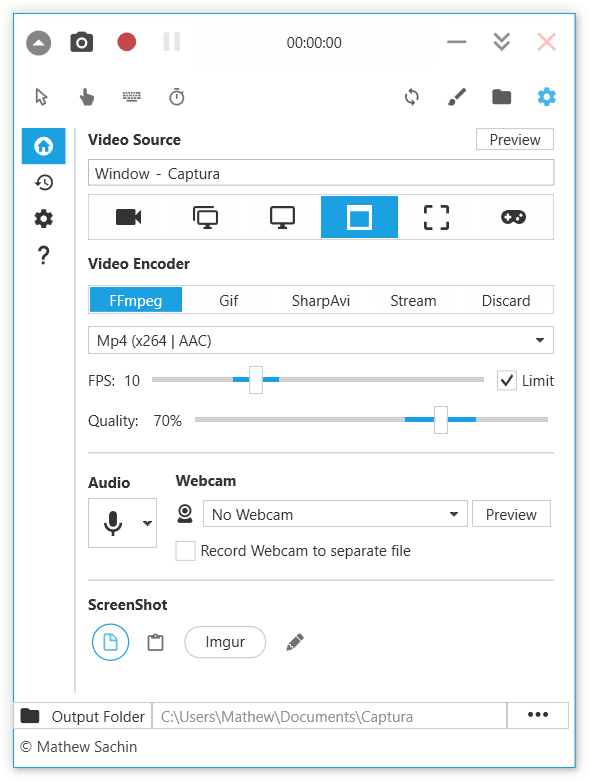
 Captura is a Windows desktop app for capturing your screen, audio, webcam, mouse clicks and keystrokes into screenshots or screencasts (Avi/Gif/Mp4).
Captura is a Windows desktop app for capturing your screen, audio, webcam, mouse clicks and keystrokes into screenshots or screencasts (Avi/Gif/Mp4).Is this a GUI app or a command-line tool?It's primarily a WPF desktop GUI app, but it also has a beta command-line interface for scripted recording.
It's primarily a WPF desktop GUI app, but it also has a beta command-line interface for scripted recording.Do I need anything extra installed to record video, like FFmpeg?Captura relies on FFmpeg for some video encoding features; there's a dedicated docs page for FFmpeg setup.
Captura relies on FFmpeg for some video encoding features; there's a dedicated docs page for FFmpeg setup.Is this still being actively developed?No, the repository is no longer actively maintained; the author has moved on to a browser-based successor called Captura Web Recorder that needs no installation.
No, the repository is no longer actively maintained; the author has moved on to a browser-based successor called Captura Web Recorder that needs no installation.Does it work on Mac or Linux too?No, Captura is a WPF application built specifically for Windows.
No, Captura is a WPF application built specifically for Windows.Can I capture just part of my screen?Yes, you can capture specific regions, individual screens, or specific windows rather than the whole display.
Yes, you can capture specific regions, individual screens, or specific windows rather than the whole display.Can it record audio along with video?Yes, it can mix audio recorded from both the microphone and the speaker output into the capture.
Yes, it can mix audio recorded from both the microphone and the speaker output into the capture.Can it overlay mouse clicks and keystrokes on the recording?Yes, it supports capturing and showing mouse clicks or keystrokes during a recording, along with configurable hotkeys.
Yes, it supports capturing and showing mouse clicks or keystrokes during a recording, along with configurable hotkeys.Is there a webcam recording option?Yes, Captura can capture video directly from a connected webcam.
Yes, Captura can capture video directly from a connected webcam.What are similar projects?ShareX, ScreenToGif, Recordly, Cap, Kap, KillerPDF, iPhoneMirror, openscreen
ShareX, ScreenToGif, Recordly, Cap, Kap, KillerPDF, iPhoneMirror, openscreenWhich topics is it in?chocolatey, record, screencast, capture, screen-recorder, recording, webcam, wpf, gif, screen-capture, screenshot, dotnet
chocolatey, record, screencast, capture, screen-recorder, recording, webcam, wpf, gif, screen-capture, screenshot, dotnet