dsh-commandcode-provider
English | 简体中文






Unofficial DeepSeek Harness LLM provider plugin for Command Code, ported from pi-commandcode-provider (MIT).
This is a community integration. You need your own Command Code account and API key or subscription, and Command Code's terms apply. This project is not affiliated with Command Code, Inc.
What you get
- Plugin bundle — install into any dsh profile with
dsh plugin add; registers a commandcode provider route with a live model catalog.
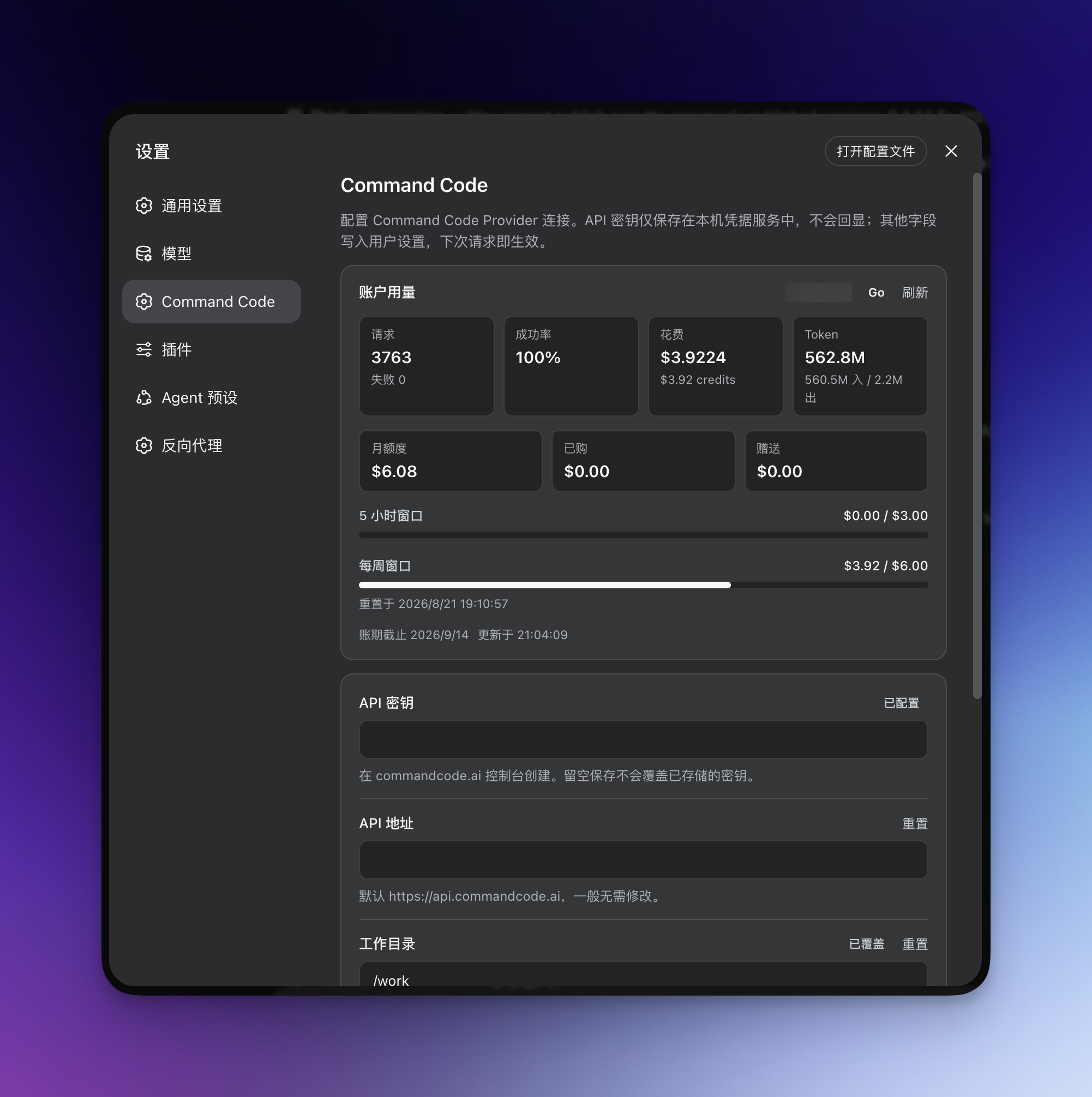
- Dedicated settings page — API key, connection options, a live account-usage card, and a "Hide out-of-plan models" toggle.
- Models-page key card — the Settings → Models → Command Code card carries the key status, a paste field, and the sign-in button inline.
- In-browser sign-in for keys — start the official authorization flow (the same one
cmd login runs) from the settings page; the approved key lands in the local credential service automatically. Manual paste remains the fallback.
- Multi-account rotation — when one account hits its usage limit, requests switch to the next account automatically. See Account rotation.
- Flexible API key setup — via the settings page, an environment variable, or the official CLI login file.
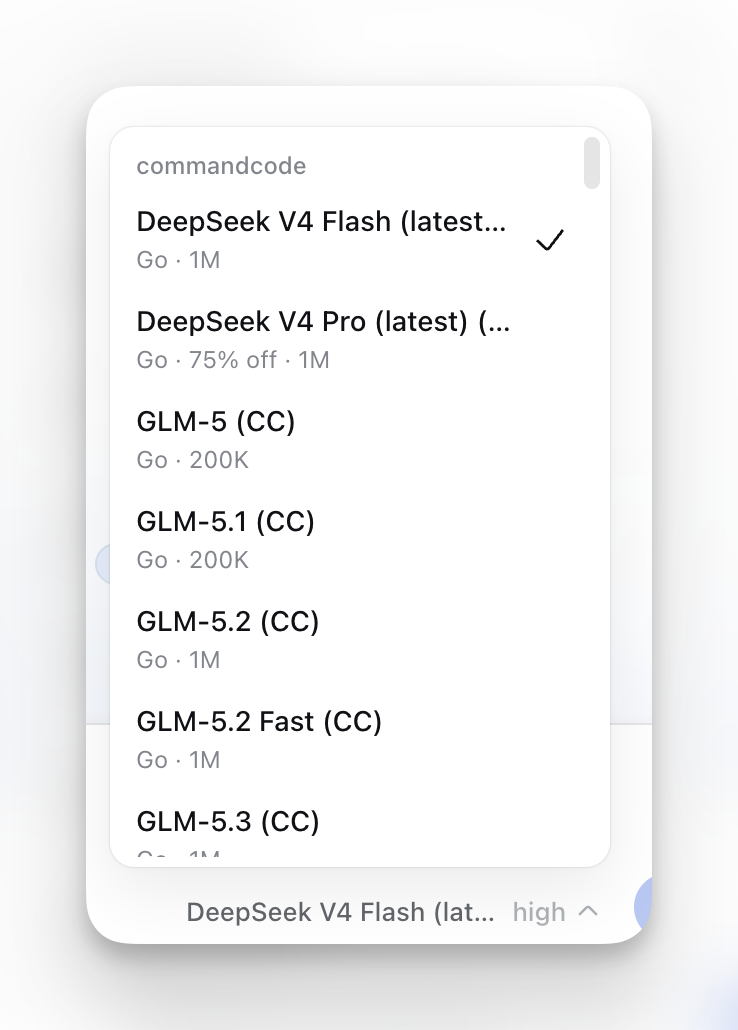
- Model-picker annotations — minimum plan, active deal or
FREE badge, peak/off-peak state, image support, and context window; free models listed first.
- Plan-aware picker — models above your subscription tier are hidden by default (toggleable); an optional Model allowlist keeps only your favorites in the picker.
- Reasoning-effort support — models with selectable reasoning effort levels expose them in the picker.
- Image input — Vision-capable models accept images.
- Web search — the dsh
web_search tool is backed by the Command Code Provider API (/alpha/web-search) with the same key/endpoint as chat, so no separate search key or base URL is needed. See Web search.
See Screenshots below for what the UI looks like.
Install
Pick the release line that matches your DeepSeek Harness version:
dsh 0.1.2-rc.1 or later (the current 0.1.2 line — what @latest installs today):
dsh plugin --profile web add @mars-sea/dsh-commandcode-provider@latest
Older dsh releases (the 0.5.0 line and earlier, which use the rc-era Host/browser APIs) — the last plugin version supporting them is 0.9.1, installed by exact version. That line is no longer under active maintenance:
dsh plugin --profile web add @mars-sea/[email protected]
The latest tag now always points at the current 0.1.2-line plugin release, so a plain @latest install gets the newest stable release for dsh 0.1.2+. Users on the old 0.5.0-era Harness line must pin @0.9.1 explicitly.
Fresh pnpm 10 marketplace generations are supported directly. Do not add a separate @deepseek-ai/dsh-invariants dependency; the plugin declares it as a Host peer so the active dsh profile remains the owner of Harness packages.
Updating
Update with the same tag you installed with:
dsh plugin --profile web update @mars-sea/dsh-commandcode-provider@latest     # dsh 0.1.2-rc.1+
dsh plugin --profile web update @mars-sea/[email protected]      # older dsh (0.5.0 line, unmaintained)
Then restart the web app.
Getting an API key
The easiest path is the official CLI (Node.js 22+):
npm i -g command-code@latest
cmd login        # macOS/Linux; native Windows: cmdc login
Or skip the CLI: click Sign in to Command Code under Settings → Command Code — your browser opens the commandcode.ai authorization page (the same flow cmd login uses) and the key is stored in the local credential service when you approve. You can still create a key on the Keys settings page and paste it into Settings → Command Code, or export COMMANDCODE_API_KEY="user_...".
The sign-in flow needs the Host and your browser on the same machine (loopback callback). With a remote Host, paste the key manually; a literal composition-level apiKey, if set, still takes precedence over a signed-in credential.
Verify it works
After restart, enter your API key in Settings → Command Code and save; Settings → Models shows a Command Code card, and the model picker lists the live catalog under commandcode. Send a message with a model your plan includes.
Usage dashboard
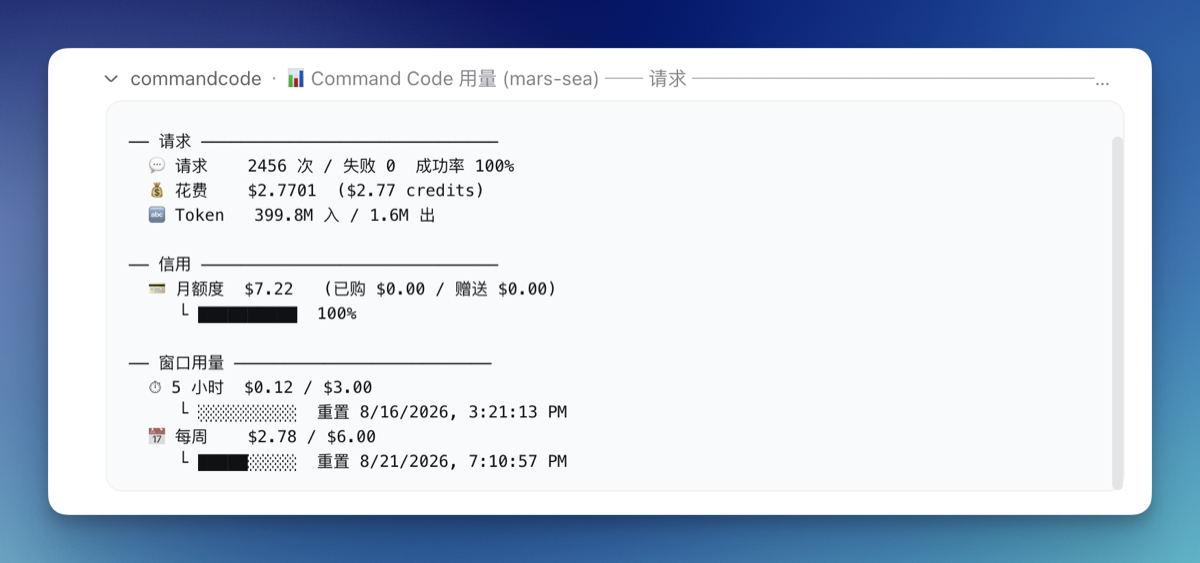
The plugin registers a /commandcode slash command showing per-account usage:
/commandcode (or /commandcode status)
The command's user-facing copy follows the shell's locale: explicit lang: 'en' | 'zh' in the llm-commandcode plugin config wins, otherwise LC_ALL/LANG is read, otherwise it falls back to zh. The web settings page is independent — it follows the browser's language preference on its own.
Account rotation
With several Command Code subscriptions, the plugin switches to the next account automatically when one hits its usage limit:
- Setup — use the Account rotation card at Settings → Command Code to add accounts with a label and API key; the top-level key always serves first as the
default account.
- Manual switching — the Active account dropdown pins a preferred account; if it is exhausted, requests fall back to other accounts and return once its window resets.
- Route models to accounts — the Route models to accounts card picks catalog models (multi-select, fetched from the live catalog) and routes them to an account. A request whose model is in a rule serves from that account while it is usable; an exhausted or invalid routed account falls back to the normal rotation. Rules match in list order — the first hit wins.
- Show only favorite models — the Model allowlist card keeps only the checked models in the model picker; unchecked shows all (the default).
- Status — the Account usage card and
/commandcode report per-account state.
The equivalent YAML ($DSH_HOME/settings.yaml or composition config):
llm-commandcode:
  apiKeyEnv: COMMANDCODE_API_KEY        # first (default) account
  activeAccount: COMMANDCODE_API_KEY_2   # optional: pin the active account (`default` or an account's credential ref)
  accounts:                              # rotation order after it
    - label: Go #2
      apiKeyEnv: COMMANDCODE_API_KEY_2
    - label: Go #3
      apiKeyEnv: COMMANDCODE_API_KEY_3
  modelAccountRules:                     # optional: route models to accounts (first match wins)
    - models:                            # catalog model ids (multi-select)
        - deepseek/deepseek-v4-pro
        - deepseek/deepseek-v4-flash-vision-exp
      account: COMMANDCODE_API_KEY_2
    - models:
        - tencent/hy4-preview
      account: default
  visibleModels:                       # optional: show only these models in pickers (catalog model ids); unset shows all
    - deepseek/deepseek-v4-pro
    - tencent/hy4-preview
Settings → Command Code covers the API key, API base URL, working directory, and request/stream timeouts; once a key is saved, a live Account usage card appears at the top of the page.
The same options live in $DSH_HOME/settings.yaml (changes apply immediately, no restart):
llm-commandcode:
  apiKeyEnv: COMMANDCODE_API_KEY   # credential reference
  apiBase: https://api.commandcode.ai
  workingDir: /path/to/project     # optional
  modelsCachePath: ~/.commandcode/models-cache.json
  requestTimeoutMs: 60000          # default 60s
  streamIdleTimeoutMs: 300000      # default 300s
Web search
When your deployment's dsh shell mounts the web capability (@deepseek-ai/dsh-web + @deepseek-ai/dsh-tool-web), the model's web_search tool is served by this plugin's commandcode search provider — it calls the Command Code Provider API's /alpha/web-search endpoint with the same API key and base URL as chat. You do not configure a separate search key, endpoint, or model.
On by default. The plugin's Settings → Command Code page has a "Serve dsh web search with Command Code" toggle (webSearch, default on). When on, the plugin selects commandcode as the active search backend automatically; turn it off to hand the selection back to whichever backend was there before (a sibling search plugin such as modsearch keeps working — it is never forced back to dsh's shipped DeepSeek search). The toggle takes effect on the next search — no restart needed.
- The provider registers as
commandcode on ctx.web only when the web service is present; without it this stays a chat-only plugin.
- The toggle works by selecting
commandcode in the web seam at boot and on every settings change, remembering the backend it displaced; turning the toggle off (or unloading the plugin) restores that backend. If you'd rather pin it durably, set searchProvider: commandcode (or $DSH_WEB_SEARCH_PROVIDER=commandcode); that remains effective even if this plugin's runtime selection is unavailable.
numResults from the dsh tool is clamped to the Command Code range (1–10, default 5); results map to the dsh WebSearchSource shape (url/title/snippet).
This reuses the Command Code Provider API directly (like the official CLI's built-in web_search), so it is distinct from a DeepSeek-native search backend.
Notes & limitations
- Image input is model-gated — only Vision models accept images; text-only models refuse them.
- Switching to a text-only model in an image-bearing session is rejected by dsh — pick a model marked
Image or remove the images first.
- No
stop sequences — requests carrying one fail.
- On the legacy
/alpha/generate transport, reasoning blocks are not replayed into later turns; on the /provider/v1/chat/completions transport, historical reasoning is passed back as reasoning_content so tool-calling loops can keep their chain of thought. Only tool calls with a paired tool result are replayed on both transports.
- The model catalog is browsable without a key; chat requests need one.
Permissions & privacy
The plugin only communicates between your local dsh profile and your Command Code account: locally it touches only the credential store and the models cache (plus ~/.commandcode/auth.json as a last-resort fallback); on the network it calls only the Command Code API. No telemetry.
Disabling / uninstalling
Disable without removing: edit your profile's cordis.patch.yml and comment out (or remove) the llm-commandcode row, or set disabled: true, then restart.
Uninstall completely:
dsh plugin --profile web remove @mars-sea/dsh-commandcode-provider
Your API key in the dsh credential store and ~/.commandcode/auth.json are left untouched.
Development
npm install
npm run typecheck   # tsc --noEmit
npm run build       # tsdown -> lib/
To try a local build in a profile:
dsh plugin --profile web add /path/to/dsh-commandcode-provider
After changing src/, re-run npm run build and restart the app.
License
MIT — see LICENSE. Portions ported from pi-commandcode-provider (MIT).
Screenshots
Model picker — plan tier, deal/FREE, peak/off-peak, Image and context annotations:
Usage dashboard — /commandcode per-account report:
Settings page — API key, connection knobs, account rotation and the live account-usage card:


 This is an unofficial plugin that adds Command Code as an LLM provider inside DeepSeek Harness (dsh), giving dsh access to Command Code's live model catalog, plan-aware model selection, reasoning effort control, image input, web search, and multi-account support.