Holo Card
A Codex skill and optional local API service for turning supplied artwork into interactive holographic cards with foreground parallax, a moving background, and adjustable contour glow.
Creative inspiration: @乌托邦的香蕉 — the same handle on Xiaohongshu (小红书) and Bilibili (B站). This project is an independent implementation; attribution does not imply endorsement.
Demo
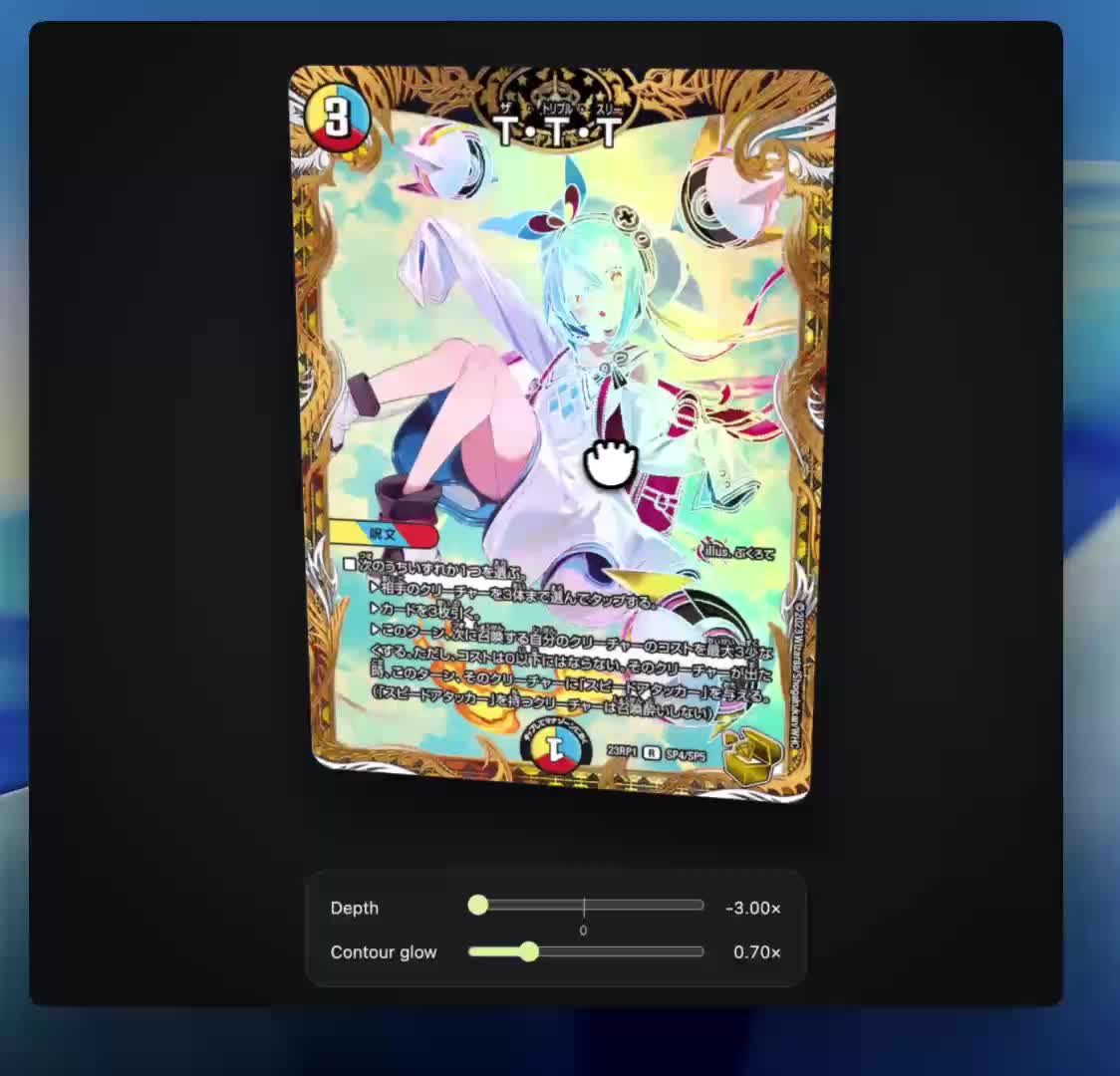
Watch or download the demo recording. The recording is a user-provided demonstration; artwork belongs to its respective owners.
Quick start: trigger the skill
After installing, start a new Codex task, attach your card image, and send:
$holo-card Turn this image into an interactive holographic card.
Chinese prompt (also supported):
$holo-card 把这张图做成光栅卡
$holo-card invokes the installed skill. Attach the actual image in the same task. If it is not found, check ~/.codex/skills/holo-card/SKILL.md and start a fresh task. Installation instructions follow.
Install the skill
Use the current installation package, or clone the current main branch (update an existing clone with git pull --ff-only):
git clone https://github.com/LerSent001/holo-card.git
python3 holo-card/scripts/install-skill.py
python3 -m pip install Pillow
The installer replaces the existing holo-card package, removes obsolete packaged files, and verifies every installed file. It does not create nested skill directories or retain discoverable backup versions. Treat the installation as managed files; keep your own card outputs elsewhere. Run the same installer after pulling updates. Start a fresh Codex task after installation so already-loaded instructions are refreshed. Attach your image and ask:
$holo-card Turn this image into an interactive holographic card.
Codex uses its built-in image tool; no Gemini key or API server is required. The runtime must provide image generation, Python/Pillow, filesystem access and a browser preview. Availability depends on your Codex environment.
What happens
- Save the original and normalize orientation without cropping.
- Generate a continuous colored foreground, repairing artwork hidden by lettering.
- Reconstruct a complete opaque background, including areas hidden by the foreground and border.
- Extract text, symbols and the decorative frame together as one colored UI layer.
- Expect colored checkerboard-matte outputs, prepare their local alpha masks, and repair only confirmed matte regions; do not mask every element or erase white artwork globally.
- Generate aligned structural contours, assemble an offline HTML card and ZIP, and inspect the result in a local browser.
The local helper does not generate or segment images by itself. It saves jobs, validates/imports layers, optionally applies a supplied alpha correction and assembles them. Source pixels hidden by overlays cannot be recovered exactly; inpainting is an approximation. Generated lettering, shape alignment and alpha edges still need visual review.
Controls
- Drag to rotate; click or press Enter/Space to flip.
- Arrow keys adjust the card angle.
- Depth: -3 to +3, default 0 at the center. Negative/positive changes foreground parallax direction. Text and frame always remain above the foreground.
- Contour glow: 0 to 3, default 0.15. Zero disables contour light. Emission and bloom are restricted to structural contour coverage; glow does not spill into the background.
- Background texture moves independently of the card's CSS rotation.
Local commands
python3 skills/holo-card/scripts/native.py prepare --source /path/card.png --output /path/new-job --name 'My Card'
# Use the native image tool, inspect its outputs, then import each layer:
python3 skills/holo-card/scripts/native.py add --job /path/new-job --kind character --image /path/character.png
# Repeat for background, ui and structure.
python3 skills/holo-card/scripts/native.py assemble --job /path/new-job
python3 -m http.server 8795 --bind 127.0.0.1 --directory /path/new-job
Open the loopback URL printed by your server. index.html is also self-contained for offline use. card.zip contains the HTML, layers and provenance. Use status --job ... before reading a saved job’s prompts: it refreshes them from the current helper. Old mask-only native jobs are rejected instead of silently using legacy extraction. Successful assembly is not proof of visual fidelity.
Edge cases
| Situation |
Handling |
| Native image safety refusal |
Stop the refused generation and record the error. Do not rephrase or switch providers to bypass it. Contact provider support for an apparent false positive, or use different permitted material. |
| No native image capability |
An independently selected API workflow is available; see below. This is not a safety-refusal bypass. |
| Baked checkerboard instead of Alpha |
Inspect alpha values, then clean only confirmed contaminated background regions. Protect white clothing, highlights and glyphs. Local code does not automatically solve this. |
| Existing valid transparency |
Preserve it; no additional full-element mask is needed. |
| Text overlaps foreground |
Remove it from the foreground and repair underlying artwork. Keep typography only in the combined UI layer. |
| Frame and text overlap |
Keep both in one UI layer, above the foreground at every depth. |
| Missing background |
Inpaint the full opaque plate before parallax. No holes or retained glyphs. |
| Layer moved or changed scale |
Align explicitly or reject it. Do not silently crop/stretch or claim an exact extraction. |
| Glow obscures details |
Reduce glow and inspect without emission; fix alignment rather than hiding defects. |
| Paid API timeout or uncertain submission |
Reuse the existing idempotency key and inspect status. Never automatically start another paid job. |
Optional API service
API setup · Agent/client workflow · OpenAPI
The service requires Node.js 24+, pnpm, a provider key and explicit paid-call authorization. Keep keys in private local files, not chat or generated artifacts. Configuration and upload do not start generation. It binds to loopback by default; no hosted endpoint is supplied.
Current limitation: the API uses legacy four-mask extraction and does not implement the native colored-layer inpainting workflow. Its tests use a mock provider; they do not prove live provider availability, billing, or visual quality. Do not treat it as an automatic fallback for a native refusal.
Verification
python3 -m unittest discover -s skills/holo-card/tests
cd packages/holo-card-api
pnpm install --frozen-lockfile
node --test test/*.test.mjs
Scope and rights
The package contains code and a navy-and-gold card back generated from a user-supplied visual reference. See the bundled artwork notice for provenance and rights. Source card images, credentials, caches and job histories are excluded; the user-provided demo recording is included. Use artwork you are entitled to process and share. This is a layered 2D parallax renderer, not reconstructed 3D geometry. The project is provided under the MIT license; third-party dependencies retain their own licenses.
Mobile preview and immersive mode
Generated cards support touch dragging, tap-to-flip, optional motion controls, and recentering. Enable motion requests browser permission on supported phones; device orientation is preferred, with gravity-based tilt as a fallback. Depth and contour glow remain independent on each device. The eye icon at the top right hides the controls and enlarges the centered card; tap it again or press Escape to exit.
Motion requires a secure browser context. Host the generated HTML at an HTTPS URL, or use an account-free temporary HTTPS tunnel to your local preview server. No OpenAI login is required by the viewer itself; authentication depends on the chosen host. Temporary tunnels require the local computer and preview server to remain online.
For a phone-preview QR entry, install the optional Python qrcode dependency and assemble with the actual destination URL:
python3 -m pip install qrcode
python3 skills/holo-card/scripts/native.py assemble --job /path/to/card-job --preview-url https://your-preview.example/card
Upload the resulting HTML to that same URL. This command embeds the link and QR code; it does not provision hosting. Phone/browser permission behavior still needs real-device validation.
Native matte handling
Native image generation is not required to return an alpha channel. Character/UI images on a checkerboard matte enter a local mask-preparation stage. The importer saves opaque inputs as needs_alpha_mask with a next action, rather than treating missing alpha as a terminal failure. Prepare a spatially verified grayscale mask and use apply-alpha to continue. The helper does not infer the mask automatically. Inspect color layers with glow disabled; reject duplicated subjects in the background and text/scenery in the structural contour layer.
Matte region repair
The skill includes a matte selection procedure and a Pillow-only seeded-region helper. It removes only explicitly selected candidate components, respects protected artwork, preserves detached foreground details and existing alpha, and uses no example-card coordinates. Candidate identification and soft-edge refinement still require visual inspection. This update does not resolve generated geometry drift, fine-text fidelity, contour alignment or the missing all-effects-off inspection control.

 Holo Card 是一个 Codex 技能(附带可选的本地 API 服务),把提供的美术图变成一张具有前景视差、动态背景和可调轮廓辉光的交互式全息卡片,并打包成一个自包含的离线 HTML 页面。