
Asspp README

项目的 README,来自 github.com/Lakr233/Asspp。合并为一个 markdown 文件:README.md。

Asspp

The Ultimate Multi-Region App Store Manager.

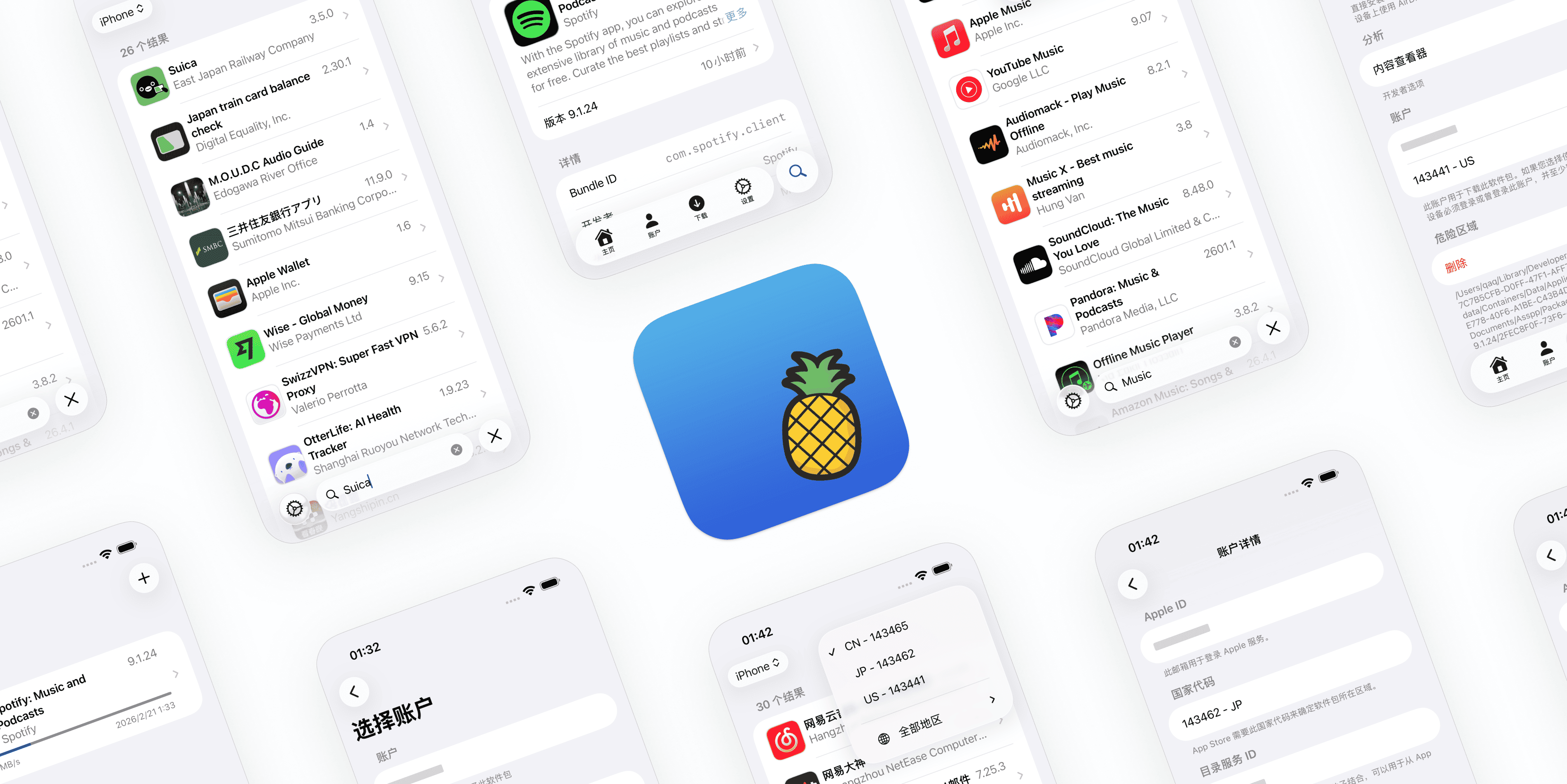
Asspp is a powerful client designed for users who need to manage multiple Apple IDs across different countries and regions. Switch stores instantly, download apps from anywhere, and manage your IPA library—all without logging out of your device.

简体中文 🇨🇳

Preview

✨ Why Asspp?

📥 Installation

iOS

Fork this repository to automatically build and sign the app with your own developer certificate. This gives you a permanent OTA installation link that stays up-to-date with the latest changes.

👉 Setup Guide

Option 2: Manual Install

  1. Download the latest .ipa from Releases.
  2. Sign and install using your preferred tool (e.g., SideStore, AltStore, TrollStore, or other signing service).

macOS

  1. Download the latest .zip from Releases.

  2. Unzip and move Asspp.app to your Applications folder.

  3. First Run and Trusting the App (Recommended):

    1. Try double-clicking to open the app. If you see "App can’t be opened because the developer cannot be verified" or a similar message:
      • In Finder, locate Asspp.app, Control-click (or right-click) the app and choose Open, then click Open again in the dialog. This will create a one-time trust exception for the app.
    2. If Control-clicking does not work or the app is still blocked:
      • Open System Settings -> Privacy & Security (or System Preferences -> Security & Privacy on older macOS). In the General/Security section, look for the blocked app and click Open Anyway or Allow. You may need to enter an administrator password.
    3. Recommendation: Download from this repository's Releases and verify the release details to ensure the source is trusted before trusting and opening the app.

    These steps follow macOS Gatekeeper practices and help minimize security risks while allowing you to run unsigned or self-signed apps.

🛠 Requirements

🚨 Special Notice

Asspp utilizes the same underlying communication protocol as ipatool. According to community speculation (unverified), previous outages of this protocol were likely caused by:

  1. Widespread usage triggering Apple's risk control mechanisms.
  2. Protocol modifications following the patching of an iCloud security vulnerability.
  3. Adjustments to Apple's front-end gateways, which now enforce stricter traffic allocation and request validation.

Given the increasingly strict management of these APIs, if the protocol becomes invalid again in the future, this project may not be able to provide further fixes.

⚠️ Important Security Warnings:

  1. Protect your GUID: Please treat your device GUID as a highly sensitive password. Never share or leak it to anyone.
  2. Do NOT use your primary Apple ID: We strongly advise using a secondary or burner account with this tool. If your account is banned by Apple, it could potentially result in an unremovable Activation Lock on your device (while there are no confirmed cases of this happening yet, we cannot make any guarantees).

⚠️ Disclaimer

This project is for educational and research purposes only. It is not affiliated with Apple Inc. Use at your own risk.

🥰 Acknowledgments

ipatool-ios and localhost.direct are no longer used in the project.

📄 License

MIT License. See LICENSE for details.

Sponsor

LookInside helps you inspect a running iOS or macOS app UI from your Mac.


Copyright © 2025 Lakr Aream. All Rights Reserved.

Fable 5 Verified

Asspp (Lakr233/Asspp)

正在搜索数据库…

6.2K ·GitHub
这是什么?Asspp 是一款客户端应用,可让你在多个 Apple ID 之间切换,管理不同 App Store 地区的账户。这样无需退出并切换系统账户,就能浏览、搜索和下载任意国家或地区商店中的应用。
这是装在手机上的应用,还是需要在电脑上运行的工具?这是一款可直接安装在 iOS 或 macOS 上的原生应用,而不是通过远程方式与手机通信的桌面工具。
如何在 iOS 或 Mac 上安装?在 iOS 上,可以 fork 该仓库,使用自己的证书进行自动构建和签名(可获得永久的 OTA 链接);也可以从 Releases 手动下载 .ipa 文件,再用 SideStore、AltStore、TrollStore 等工具签名。在 macOS 上,从 Releases 下载 .zip 文件,解压后将 Asspp.app 移到“应用程序”文件夹,然后右键选择“打开”,以绕过 Gatekeeper 对未验证开发者的警告。
使用这款应用需要 Apple ID 吗?需要。应用会直接与 Apple 的 App Store 接口通信,因此必须有 Apple ID。
用我的主 Apple ID 来使用它安全吗?不安全。README 强烈建议不要使用主 Apple ID,因为账户被封禁可能会导致设备上出现无法移除的激活锁;同时也提醒切勿泄露设备 GUID。此外,由于 Apple 不断收紧限制,底层协议随时可能再次失效。
需要什么系统版本?需要 iOS 17.0 或更高版本,或 macOS 15.0 或更高版本。
授权方面有什么需要注意的吗?该项目采用 MIT 许可证,除标准 MIT 条款外没有其他限制。
能下载应用的旧版本,而不只是最新版吗?可以。Asspp 允许你查找并下载应用的历史版本,而不仅限于当前版本。
Apple 的下载协议有一天可能会失效,为什么?Asspp 使用与 ipatool 相同的协议。作者推测过去的故障是由于高频使用触发了 Apple 的风控机制、iCloud 安全补丁,或更严格的网关流量验证所致。如果再次失效,可能无法修复。
这是 Apple 的官方产品吗?不是。该项目明确与 Apple 无关,仅用于教育和研究目的,使用风险需自行承担。
通过 Asspp 下载的 IPA 能用于侧载吗?可以。它直接从 Apple 服务器下载官方签名的 IPA,可用于备份或侧载。
作者
Lakr233
大小
10.6 MB
星标
6.2K
时长
2年
提交 · 90 天