15.7K ·GitHub
What is this?
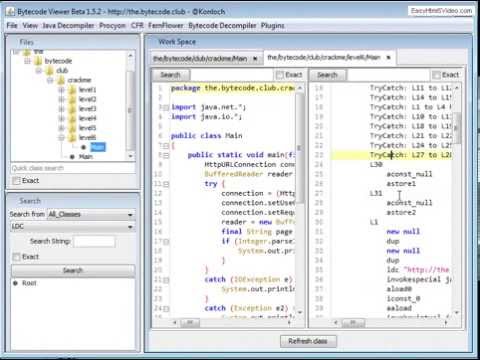
 Bytecode Viewer (BCV) is a lightweight Java/Android reverse engineering suite: drag in a Jar or APK and it decompiles, disassembles, searches and debugs it, powered by several open source tools.
Bytecode Viewer (BCV) is a lightweight Java/Android reverse engineering suite: drag in a Jar or APK and it decompiles, disassembles, searches and debugs it, powered by several open source tools.Is this a desktop app or something I use in the browser?It's a desktop application written entirely in Java with a full GUI (dark mode by default), not a web service — you run it locally. It also accepts command line input.
It's a desktop application written entirely in Java with a full GUI (dark mode by default), not a web service — you run it locally. It also accepts command line input.How do I get it running?Download the latest Bytecode-Viewer jar and run it (via java -jar if double-clicking doesn't work); you need a Java 8+ runtime. To build from source, clone the repo and run mvn package.
Download the latest Bytecode-Viewer jar and run it (via java -jar if double-clicking doesn't work); you need a Java 8+ runtime. To build from source, clone the repo and run mvn package.Any gotchas with big files or on Windows?Large inputs can exhaust the heap — relaunch with more RAM, e.g. java -Xmx3G -jar BCV.jar. On Windows you may need to Unblock the jar in its properties, and APK permission errors require running as administrator.
Large inputs can exhaust the heap — relaunch with more RAM, e.g. java -Xmx3G -jar BCV.jar. On Windows you may need to Unblock the jar in its properties, and APK permission errors require running as administrator.Which languages is the interface translated into?Over 30, including Arabic, German, Japanese, Mandarin, Russian and Spanish. Dark mode is on by default with multiple themes, and if the UI lags you can switch to your system theme in the visual settings.
Over 30, including Arabic, German, Japanese, Mandarin, Russian and Spanish. Dark mode is on by default with multiple themes, and if the UI lags you can switch to your system theme in the visual settings.Is it useful for malware analysis?Yes — it ships a malicious code scanning API, and the plugin system is designed for exactly this kind of work, like writing malicious code searchers or string deobfuscators that run over every loaded class.
Yes — it ships a malicious code scanning API, and the plugin system is designed for exactly this kind of work, like writing malicious code searchers or string deobfuscators that run over every loaded class.What's new in recent releases?Recent versions added jump-to-declaration, draggable tabs, a Plugin Writer for creating plugins inside BCV, a Javap disassembler, XAPK support, JDK 13+ file support and a fix for CVE-2022-21675 — make sure you're on v2.11.X.
Recent versions added jump-to-declaration, draggable tabs, a Plugin Writer for creating plugins inside BCV, a Javap disassembler, XAPK support, JDK 13+ file support and a fix for CVE-2022-21675 — make sure you're on v2.11.X.Which topics is it in?bytecode, malware, debugger, decompiler, apk, static-analysis, compiler, editor, reverse-engineering, java, hacktoberfest, android
bytecode, malware, debugger, decompiler, apk, static-analysis, compiler, editor, reverse-engineering, java, hacktoberfest, android