






What is this?
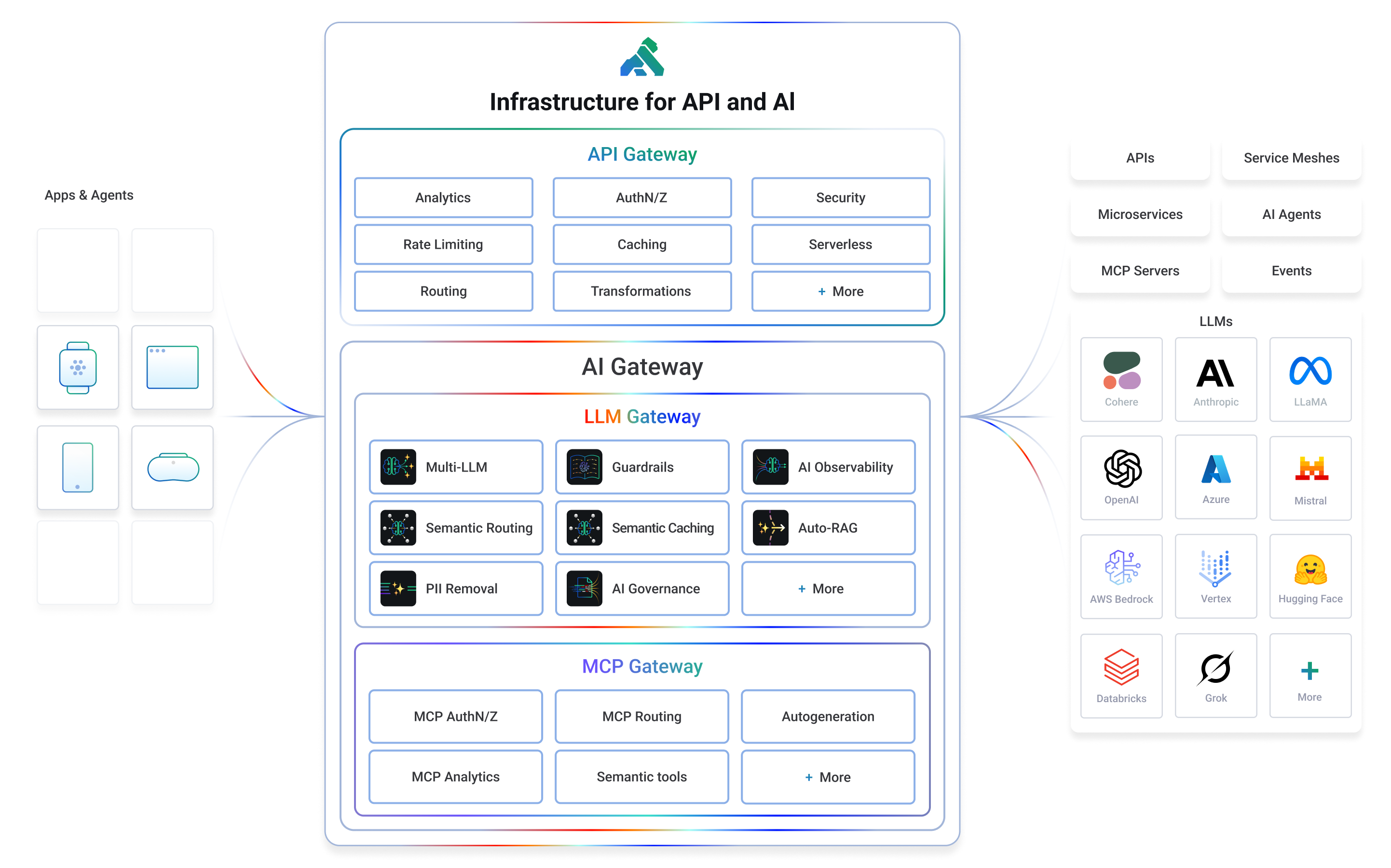
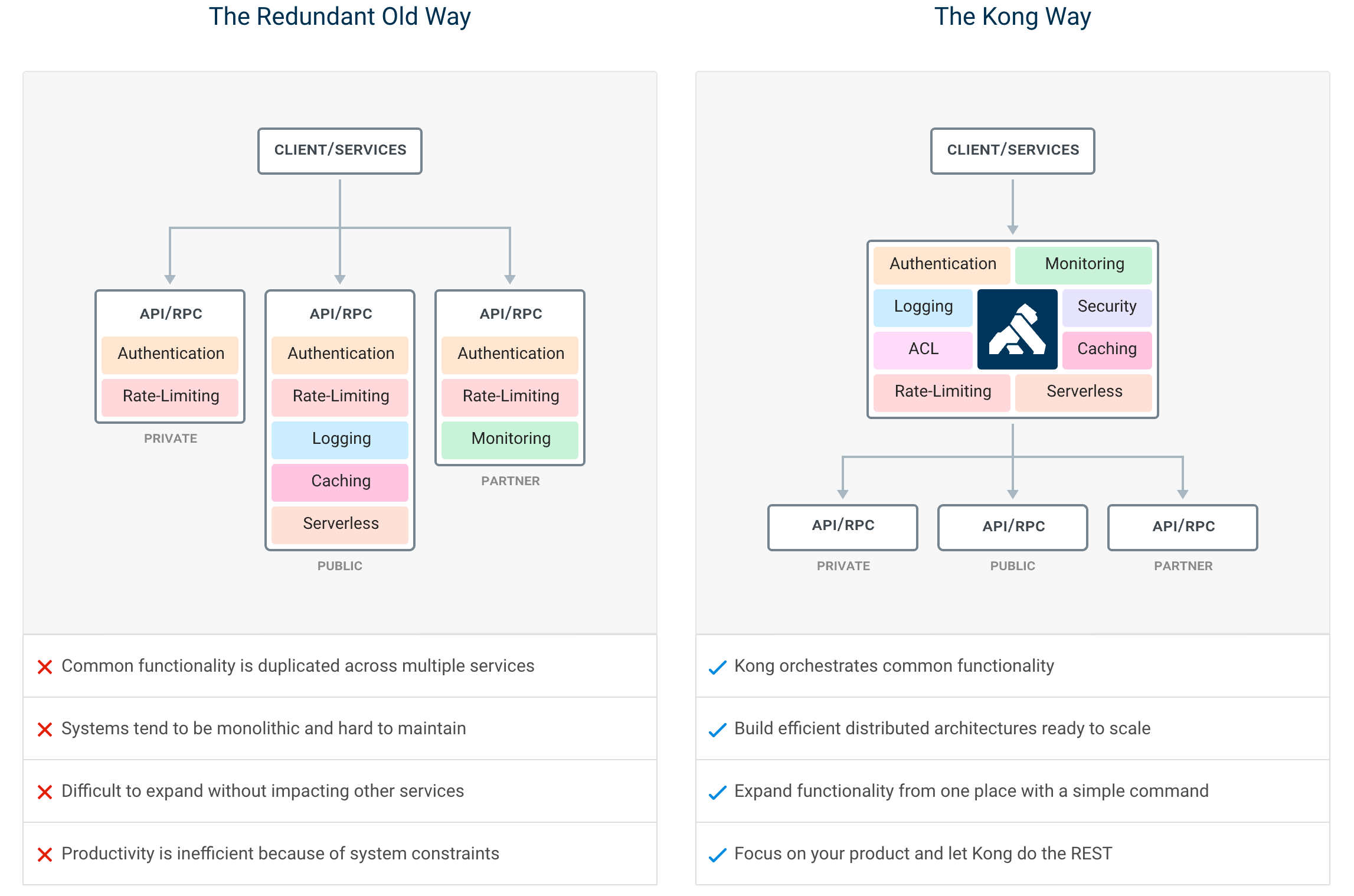
 Kong is a cloud-native API gateway that also acts as an AI and MCP gateway, handling routing, load balancing, authentication, and traffic management for microservices and LLM/agentic traffic.
Kong is a cloud-native API gateway that also acts as an AI and MCP gateway, handling routing, load balancing, authentication, and traffic management for microservices and LLM/agentic traffic.Is this a library I import, or a standalone service I run?It's a standalone proxy server you deploy (e.g. via Docker) in front of your APIs, not a library you import into code.
It's a standalone proxy server you deploy (e.g. via Docker) in front of your APIs, not a library you import into code.How do I get it running?Clone the Docker repository, go to the compose folder, and start the stack; the gateway then listens on localhost:8000 (proxy), 8001 (Admin API) and 8002 (Kong Manager Web UI).
Clone the Docker repository, go to the compose folder, and start the stack; the gateway then listens on localhost:8000 (proxy), 8001 (Admin API) and 8002 (Kong Manager Web UI).Do I need Docker to try it, or can I run it bare metal?Docker Compose is the recommended quick-start path, but Kong also supports bare metal, container, and Kubernetes deployments via its official install page.
Docker Compose is the recommended quick-start path, but Kong also supports bare metal, container, and Kubernetes deployments via its official install page.Can I run it without a database?Yes, Kong supports a DB-less declarative configuration mode in addition to the traditional database-backed setup.
Yes, Kong supports a DB-less declarative configuration mode in addition to the traditional database-backed setup.Does it run on Kubernetes?Yes, Kong has a native Kubernetes Ingress Controller for running directly on Kubernetes clusters.
Yes, Kong has a native Kubernetes Ingress Controller for running directly on Kubernetes clusters.What LLM providers does the AI Gateway support?It offers a universal LLM API that routes across multiple providers including OpenAI, Anthropic, GCP Gemini, AWS Bedrock, Azure AI, Databricks, Mistral and Huggingface.
It offers a universal LLM API that routes across multiple providers including OpenAI, Anthropic, GCP Gemini, AWS Bedrock, Azure AI, Databricks, Mistral and Huggingface.What can Kong do with MCP traffic?Kong provides MCP traffic governance, security, and observability, and can even auto-generate MCP servers from any RESTful API.
Kong provides MCP traffic governance, security, and observability, and can even auto-generate MCP servers from any RESTful API.Can I extend Kong with custom plugins?Yes, Kong has a plugin system and Plugin Hub; developers can build plugins in Lua, Go or JavaScript using the Plugin Development Kit.
Yes, Kong has a plugin system and Plugin Hub; developers can build plugins in Lua, Go or JavaScript using the Plugin Development Kit.Is there a managed/cloud version if I don't want to self-host?Yes, Kong Konnect is a commercial cloud-hosted SaaS control plane offering additional features, analytics, and support on top of the open-source Gateway.
Yes, Kong Konnect is a commercial cloud-hosted SaaS control plane offering additional features, analytics, and support on top of the open-source Gateway.Which topics is it in?api-management, llm-ops, apis, mcp-gateway, microservice, rate-limiting, ai-gateway, llm-gateway, load-balancer, api-gateway, jwt, lua
api-management, llm-ops, apis, mcp-gateway, microservice, rate-limiting, ai-gateway, llm-gateway, load-balancer, api-gateway, jwt, lua