






15.7K ·GitHub
Что это такое?
 Zigbee2MQTT позволяет управлять вашими устройствами Zigbee через MQTT вместо фирменного моста или шлюза производителя, поэтому их можно подключить к любой удобной вам системе умного дома.
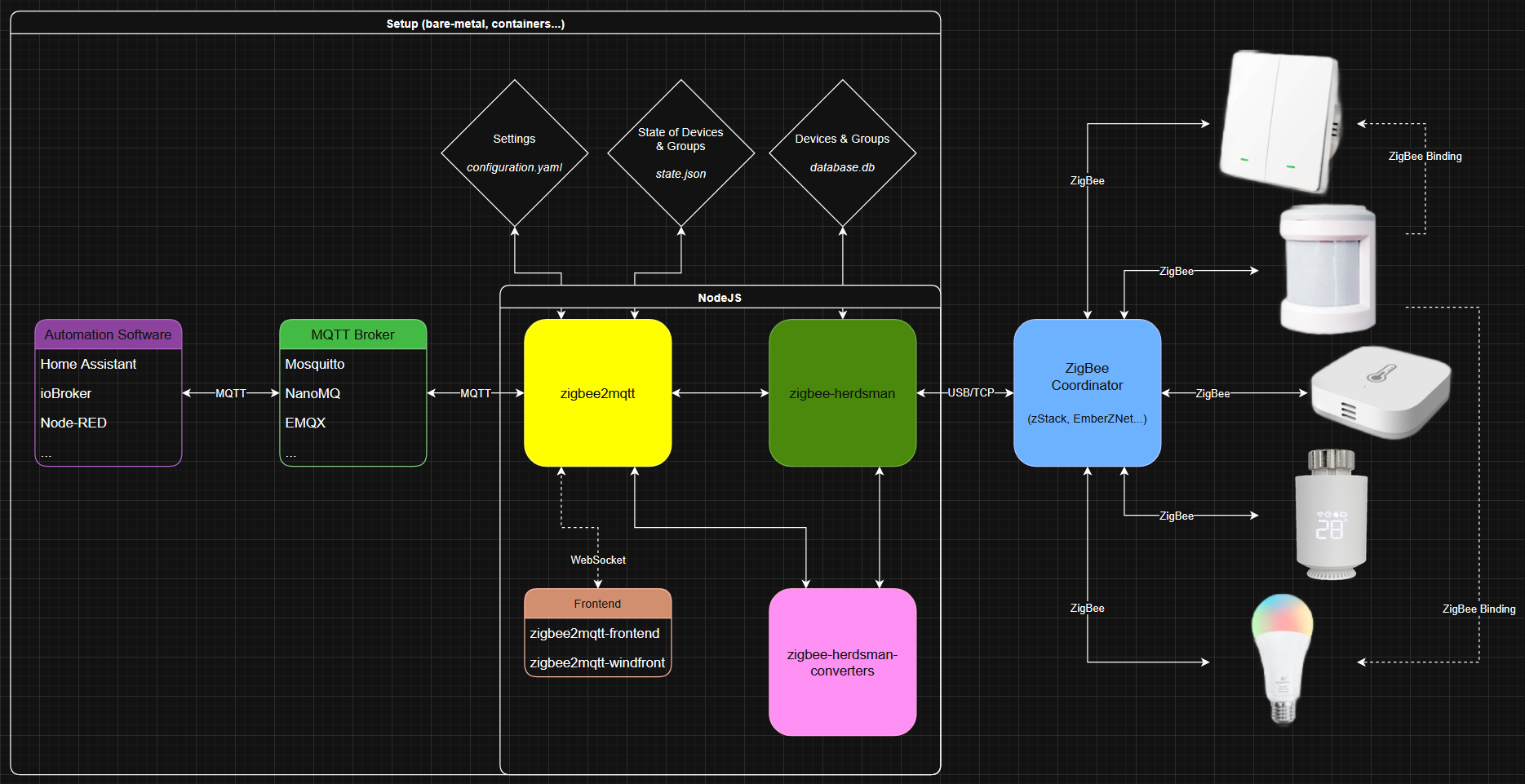
Zigbee2MQTT позволяет управлять вашими устройствами Zigbee через MQTT вместо фирменного моста или шлюза производителя, поэтому их можно подключить к любой удобной вам системе умного дома.Это приложение, которое я устанавливаю, или сервис, который я запускаю сам?Это самостоятельно размещаемый сервис на Node.js/TypeScript, который постоянно работает на компьютере, подключённом к адаптеру Zigbee. Он включает веб-интерфейс (zigbee2mqtt-frontend или zigbee2mqtt-windfront) для мониторинга и настройки.
Это самостоятельно размещаемый сервис на Node.js/TypeScript, который постоянно работает на компьютере, подключённом к адаптеру Zigbee. Он включает веб-интерфейс (zigbee2mqtt-frontend или zigbee2mqtt-windfront) для мониторинга и настройки.Как мне его запустить?Следуйте официальной документации: в ней описаны установка и первоначальная настройка, а также объяснена терминология Zigbee, если вы с ней не знакомы.
Следуйте официальной документации: в ней описаны установка и первоначальная настройка, а также объяснена терминология Zigbee, если вы с ней не знакомы.Нужны ли мне USB-адаптер Zigbee и брокер MQTT?Да. zigbee-herdsman нужен адаптер-координатор Zigbee (например, на оборудовании Texas Instruments), чтобы обмениваться данными с вашими устройствами. А поскольку Zigbee2MQTT передаёт всё через MQTT, также нужен запущенный брокер MQTT.
Да. zigbee-herdsman нужен адаптер-координатор Zigbee (например, на оборудовании Texas Instruments), чтобы обмениваться данными с вашими устройствами. А поскольку Zigbee2MQTT передаёт всё через MQTT, также нужен запущенный брокер MQTT.Поддерживает ли он каждое устройство Zigbee?Большинство популярных брендов, таких как Xiaomi, Ikea, Philips и OSRAM, поддерживаются, но сначала проверьте список поддерживаемых устройств. Устройства, которых нет в списке, обычно можно добавить достаточно легко, следуя руководству по поддержке устройств.
Большинство популярных брендов, таких как Xiaomi, Ikea, Philips и OSRAM, поддерживаются, но сначала проверьте список поддерживаемых устройств. Устройства, которых нет в списке, обычно можно добавить достаточно легко, следуя руководству по поддержке устройств.С какими платформами умного дома он работает?Поскольку он работает через MQTT, он подходит почти для любой системы домашней автоматизации. Есть также документированная интеграция с Home Assistant, Homey, Domoticz, Gladys Assistant и ioBroker.
Поскольку он работает через MQTT, он подходит почти для любой системы домашней автоматизации. Есть также документированная интеграция с Home Assistant, Homey, Domoticz, Gladys Assistant и ioBroker.Как Zigbee2MQTT отслеживает мои устройства?Он хранит подключённые устройства и их возможности в базе данных — файле database.db, который представляет собой текстовую базу данных в формате JSON и внутренне ведётся модулем Zigbee2MQTT.
Он хранит подключённые устройства и их возможности в базе данных — файле database.db, который представляет собой текстовую базу данных в формате JSON и внутренне ведётся модулем Zigbee2MQTT.Какие три внутренних модуля лежат в основе проекта?zigbee-herdsman отвечает за связь с аппаратным адаптером, zigbee-herdsman-converters сопоставляет модели устройств с кластерами Zigbee, а модуль Zigbee2MQTT объединяет всё это и передаёт сообщения в MQTT.
zigbee-herdsman отвечает за связь с аппаратным адаптером, zigbee-herdsman-converters сопоставляет модели устройств с кластерами Zigbee, а модуль Zigbee2MQTT объединяет всё это и передаёт сообщения в MQTT.What are similar projects?glasshouse, esphome, WLED, ha_xiaomi_home, EchoMuse, Tasmota, core, local_roborock_server
glasshouse, esphome, WLED, ha_xiaomi_home, EchoMuse, Tasmota, core, local_roborock_serverWhich topics is it in?smart-home, mqtt, home-assistant, home-automation, iot, hardware, json, dashboard, monitoring, hacktoberfest, gplv3, automation
smart-home, mqtt, home-assistant, home-automation, iot, hardware, json, dashboard, monitoring, hacktoberfest, gplv3, automation