EasyOCR




Ready-to-use OCR with 80+ supported languages and all popular writing scripts including: Latin, Chinese, Arabic, Devanagari, Cyrillic, etc.
Try Demo on our website
Integrated into Huggingface Spaces 🤗 using Gradio. Try out the Web Demo: 
What's new
What's coming next
Examples
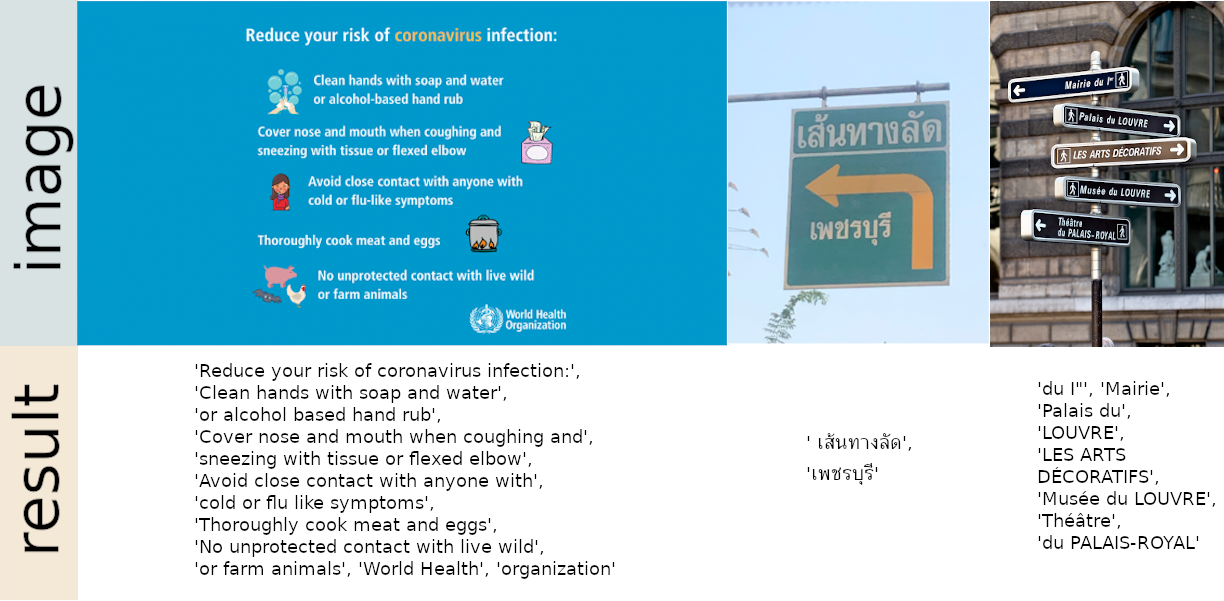
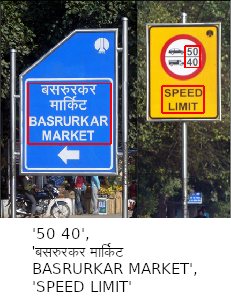
Installation
Install using pip
For the latest stable release:
pip install easyocr
For the latest development release:
pip install git+https://github.com/JaidedAI/EasyOCR.git
Note 1: For Windows, please install torch and torchvision first by following the official instructions here https://pytorch.org. On the pytorch website, be sure to select the right CUDA version you have. If you intend to run on CPU mode only, select CUDA = None.
Note 2: We also provide a Dockerfile here.
Usage
import easyocr
reader = easyocr.Reader(['ch_sim','en']) # this needs to run only once to load the model into memory
result = reader.readtext('chinese.jpg')
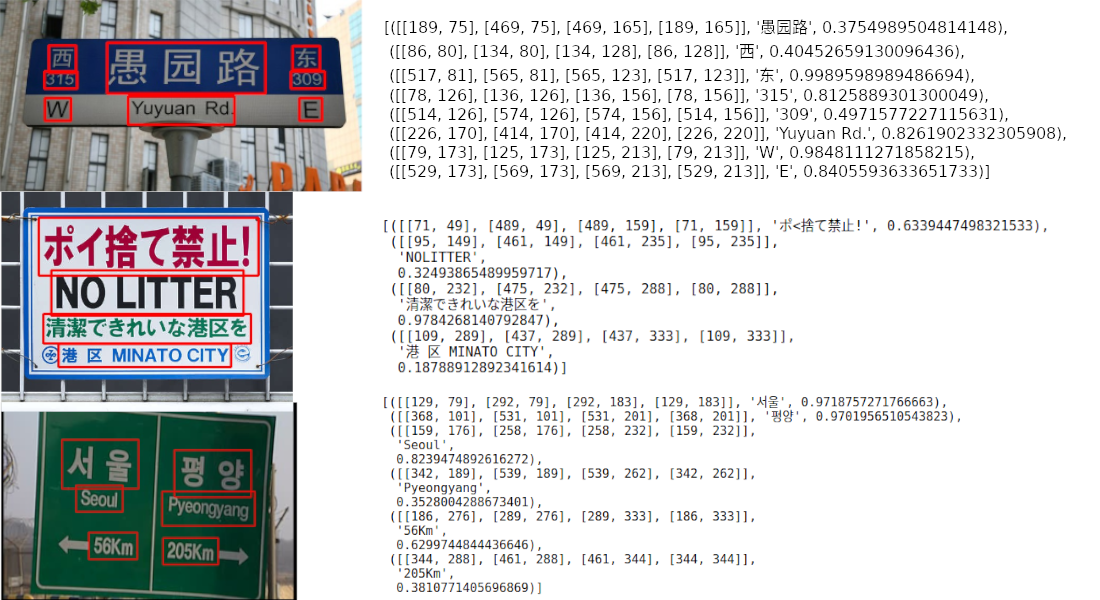
The output will be in a list format, each item represents a bounding box, the text detected and confident level, respectively.
[([[189, 75], [469, 75], [469, 165], [189, 165]], '愚园路', 0.3754989504814148),
 ([[86, 80], [134, 80], [134, 128], [86, 128]], '西', 0.40452659130096436),
 ([[517, 81], [565, 81], [565, 123], [517, 123]], '东', 0.9989598989486694),
 ([[78, 126], [136, 126], [136, 156], [78, 156]], '315', 0.8125889301300049),
 ([[514, 126], [574, 126], [574, 156], [514, 156]], '309', 0.4971577227115631),
 ([[226, 170], [414, 170], [414, 220], [226, 220]], 'Yuyuan Rd.', 0.8261902332305908),
 ([[79, 173], [125, 173], [125, 213], [79, 213]], 'W', 0.9848111271858215),
 ([[529, 173], [569, 173], [569, 213], [529, 213]], 'E', 0.8405593633651733)]
Note 1: ['ch_sim','en'] is the list of languages you want to read. You can pass
several languages at once but not all languages can be used together.
English is compatible with every language and languages that share common characters are usually compatible with each other.
Note 2: Instead of the filepath chinese.jpg, you can also pass an OpenCV image object (numpy array) or an image file as bytes. A URL to a raw image is also acceptable.
Note 3: The line reader = easyocr.Reader(['ch_sim','en']) is for loading a model into memory. It takes some time but it needs to be run only once.
You can also set detail=0 for simpler output.
reader.readtext('chinese.jpg', detail = 0)
Result:
['愚园路', '西', '东', '315', '309', 'Yuyuan Rd.', 'W', 'E']
Model weights for the chosen language will be automatically downloaded or you can
download them manually from the model hub and put them in the '~/.EasyOCR/model' folder
In case you do not have a GPU, or your GPU has low memory, you can run the model in CPU-only mode by adding gpu=False.
reader = easyocr.Reader(['ch_sim','en'], gpu=False)
For more information, read the tutorial and API Documentation.
Run on command line
$ easyocr -l ch_sim en -f chinese.jpg --detail=1 --gpu=True
Train/use your own model
For recognition model, Read here.
For detection model (CRAFT), Read here.
Implementation Roadmap
- Handwritten support
- Restructure code to support swappable detection and recognition algorithms
The api should be as easy as
reader = easyocr.Reader(['en'], detection='DB', recognition = 'Transformer')
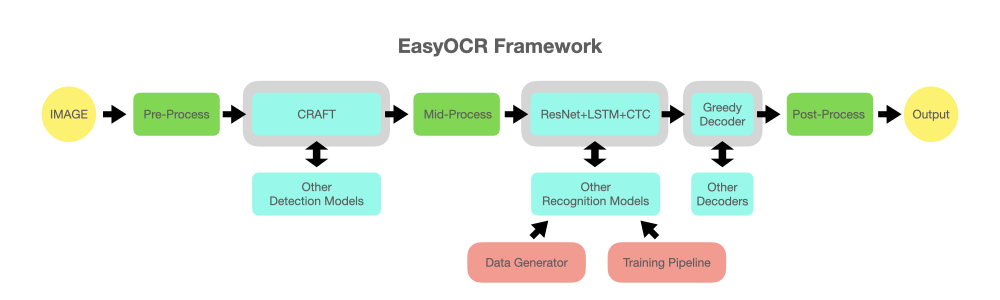
The idea is to be able to plug in any state-of-the-art model into EasyOCR. There are a lot of geniuses trying to make better detection/recognition models, but we are not trying to be geniuses here. We just want to make their works quickly accessible to the public ... for free. (well, we believe most geniuses want their work to create a positive impact as fast/big as possible) The pipeline should be something like the below diagram. Grey slots are placeholders for changeable light blue modules.
Acknowledgement and References
This project is based on research and code from several papers and open-source repositories.
All deep learning execution is based on Pytorch. :heart:
Detection execution uses the CRAFT algorithm from this official repository and their paper (Thanks @YoungminBaek from @clovaai). We also use their pretrained model. Training script is provided by @gmuffiness.
The recognition model is a CRNN (paper). It is composed of 3 main components: feature extraction (we are currently using Resnet) and VGG, sequence labeling (LSTM) and decoding (CTC). The training pipeline for recognition execution is a modified version of the deep-text-recognition-benchmark framework. (Thanks @ku21fan from @clovaai) This repository is a gem that deserves more recognition.
Beam search code is based on this repository and his blog. (Thanks @githubharald)
Data synthesis is based on TextRecognitionDataGenerator. (Thanks @Belval)
And a good read about CTC from distill.pub here.
Want To Contribute?
Let's advance humanity together by making AI available to everyone!
3 ways to contribute:
Coder: Please send a PR for small bugs/improvements. For bigger ones, discuss with us by opening an issue first. There is a list of possible bug/improvement issues tagged with 'PR WELCOME'.
User: Tell us how EasyOCR benefits you/your organization to encourage further development. Also post failure cases in Issue Section to help improve future models.
Tech leader/Guru: If you found this library useful, please spread the word! (See Yann Lecun's post about EasyOCR)
Guideline for new language request
To request a new language, we need you to send a PR with the 2 following files:
- In folder easyocr/character,
we need 'yourlanguagecode_char.txt' that contains list of all characters. Please see format examples from other files in that folder.
- In folder easyocr/dict,
we need 'yourlanguagecode.txt' that contains list of words in your language.
On average, we have ~30000 words per language with more than 50000 words for more popular ones.
More is better in this file.
If your language has unique elements (such as 1. Arabic: characters change form when attached to each other + write from right to left 2. Thai: Some characters need to be above the line and some below), please educate us to the best of your ability and/or give useful links. It is important to take care of the detail to achieve a system that really works.
Lastly, please understand that our priority will have to go to popular languages or sets of languages that share large portions of their characters with each other (also tell us if this is the case for your language). It takes us at least a week to develop a new model, so you may have to wait a while for the new model to be released.
See List of languages in development
Github Issues
Due to limited resources, an issue older than 6 months will be automatically closed. Please open an issue again if it is critical.
Business Inquiries
For Enterprise Support, Jaided AI offers full service for custom OCR/AI systems from implementation, training/finetuning and deployment. Click here to contact us.

 一个开箱即用的 Python 开源 OCR 库:能检测并识别图片中的文字,支持 80 多种语言和常用文字体系——拉丁文、中文、阿拉伯文、天城文、西里尔文等等。