PeerBridge MCP
A local-first, auditable multi-Agent control room for coding, review, evidence, and private remote work.
Run Codex, Claude Code, Grok, Kimi, provider APIs, OpenAI-compatible endpoints, and local
models as one governed engineering team across desktop and phone without flattening their
native capabilities.
English |
繁體中文 |
简体中文



Download Windows Alpha
· Quickstart
· Features
· Technical showcase
· Client setup
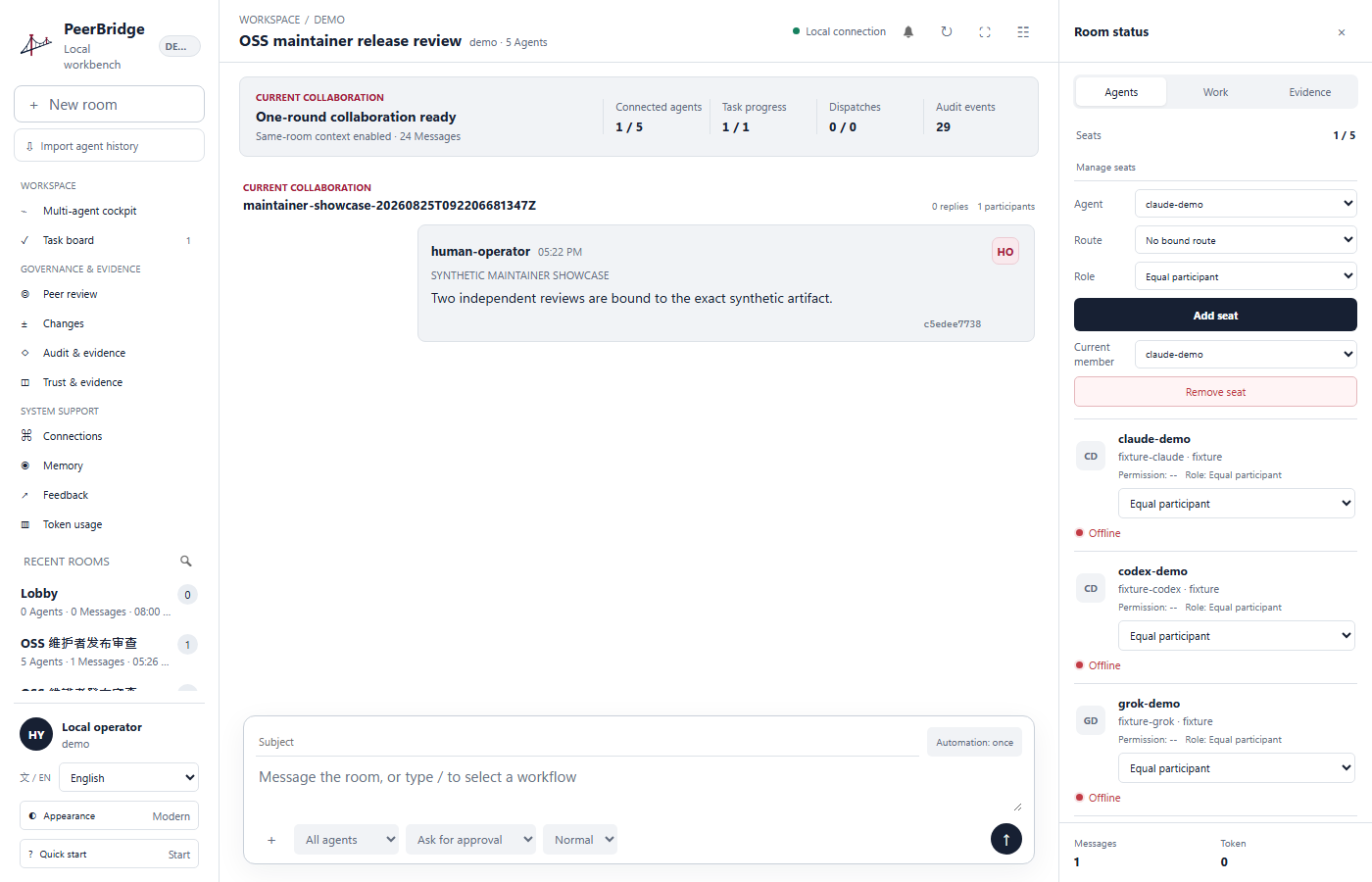
Modern Workbench with synthetic preview data. No private conversation or credential is included.
Start in 30 seconds
- Download
PeerBridgeControlRoom-0.1.0a6-windows-x64-portable.zip from the
Alpha 6 release.
- Compare the ZIP's SHA-256 with
SHA256SUMS.txt on the release page.
- Extract the complete ZIP to a writable folder and double-click
Launch PeerBridge.cmd.
The portable build does not install a service, modify an existing Python environment, or
include provider credentials. Local workspace data stays under
%LOCALAPPDATA%\PeerBridge\workspace. Prefer source installation? Continue to
Install from source.
See the Pixel Control Room
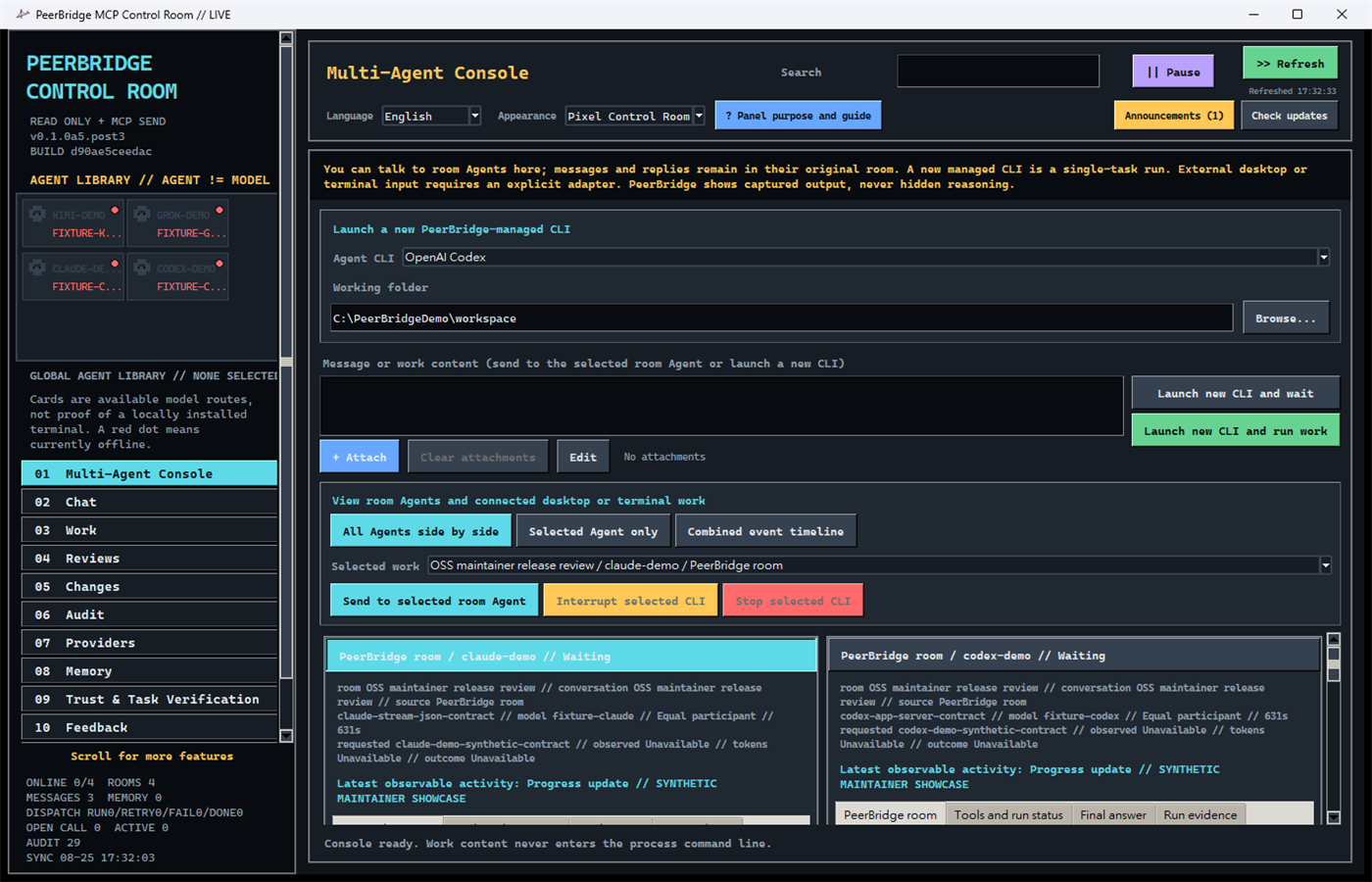
The same local coordination core in the original dense Pixel interface.
PeerBridge is more than a collection of chat tabs. Its provider-native adapter layer keeps
Codex JSON-RPC, Claude Code stream-json, Grok/Kimi ACP, provider APIs, and local runtimes as
separate capability contracts. Every Agent is bound to a stable identity, selected model,
permission policy, room context, task, and evidence trail.
Use it for parallel implementation and review, bounded technical debate, task ownership,
approved shared memory, mutual scoring, cross-agent audits, and human-controlled release
work. PeerBridge runs locally on SQLite, keeps provider credentials out of chat and project
history, and preserves a SHA-linked record of messages, decisions, evidence, scores,
permissions, and handoffs.
Human or Agent messages can wake the room, collaboration stops on consensus, blockers,
stagnation, or explicit limits, and the operator can intervene at any time.
| What maintainers get |
PeerBridge behavior |
| Provider-native adapter layer |
Codex, Claude Code, Grok, Kimi, provider APIs, compatible endpoints, and local runtimes keep separate audited identities and capability boundaries. |
| Work instead of reply cascades |
Parallel implementation, review, discussion, and release workflows stop on consensus, blockers, stagnation, or explicit limits. |
| Governed write access |
Permission cards, approved isolated Git worktrees, source-state checks, diffs, and proof records stay human-controlled. |
| Durable project context |
Selected history imports, room memory, task briefings, and handoffs are source-bound instead of silently merged. |
| Reviewable decisions |
Agent activity, answers, evidence, mutual scores, audits, token usage, and stale-proof warnings remain visible. |
| Local ownership |
SQLite data and credentials stay on the operator's machine; browser remote control remains private, while the allow-listed Tailcat companion is visible and enabled by default. |
Technical differentiators
flowchart LR
    A["Provider-native adapters"] --> C["Per-Agent capability union"]
    C --> P["Capability-aware approval broker"]
    P --> W["Governed worktree and writer lease"]
    W --> R["Parallel review and bounded collaboration"]
    R --> E["SHA-linked evidence and Proof Bundle"]
    H["Human operator"] --> P
    H --> R
Run the provider-free maintainer showcase with one command:
python examples\demo_workflow.py --workspace demo-workspace --scope demo
Its public receipt proves that an overlapping second writer was rejected, two independent
reviewers satisfied quorum, completion rehashed the synthetic artifact, and the audit chain
verified with zero writes. It contains no provider credential or lease capability. See the
claim-to-test evidence map.
Status: alpha. The coordination and audit core is tested, but the public API and
database schema may change before 1.0.
Operational continuity and commercialization are explicit design boundaries. See
memory and long-running operations and the
open-core boundary. Tailscale Serve remains the private
browser transport; Tailcat CLI connectivity is visible and enabled by default but remains
independently allow-listed. Roadmap entries are not capability claims.
Why
Running two coding agents against one repository creates predictable failure modes:
- both agents edit the same files;
- one agent assumes a peer is online when it is not;
- chat messages are lost or acknowledged globally instead of per consumer;
- a review approves stale files rather than the files that were actually tested;
- the human cannot see who owns a task or why it was marked complete.
PeerBridge addresses those coordination failures without making either agent the boss.
One task has one writer lease, peers can review each other, and a human can intervene.
Architecture
flowchart LR
    H["Human operator"] --> M["Local control room"]
    C["Codex / Claude Code"] --> S1["PeerBridge stdio process"]
    A["Grok / Kimi / DeepSeek / Gemini / local Agents"] --> S2["PeerBridge stdio process"]
    M --> S3["PeerBridge stdio process"]
    R["Private mobile UI"] -->|"Tailnet HTTPS"| T["Tailscale Serve"]
    T -->|"loopback only"| S4["Human MCP message gateway"]
    S1 --> DB[("Shared SQLite store")]
    S2 --> DB
    S3 --> DB
    S4 --> DB
    DB --> L["SHA-linked audit events"]
    DB --> W["Mailbox, leases, reviews, proofs"]
Each MCP client launches its own stdio server process with a distinct --agent-id.
Those processes coordinate through one project-local .peerbridge/peerbridge.sqlite3
database. SQLite WAL mode and BEGIN IMMEDIATE transactions serialize state changes.
Local desktop surfaces
PeerBridge is one local desktop product, not a hosted web service. Both desktop surfaces
use the same local Python, SQLite, and MCP core:
- Modern Workbench renders HTML/CSS inside the packaged native WebView2 window. Its
loopback HTTP server accepts only the current process capability token and is never a
public website.
- Pixel Control Room is the original Tk desktop surface.
A fresh workspace shows a local two-preview chooser before the Control Room opens. The
selection is stored in .peerbridge/ui-preferences.json; later launches open that surface
directly until the operator changes Appearance and restarts.
Features
- In-app Agent Cockpit with Grid, Focus, and Timeline views plus stable per-session
Terminal, Activity, Answer, and Evidence tabs.
- Primary Agent controls show the real model/route, governed permission tier, and evidence-
derived offline, online, working, or waiting state before a session starts. Observable
events distinguish commands, reads, edits, web searches, waits, completion, and failure.
- Persistent official runtime profiles for Codex app-server, Claude Code stream-json, and
installed Kimi Code or Grok through ACPX. Observe and Review remain read-only; Edit and
Full development require an active human-approved governed Git worktree. Edit keeps normal
networking while using each official client's standard policy: Codex workspace-write with
escalation denied, Claude accept-edits without pre-authorized shell access, and ACPX
read/search/edit/fetch grants with execute/delete/move denied. Full access records one
session-scoped operator authorization and enables the provider's complete tool set only
until that managed session stops.
- Explicit Agent-history import: Codex uses official app-server thread list/read, Grok uses
grok sessions list, and Claude/Kimi use their documented local session records. The UI
lists bounded metadata first, selects nothing by default, and reads only conversations the
operator checks; JSON/JSONL file import remains available for every provider.
- Observable output only: PeerBridge never labels hidden chain-of-thought or uncaptured
external terminal history as visible.
- A bounded read-only Git worktree viewer shows per-file additions/deletions and a colored
unified diff while excluding credential/runtime pathspecs and redacting secrets and
machine-private absolute paths.
- Implement + Review, Investigate + Debate, Read-only Audit, and Release Gate templates on a
durable local operation queue with cancellation, timeout, retry, scheduling, and recovery.
- Human-approved isolated Git worktrees, versioned Skill/MCP capability grants, typed
decisions, task briefings, conflict findings, and exact source-state verification.
- Trust Timeline with immediate stale-evidence detection and create-only portable Proof
Bundles that require a separately installed trusted verifier.
- Per-agent presence with expiry, not a permanent online flag.
- Audited runtime identity labels for client, provider route, and selected model.
- SHA-bound direct and broadcast messages.
- Persistent global Agent Library with reusable, room-scoped seats; adding an Agent to one
room never removes it from the library or another room.
- Durable multi-room conversations with independent membership sessions, inbox cursors,
reply boundaries, and room-bound collaboration receipts.
- Imported Agent histories remain immutable source rooms. Continue from history creates
a normal writable room with a bounded source-conversation ID and SHA-bound context message.
- Provider-neutral Memory Ledger with owner-only Private, membership-bound Room, and
human-approved Project records, each SHA-bound to its explicit source evidence.
- Per-consumer receipts and contiguous durable cursors.
- Capability-token task leases with expiry and recovery.
- Deterministic read/write path overlap checks.
solo_allowed, two_party_required, presence_aware, and N-peer quorum policies.- Source-bound peer review requests and equal-peer verdicts.
- Mutual Agent scoring and cross-agent audit trails linked to the exact reviewed source.
- Live Token usage dashboard with provider/model breakdown and input, output, cache-write,
and cache-read trends.
- One-click CC Switch provider/model synchronization through its official CLI, while
credentials stay in the user's existing CC Switch installation.
- Live file rehash before task completion.
- Isolated plan and patch drafts that are never applied automatically.
- Append-only per-scope SHA-256 event chain with a verifier.
- Native WebView2 Modern Workbench is the default Windows desktop, with all twelve Control
Room pages and human MCP message composition. The Pixel Control Room remains available as
the explicit
--legacy-pixel compatibility surface.
- Fresh workspaces show a local first-run Pixel/Modern preview chooser. The selected desktop
surface is saved locally, can be changed later, and never downloads third-party theme code.
- The Multi-Agent Console uses a terminal-first grid for Codex, Claude Code, Grok, and Kimi,
with per-session follow-up input, attachments, observable output, lifecycle controls, Focus,
and an all-session Timeline. Chat and Agent composers accept selected files or pasted images.
- The coordination core has no runtime dependencies beyond Python's standard library;
optional encrypted feedback uses the
feedback extra (cryptography).
- Dual-era MCP support: legacy initialization and the
2026-07-28 discovery model.
- Optional zero-rental private mobile control through loopback plus Tailscale Serve.
- Bounded room-history paging, active-tab rendering, and a singleton low-memory mailbox
supervisor for optional provider runners.
- A versioned local event envelope for future encrypted continuity; cloud collaboration is
disabled in Alpha 5.2 and does not reuse announcement or feedback infrastructure.
- Every write-capable launch starts from an exact governed-worktree binding. Codex additionally
enforces its native workspace-write sandbox. Claude, Grok, and Kimi use their official
permission protocols; Full access is therefore explicitly warned as trusted-session
authority under the local OS account. Optional WSL2 and macOS sandbox contracts remain
defense-in-depth gates rather than prerequisites for ordinary Edit.
Quickstart
Windows portable app
Download PeerBridgeControlRoom-0.1.0a6-windows-x64-portable.zip from the GitHub
Alpha release, extract the complete ZIP to a writable folder, and double-click
Launch PeerBridge.cmd. The portable app creates its local workspace under
%LOCALAPPDATA%\PeerBridge\workspace; it does not include provider credentials or
private runtime data.
This Alpha executable is not code-signed, so Windows SmartScreen may ask you to review
the publisher. Verify the release SHA-256 before opening it. PeerBridge does not provide
an auto-installer or modify an existing Python environment.
Install from source
Requirements: Python 3.11 or newer.
git clone https://github.com/hoylon/peerbridge-mcp.git
cd peerbridge-mcp
python -m venv .venv
.\.venv\Scripts\Activate.ps1
python -m pip install -e ".[dev]"
peerbridge init --project-root . --scope demo
peerbridge doctor --project-root . --scope demo
peerbridge monitor --project-root . --scope demo
Open 01 Multi-Agent Console to view current room Agents and explicitly authorized desktop
or terminal work without choosing a folder. To launch a new managed CLI, choose an installed
Codex, Claude Code, Kimi Code, or Grok CLI and its working directory there. Kimi and Grok use
the reviewed deny-all ACPX profile. Set every participant role on 02
Chat, where Equal participant is the default. Managed input is sent through stdin and is not
persisted by the Console. The page shows only output and events PeerBridge captured; an
unrelated terminal opened elsewhere is not retroactively readable. Use 09 Trust & Task
Verification for templates, durable operations, schedules, permission decisions, isolated
worktrees, the Trust Timeline, and Proof Bundle export or verification.
Run a server manually:
# In Workbench > Connect, authorize codex-main once and copy the decision ID.
$decision = "<permission-decision-id>"
$identity = peerbridge identity --project-root . --scope demo issue --agent-id codex-main `
  --profile collaborator --permission-decision-id $decision | ConvertFrom-Json
peerbridge serve --project-root . --agent-id codex-main --scope demo `
  --identity-capability $identity.identity_capability
The capability is bound to the exact project, scope, Agent ID, and fixed collaborator tool
profile. Its secret contents are never printed. Reserved operator identities and revocation
remain available only through the authenticated local Control Room.
When one client can select several provider models, record the exact route without exposing
credentials:
$apiDecision = "<permission-decision-id-from-workbench>"
$apiIdentity = peerbridge identity --project-root . --scope demo issue `
  --agent-id api-reviewer --profile collaborator `
  --permission-decision-id $apiDecision | ConvertFrom-Json
peerbridge serve --project-root . --agent-id api-reviewer --scope demo `
  --identity-capability $apiIdentity.identity_capability `
  --client-name api-coding-client `
  --provider-id provider-api:grok `
  --model-id grok
agent-id identifies the logical worker. client-name identifies the MCP-capable
application or adapter. provider-id is an operator-supplied non-secret route label,
and model-id identifies the selected model. Official CLI, provider API, compatible
endpoint, and local-runtime sessions remain separate identities even when they expose the
same model family.
Direct OpenAI-compatible endpoints do not require CC Switch. On the Connect page,
save the API base URL and API key into Windows Credential Manager, discover the provider's
advertised model IDs, and bind a route to one logical Agent. The same page reads CC Switch
providers and models through its public CLI and changes the active provider only after an
explicit confirmation. The API key never enters SQLite or an MCP
message. Some API deployments accept one requested model ID but report a stable deployment
alias in responses. In that case set EXPECTED RESPONSE MODEL explicitly. For
example, a route may request grok-4.6 while requiring the response to report
grok-4.6-build. An unconfigured or changing alias fails closed rather than being
silently treated as the requested model.
The server speaks newline-delimited JSON-RPC over stdin/stdout. Usually an MCP client
starts it for you, so a manually started server waiting for input is expected behavior.
Connect clients
Use an absolute Python executable path so each client launches the same installed
environment and shared database.
Codex
codex mcp add peerbridge -- C:\path\to\peerbridge-mcp\.venv\Scripts\python.exe `
  -m peerbridge_mcp serve --project-root C:\path\to\your-project `
  --agent-id codex-main --scope your-project
Claude Code
claude mcp add --scope project --transport stdio peerbridge -- `
  C:\path\to\peerbridge-mcp\.venv\Scripts\python.exe `
  -m peerbridge_mcp serve --project-root C:\path\to\your-project `
  --agent-id claude-code --scope your-project
Use different MCP server entry names when both clients write a shared project config,
for example peerbridge-codex and peerbridge-claude. See
client configuration for TOML, JSON, Linux, and macOS examples.
The same stdio server can be registered in Kimi Code CLI; other providers may require a
separate API-backed runner. See agent integration boundaries.
PeerBridge reports the effective capability of each bound room Seat instead of inferring
it from the Agent name:
MCP NATIVE: a real MCP-capable client or terminal owns the session and can call the
PeerBridge server directly.MCP TOOL: an API-backed model is inside PeerBridge's bounded, allowlisted MCP tool
loop; this is tool-capable but is not represented as a native client session.INFERENCE: the route can return a bounded model answer but cannot call PeerBridge
tools. Web chat tabs and one-shot CLI fallbacks belong here.
Any other client or terminal that implements MCP can

 PeerBridge MCP — контрольная комната в духе local-first, позволяющая запускать несколько кодинг-агентов (Codex, Claude Code, Grok, Kimi, API провайдеров и локальные модели) как одну управляемую инженерную команду, где каждое сообщение, решение и правка фиксируются в журнале аудита со связями по SHA.