Halo Battery
Battery levels for wireless mice, keyboards, headsets and controllers in the Windows system tray - one icon per device, no vendor software.
While charging, the arc slowly "breathes":
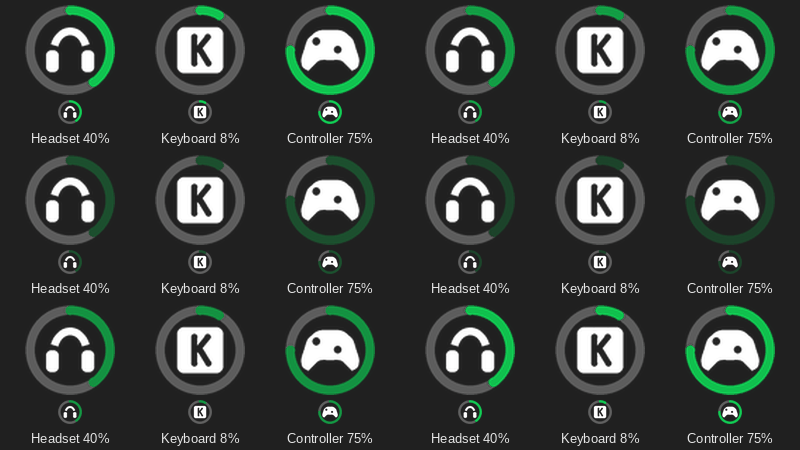
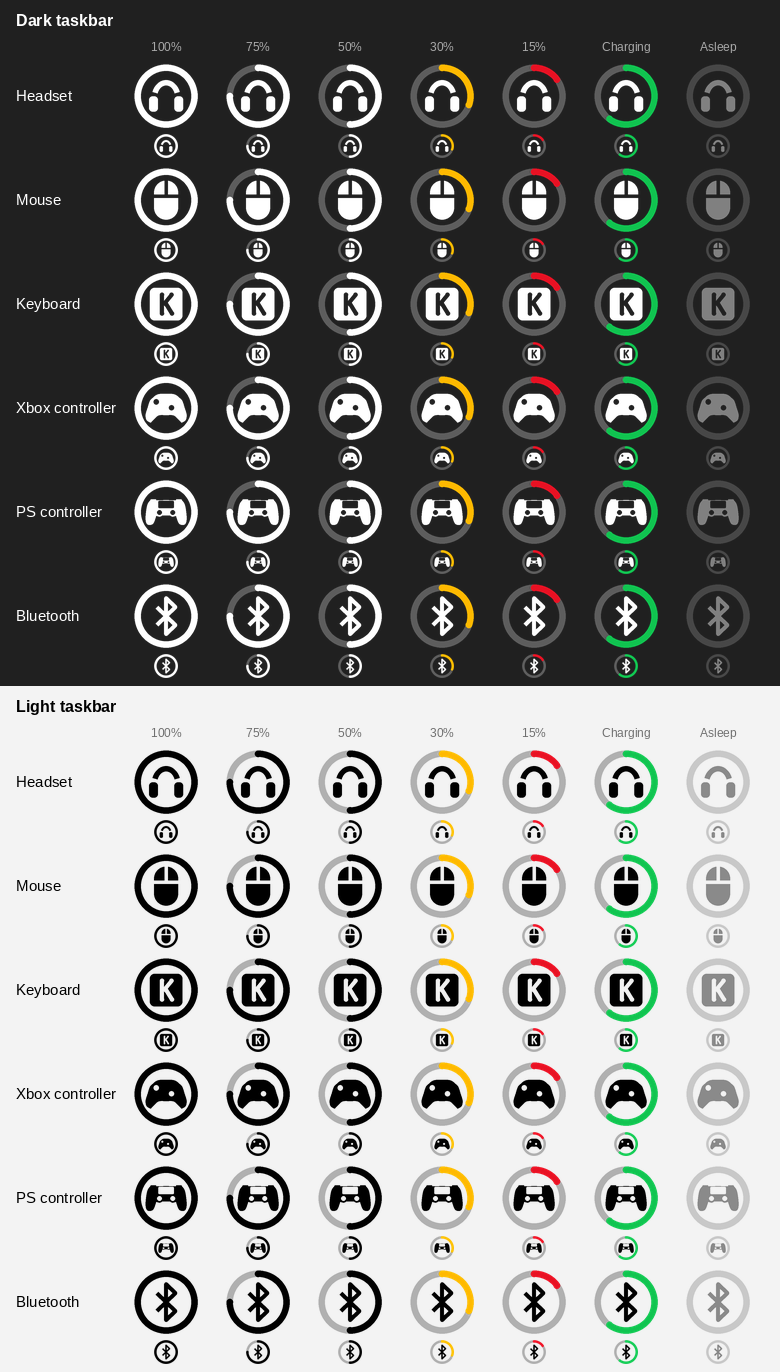
Each device gets its own tray icon: a battery ring with the device's pictogram in the middle. The arc fills clockwise from the top, turns amber as the level approaches your alert threshold and red at or below it, and breathes green while the device charges. Hover over an icon for the exact percentage; right-click it to rename, hide, change the preferences or take a diagnostics report.
Levels are read over USB/HID (a dongle, a receiver or a cable), from Xbox-style controller reports, and from Windows itself for Bluetooth devices.
Supported devices
yes means the level has actually been seen on the device - here, from a report, or from a user who tried it. no means the support was written from another tool's code and nobody has tried it on real hardware yet. likely means other models of the same family share the code, so they should work too - they just haven't been tried one at a time. Each device links to notes on how its level is read.
| Device |
Connection |
Verified on hardware |
| 8BitDo Pro 2, Pro 3, SN30 Pro, SF30 Pro in D-input mode |
Bluetooth or USB |
no |
| AM Infinity 8K (Angry Miao) |
2.4 GHz receiver |
no |
| Astro A50 Gen 5 (Logitech 046D:0B1C) |
Base station |
no |
ASUS ROG Gladius III Aimpoint and other ROG / TUF wireless mice (list in providers/asus.py) |
2.4 GHz receiver or USB cable |
no |
| Audeze Maxwell |
2.4 GHz dongle or USB-C cable |
yes |
| Bluetooth devices, tested on the 1MORE SonoFlow headset (users also report Audio-Technica and JBL Tune 760NC headphones working) |
Bluetooth (on by default, can be turned off in the menu) |
yes |
| Corsair Dark Core RGB Pro SE |
2.4 GHz dongle |
no |
| Corsair Void v2 Wireless, Virtuoso Max Wireless, HS80 Max Wireless |
Wireless receiver |
no |
| GameSir G7 Pro; FlyDigi Vader Pro (tested by users) |
2.4 GHz receiver (shows up as an Xbox controller) |
yes |
| G-Wolves WARG, HTS Plus (Pro), HTXU, Lycan, Fenrir Pro / Asym, HTX Mini |
8K receiver or USB cable |
no |
| Hitscan Hyperlight |
2.4 GHz receiver or USB cable |
no |
| HyperX Cloud Alpha 2 |
2.4 GHz station |
yes |
| HyperX Cloud II Wireless |
2.4 GHz dongle |
no |
| HyperX Cloud III Wireless |
2.4 GHz dongle |
no |
| JBL Quantum 910 Wireless |
2.4 GHz dongle |
yes |
| Keychron Ultra-Link 8K, Keychron M5 |
2.4 GHz receiver and USB cable |
no |
| LAMZU Maya X |
8K dongle or USB cable |
yes |
| Lofree Hyzen |
2.4 GHz dongle |
no |
| Logitech G502 LIGHTSPEED, G502 X PLUS |
Lightspeed receiver |
yes |
| Logitech (more HID++ 2.0 devices and G-series headsets) |
Lightspeed, Unifying or Bolt receiver |
likely |
| MCHOSE A7 V2 Ultra |
2.4 GHz receiver |
no |
| MCHOSE G7 |
USB (chip 'YJX-CHIP') |
yes |
| MCHOSE M7 Ultra |
2.4 GHz receiver |
yes |
| Nintendo Switch Pro Controller, Joy-Con (L) / (R) |
Bluetooth |
no |
| Pulsar X2 V2 Mini, ATK VXE R1 SE+, VXE R1 Pro Max |
2.4 GHz dongle and USB cable |
yes |
| Razer Barracuda Pro (2.4 GHz) |
2.4 GHz dongle |
yes |
| Razer Basilisk V3 Pro, Razer Basilisk Ultimate (tested by users) |
2.4 GHz receiver |
yes |
| Razer BlackShark V2 Pro (2023) |
2.4 GHz receiver |
yes |
| Razer BlackWidow V3 Pro |
2.4 GHz receiver or USB cable |
no |
| Razer DeathAdder V4 Pro |
2.4 GHz receiver |
yes |
| Razer wireless mice (other OpenRazer models) |
2.4 GHz receiver or USB cable |
likely |
| Sony DualSense (PS5) |
USB or Bluetooth |
yes |
| Sony DualShock 4 (PS4) |
USB cable and Bluetooth |
yes |
| SteelSeries Aerox 3 Wireless |
2.4 GHz dongle |
no |
| SteelSeries Arctis and GameBuds (other models) |
wireless base station or dongle |
likely |
| SteelSeries Arctis Nova 7 |
2.4 GHz dongle |
yes |
SteelSeries Arctis Nova Pro Wireless (1038:12E0, 1038:12E5 X) |
Wireless base station, interface 3 or 4 |
no |
| SteelSeries Rival 3 Wireless |
2.4 GHz dongle |
no |
| WLmouse Beast X and Beast X Mini Pro |
8K or 1K receiver, or USB cable |
likely |
| WLmouse Beast X Max |
8K receiver and USB cable |
yes |
| Xbox-compatible controllers (other models) |
USB or the Xbox wireless adapter |
likely |
PlayStation controllers over Bluetooth: a DualShock 4 or DualSense sends its battery level over Bluetooth only in its "full report" mode. Switching a controller into that mode makes it invisible to games that use DirectInput until it is turned off and on again (#96), so the app does not switch it: the level shows while Steam or a game has already put the controller in that mode, and otherwise the icon shows the controller without a level. If you do not play such games, turn on Preferences > PlayStation full mode (Bluetooth) to always see the level. Over USB the level is always shown.
8BitDo controllers in D-input mode: the battery level is only in the controller's enhanced report. Switching the controller into that mode makes it invisible to DirectInput games until it is turned off and on (tested by the reporter of #101), so the app never switches it: the level shows while Steam or a game has already put the controller in that mode, and otherwise the icon shows the controller without a level. In XInput mode the level is always shown.
The devices marked likely are the same code paths with other models: the rest of the Razer list
OpenRazer reads, the other WLmouse models, more Logitech HID++ 2.0 devices and G-series headsets,
the other Arctis Nova and older Arctis models, and other Xbox-compatible controllers.
Support for other devices is not guaranteed. New devices are added based on feedback and diagnostics
logs: if yours is not detected or shows a wrong level, open an issue and attach the diagnostics
report - see Troubleshooting below.
Installation
Option 1: the ready-made .exe (recommended)
- Download
HaloBattery-<version>.zip from the Releases page.
- Extract it somewhere permanent, e.g.
C:\Tools, so you get C:\Tools\HaloBattery\HaloBattery.exe, and run HaloBattery.exe. Keep the HaloBattery folder together: the .exe needs the _internal folder next to it.
- Right-click the tray icon → Start with Windows.
The app checks for a new release once a day and adds Download vX.Y.Z… to the menu when there is one. To update: tray menu → Exit, then replace the folder; Start with Windows follows the new copy. If you used the old single-file HaloBattery.exe, delete it.
Windows SmartScreen may warn about an unrecognized app on first launch, because the file is not code-signed: More info → Run anyway. Some antivirus tools flag unsigned Python apps by mistake (usually a generic !ml detection). The release is built by GitHub Actions straight from this repository, with public build logs; if you would rather not trust it, use Option 2.
Option 2: from source
- Install Python 3.10+ with Add python.exe to PATH checked.
- Download or clone this repository somewhere permanent, e.g.
C:\Tools\HaloBattery.
- Run
install_and_run.bat, then right-click the tray icon → Start with Windows.
build_exe.bat builds it yourself into dist\HaloBattery. Releases are built automatically: pushing a tag like v1.8.0 makes GitHub Actions build the app and attach the zip (.github/workflows/release.yml).
The icon
- Centre: a headset, a mouse, a keyboard (a keycap with a K), an Xbox or PlayStation controller, or the Bluetooth rune - the pictogram can be turned off in the menu.
- Colour: follows the taskbar (white on a dark bar, black on a light one). With MyDockFinder running it follows its top menu bar instead. With a transparent taskbar (e.g. TranslucentTB) pick Icon colour → White or Black.
- Amber: close to the alert threshold. Red: at or below it.
- Green and breathing: charging - the animation can be turned off in the menu, leaving a plain green arc.
- Translucent: the mouse is asleep and keeps its last level for 5 minutes. A device that is switched off leaves the tray and comes back when it is switched on.
The low battery notification fires once, and again only after the device has been charged.
Right-click a device icon to open its menu. It looks like a Windows 11 menu (acrylic background, rounded corners, the light or dark app theme) and is sharp at any display scale. If it does not work on your PC, set "fluent_menu": false in %APPDATA%\HaloBattery\config.json to get the classic Windows menu back.
- Rename…: give the device your own name (for example, two controllers with the same name). Reset name goes back to the device's own name.
- Icon: pick the pictogram of this device (Automatic, Mouse, Keyboard, Headset, Controller or Bluetooth), for example a controller over Bluetooth that shows the Bluetooth pictogram.
- Low battery alert at: an alert level for this device only (off, 10–30%), or Default to follow Preferences. The red ring follows it too.
- Hide this device: remove its icon, for example for a controller that always reports 100%.
- Refresh now
- Preferences:
- Poll interval (15 s to 5 min) and Low battery alert (off, 10–30%): change them with the − and + buttons or the mouse wheel, the menu stays open
- Alert when fully charged (a notification once per charge, on by default)
- Estimated time left: "about 5 h of use left" in the tooltip, from how fast the device has drained since its last charge. Only time the device is awake and on battery counts, and there is no estimate until it has been used for 30 minutes and dropped 3%. The history is kept in
%APPDATA%\HaloBattery\history.json.
- Quiet while gaming (on by default): while a game or other app is full screen (the same signal Windows uses to hold its own notifications), alerts are held and shown once it closes - one per device, and a low battery alert is dropped if the device was put on the charger meanwhile. Devices are polled only every 5 minutes then, since every poll talks to them; plugging something in still updates at once.
- Windows Bluetooth devices, Device pictogram, Percentage in the icon (the level as a number in the ring instead of the pictogram, amber or red when low), Charging animation
- PlayStation full mode (Bluetooth) (off by default): always read the battery of a PS4 / PS5 controller over Bluetooth. Some games stop seeing the controller in that mode until it is turned off and on
- Status file for other apps (off by default): writes
%APPDATA%\HaloBattery\status.json after every poll, for Rainmeter, a Stream Deck plugin or a script. Each device has name, level, charging, online, kind, seconds_left and the tooltip text; running turns false when the app exits, and updated_unix says how fresh it is. Turning it off deletes the file.
- Device types: turn off a brand or device family; its devices are then not opened at all
- Icon colour: Automatic (the Windows theme, or MyDockFinder's menu bar while it is running), White or Black
- Start with Windows (per-user registry key, no admin rights needed)
- Check for updates: once a day, on by default; a notification and a Download vX.Y.Z… item appear when a new release is out
- Hidden devices (only when a device is hidden): click a device to show it again
- Diagnostics…: writes a detailed report and opens it
Troubleshooting
- Close Synapse, the WLmouse web driver and other battery tools - they may hold the receiver.
- Wake the mouse up by moving it.
- Run
probe.bat or choose Diagnostics… from the tray menu. The report lists every HID device and the raw protocol replies. Attach it to an issue in this repository to get a new device supported. The report contains Bluetooth MAC addresses and device serial numbers; you may want to redact them before posting. CONTRIBUTING.md tells you what to attach, how to record a USB capture for a device that is not supported yet, and how to open a pull request.
- "python312.dll was not found", or Start with Windows says the app runs from a temporary folder: the app was started straight from the ZIP, or only
HaloBattery.exe was copied out of it. Extract the whole ZIP to a folder of its own (the _internal folder must stay next to the .exe) and run HaloBattery.exe from there.
Settings, the log and the diagnostics report live in %APPDATA%\HaloBattery.
Credits
- WLmouse protocol: @len0c (incconutwo/mouse-battery-tray, MIT).
- MCHOSE protocol: the write-up by @alexfrih (alexfrih/mchose-linux, recovered from MCHOSE's own web driver); the G7 from @kek353's monitor and the dump in #8.
- Hitscan Hyperlight protocol: @sopparus (sopparus/hitscan-battery), who mapped it from the vendor application's USB traffic and confirmed it in the libratbag discussion.
- AM Infinity 8K protocol: the AJAZZ Control Center project (Aiacos/ajazz-control-center, GPL-3.0), which reads the same USB id on its own AJ159 APEX unit.
- BlackShark V2 Pro 2023: the OpenRazer driver (PR #2862). Razer PIDs and transaction ids: OpenRazer and RazerBatteryTaskbar.
- The reference implementations behind individual devices - HeadsetControl, rivalcfg, Solaar, G-Helper, HyperHeadset, mouse.xyz,
@openmouse/protocol, keychron-battery-dkms, JBL_Baterry_Monitor and others - are credited next to the device they were used for in docs/protocols.md.
License
MIT, see LICENSE.

 HaloBattery — приложение для трея Windows, показывающее уровень заряда беспроводных мышей, клавиатур, гарнитур и геймпадов и дающее каждому устройству свою иконку, вместо того чтобы заставлять вас устанавливать фирменный софт каждого производителя.