Your company's data, connected into one ontology, on your own computer.
Helix Foundry is a local-first data workspace built on HelixDB and DuckDB. Connect the tools your company already runs on, such as your database, Stripe, WorkOS, PostHog, files and APIs, and it suggests one connected ontology across them that you can explore and ask questions of. There are no accounts and nothing to host: it runs on your computer, and AI runs locally by default.
Get started with your coding agent
You need Docker installed and running. The first run downloads several GB, so give it a few minutes.
Paste this prompt into Claude Code, Codex, Cursor or any coding agent that can run terminal commands:
Set up Helix Foundry on this computer.

Clone https://github.com/helixdb/helix-foundry.git (or use the copy I already
have), cd into it, then read AGENTS.md and follow it to install, start and
verify the app. Ask me before doing anything that deletes data or stops
something that is already running. When it is ready, give me the URL and
tell me what to do next.
Your agent will ask you to approve git, docker and network commands as it goes. Approve them one at a time rather than allowing every docker command up front; the runbook asks before anything that deletes data.
What your agent will do
Check that Docker is running and that the app's port (3001 by default) is free, and pick another port if it is not.
Generate local encryption keys in .env with scripts/setup.sh.
Build and start the stack with Docker Compose, including a local AI model. On a Mac where Ollama is already running, it uses that instead.
Wait for the health check to pass, then give you the URL.
Guided setup takes you through AI → Data → Ontology. Choose Local, Claude or OpenAI. Connect your data, or choose Continue with sample data. Then confirm the suggested ontology.
Home opens with your key metrics. Ask anything about your data from the box at the top.
You enter Claude or OpenAI keys and database credentials yourself, in the browser. Your agent never needs them.
Manual quick start
You need Docker with Compose v2 (see requirements).
git clone https://github.com/helixdb/helix-foundry.git
cd helix-foundry
./scripts/setup.sh --compose
setup.sh writes fresh keys to .env if it does not exist yet, then builds and starts the app, a background worker, the DuckDB executor, HelixDB and Ollama. The first run builds the image and downloads HelixDB, Ollama and the qwen3:4b model (roughly 2.5 GB), so give it several minutes.
Add the two lines once; if .env already has them, change their values instead. Always change both. If only the port changes, pages load but every save fails with 403 Origin is not allowed.
Apple Silicon. Docker cannot use Metal, so local AI is faster with native Ollama. Start Ollama, then run the stack without the bundled model:
This relies on Docker Desktop, which provides host.docker.internal. With another Docker runtime, use the default command above.
Requirements
Docker with the Compose v2 plugin (docker compose, not docker-compose). Checked with Compose 2.29.
git, bash and openssl for the setup scripts.
Disk: several GB for the first run: the app image (about 0.9 GB), HelixDB, Ollama and the qwen3:4b model. Then room for your data: importing a large file can take several times its size while it runs. See deployment limits.
Memory: local AI was developed and benchmarked on a 16 GB machine. Give Docker enough memory for the model, or choose Claude or OpenAI during setup.
Helix Foundry is developed and validated on macOS with Apple Silicon, and CI runs on Linux. Windows is untested, and the scripts need bash.
What you get
Connectors for Neon, Supabase, PlanetScale, PostgreSQL, MySQL, Stripe, WorkOS, PostHog, REST APIs, S3-compatible storage, file uploads (CSV, JSON, JSONL, Parquet) and an ingestion API.
Automatic sync through native PostgreSQL and MySQL change capture where the database allows it, and scheduled snapshot refreshes otherwise.
A suggested ontology that matches the same customers and records across sources, stored as real objects and relationships in HelixDB.
Versioned data: immutable Parquet snapshots with profiles, schema-drift review and history, queried by isolated DuckDB processes.
Home and Analyst: key metrics, and answers to your questions backed by executed SQL with snapshot citations.
Your choice of AI: local qwen3:4b through Ollama by default, or Claude or OpenAI. AI-proposed changes are tested and wait for your review.
Developer access: OpenAPI at /api/docs, a TypeScript SDK, scoped API tokens, and backup, restore and upgrade scripts.
The full feature list, connector details and architecture are in the guide.
Everyday commands
Run these from the repository. If you use native Ollama, leave out --profile local.
docker compose --profile local ps -a                # status
docker compose --profile local logs -f app worker   # follow logs (Ctrl+C to stop)
docker compose --profile local stop                 # stop
docker compose --profile local up -d                # start again
The stack starts again with Docker unless you stopped it.
Upgrade. Run ./scripts/upgrade.sh. It backs up to ~/helix-foundry-backups/ first and stops if the backup fails, then pulls and rebuilds; if the rebuild fails, run it again. If the new release changes HelixDB, it asks first: a newer HelixDB upgrades your data one way, so only that backup can take you back. To go back, run the two commands it prints at the end. A checkout from before scripts/upgrade.sh records the running commit and pulls once first; see operations.
Back up and restore../scripts/backup.sh PATH briefly stops the services and archives the HelixDB and data volumes to a folder outside the repository. Backups leave out your encryption key, so keep a separate copy of .env, for example in a password manager. --include-key adds .env, encrypted with a passphrase. ./scripts/restore.sh PATH --replace replaces the current data. It refuses a backup made with another key unless you pass your copy with --env-file, and keeps the .env it replaces as .env.pre-restore-TIME.
Never run docker compose down -v unless you mean to delete everything. It removes all workspaces, imported data and stored credentials. See operations for upgrades, change capture and limits.
Local development
Use Node.js 24 and pnpm 10.7. Run HelixDB in Docker and the app natively:
pnpm install
./scripts/setup.sh
docker run -d --name helix-foundry-dev -p 127.0.0.1:6996:8080 \
  -e HELIX_DATA_DIR=/var/lib/helix -v helix-foundry-dev:/var/lib/helix \
  ghcr.io/helixdb/helixdb:v0.0.6@sha256:94b29942658ebdca0a91bf15edffe921a46da3e26e1223ea333ccce58c6212dd
pnpm dev
Open http://localhost:5173. pnpm dev runs the API on 3001, the executor on 3002 and the web app on 5173. Local AI also needs Ollama on port 11434 (ollama serve). Before opening a pull request, run the same checks as CI: pnpm typecheck, pnpm test and pnpm build. The guide covers tests, ports and the SDK.
Security model
Helix Foundry is built for one person on their own computer. There are no accounts and no sign-in, so anyone who can reach the app controls every workspace.
The app is published on 127.0.0.1 only. Never expose it with a reverse proxy, tunnel or port forward, and never publish the internal HelixDB, executor or Ollama ports.
The API rejects requests whose Host is not this computer, and browser changes from any other origin, with 403.
Connector and AI credentials are encrypted with ENCRYPTION_KEY from .env. Keep .env, .env.pre-restore-* files and backups private and out of git, and keep a copy of .env apart from your backups, which do not include the key. Backups made by an older backup.sh do: their config.env holds both keys in plain text, often in the repository's backups/ folder. Once you have a new backup and a separate copy of .env, delete those backups, or at least their config.env; backup.sh and upgrade.sh warn while any remain in backups/ or ~/helix-foundry-backups/. If you lose the key, stored credentials cannot be recovered. Do not try to rotate it by replacing the value.
Generated SQL runs in a separate DuckDB executor on an internal network with no internet access, no connector credentials, no Linux capabilities, and memory and process limits.
Scripts and the SDK use workspace-scoped API tokens from Settings → Developer tools. Tokens are read-only unless you grant write access.
Test results, benchmarks and known limits from the September and October 2026 validation runs; the backup, restore and upgrade scripts have only stub Docker tests so far

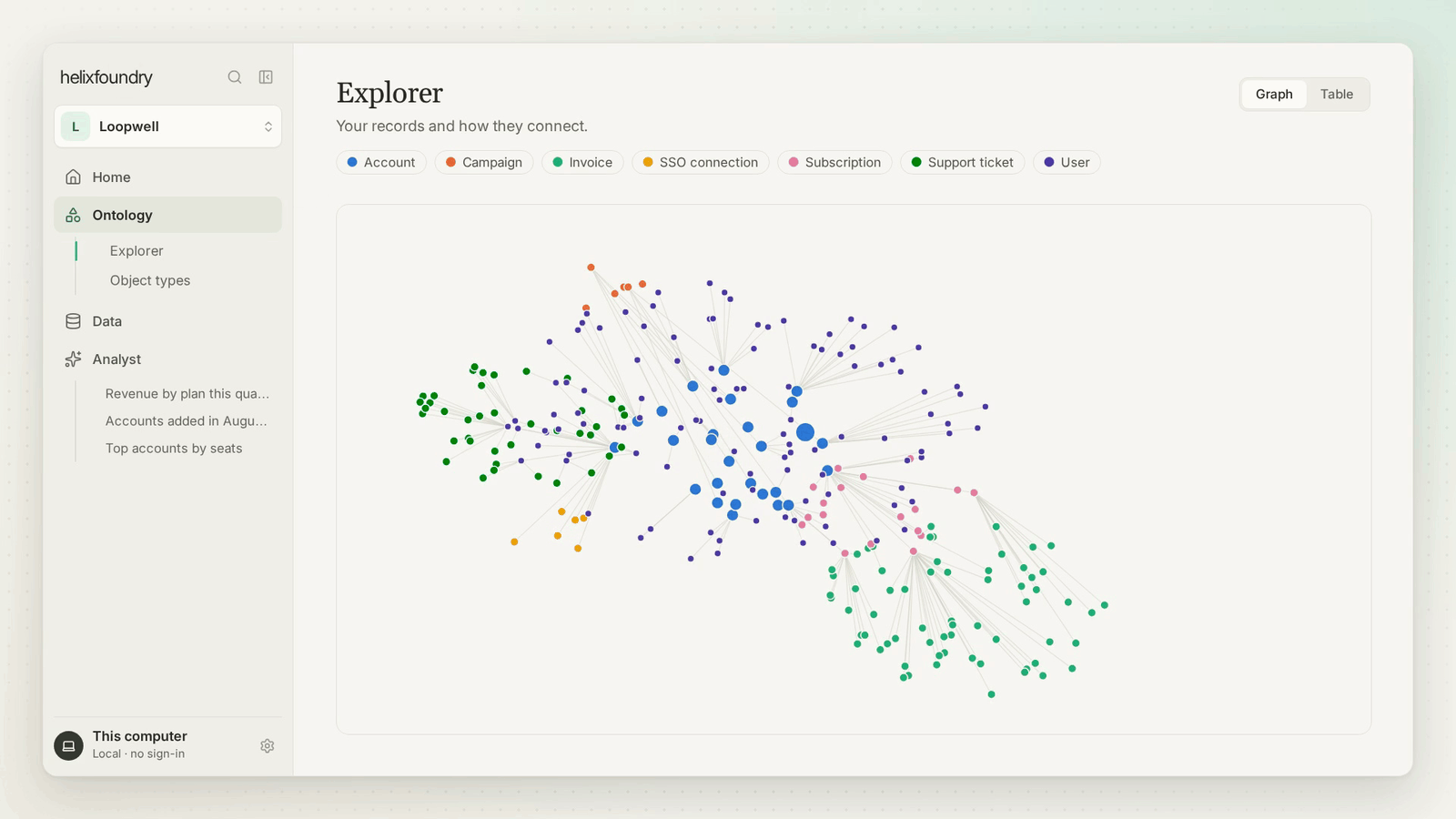

 Helix Foundry 是一个本地优先的数据工作区,把你公司的各种工具(数据库、Stripe、WorkOS、PostHog、文件、API)连接成一份存储在 HelixDB 中的建议本体,让你可以探索数据并向数据提问。