
Munder Difflin
Agent harness to run an office of your clones


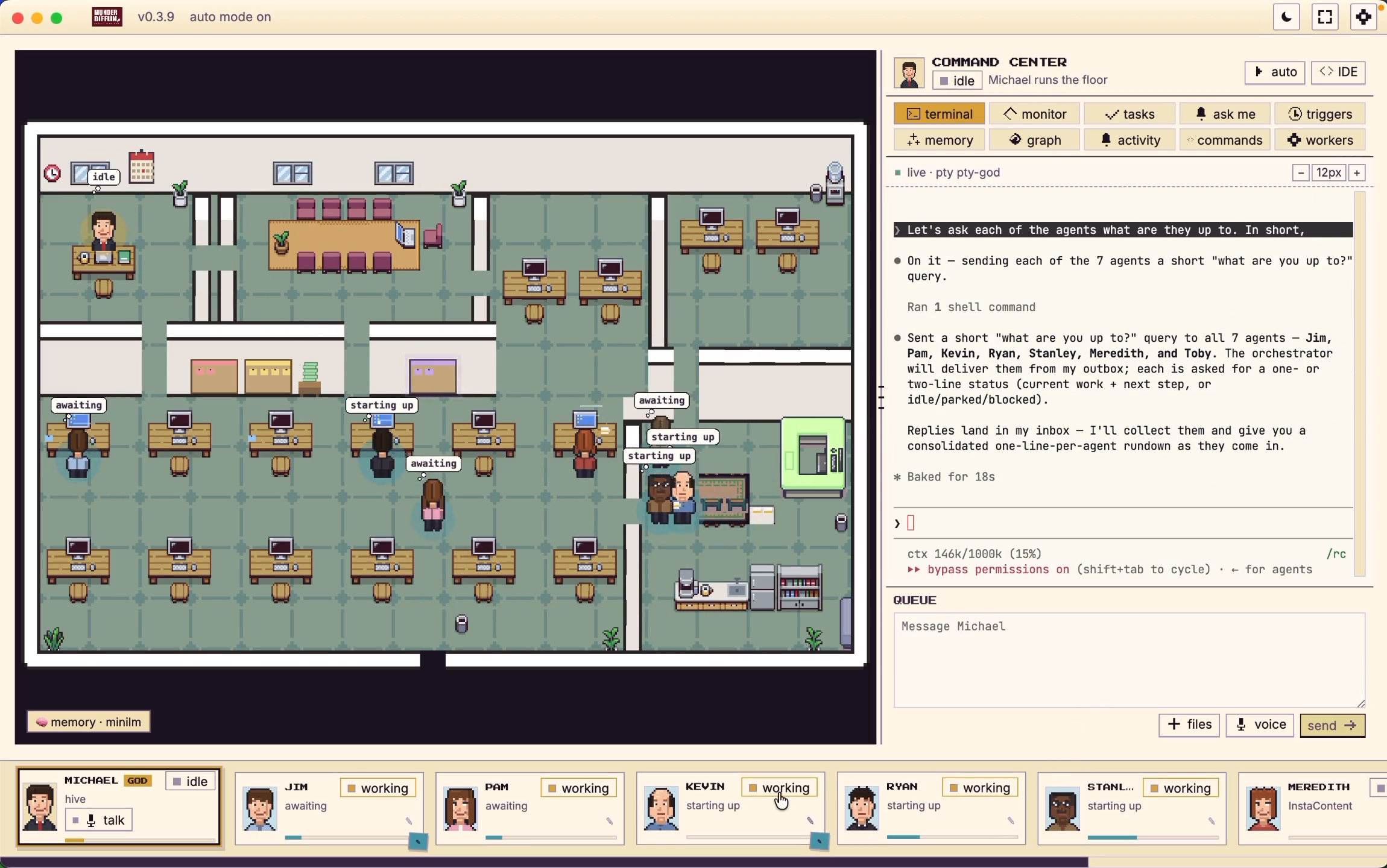
Free, open source and performant — a multi-agent harness that works with the
subscriptions you already pay for, on their hourly limits. It turns the terminal coding CLI
you already run into a clone of you, one that keeps working while you're away and
coordinates a whole office of agents on your own machine.
Wraps Claude Code, Antigravity (Gemini), OpenAI Codex,
xAI Grok, Kimi Code, Gemini CLI, Qwen, OpenCode, Crush,
pi.dev, GitHub Copilot CLI, and Cursor — with bring-your-own keys and local LLMs.
Agents that message, route, and remember, coordinated by your clone (Michael) and
visualized as avatars at work on a shared office floor.
Electron · React · TypeScript · Pixi.js · xterm.js · node-pty







▶ Watch the floor — Munder Difflin running a hive of Claude Code agents
⬇ Download for macOS, Windows or Linux
macOS builds are signed and notarized. You do not need to build from source to use it.
[!NOTE]
The world's best agents. The world's worst paper company.
Munder Difflin takes the terminal-agent CLIs you already run — claude, agy, codex, grok,
kimi, qwen, opencode, crush, pi, and copilot — and turns them
into a self-coordinating team: each agent gets long-term memory, a mailbox, and a desk on a 2D
office floor — and your clone (Michael) routes work between them while you watch. He's the
boss of the floor; you're still the boss of him.
Contents
Supported agents
Bring the CLI you already pay for. Every one of these runs as a real process in its own
terminal, with your existing subscription and its hourly limits. If it runs in a terminal, it
can run here.
Claude Code
Codex · GPT
Grok · xAI
Kimi Code
Gemini CLI
Antigravity · Gemini
Qwen
OpenCode
Crush · Charm
Pi
GitHub Copilot
Cursor
+ any custom command
Plus bring your own keys and local models through Ollama, LM Studio or vLLM.
What it is
Munder Difflin is a desktop app that wraps real terminal-agent CLIs as fully-capable agents,
wires them into a hive mind, and puts your clone in charge — Michael, the one agent you
talk to in order to get things done. Under the hood it runs the fastest memory layer in the
world so every agent remembers what it learns and recalls it instantly.
- Every terminal is an agent. Each
claude, agy, codex, grok, kimi, qwen, opencode, crush, pi, copilot, or custom session runs as a real
process in a pseudo-terminal (node-pty), byte-for-byte authentic, rendered with xterm.js.
- Every agent is an avatar. Sessions appear as characters on a Pixi.js office floor — they walk
to stations as they work, and envelopes fly desk-to-desk when they message each other.
- The hive coordinates them. Agents read their memory and drain a mailbox; the router moves
messages between inboxes; the GOD agent adjudicates, assigns, and escalates only when it needs you.
- Memory that's instant. A markdown-first memory layer with a semantic recall index means agents
remember across sessions and recall in milliseconds.
How it works
            you ── talk to ──►  ┌─────────────┐
                                │  GOD agent  │  orchestrator / supervisor
                                │ (Michael's  │  roster · routing · adjudication
                                │   office)   │  blackboard · task ledger
                                └──────┬──────┘
                                       │ assigns · routes · escalates
              ┌────────────────────────┼────────────────────────┐
              ▼                         ▼                         ▼
        ┌───────────┐            ┌───────────┐            ┌───────────┐
        │  agent A  │  message   │  agent B  │  message   │  agent C  │
        │ provider  │ ─────────► │ provider  │ ─────────► │ provider  │
        │  + memory │            │  + memory │            │  + memory │
        └───────────┘            └───────────┘            └───────────┘
              └──────── shared hive: memory · mailbox · blackboard · log ───────┘
- You spawn agents — each is a normal terminal process (
claude, agy, codex, or custom)
with its own working directory, identity, and provider-specific lifecycle.
- Agents collaborate through the hive — a local git repo of plain files. They write to their own
outbox/; the harness's router delivers into recipients' inbox/. No agent ever touches git
(single-committer design avoids index.lock corruption).
- The GOD agent runs the floor — it reads every request, resolves routine ones itself (keeping
the system fully autonomous), and only escalates critical items (spend, destructive ops, scope
changes) into an approvals queue you act on.
- Everything is visible — you watch avatars move, envelopes fly, and the live terminal stream;
you can type back into any session, browse its files, and read its git history.
See HIVE.md for the full multi-agent design, SPEC.md for the
terminal/event plane, and DESIGN.md for the visual system.
Features
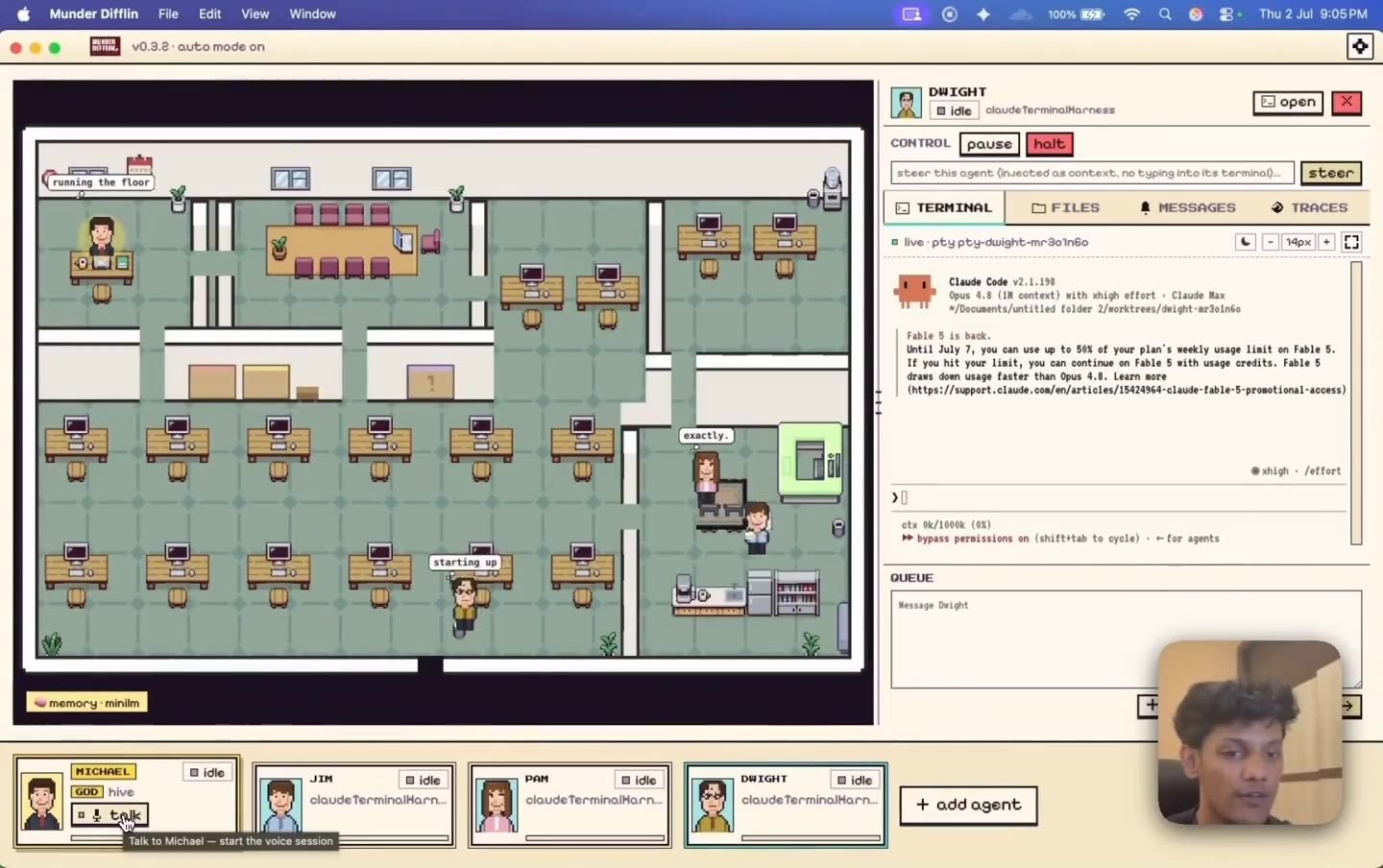
Talk to one agent, not twelve
Michael is your clone and the only agent you brief. He assigns the work, routes the traffic, and
escalates the few things that actually need you.
|
|
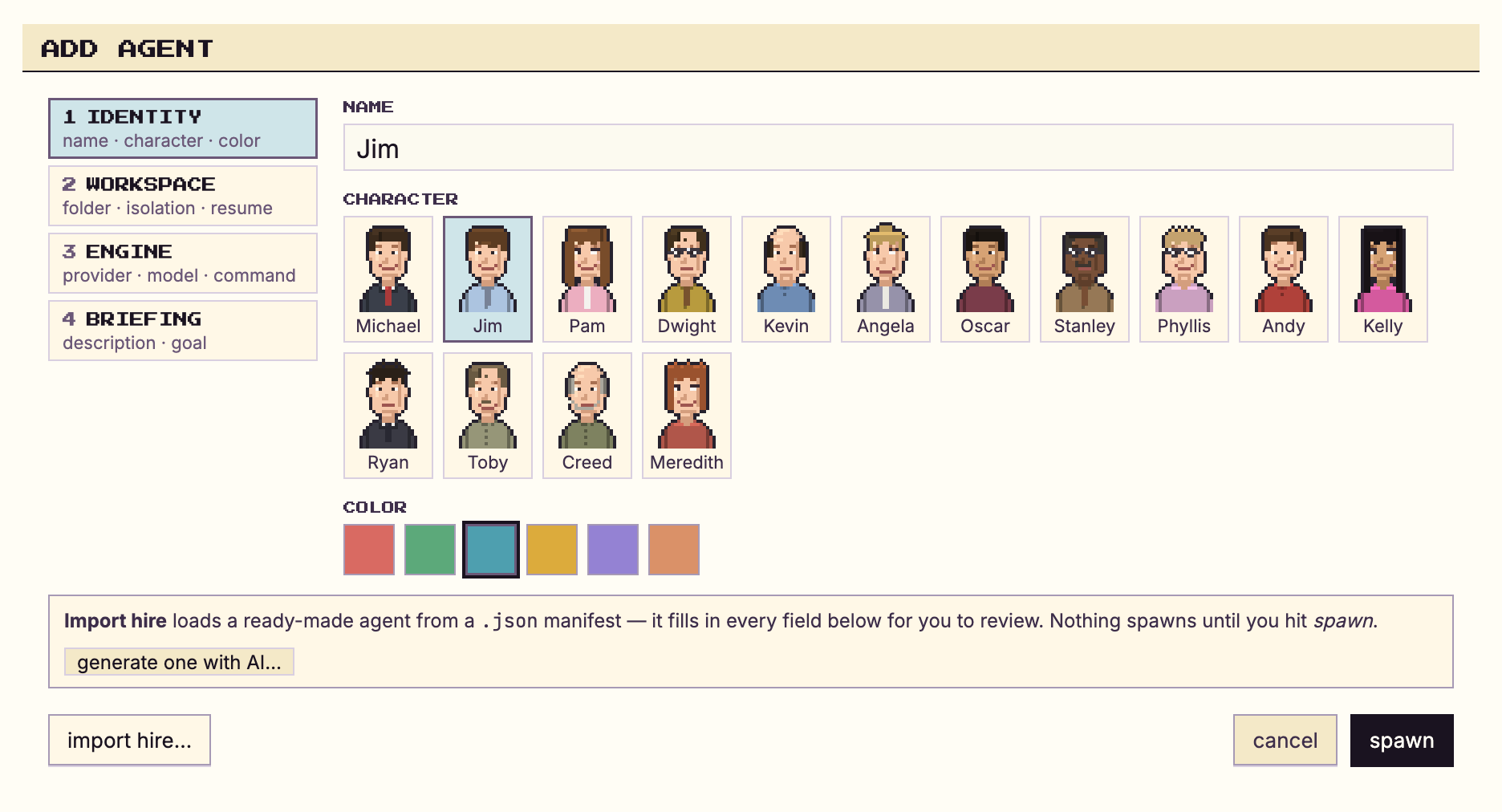
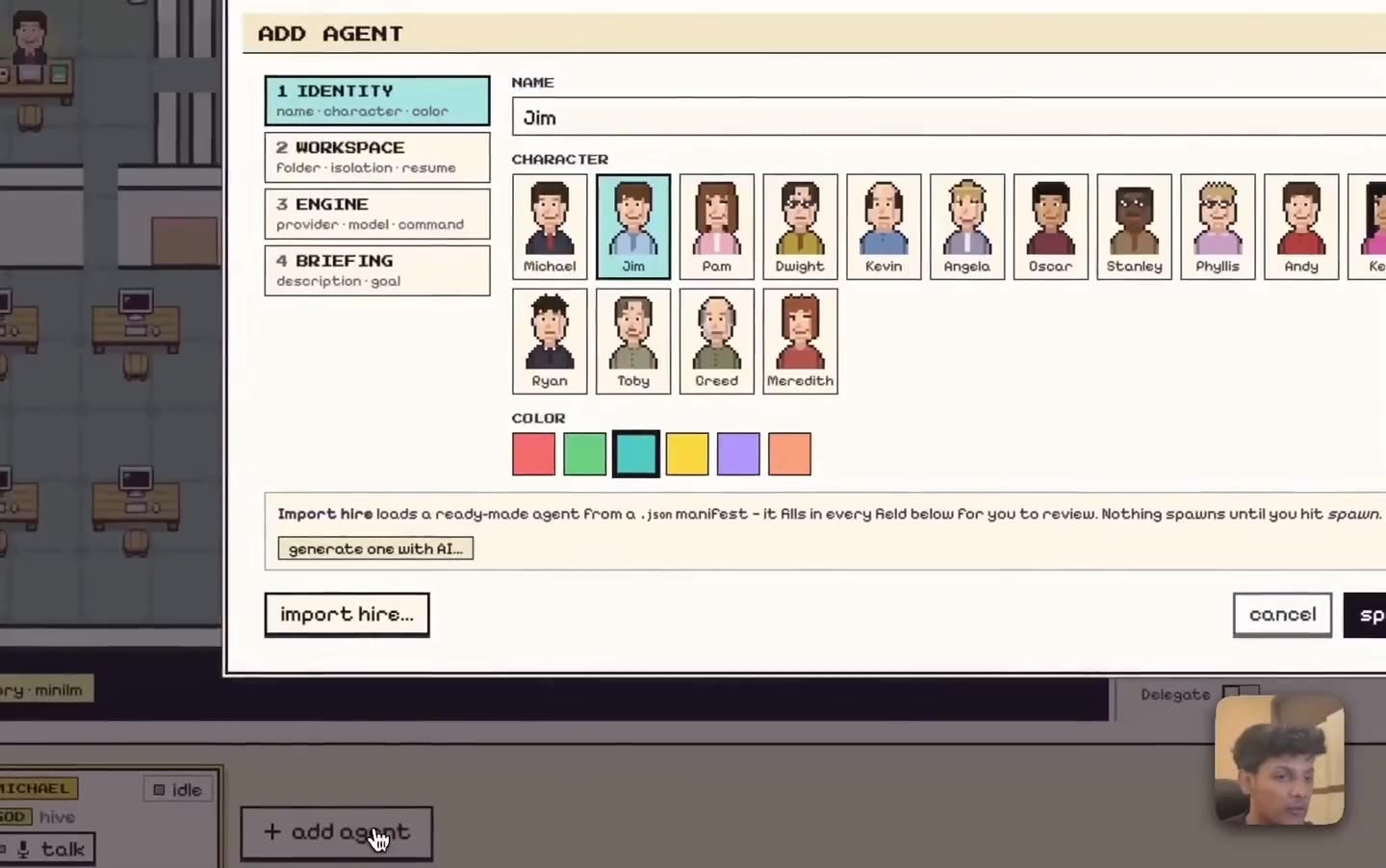
Hire an agent in a few clicks
Pick the CLI, the model and the autonomy, give it a desk, and it starts working. Import a
ready made role from the Agent Gallery if you would rather not
start from scratch.
|
|
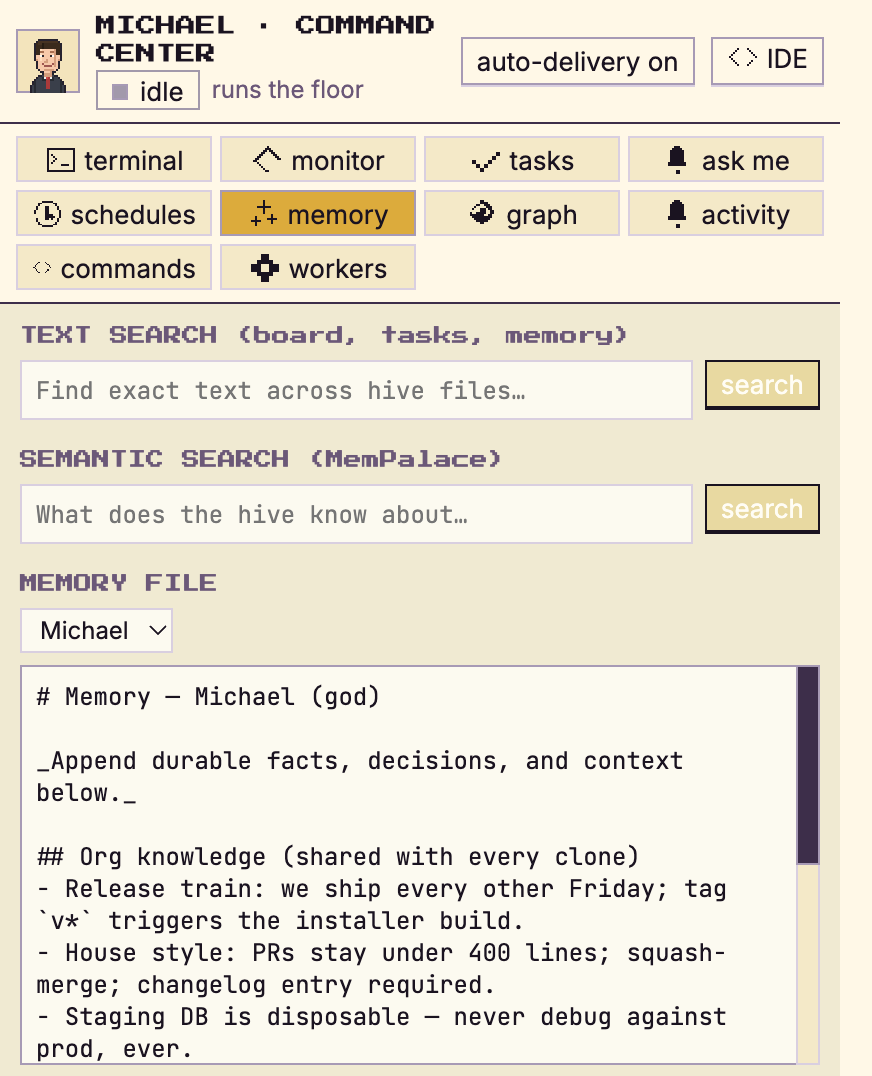
Memory that survives the session
Every agent keeps markdown memory that is mined into a shared, searchable palace. Close the app,
come back tomorrow, and they still know what they learned.
|
|
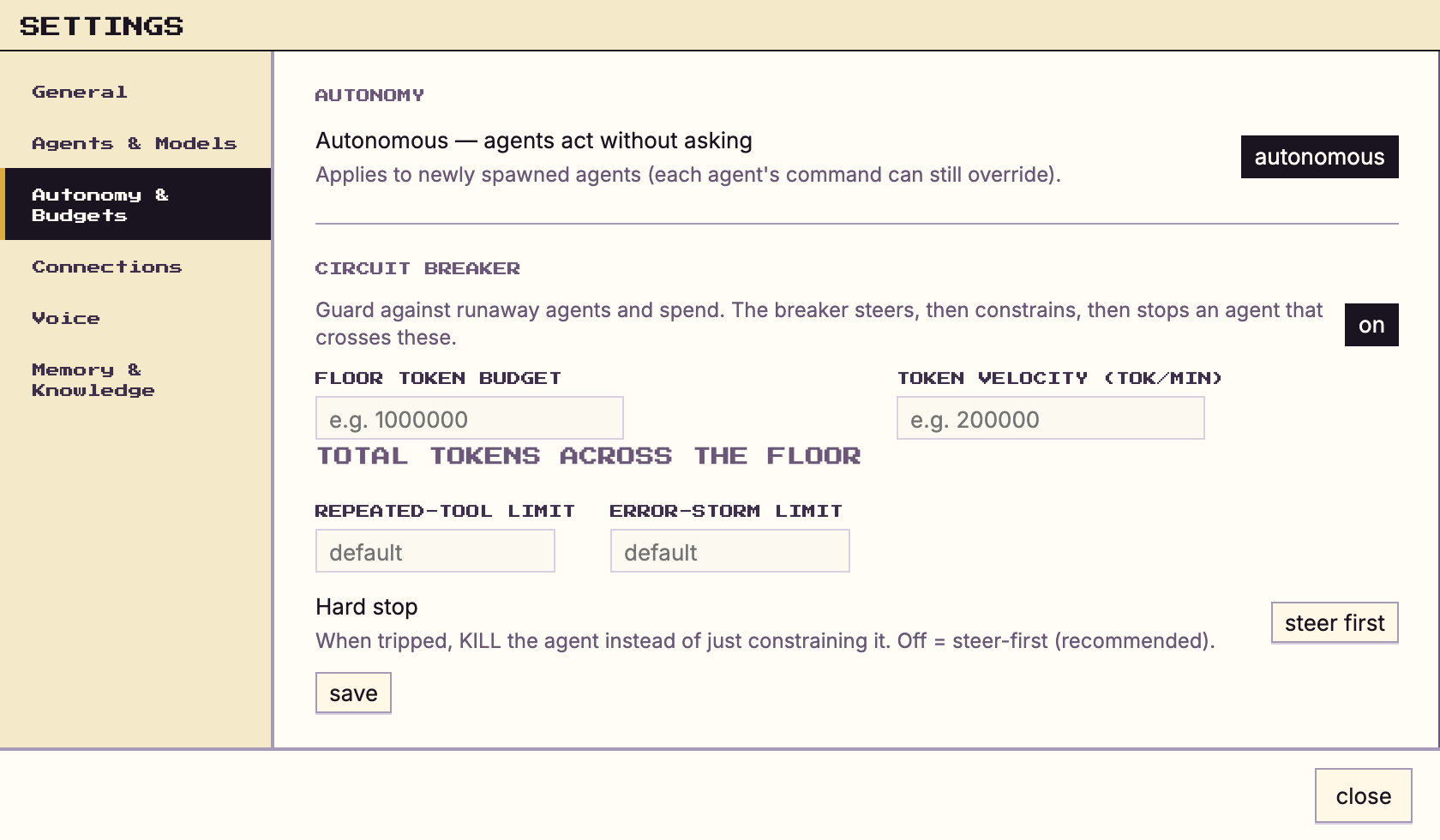
Autonomy with a leash
Set how far each agent may go on its own. Spend, scope and destructive operations come back to
you, and a circuit breaker steers, constrains, then stops anything that loops or runs away.
|
|
Watch the whole floor work
Agents walk to stations as they work and envelopes fly desk to desk when they message each other.
Click any desk to read that terminal live, and type straight back into it.
|
|
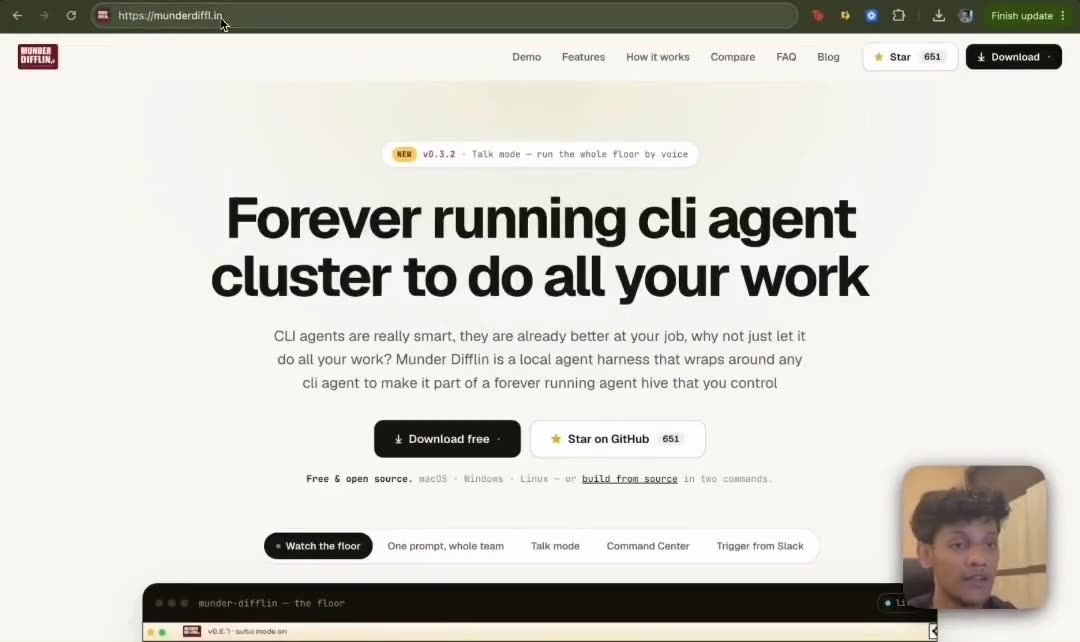
Set up once
The onboarding wizard checks what you already have, and offers to install what is missing rather
than sending you to a docs page.
|
|
The floor
- Every terminal is a real agent. Claude Code, Antigravity (Gemini), OpenAI Codex, xAI Grok, Kimi Code, Gemini CLI, Qwen, OpenCode, Crush, pi.dev, GitHub Copilot CLI, Cursor, or a custom command — each in its own
node-pty PTY, rendered with xterm.js.
- Every agent is an avatar. A Pixi.js office floor where agents walk to stations, envelopes fly desk to desk, and avatar state reflects real work.
- A GOD orchestrator you talk to. It routes tasks, adjudicates traffic, and escalates only what needs a human. Or press Talk and run the floor by voice.
- Per-agent git worktrees. Optional isolation so parallel agents never collide on branches.
Memory & coordination
- The hive — per-agent memory, atomic-file mailboxes, a shared blackboard, an append-only event log, single-committer git.
- Semantic recall — markdown memory mined into a shared palace, searchable from the UI, with condensation so it doesn't grow forever.
- Enterprise Knowledge Graph — your own documents and policies, queryable by any agent.
Control & safety
- Human gates — spend, scope, and destructive ops escalate to you. Steer mid-run or stop gracefully.
- Circuit breaker — a steer → constrain → stop ladder for agents that loop, storm errors, or blow their budget.
- Budgets & telemetry — per-agent token budgets, real cost from transcripts, a durable ledger, OTel spans, and a tool waterfall.
Command Center
- Kanban tasks with dependencies, scheduled missions + heartbeat, live fleet monitoring, memory search, activity log, and a CI watcher.
- Skills — what every agent can already do across Claude Code, OpenCode and Codex, plus a browsable catalog of 227 more with search, filters, install and uninstall.
- Built-in Monaco IDE — file tree, editor tabs, save, plus CHANGES · HISTORY · COMPARE git rails with commit graph, diffs, branch compare, and guarded checkout. All fs/git access brokered through main.
Getting work in and out
- Slack & webhooks — message a channel or POST a webhook; Michael can spawn an ephemeral worker, reply in-thread, and tear it down.
- Shareable hires + Agent Gallery — import a role from a
munderdifflin://hire link; import only pre-fills the form, a human still spawns it. Browse roles at the Agent Gallery.
- BYOK keys + local LLMs — per-provider keys in a write-only secret broker, plus Ollama / LM Studio / vLLM base URLs. Guides: open models · Mac Mini.
- Updates in one click: the title-bar badge runs the real update. It downloads the build for your machine, then restarts and installs it, and it reads
latest once a check confirms you are current. A manual download is the fallback for when the updater cannot fetch the build itself. The first run afterwards opens that release's notes as a designed page rather than a version number.
- Your language: English, Simplified Chinese and Arabic, with right to left layout for Arabic. English is the default and nothing changes until you pick another one in Settings. The app does not read your OS locale. All three app fonts ship inside the bundle, so nothing is fetched at boot.
- Prerequisites — one Settings page showing which supporting tools (uv, git, Node, MemPalace, each agent CLI) you have, what each is for, and a button that asks Michael to install what is missing.
[!NOTE]
Status: v0.4.6, the release where the app stops assuming everyone reads English left to right.
The interface now runs in Simplified Chinese and Arabic, with right to left support. English
stays the default and nothing changes until you pick a language in Settings, under General; the
app never reads your operating system locale. All three app fonts now ship inside the bundle
instead of loading from Google, which is blocked in mainland China and was breaking the interface
for exactly the people the Chinese translation was for. An input method Enter no longer fires a
send, a search or a rename while a candidate word is still being composed.
Every string is translated, with nothing falling back to English, and the terminals read right to
left. Some screens still need their padding and icons mirrored, and that is the next piece of
work. No Arabic reader has reviewed the wording yet.
Also in this release: the update badge runs the real download and restart instead of handing you
a disk image, the update check can no longer spin forever, Settings persists through one Save
button, the model lists moved into a checked in catalog, and the ASK ME card renders markdown.
On the security side: the name of the CLI an agent launches is validated before it is resolved
against your PATH, the OS sandbox stays on in auto mode, and analytics stopped sending IP and
derived location. Telemetry now counts the messages you send to an agent, a count and nothing
else, with no text, length or hash of the body in any shape.
16 community pull requests from 13 contributors landed in this release, one of them (#213)
re-implemented rather than merged.
If you're on 0.3.8, update: that build's usage-limit guard never released the agents it held,
and it has been removed entirely.
macOS (signed & notarized), Windows, and Linux builds are on the
releases page.
Getting started
Download the app
Most people want this one. Signed and notarized macOS builds, plus Windows and Linux, are on
the latest release. Install it,
open it, and the wizard takes you the rest of the way. You do not need Node, a toolchain, or this
repository.
You do still need at least one agent CLI on your machine, and the app can install missing ones for
you from Settings → Prerequisites.
Build from source
Everything below is for contributors and for people who want to run an unreleased build.
Prerequisites
- macOS, Windows, or Linux.
- Node.js 18+ and npm.
- A C/C++ toolchain for
node-pty's native addon — on macOS, install Xcode Command Line Tools:xcode-select --install
- At least one supported agent CLI on your
PATH — Claude Code
(claude, the default), Antigravity (agy), OpenAI Codex (codex), xAI Grok (grok),
Kimi Code (kimi), Gemini CLI (gemini), Qwen (qwen), OpenCode (opencode),
Crush (crush), pi.dev (pi), GitHub Copilot (copilot), or Cursor (cursor-agent).
Most missing CLIs self-heal: the harness runs the installer in the
terminal and continues into the new binary.
- Optional: your own API keys and local LLMs in Settings → AI Engines (Ollama / LM Studio / vLLM).
- Optional: the semantic memory index for instant cross-session recall — markdown memory works without it.
Install & run
git clone https://github.com/chaitanyagiri/munder-difflin.git
cd munder-difflin
npm install        # postinstall rebuilds node-pty against Electron's ABI
npm run dev        # launches the Electron app with hot reload
On first launch you'll go through the onboarding wizard, then land on the floor. Use Add agent to
spawn your first session — the GOD agent seats itself in Michael's office automatically.
Other scr

 Munder Difflin 是一款免费的开源桌面应用,能把你已经在用的编程智能体命令行工具(Claude Code、Codex、Gemini CLI、Grok、Qwen、OpenCode 等)组织成一个协同工作的“办公室”。这些自主智能体以头像的形式在 2D 办公室地板上工作,并由你自己的 AI 分身 Michael 统一管理。