org-timegrid
org-timegrid is a beautiful SVG week calendar for Org mode. It reads timed active
timestamps from your Org files and writes edits back to their source headings.
Create, move, resize, copy, rename, and remove calendar blocks with the mouse
or keyboard. The same renderer can add a compact, read-only day view to an
existing Org Agenda.
https://github.com/user-attachments/assets/2e1df1c3-d0f0-419d-b5f2-66d876753872
Screenshots
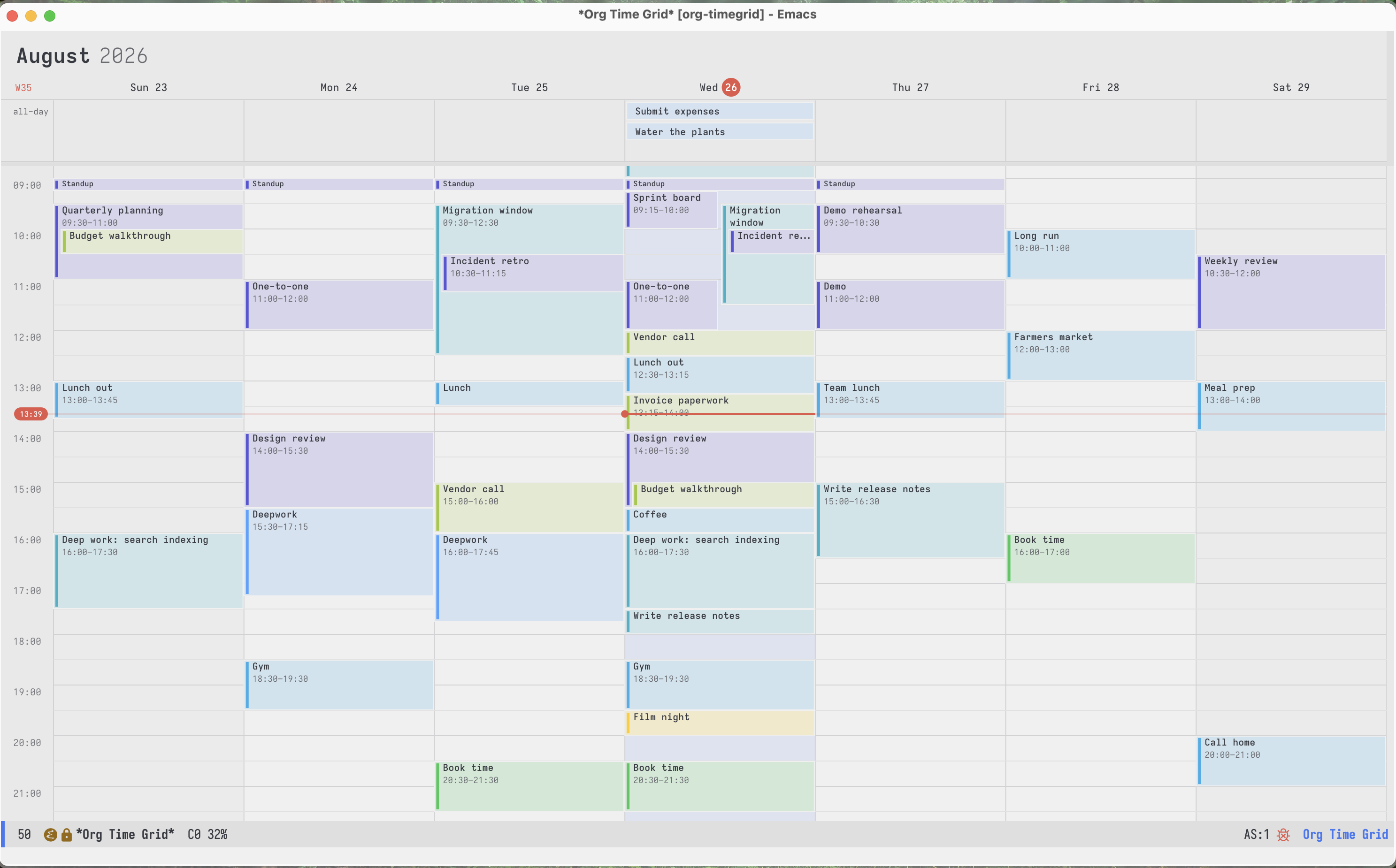
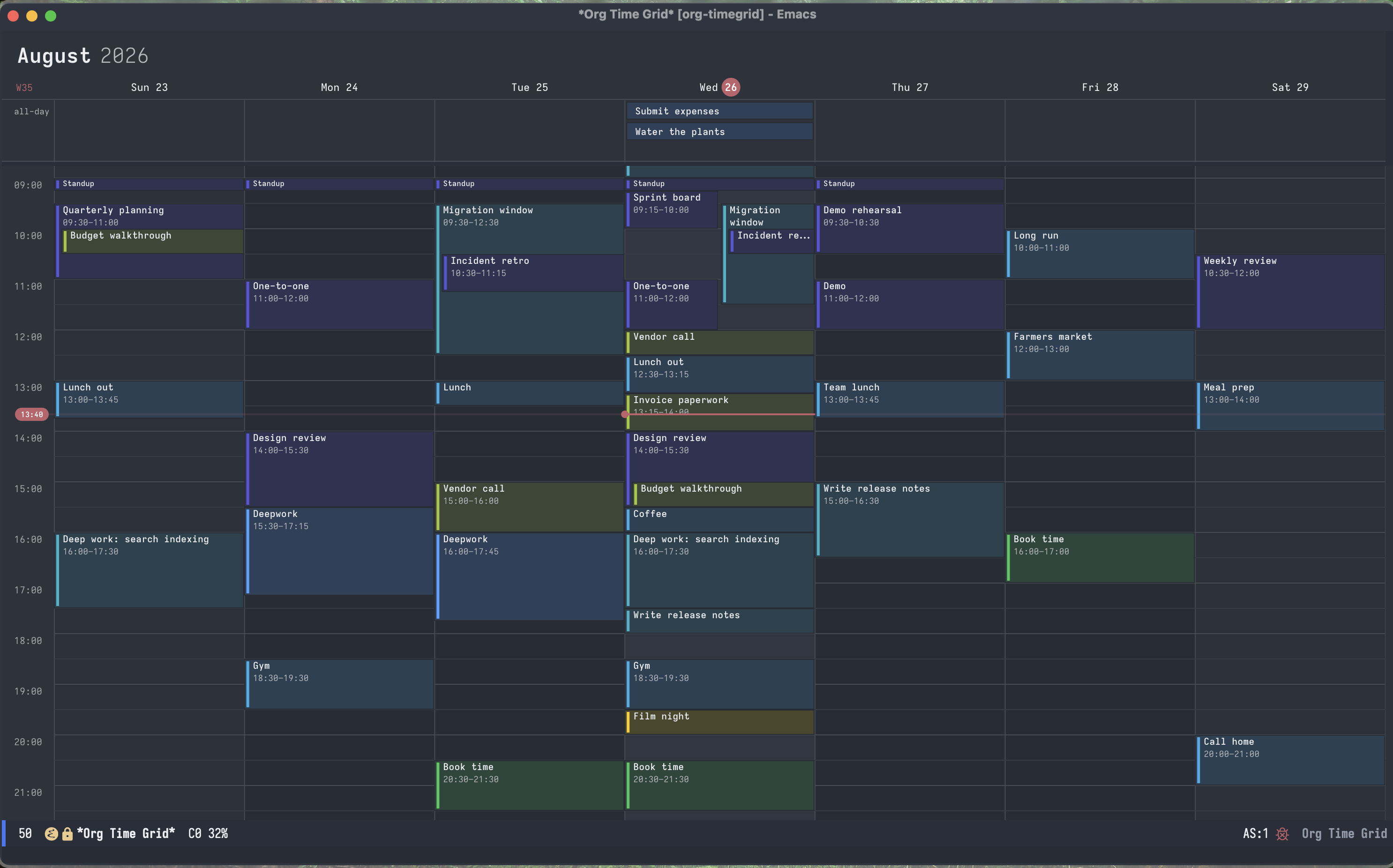
The palette comes from the theme, and is redrawn when the theme changes.
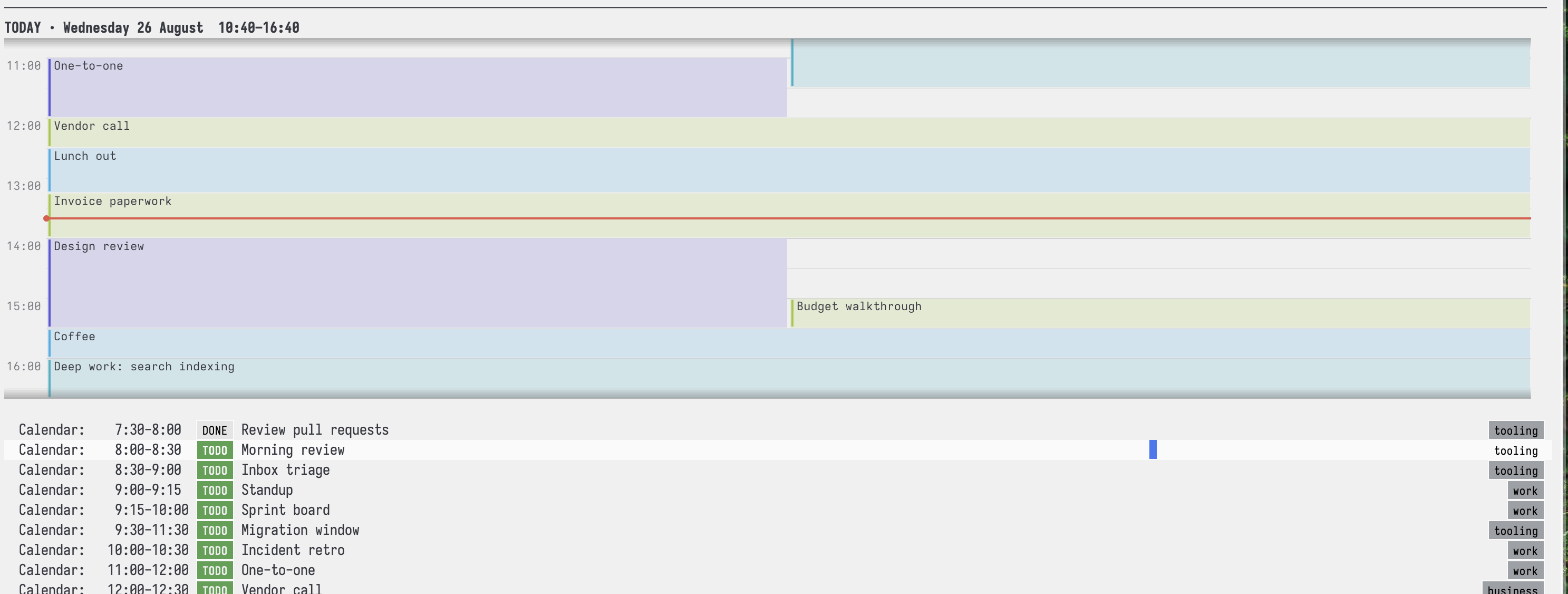
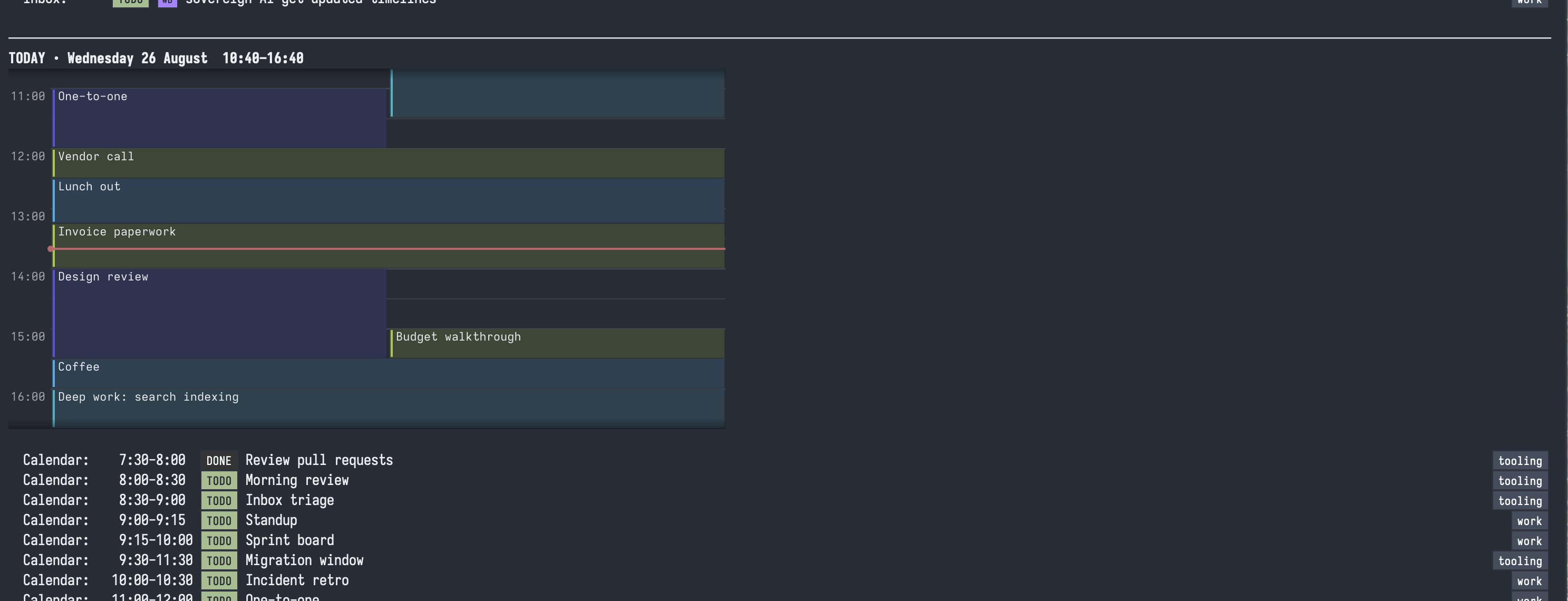
Agenda view:
Requirements and installation
You need Emacs 29.1 or later with SVG support and Org 9.6 or later. Check SVG
support with (image-type-available-p 'svg). There are no other dependencies.
With Elpaca:
(use-package org-timegrid
  :ensure (:host github :repo "Gleek/org-timegrid")
  :commands (org-timegrid-week)
  :bind ("C-c c" . org-timegrid-week))
For a manual install, put the .el files on load-path, evaluate (require 'org-timegrid-org), then run M-x org-timegrid-week.
Complete example configuration
The following is a self-contained Elpaca configuration that can be pasted into
your Emacs configuration. It reads events from your existing
org-agenda-files, writes entries created in the calendar to calendar.org
inside org-directory, and enables the optional day strip in Org Agenda.
(require 'org)

(use-package org-timegrid
  :ensure (:host github :repo "Gleek/org-timegrid")
  :demand t
  :bind (("C-c a c" . org-timegrid-week))
  :init
  ;; The symbol `agenda' means: read events from `org-agenda-files'.
  (setq org-timegrid-org-files 'agenda

        ;; Recommended compact scale; use 1.0 to match Emacs's default font.
        org-timegrid-default-zoom 0.7

        org-timegrid-org-capture-file
        (expand-file-name "calendar.org" org-directory)
        org-timegrid-org-capture-template
        '(:target file
          :template "* %{title}\n%{time-range}\n%?")

        ;; Save Org buffers immediately after edits made in the calendar.
        org-timegrid-org-auto-save t

        ;; Set this to nil if repeating entries should be hidden.
        org-timegrid-org-show-repeaters t

        ;; The first matching tag supplies an event's colour.
        org-timegrid-org-tag-color-alist
        '(("work"     . indigo)
          ("personal" . green)
          ("reading"  . yellow)
          ("errand"   . cyan)))
  :config
  (require 'org-timegrid-org))

;; This is part of the same package. It adds a read-only day strip to Org
;; Agenda; pressing RET on the strip opens the editable week view.
(use-package org-timegrid-agenda
  :ensure nil
  :after org-agenda
  :demand t
  :init
  ;; nil inserts the strip at the top. To place it after a particular custom
  ;; agenda block, use a regexp matching that block's heading instead.
  (setq org-timegrid-agenda-insert-after nil
        org-timegrid-agenda-separator t
        org-timegrid-agenda-minutes-before 180
        org-timegrid-agenda-minutes-after 180)
  :config
  (org-timegrid-agenda-mode 1))
Change org-timegrid-org-capture-file if new entries should go somewhere
else. The file does not need to be in org-agenda-files; org-timegrid always
queries its capture file as well. If you do not want the Org Agenda strip,
omit the second use-package form.
Android Emacs
See ANDROID.org for a complete phone setup without ADB, Git,
Termux, or other command-line binaries, plus optional Syncthing instructions.
On Android, org-timegrid adds native touch scrolling and long-press editing,
prevents calendar gestures from opening the software keyboard, and uses a
one-day layout suitable for a phone. Set
org-timegrid-android-display-keyboard to non-nil to keep the on-screen
keyboard available for commands that have no touch gesture.
Here's a screencast:
https://github.com/user-attachments/assets/fc368b76-4b29-40d0-8a0a-536ac526f6e0
Android Emacs bundles librsvg without the font support needed to display SVG
text. The Android layer therefore draws calendar text from bundled Noto Sans
glyph outlines while retaining the shared SVG renderer and layout. Printable
ASCII and common calendar punctuation are included; unsupported characters use
a question-mark glyph. The outline subset is roughly 59 KB, and its source font
is licensed under the SIL Open Font License 1.1. You can generate the resource
from another font with
builds/generate-android-font.py.
What appears on the calendar
The Org backend reads active timestamps with a start time. They may be plain
timestamps or values attached to SCHEDULED and DEADLINE.
* TODO Design review :work:
<2026-08-24 Mon 14:00-15:30>

* TODO Standup
SCHEDULED: <2026-08-24 Mon 09:00-09:15>

* Call the vendor
<2026-08-24 Mon 15:00>
The last heading appears even though it has no TODO keyword. A timed active
timestamp is enough to put a heading on the calendar. A timestamp without an
end uses org-timegrid-default-duration-minutes, which defaults to 30 minutes.
Inactive timestamps do not appear on the time grid.
A separate date-only rail appears for active timestamp entries with no day times
Repeaters are expanded into dated occurrences for display. Moving or resizing
one occurrence edits the series anchor and preserves its repeater and warning
modifiers. Edits leave source buffers modified but unsaved, like Org Agenda
commands.
Set org-timegrid-org-show-repeaters to nil to omit repeating timestamps and
all of their occurrences.
Week view
Run M-x org-timegrid-week to open the week containing today.
Mouse
| Gesture |
Action |
| Drag empty space |
Create an entry for that range |
| Drag a block |
Move it |
| Drag a block's top or bottom edge |
Resize it |
| super-drag a block |
Duplicate it as an independent entry |
| shift-drag a block |
Add another time to its source entry |
| Click |
Put the cursor there |
| Double-click a block |
Visit its Org heading |
| Wheel |
Scroll the day |
Mouse edits snap to 15 minutes and use a 15-minute minimum. Release commits a
drag. Press C-g before releasing to cancel it.
Keyboard
The calendar has one cursor (point). A block is selected when the cursor sits on the
slot where that block begins. This keeps keyboard and mouse selection in sync
after redraws.
| Key |
Action |
C-n / C-p, up/down |
Move the cursor by 15 minutes (configurable) |
C-f / C-b, left/right |
Move through overlapping lanes, then days |
C-v / M-v, SPC |
Move by one screen |
C-a / C-e |
Go to the first or last slot of the day |
C-l |
Center the view on the cursor |
C-x + / C-x C-- / C-x C-0 |
Zoom in, zoom out, or reset zoom |
n / p |
Select the next or previous block |
RET |
Visit the selected block, or create one at the cursor |
C-g |
Hide the cursor / Cancel unsaved new block |
M-down / M-up |
Move the selected block by 15 minutes |
M-right / M-left |
Move the block by one day |
S-down / S-up |
Move the end time |
C-S-up / C-S-down |
Move the start time |
t |
Enter a new time or range |
e |
Rename the heading |
d, backspace |
Remove its time, then optionally delete the heading |
M-w, then C-y |
Duplicate the block as an independent entry |
C-w, then C-y |
Move the block by cutting and restoring its timestamp |
M-w, then C-u C-y |
Add the pasted timestamp to the existing entry instead of duplicating it |
C-/, C-x u |
Undo the last calendar edit |
:, C-c C-q |
Change the selected entry's tags |
C-c C-t |
Change the selected entry's TODO state |
,, C-c , |
Set the selected entry's priority |
i |
Clock in to the selected entry |
O |
Clock out |
z, C-c C-z |
Add a note to the selected entry |
C-c C-x e |
Set the selected entry's effort |
C-c C-w |
Refile the selected entry |
$ |
Archive the selected entry |
b / f, M-b / M-f |
Shift by a day or week |
j / . |
Jump to a date or today |
g |
Reload the week from the backend |
q |
Quit |
C-s, C-r |
Isearch like forward or backward search. RET keeps the current match, C-g resets |
The Org backend can wrap other interactive commands for use in the calendar.
org-timegrid-org-command runs a command at the selected source heading.
org-timegrid-org-agenda-command finds the corresponding line in a live Org
Agenda buffer and runs the command there. Both wrappers return to the calendar
and reload it without resetting the cursor or scroll position.
(keymap-set org-timegrid-mode-map "i"
            (org-timegrid-org-command #'org-clock-in))
(keymap-set org-timegrid-mode-map ","
            (org-timegrid-org-agenda-command #'org-agenda-priority))
The Agenda wrapper signals a user error when no live Agenda buffer contains
the selected entry. Prefer the Org wrapper when the underlying Org command is
available, since it does not depend on an Agenda view being open.
Org Agenda strip
Enable the optional integration after loading org-timegrid-agenda:
(require 'org-timegrid-agenda)
(org-timegrid-agenda-mode 1)
Org continues to build the agenda buffer. A finalize hook inserts a read-only
SVG view of the hours around the current time. Press RET on the image to open
the editable week view.
(setq org-timegrid-agenda-insert-after "To Refile"
      org-timegrid-agenda-separator nil)
The first option matches the agenda block above the strip. A nil separator lets
the following block read as the untimed part of the same day section. The strip
shades an edge only when an event continues beyond the visible window.
org-timegrid-day-blocks gets and lays out one day's blocks.
org-timegrid-day-image draws a chosen minute range as an SVG image. Neither
function needs a calendar buffer.
Org date picker
The standard Calendar opened by org-read-date shows dates containing events
in bold coloured text. The Org backend enables this by default for the j
date prompt. Other backends can reuse the integration directly:
(require 'org-timegrid-calendar)
(org-timegrid-calendar-read-date backend t nil nil "Time" default-time)
Calendar still owns its buffer, navigation, and selection; the integration
only adds standard temporary Calendar marks while the prompt is active. Set
org-timegrid-calendar-highlight-dates to nil to disable them. Customize
org-timegrid-calendar-event-face to change their appearance, or set
org-timegrid-calendar-event-predicate to choose which backend events count.
Colours
The grid, text, cursor, and backgrounds use the current Emacs theme. Images
redraw after a theme change and respect buffer-local face remapping.
Map Org tags to the built-in macOS-style palette or any colour string Emacs
accepts:
(setq org-timegrid-org-tag-color-alist
      '(("work" . indigo)
        ("business" . lime)
        ("reading" . green)
        ("errand" . cyan)
        ("urgent" . "#b4d74a")))
The named colours are blue, cyan, teal, indigo, purple, pink,
red, orange, yellow, lime, green, brown, and graphite. The first
mapped tag wins. Set org-timegrid-org-color-function to colour by TODO state,
priority, property, or file.
Configuration
| Variable |
Default |
Meaning |
org-timegrid-days |
7 |
Consecutive days shown in the main view |
org-timegrid-start-hour / org-timegrid-end-hour |
0 / 24 |
Hours drawn |
org-timegrid-pixels-per-minute |
0.9 |
Week-view scale |
org-timegrid-default-zoom |
0.7 |
Initial zoom; 1.0 matches Emacs's default font size |
org-timegrid-slot-minutes |
15 |
Cursor and edit granularity |
org-timegrid-cursor-step-minutes |
15 |
Normal keyboard step |
org-timegrid-keyboard-commit-delay |
0.25 |
Idle delay before a moved block is saved |
org-timegrid-default-duration-minutes |
30 |
Length used when no end is present |
org-timegrid-block-gap |
1 |
Gap between blocks, in pixels |
org-timegrid-corner-radius |
0 |
Block corner radius |
org-timegrid-nesting-indent |
8 |
Indent for contained events |
org-timegrid-title-clearance |
18 |
Space a parent keeps for its title |
org-timegrid-data-refresh-seconds |
300 |
Backend reload interval |
| Agenda variable |
Default |
Meaning |
org-timegrid-agenda-minutes-before / -after |
180 / 180 |
Visible window around now |
org-timegrid-agenda-insert-after |
"To Refile" |
Block above the strip |
org-timegrid-agenda-separator |
t |
Separator after the strip |
org-timegrid-compact-pixels-per-minute |
0.95 |
Strip scale |
org-timegrid-compact-font-size |
11 |
Strip text size |
| Org variable |
Default |
Meaning |
org-timegrid-org-files |
agenda |
Files to query; a list is literal |
org-timegrid-org-capture-file |
calendar.org in user-emacs-directory |
Target for new entries; always queried |
org-timegrid-org-capture-template |
top-level title and time range |
Structure and location inside the capture file |
org-timegrid-org-auto-save |
nil |
Save the affected Org file after every calendar edit |
org-timegrid-org-show-done |
t |
Show timestamps belonging to headings in a done state |
org-timegrid-org-show-repeaters |
t |
Show repeater anchors and their generated occurrences |
org-timegrid-org-exclude-tags |
nil |
Hide headings carrying any listed tag |
org-timegrid-org-exclude-todo-states |
nil |
Hide headings whose TODO keyword is listed |
org-timegrid-org-exclude-properties |
nil |
Hide headings matching (PROPERTY . VALUE); nil matches any value |
org-timegrid-org-filter-function |
org-timegrid-org-default-filter |
Keep-predicate called with headline and timestamp Org elements |
org-timegrid-org-tag-color-alist |
nil |
Tag-to-colour mapping |
On an empty slot, RET and mouse-drag creation complete against unfinished
TODO headings in the configured Org files. Choosing one adds the new time
range to that heading. Entering text that does not match a candidate creates a
heading in org-timegrid-org-capture-file, as before. This uses Org's parser
and works with any completion-styles.
The default template is (:target file :template "* %{title}\n%{time-range}\n%?").
Its target may also be datetree, (headline "Name"), or
(olp "Parent" "Child"). Template headings are relative to that target. The
available substitutions are %{title}, %{time-range}, %{start}, %{end},
%{duration}, %<FORMAT> (using the selected start time), and %? for the
final point.
To keep calendar entries in a dedicated file organized by their start date:
(setq org-timegrid-org-capture-file "~/org/timegrid.org"
      org-timegrid-org-capture-template
      '(:target datetree
        :template "* %{title}\n%{time-range}\n%?"))
Creating �

 org-timegrid — недельный календарь в SVG для Emacs, который читает временные метки из ваших Org-файлов и записывает правки обратно в исходные заголовки, так что вы можете создавать, перемещать, масштабировать, переименовывать и удалять календарные блоки мышью или клавиатурой.