








Prism-Legal-OS README

The project's README from github.com/FuturixAI-and-Quantum-Works/Prism-Legal-OS. As one markdown file: README.md.

Prism

The open-source command centre for legal teams.

One legal OS to draft, review, and take command of every contract.
Host it yourself, or have FuturixAI run it for you.

CI AGPL-3.0-only license Node.js 22 PostgreSQL 16

Product site · Features · Quick start · Architecture · Deployment · Enterprise


Prism is an open-source contract litigation management system for drafting, reviewing, sharing, and managing legal work. Luna is the AI assistant inside Prism. The browser application uses React and Vite. The API uses Express, Better Auth, PostgreSQL, and Drizzle ORM.

Legal work is still too fragmented. Teams draft documents, review contracts, compare versions, check compliance, and manage negotiations across different tools. Prism brings that work together in one connected workspace.

Platform preview

Product screenshots from the Prism Legal OS site.

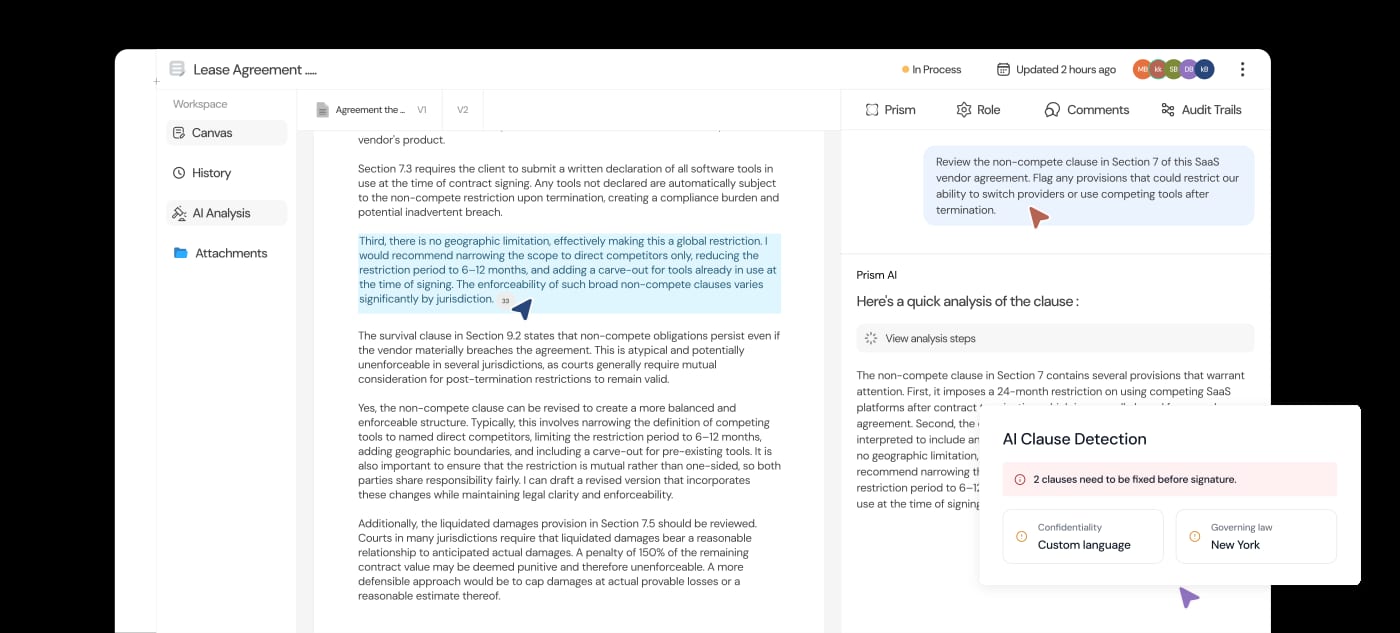
Workspace

Review documents, work together, and keep every clause in context.

Prism document workspace with a legal agreement, highlighted clauses, an AI review, and a floating clause detection card

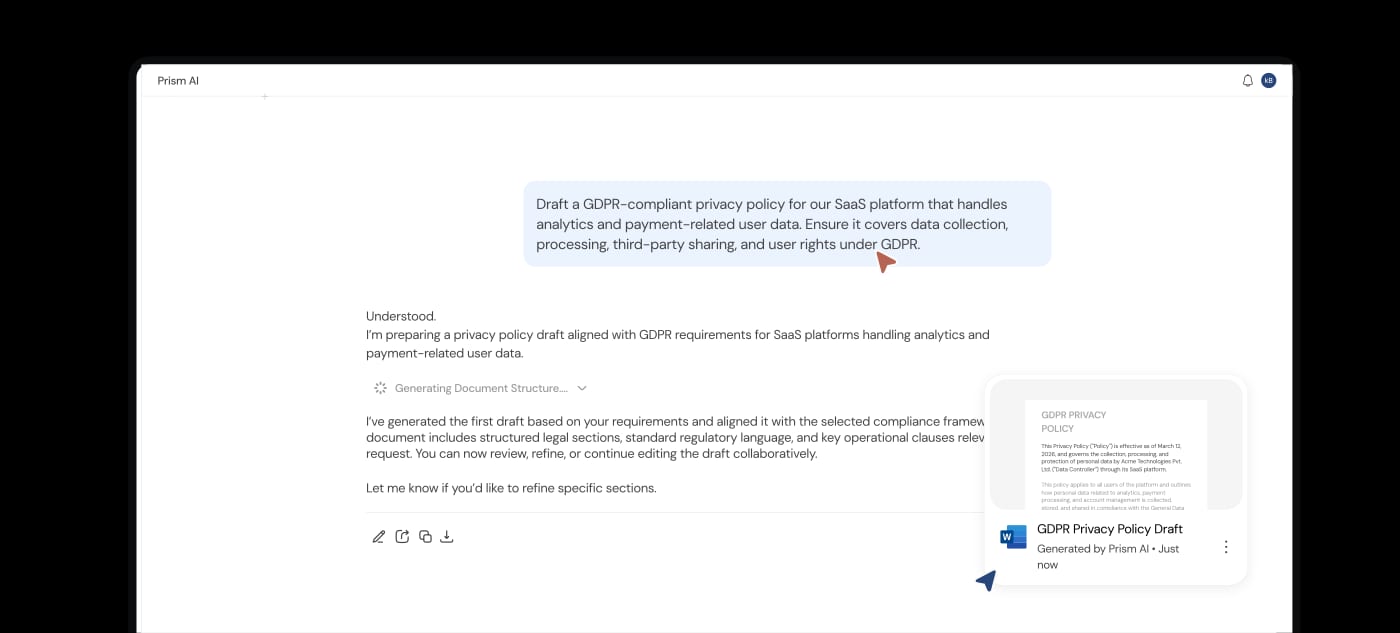
Prism AI

Research, draft, and refine legal documents with your AI assistant.

Prism AI assistant showing a conversation and an editable generated document preview

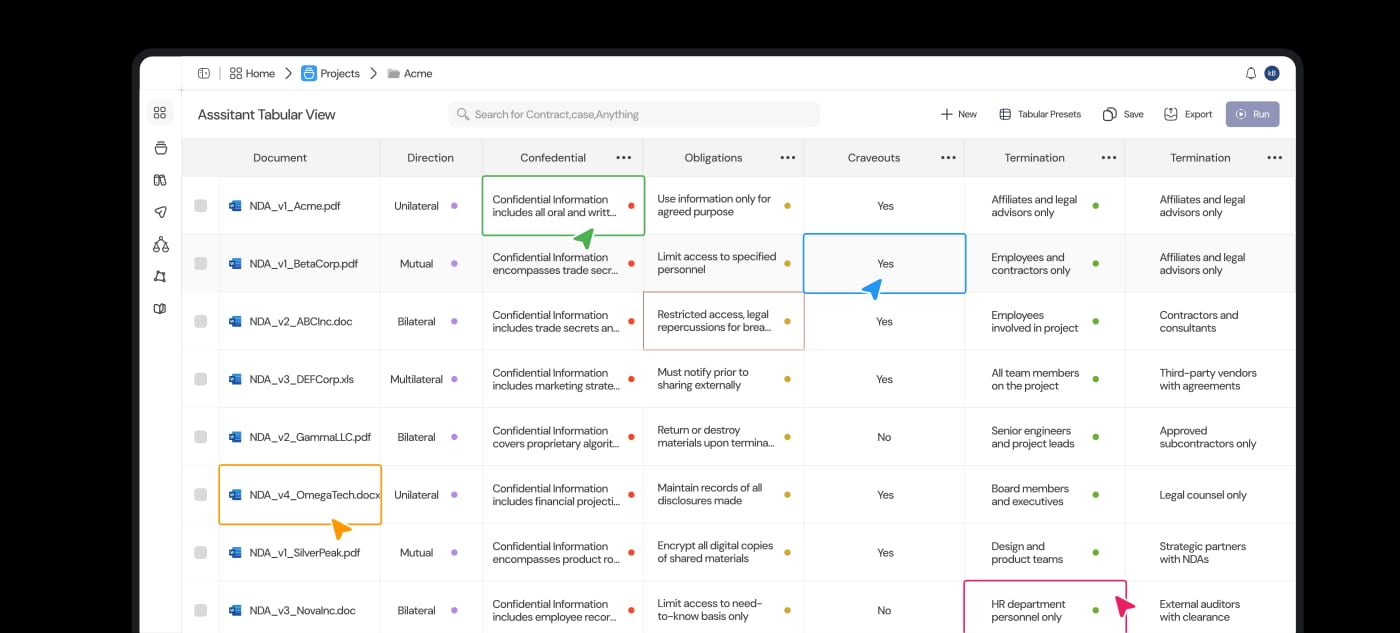
Contract Intelligence

Compare documents side by side and bring the details that matter into view.

Prism contract intelligence table comparing terms, confidentiality, obligations, and carve-outs across multiple documents

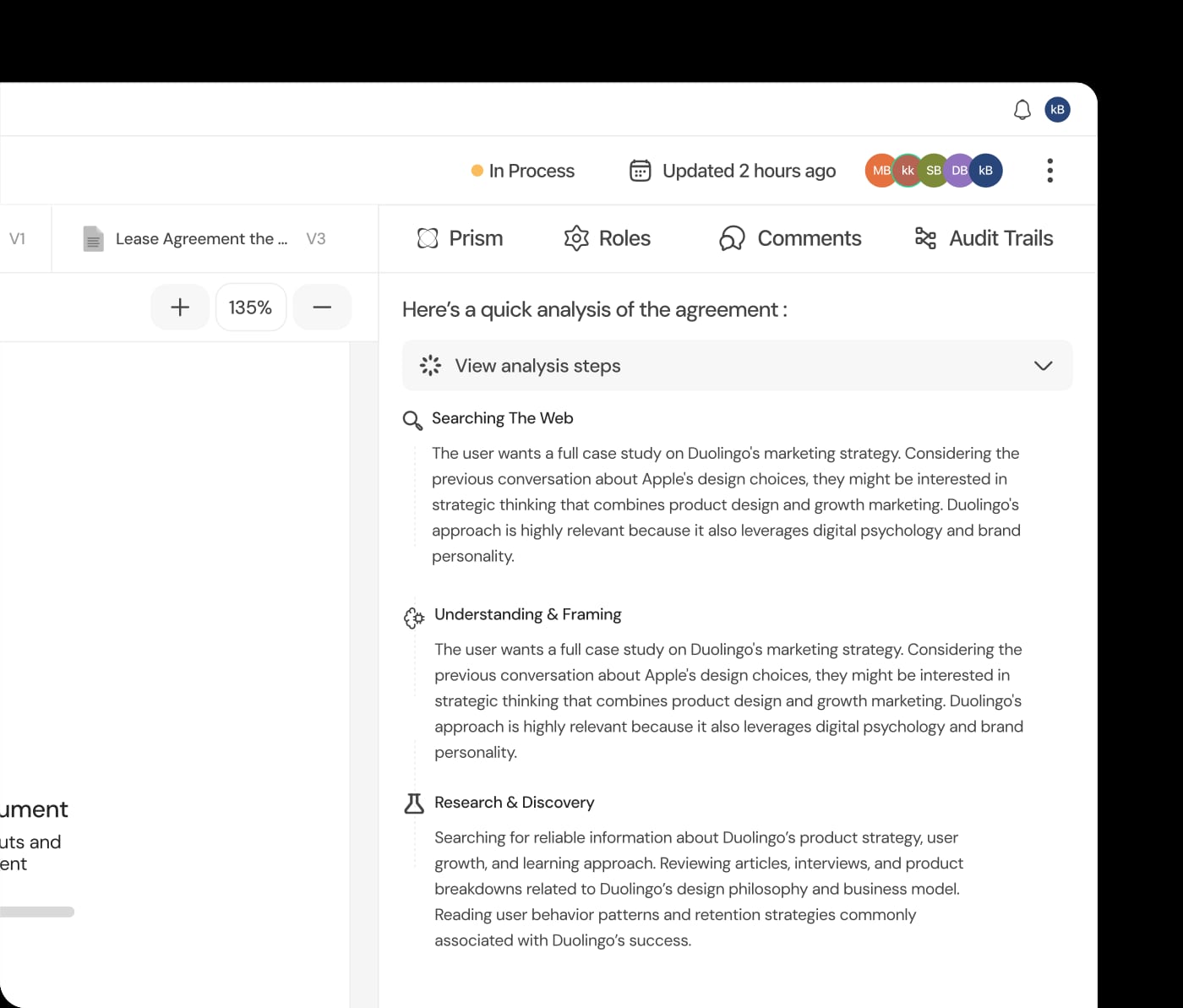
Document Intelligence

Analyze legal documents with speed and precision. Extract clauses, obligations, risks, key entities, and critical information from contracts, policies, and legal documents in seconds.

Prism analyzing a legal agreement alongside the source document

Features

Draft faster. Check smarter. Work better. Start with a template or a request to Luna, bring your documents into a shared workspace, and move drafts through review and approval. Explore the feature guide for workflows, examples, and setup requirements.

Feature What you can do
Shared legal workspaces Bring primary and supporting documents into a shared legal workspace. Organize agreements, versions, and collaborators with role-based access.
AI-powered drafting and document assistance Research, draft, and refine legal documents with Luna. Ask questions about your files and inspect supporting source references.
61 contract and legal-document templates Start with a legal template and refine your draft with Luna. Use 54 Word and seven HTML templates with guided fields.
Multi-document tabular review Extract and compare key terms across multiple documents in a configurable review table.
AI-assisted contract review Identify legal risks before they become problems. Spot missing clauses, compliance gaps, conflicting terms, and potential risks with supporting context.
Custom review playbooks Check contracts against your team's review playbooks. Keep review criteria consistent across matters.
Document editing and version history Edit clauses, resolve comments, and keep a history of every version. Export Word or PDF documents ready for the next step.
Collaborative review and approvals Bring the whole team into the conversation. Discuss clauses, share feedback, resolve comments, and approve or reject drafts with activity history.

All your legal work, one connected workspace:

  1. Organize. Bring primary and supporting documents into a shared legal workspace.
  2. Research. Explore your sources with AI-assisted answers and supporting references.
  3. Draft. Start with a legal template and refine your draft with Luna.
  4. Analyze. Extract and compare key terms across multiple documents.
  5. Review. Check contracts against your team's review playbooks.
  6. Refine. Edit clauses, resolve comments, and keep a history of every version.
  7. Approve. Bring your team together to review and approve the final draft.
  8. Export. Export your document in Word or PDF, ready for the next step.

AI features require a configured provider. Indexed source retrieval also requires Qdrant and an OpenAI key, and background analysis requires the worker. Each feature guide explains its prerequisites. AI output and templates need qualified legal review before use.

[!IMPORTANT] Deploy on your terms

Self-hosted: your infrastructure, your control. Get the source, customize Prism, and run it wherever you choose. Managed by FuturixAI: we deploy, maintain, and run Prism for your team. You focus on legal work.

For private infrastructure, custom integrations, migration support, or managed rollouts, contact [email protected].

What runs

The repository has three application processes and two data services:

The shared event contract lives in packages/protocol/. Uploaded and generated files live in an S3-compatible object store. Compose runs MinIO for it, and host development can use local files.

Quick start

Install Docker Engine with Docker Compose. You need a Resend API key for sign-in email. An OpenAI API key enables Luna and document search.

git clone https://github.com/FuturixAI-and-Quantum-Works/Prism.git

Run the remaining commands from the new Prism directory.

cp .env.example .env

Set RESEND_API_KEY and OPENAI_API_KEY in .env, then start Prism.

docker compose up -d

Open http://localhost:8080 and sign in with your email address. The six-digit sign-in code arrives by email through Resend.

The default sender, [email protected], delivers only to the email address of your Resend account. To invite other people, set MAIL_FROM in .env to an address on a domain you have verified in Resend, then run docker compose up -d again.

Compose starts PostgreSQL, Qdrant, MinIO, the API, the worker, and the frontend. MinIO stores uploaded and generated files in the prism bucket, which Compose creates on first start. The backend container runs migrations automatically before it starts the API. It also seeds approval policies, workflows, the AI model catalog, and all 61 bundled templates. Prism generates its application secrets on first start and keeps them in the prism_secrets volume.

The API listens on http://localhost:8003, with API documentation at http://localhost:8003/api-docs. To grant an existing account the global administrator role, run:

docker compose exec backend node dist/scripts/seedAdmin.js --email [email protected]

Stop Prism without deleting data:

docker compose down

Adding -v deletes the database, stored files, search index, and generated secrets.

Develop Prism on the host

Install Node.js 22.x, npm 11.19.0, and Docker Engine with Docker Compose. Install LibreOffice if you need DOC or DOCX to PDF conversion. Puppeteer installs its Chromium build with the normal dependency install.

Complete the .env step from the quick start, then run:

npm ci
docker compose up -d postgres qdrant
cp backend/.env.example backend/.env
npm run setup --workspace @prism/backend
npm run dev

setup builds the backend, applies migrations, and runs every seed. Rerun it after you pull new migrations. The backend generates its secrets into backend/.secrets.env on first start.

Open http://localhost:5173. The API listens on http://localhost:3001. The worker does not open a network port.

The baseline at backend/drizzle/0000_prism_baseline.sql is for a new database. Do not apply it over a private database created before the baseline. Use the pre-baseline database migration guide.

Know the default behavior

Read provider setup and deployment operations for the complete configuration.

Run the checks

Run the documentation check first.

node scripts/check-docs.mjs

Run the publication blocker scan.

npm run check:publication

Run the full local CI sequence.

npm run ci

The full sequence verifies the publication rules, authentication migration guard, database baseline, seed data, formatting, lint, types, unit and security tests, production dependency audit, builds, and mocked browser journeys.

Read the documentation

Tutorials

How-to guides

Reference

Explanation

💪 Thanks to our Contributors

See our contributors list in CONTRIBUTORS.md. You can also view the full list of contributors tracked by GitHub.

Abhishek Tiwari (@Absk-tiwari) Aqua (@Aqua-123) Abhishek Singh (@Hloabhi) Pratoosh Garg (@Pratoosh-18) Rudransh Agnihotri (@rudransh2004) Ujjwal Pasahan (@UjjwalPasahan) Yash Duhan (@YashDuhan)

License and hosted modifications

Prism is licensed under GNU Affero General Public License version 3 only. If you modify Prism and let users interact with that modified version over a network, section 13 requires you to offer those users the Corresponding Source of the running version at no charge through a standard method. Sections 4 through 6 also contain notice and source requirements for distribution.

The application does not add a source-code link for an operator. A host of a modified version must provide an appropriate source offer that matches the deployed version. Keep the license and notices with redistributed copies.

This paragraph summarizes repository obligations. It is not legal advice. Read the license and ask qualified counsel how it applies to your deployment.

Prism-Legal-OS (FuturixAI-and-Quantum-Works/Prism-Legal-OS)

Searching Database…

Что это?Prism — это открытая юридическая ОС для составления и проверки договоров, юридических исследований и управления судебными делами, со встроенным ИИ-ассистентом по имени Luna.
Это SaaS-продукт или то, что я запускаю сам?Это веб-приложение для самостоятельного размещения, которое вы запускаете с Docker Compose (фронтенд на React/Vite, API на Express), хотя FuturixAI также предлагает запускать его за вас как управляемый сервис.
Как запустить Prism?Установите Docker Engine с Docker Compose, задайте RESENDAPIKEY и OPENAIAPIKEY в .env, затем выполните docker compose up -d, что запустит PostgreSQL, Qdrant, MinIO, API, воркер и фронтенд.
Нужен ли ключ Resend или OpenAI перед стартом?Нужен API-ключ Resend для кода входа по email и API-ключ OpenAI, чтобы включить Luna и поиск по документам; пользователи могут позже добавить свои подключения Anthropic, Google, OpenAI или совместимые с OpenAI.
Что произойдёт, если пропустить ключ OpenAI или Qdrant?Загрузка файлов всё равно работает, но для индексации источников и поиска на базе ИИ нужны и Qdrant, и ключ OpenAI; без ключа Resend письма для входа просто не отправляются, а не уходят.
Для кого создан Prism?Он нацелен на юридические команды, которым нужно одно общее рабочее пространство, чтобы составлять, проверять, исследовать и утверждать договоры, вместо того чтобы жонглировать отдельными инструментами.
Что означает лицензия AGPL, если я размещаю изменённый Prism?Prism распространяется только под AGPLv3, поэтому если вы его измените и дадите пользователям работать с этой версией по сети, вы обязаны бесплатно предложить им Corresponding Source работающей версии.
Что именно делает Luna?Luna — это ИИ-ассистент внутри Prism, который помогает исследовать, составлять и дорабатывать юридические документы, отвечая на вопросы о загруженных файлах со ссылками на источники.
Есть ли в Prism готовые шаблоны договоров?Да, в комплекте 61 шаблон договоров и юридических документов (54 Word и 7 HTML) с подсказками для полей, которые можно дорабатывать с Luna.
В каких форматах можно экспортировать готовые документы?Отредактированные черновики можно экспортировать как документы Word или PDF, готовые для следующего шага юридического процесса.
Где Prism хранит загруженные файлы и данные поиска?PostgreSQL хранит данные приложения и очереди заданий, Qdrant хранит индекс поиска по документам, а загруженные и сгенерированные файлы попадают в хранилище, совместимое с S3 (MinIO под Docker Compose).
Size
5.1 MB
Stars
334
Updated
CommitOct 03
Age
1mo
Commits · 90 Days
