
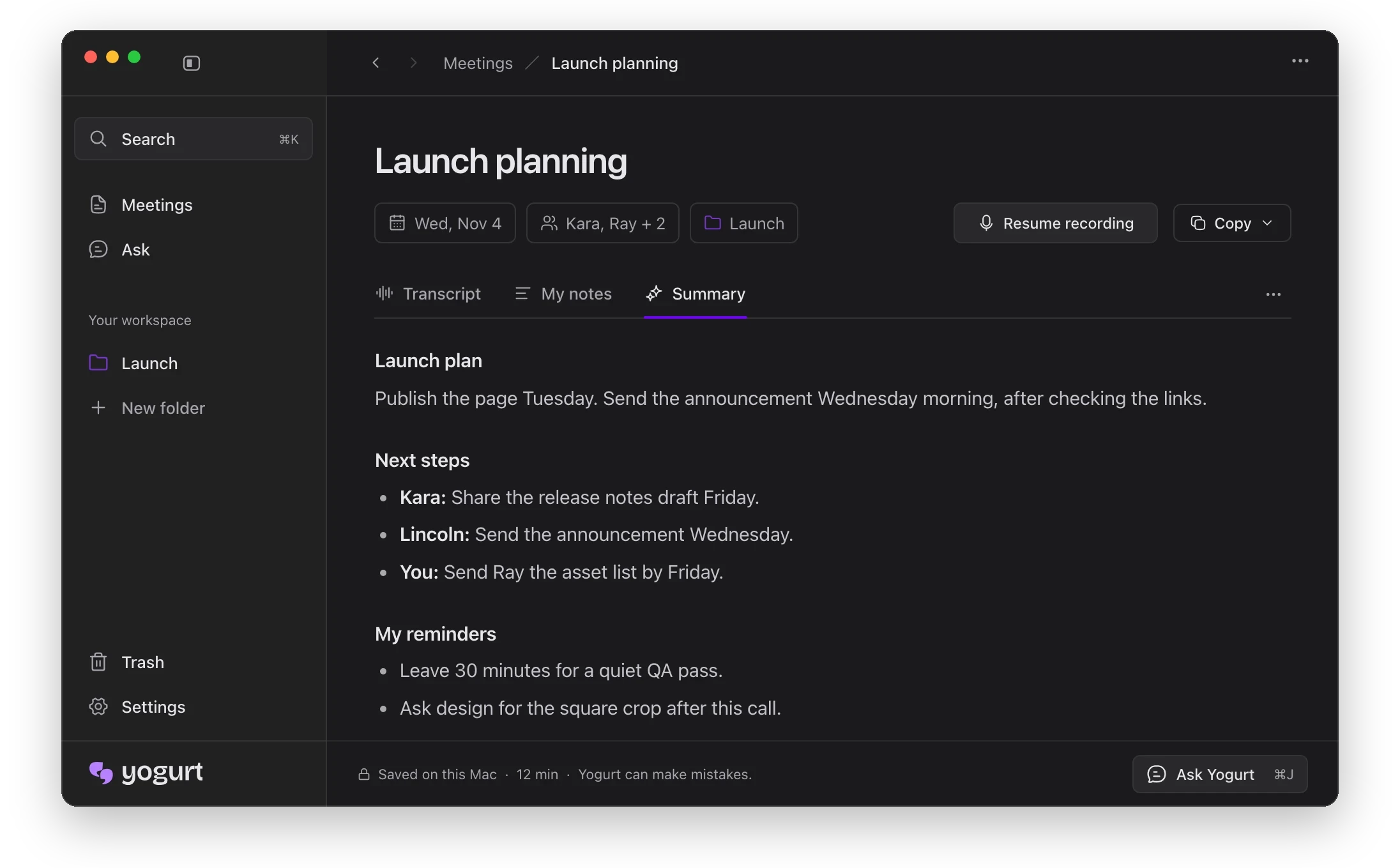
Что это?
 Yogurt — это приватное приложение с ИИ для заметок о встречах. Оно записывает ваши звонки, преобразует речь в текст и пишет краткие изложения, и всё это работает на вашем собственном компьютере. Приложение бесплатное и с открытым исходным кодом под лицензией MIT.
Это бот, который подключается к моим встречам, или приложение на компьютере?Это настольное приложение. Никакой бот к звонку не подключается. Yogurt записывает ваш микрофон и звук, который воспроизводится на вашем компьютере.
Это настольное приложение. Никакой бот к звонку не подключается. Yogurt записывает ваш микрофон и звук, который воспроизводится на вашем компьютере.Как его запустить?Скачайте установщик для своей системы со страницы релизов проекта или соберите приложение из исходного кода по инструкции в разделе «Build and run locally». При первом запуске установка загружает модели ИИ.
Скачайте установщик для своей системы со страницы релизов проекта или соберите приложение из исходного кода по инструкции в разделе «Build and run locally». При первом запуске установка загружает модели ИИ.Какой компьютер мне нужен?Mac с чипом Apple silicon под macOS 14.4 или новее, 64-битный ПК с Windows 10 (2004) или новее либо 64-битный компьютер с Ubuntu 22.04+ Linux. Требуется не менее 8 ГБ памяти.
Mac с чипом Apple silicon под macOS 14.4 или новее, 64-битный ПК с Windows 10 (2004) или новее либо 64-битный компьютер с Ubuntu 22.04+ Linux. Требуется не менее 8 ГБ памяти.Первая установка займет много места на диске?Да. Сначала установка загружает меньшую модель для заметок примерно на 5 ГБ, а затем лучшую модель, которую ваш компьютер потянет. Она может занимать 14 ГБ и больше.
Да. Сначала установка загружает меньшую модель для заметок примерно на 5 ГБ, а затем лучшую модель, которую ваш компьютер потянет. Она может занимать 14 ГБ и больше.Имена спикеров работают на всех ОС?Нет. Имена участников из Zoom, Teams и Meet, а также имена из календаря пока работают только на Mac.
Нет. Имена участников из Zoom, Teams и Meet, а также имена из календаря пока работают только на Mac.Это действительно бесплатно?Да. Приложение бесплатное и с открытым исходным кодом под лицензией MIT, и аккаунт не нужен.
Да. Приложение бесплатное и с открытым исходным кодом под лицензией MIT, и аккаунт не нужен.Поддерживает ли он несколько языков?Да. Многоязычный режим распознает 99 языков. По умолчанию включен только английский, переключить язык можно в настройках или в нижней части заметки.
Да. Многоязычный режим распознает 99 языков. По умолчанию включен только английский, переключить язык можно в настройках или в нижней части заметки.Как обеспечивается приватность с MCP-сервером?Доступ по умолчанию выключен и включается в настройках. Приложения получают доступ только для чтения к встречам, заметкам и расшифровкам через локальный сокет или именованный канал. Но пока доступ включен, любое приложение под вашей учетной записью может их читать.
Доступ по умолчанию выключен и включается в настройках. Приложения получают доступ только для чтения к встречам, заметкам и расшифровкам через локальный сокет или именованный канал. Но пока доступ включен, любое приложение под вашей учетной записью может их читать.Какие модели ИИ он запускает?Распознаванием речи занимается Whisper через whisper.cpp, а на поддерживаемых Mac расшифровка работает в реальном времени через Apple SpeechAnalyzer. Для изложений и ответов используется локальная модель с открытыми весами из семейств Gemma 4, gpt-oss или Qwen3, которая работает через llama.cpp.
Распознаванием речи занимается Whisper через whisper.cpp, а на поддерживаемых Mac расшифровка работает в реальном времени через Apple SpeechAnalyzer. Для изложений и ответов используется локальная модель с открытыми весами из семейств Gemma 4, gpt-oss или Qwen3, которая работает через llama.cpp.Почему Windows показывает предупреждение при установке?Windows показывает сообщение «Windows protected your PC» для новых приложений, которые еще не подписаны сертификатом Microsoft. Нажмите «More info», затем «Run anyway». Так как исходный код открыт, вы можете его проверить.
Windows показывает сообщение «Windows protected your PC» для новых приложений, которые еще не подписаны сертификатом Microsoft. Нажмите «More info», затем «Run anyway». Так как исходный код открыт, вы можете его проверить.Какие есть похожие проекты?meetily, screenpipe, openwhispr, call.md, parrot, Handy, hob, Portable-Local-Studio
meetily, screenpipe, openwhispr, call.md, parrot, Handy, hob, Portable-Local-StudioВ каких он темах?meeting-notes, llama-cpp, transcription, whisper, local-ai, speech-to-text, offline-first, electron, offline, local-first, productivity, privacy
meeting-notes, llama-cpp, transcription, whisper, local-ai, speech-to-text, offline-first, electron, offline, local-first, productivity, privacy- Автор
- FrigadeHQ
- Размер
- 11.1 MB
- Звёзды
- 2K
- Обновлён
- КоммитNov 18Релизv0.3.42Nov 18
- Возраст
- 8 д
- Коммиты · 90 дней