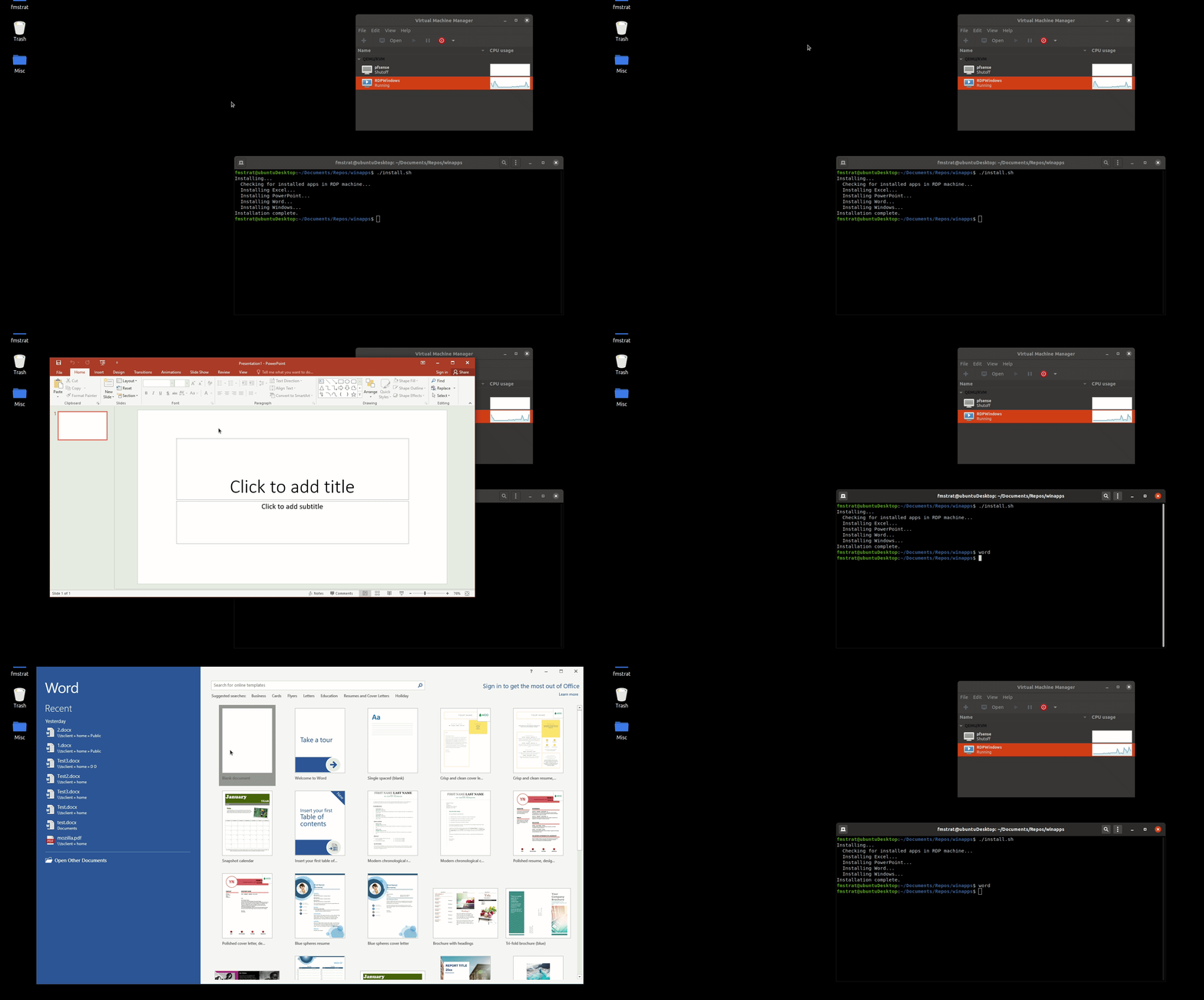








这是什么?
 WinApps 让你在使用 GNOME 或 KDE 的 Linux(Ubuntu/Fedora)中运行 Microsoft Office 和 Adobe Creative Cloud 等 Windows 应用,它们的外观和行为都像原生应用,还包括在 Nautilus 文件管理器中的右键集成。
WinApps 让你在使用 GNOME 或 KDE 的 Linux(Ubuntu/Fedora)中运行 Microsoft Office 和 Adobe Creative Cloud 等 Windows 应用,它们的外观和行为都像原生应用,还包括在 Nautilus 文件管理器中的右键集成。这些应用在本地运行,还是从别处串流?Windows 应用实际运行在后台虚拟机或任意 RDP 服务器上;WinApps 用 FreeRDP 把这些窗口无缝拉进你的 Linux 桌面,在命令行和 GNOME 托盘中呈现为看起来原生般的快捷方式。
Windows 应用实际运行在后台虚拟机或任意 RDP 服务器上;WinApps 用 FreeRDP 把这些窗口无缝拉进你的 Linux 桌面,在命令行和 GNOME 托盘中呈现为看起来原生般的快捷方式。怎么让它跑起来?WinApps 被设计为快速的一条命令安装流程:扫描你的 RDP 服务器/虚拟机上已安装的 Windows 程序,并自动生成对应的 Linux 快捷方式。
WinApps 被设计为快速的一条命令安装流程:扫描你的 RDP 服务器/虚拟机上已安装的 Windows 程序,并自动生成对应的 Linux 快捷方式。我需要先搭好 Windows 虚拟机或 RDP 服务器吗?需要。你需要一台已装好所需应用的 Windows RDP 服务器(本地虚拟机或远程),因为 WinApps 在创建快捷方式前会检查该服务器上安装了哪些应用。
需要。你需要一台已装好所需应用的 Windows RDP 服务器(本地虚拟机或远程),因为 WinApps 在创建快捷方式前会检查该服务器上安装了哪些应用。每个 Windows 应用都能开箱即用吗?WinApps 通过扫描 Windows 注册表可以集成任何已安装的应用,不只是官方配置列表里的;但自动检测到的应用只有从 EXE 提取的图标,缺乏精心整理的 mime 类型处理,而且即使是官方列表中的应用也是社区维护的,可能未经测试。
WinApps 通过扫描 Windows 注册表可以集成任何已安装的应用,不只是官方配置列表里的;但自动检测到的应用只有从 EXE 提取的图标,缺乏精心整理的 mime 类型处理,而且即使是官方列表中的应用也是社区维护的,可能未经测试。它在 GNOME 和 KDE 上都能用吗?可以,它面向运行 Ubuntu 或 Fedora、使用 GNOME 或 KDE 的 Linux 桌面。
可以,它面向运行 Ubuntu 或 Fedora、使用 GNOME 或 KDE 的 Linux 桌面。它在 GNOME 和 KDE 上都能用吗?可以,它面向运行 Ubuntu 或 Fedora、使用 GNOME 或 KDE 的 Linux 桌面。
可以,它面向运行 Ubuntu 或 Fedora、使用 GNOME 或 KDE 的 Linux 桌面。文件怎么在我的 Linux 主文件夹和 Windows 应用之间来回?你的主目录会以 \\tsclient\home 的形式挂载到虚拟机里,因此你可以在 Linux 中右键点击任何文件,直接用 Windows 应用打开。
你的主目录会以 \\tsclient\home 的形式挂载到虚拟机里,因此你可以在 Linux 中右键点击任何文件,直接用 Windows 应用打开。如果我的应用不在官方列表里怎么办?WinApps 会扫描 Windows 注册表,寻找其他有安装记录的 EXE,并自动生成一个快捷方式,图标取自该可执行文件,只是没有官方列表应用那种精心整理的 mime 类型支持。
WinApps 会扫描 Windows 注册表,寻找其他有安装记录的 EXE,并自动生成一个快捷方式,图标取自该可执行文件,只是没有官方列表应用那种精心整理的 mime 类型支持。开箱即用官方支持哪些应用?精选列表涵盖 Microsoft Office 应用(Word、Excel、PowerPoint、Outlook、Access、Publisher、Project、OneNote)、Adobe Creative Cloud 应用(Photoshop、Illustrator、Premiere Pro、After Effects、Audition、Bridge、Lightroom、InDesign、Acrobat)、Visual Studio、PowerShell、Command Prompt、File Explorer、Internet Explorer,以及完整的 RDP Windows 会话。
精选列表涵盖 Microsoft Office 应用(Word、Excel、PowerPoint、Outlook、Access、Publisher、Project、OneNote)、Adobe Creative Cloud 应用(Photoshop、Illustrator、Premiere Pro、After Effects、Audition、Bridge、Lightroom、InDesign、Acrobat)、Visual Studio、PowerShell、Command Prompt、File Explorer、Internet Explorer,以及完整的 RDP Windows 会话。Which topics is it in?gnome, adobe, rdp, compatibility-layer, vm, ubuntu, office, remote-desktop, virtual-machine, virtualization, app, shell
gnome, adobe, rdp, compatibility-layer, vm, ubuntu, office, remote-desktop, virtual-machine, virtualization, app, shell