AutoResearch
From Idea to Paper-Ready Evidence
Insight In, Hallucination Out.
English · 简体中文






Yiming Ren
·
Xiang Liu
·
Qumeng Sun
·
Xiao Zhang
·
Jiahao Li
Project Leaders:
Haoyang Zhang
·
Junjie Wang
Infinite Evolution Lab, EvoMap
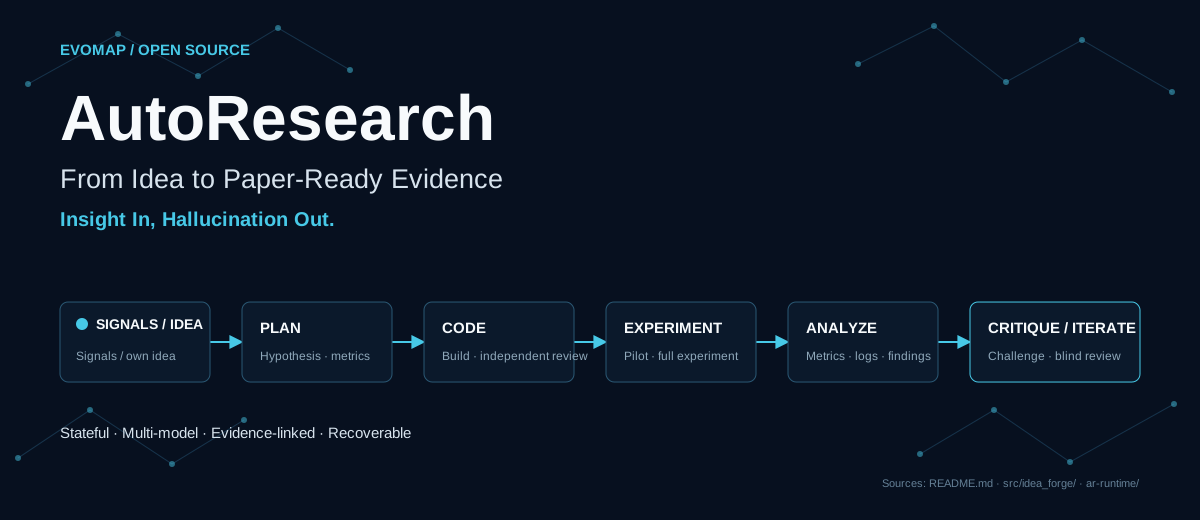
AutoResearch is an open-source agent workflow for AI and machine learning research. Give it a research idea, or let it discover directions from recent papers, developer communities, and open-source trends. It continues through experiment planning, implementation, review, execution, result analysis, and independent evaluation to produce an evidence package ready for paper writing.
The workflow is stateful and recoverable. It can iterate based on pilot results and independent review. Research plans, code, run logs, metrics, failure causes, critic reports, and blind reviews are written to disk so researchers can inspect, take over, or stop the process.
1. Ways to Use AutoResearch
| Your starting point |
Path |
Main outputs |
| You do not have a specific idea yet |
Run Idea Generation |
Candidate research directions, reviewed ideas, and experiment plans |
| You already have an idea |
Execute the idea directly |
Experiment code, run logs, result analysis, and independent review |
| You want the complete workflow |
Generate ideas, then select a plan for execution |
A complete record from research signals to paper-ready evidence |
2. Core Capabilities
| Capability |
What you get |
| Cross-domain idea generation |
Discover problems from recent external signals, then add constraints and experience from your own domain knowledge |
| Independent multi-model review |
Use at least three distinct models during Idea Generation instead of letting one model generate and approve its own work |
| Stateful experiment execution |
Persist plans, code, queues, logs, and conclusions so long-running work can resume after interruption |
| Pilot before scaling |
Test feasibility at lower cost before starting full experiments or stopping early |
| Traceable evidence and sources |
Record Forge sources, knowledge directions, experiment results, critic reports, and blind reviews |
| Support for negative results |
Preserve evidence and stop when a hypothesis fails instead of forcing every experiment into a success story |
Research agents can invent missing details when evidence is thin and repeatedly validate their own output. AutoResearch grounds problem discovery in real signals, adds domain knowledge from a local knowledge base, and checks important claims through cross-model review, source records, experiment logs, critic reports, and blind review. These mechanisms reduce unsupported generation, unclear provenance, inflated self-evaluation, and overinterpretation of negative results. The system cannot guarantee that every conclusion is correct, but it preserves the evidence and state needed for researcher review.
3. Quickstart
3.1 Clone the Repository and Check the Environment
Prepare a Linux machine, either local or accessible over SSH, with Git, Python 3.10+, and python3-venv installed:
git clone https://github.com/EvoMap/AutoResearch.git
cd AutoResearch
bash scripts/bringup.sh
scripts/bringup.sh creates .venv, installs Python dependencies, runs the baseline tests and secret scan, and checks the current model configuration. It does not contact model services or incur API charges.
On the first run, before API credentials are configured, a final BLOCKED result or nonzero exit is expected. Confirm that Python setup, dependency installation, and tests succeeded, then configure credentials in the next step.
Create local configuration files without overwriting existing ones:
test -f .env || cp .env.example .env
test -f config/providers.local.json || \
  cp config/providers.example.json config/providers.local.json
Edit both files:
.env stores real API URLs, keys, proxies, and other machine-local values. Do not commit it.config/providers.local.json declares endpoints, model aliases, and the models assigned to each role.
AutoResearch does not require a fixed combination of Gemini, GPT, or Claude. You can use one or more compatible endpoints. Stages that require independent opinions count distinct underlying model identities; a single endpoint may expose several different models.
3.3 Test the APIs
set -a
. ./.env
set +a
.venv/bin/python scripts/preflight.py --live
This command sends a small number of real requests. Exit code 0 means that normal roles have usable models and that multi-model stages such as Idea Forge and the critic meet their independence requirements.
Then choose a path:
# Generate ideas.
.venv/bin/python idea_generation.py

# Execute an existing idea.
# Continue with section 5, "Idea Execution"
4. Idea Generation: Cross-Domain Discovery
4.1 Intersect External Research Signals with Local Domain Knowledge
- Online research signals: Collect recent papers, community discussions, and open-source trends, then aggregate, deduplicate, filter, and assess them.
- Local domain knowledge: Read research experience, constraints, and common failure patterns maintained by the user in
knowledge_base/.
- Cross-domain discovery: Combine new external signals with local knowledge directions to produce candidate ideas, then run cross-review and experiment planning.
The workflow never rewrites the local knowledge base automatically. You can use the included directions or add your own Markdown files.
Two entrypoints cover full runs and targeted recovery:
idea_generation.py is the recommended entrypoint. It runs online collection, filtering, Idea Forge, and result updates.run_pending_forge.py resumes seeds already present in data/pending_forge_seeds.json without collecting online sources again.
4.2 Run the Pipeline
| Stage |
What happens |
| 1. Collect |
Gather recent research signals from several public channels |
| 2. Filter |
Aggregate, deduplicate, screen, and deeply assess candidate directions |
| 3. Intersect |
Combine each accepted signal with selected local knowledge directions |
| 4. Generate and review |
Ask three or more distinct models to develop ideas independently and cross-review the candidates |
| 5. Plan |
Check freshness and agreement, then produce experiment plans for accepted ideas |
Run the default entrypoint:
.venv/bin/python idea_generation.py
Main outputs:
| Path |
Contents |
data/candidates/ |
Aggregated candidate research signals |
data/verified/ |
Filtering and in-depth assessment results |
data/idea_forge/ |
Complete ideas, review results, and experiment plans |
logs/ |
Run logs |
If a run produces no new seeds, the current implementation searches recent historical verification results for strongly recommended seeds and records that fallback in the logs.
4.3 Select Local Knowledge Directions
List the available directions or filter them by keyword:
.venv/bin/python src/idea_forge/b_library.py
.venv/bin/python src/idea_forge/b_library.py agent
The registered directions are used by default. To choose your own combination, add the following to config/providers.local.json:
{
  "idea_forge": {
    "b_directions": ["agent_memory", "llm_reasoning"]
  }
}
The example uses knowledge files included in this repository. Each direction name is a Markdown filename under knowledge_base/ without the .md suffix. To use a custom direction, create its knowledge file before adding its name to the configuration. Adding directions increases generation and review calls; start with a small set when validating a new setup.
4.4 Optional: Draft a Knowledge Direction with GPT Researcher
The repository does not bundle GPT Researcher source code, and Idea Generation does not invoke it automatically. To gather material for a new direction, install the pinned upstream release in a separate Python 3.11 environment:
python3.11 -m venv .venv-research
.venv-research/bin/python -m pip install -r requirements-research.txt
The upstream tool does not read config/providers.local.json. It reads environment variables directly. The default setup expects OPENAI_API_KEY and TAVILY_API_KEY in .env; use upstream variables such as FAST_LLM, SMART_LLM, and RETRIEVER to change models or retrieval backends.
The following command accesses the network and may incur model and retrieval charges, so it requires explicit confirmation:
set -a
. ./.env
set +a
.venv-research/bin/python scripts/research_to_knowledge.py \
  "agent runtime safety" \
  --confirm-paid-network
Drafts are written only to the Git-ignored workspaces/knowledge-drafts/ directory. Review sources, remove incorrect content, and complete the sections required by knowledge_base/TEMPLATE.md before moving accepted material into knowledge_base/. The adapter never rewrites the formal knowledge base automatically.
4.5 Select and Export an Idea
Idea Generation does not choose the final plan for execution. First list executable plans:
.venv/bin/python src/idea_provenance.py list \
  --forge-file data/idea_forge/forge_YYYYMMDD_HHMM.json
Then export a selected plan to data/ideas/:
.venv/bin/python src/idea_provenance.py export \
  --forge-file data/idea_forge/forge_YYYYMMDD_HHMM.json \
  --result-index 1 \
  --plan-index 1 \
  --output data/ideas/my_experiment.txt
Both indices start at 1. The exported file records the Forge file checksum, seed index, plan index, and knowledge directions for downstream experiment and dashboard provenance.
90-day mode, checkpoint recovery, and pending seeds
Collect signals from a roughly 90-day window:
touch trigger_3month.txt
.venv/bin/python idea_generation.py
The trigger file is deleted automatically after the run starts.
Forge saves every completed seed atomically. Set a fixed checkpoint path and restart with the same path to skip completed seeds:
export AR_FORGE_CHECKPOINT=data/idea_forge/my_forge_checkpoint.json
.venv/bin/python idea_generation.py
You may change execution.max_concurrency in config/providers.local.json while a run is active. The next batch of independent tasks reads the new value; requests already in flight are not interrupted.
To resume Forge from seeds already written to data/pending_forge_seeds.json without collecting online sources again:
.venv/bin/python run_pending_forge.py
5. Idea Execution
If you already have an idea, start here. The execution workflow lives in ar-runtime/ and uses the official Claude Code CLI to advance one idea through a recoverable experiment project.
5.1 Prepare the Execution Environment
In addition to the Python environment, install or provide:
- Bun 1.3+
- Node.js, which is used by the
bun install lifecycle scripts
- Conda or another suitable Python environment manager for experiments
- The CPU, GPU, data, and disk resources required by the experiment
- The Ralph Loop plugin for automatic workflow continuation
Install runtime dependencies:
cd ar-runtime
bun install --frozen-lockfile
cd ..
If Bun is installed in ~/.bun/bin but is not on PATH, add this line to your shell configuration and reconnect:
export PATH="$HOME/.bun/bin:$PATH"
5.2 Generate the Execution Configuration
Create machine-local settings from the safe template, then project the unified provider configuration into the execution loop:
test -f ar-runtime/.claude/settings.local.json || \
  cp ar-runtime/.claude/settings.local.example.json \
     ar-runtime/.claude/settings.local.json

set -a
. ./.env
set +a
.venv/bin/python scripts/render_env.py
.venv/bin/python scripts/preflight.py --live --tools
ar-runtime/.claude/settings.local.json is ignored by Git. Projection configures the Claude Code execution loop; the reviewer and critic MCP servers read their role routes directly from the same unified JSON configuration.
The final command also checks two rounds of tool calls. It can detect endpoints that accept a single model request but fail on multi-agent tool messages.
5.3 Prepare an Idea
Ideas can come from either source:
data/ideas/*.txt files exported by Idea Generation.- Text or Markdown files you write yourself.
At minimum, describe the research hypothesis, available data, success metrics, and compute and time constraints. The simplest path is:
data/ideas/my_experiment.txt
b_id must resolve through src/idea_forge/b_library.py. Initialization and dashboard generation fail clearly if the name is misspelled or the knowledge file does not exist. Forge exports include this metadata automatically; do not rewrite it manually.
5.4 Start the Coordinator
The current Alpha entrypoint grants Claude Code broad tool permissions. Run it only in an isolated, disposable task environment. Do not mount the host home directory, SSH agent, cloud credentials, customer data, or unrelated project directories.
Install and start the official Claude Code CLI:
cd ar-runtime
claude --dangerously-skip-permissions
If Ralph Loop is unavailable after startup, install and enable ralph-loop@claude-plugins-official through the Claude Code /plugin interface.
Inside Claude Code, run:
/ar-coordinator ../data/ideas/my_experiment.txt ../data/projects/my_experiment
For non-interactive runs, use the supervisor. It reaps the process group, retries terminal API failures within a restart budget, and stores a manifest for every attempt:
cd ar-runtime
scripts/ar-supervisor.sh \
  ../data/ideas/my_experiment.txt \
  ../data/projects/my_experiment
5.5 How an Experiment Proceeds
| Stage |
Main actions |
| Initialize and plan |
Freeze idea provenance, create project state, and generate and review the experiment plan |
| Pilot |
Implement and review code, then validate feasibility at smaller scale |
| Scale or stop |
Use pilot results to start the main experiment, revise the plan, or stop with a preserved negative result |
| Main experiment and analysis |
Run full experiments and organize metrics, logs, failure causes, and findings |
| Independent review |
Ask the critic to challenge conclusions, then run blind review without self-evaluation context |
| Close or iterate |
Close when completion conditions pass; otherwise append the next concrete work unit |
Each step advances one persistable work unit. After an interruption, use the same idea and project directory to continue:
/ar-coordinator ../data/ideas/my_experiment.txt ../data/projects/my_experiment continue the workflow
The coordinator emits the following marker only after the queue is complete and closure checks pass:
<promise>AUTORESEARCH_DONE</promise>
5.6 Inspect Project Results
Each project is stored under data/projects/<project_name>/:
| File or directory |
Contents |
idea.md, idea_provenance.json |
Frozen idea text and provenance |
plan.md |
Experiment plan, metrics, and success criteria |
workflow_queue.json, state.md |
Recoverable work queue and current state |
decisions.log |
Append-only decision log |
code/ |
Experiment code |
review.md |
Plan and code review |
results/ |
Run logs, metrics, and result summaries |
| Critic and blind-review files |
Final independent evaluations |
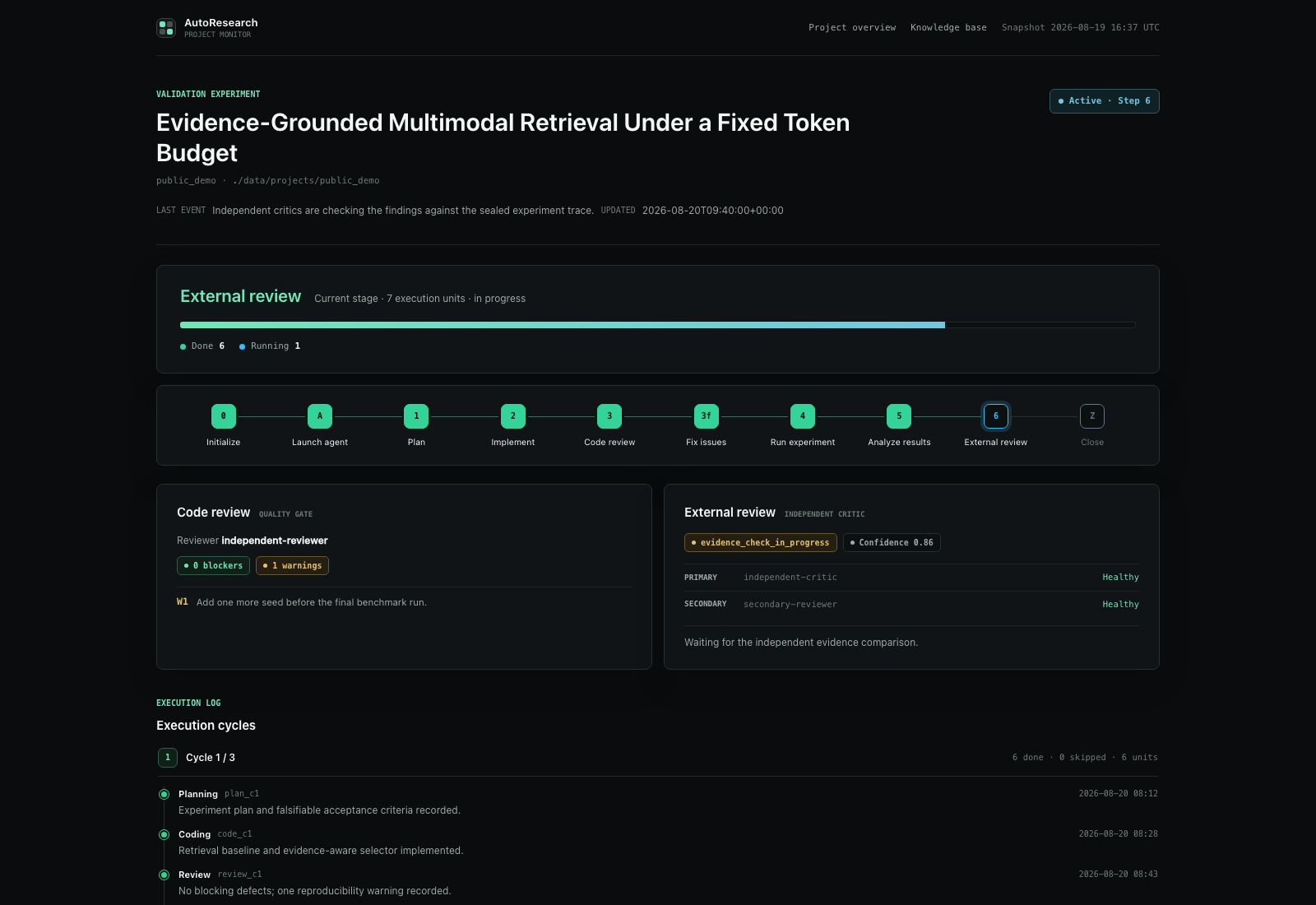
Generate a dashboard for one project:
.venv/bin/python src/generate_project_dashboard.py my_experiment
Generate the project overview:
.venv/bin/python src/generate_project_dashboard.py --all
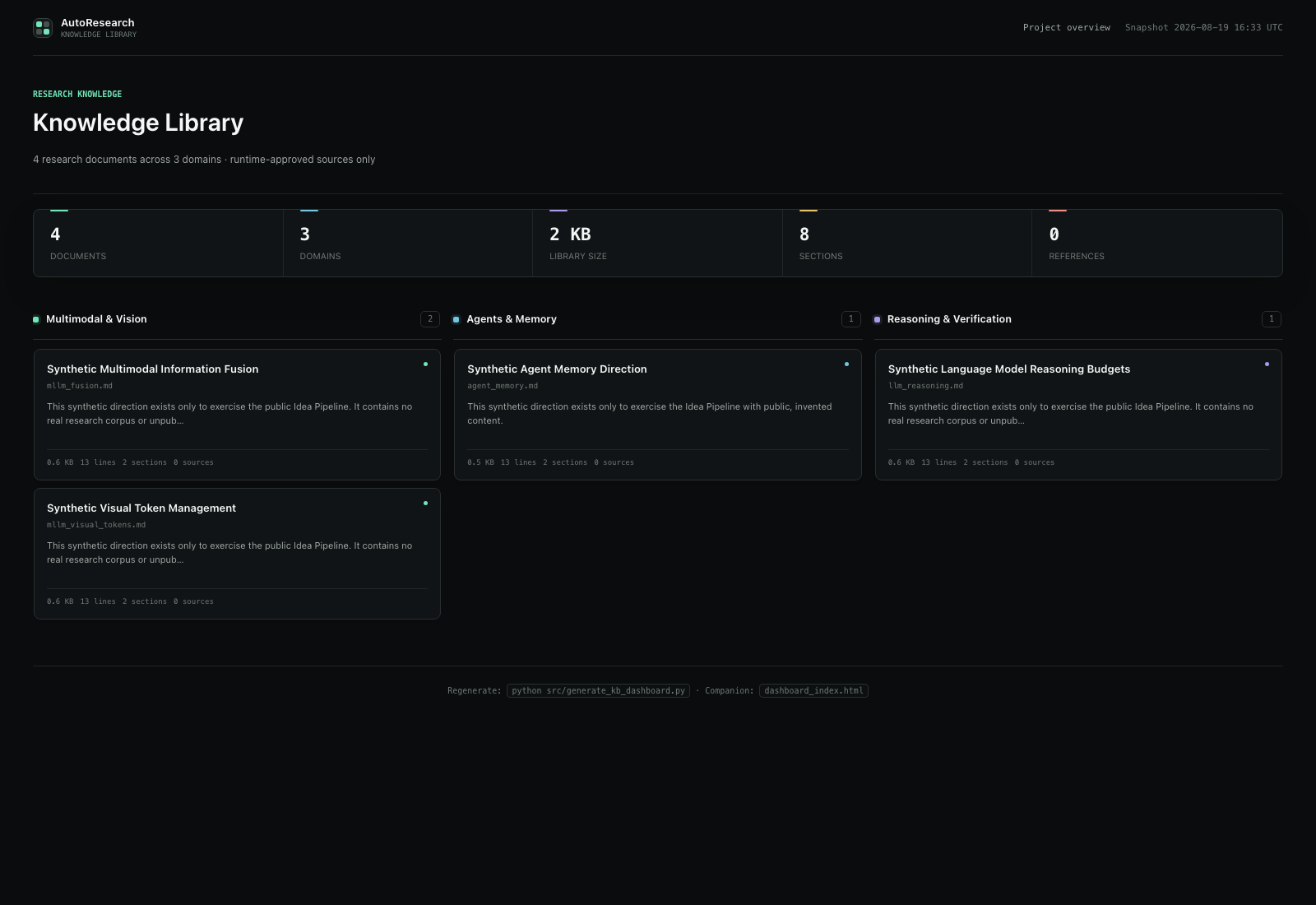
Generate the knowledge base board:
.venv/bin/python src/generate_kb_dashboard.py
Run a GPU smoke test first
After a GPU is available, use the included matrix-multiplication idea to confirm that the execution path actually uses it:
cd ar-runtime
claude --dangerously-skip-permissions \
  -p "/ar-coordinator ../examples/idea_gpu_smoke.txt ../data/projects/gpu_smoke"
This separates environment failures from problems in a research idea. It does not represent the compute requirements of a real experiment.
6. Model and Role Configuration
AutoResearch has one model configuration entrypoint: config/providers.local.json. The Python pipeline, preflight checks, reviewer MCP, and critic MCP all read this file. Real keys belong only in .env.
Roles fall into three groups:
| Stage |
Role |
Purpose |
Model requirement |
░ Idea signal filtering |
screener |
Quickly screen online research signals |
One model |
judge |
Assess the research value of candidate signals in depth |
One model |
consensus_checker |
Check whether repeated assessments genuinely agree |
One model |
▒ Idea generation and validation |
ideator |
Develop ideas independently through cross-domain discovery and cross-review them |
At least 3 distinct models |
planner |
Turn an accepted idea into an experiment plan |
|

 AutoResearch 是一个开源的智能体工作流,能把一个研究想法(或它从最新论文和趋势中发现的想法)变成接近论文水准的证据包,经历规划、实现、评审、执行、分析和独立评估等阶段。