agentplay
See what your coding agent actually did. Replay every session as a map and a timeline: what it read, what it edited, what failed, and what it shipped. Local, open source, works across Claude Code, Codex, Cursor, Copilot, OpenCode and Kiro.
uvx agentplay
That one command finds the agent sessions already on your machine, builds a redacted replay of each one, and opens a local viewer. No account and no API key are required, and your session data never leaves your machine. The only network call is an optional email signup in the viewer, described under Privacy; set AGENTPLAY_NO_NETWORK=1 to switch it off.
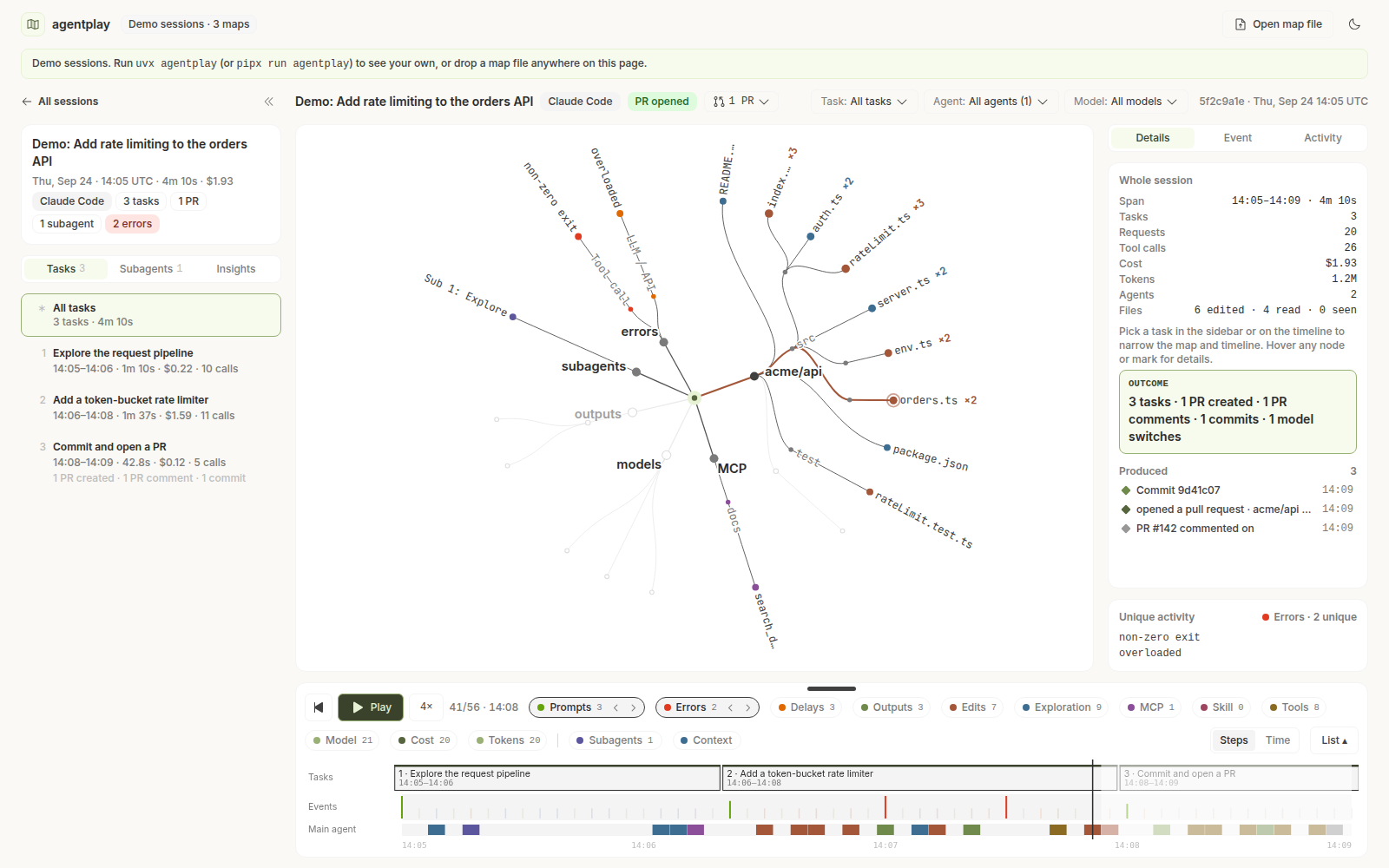
Screenshot of the bundled demo session (synthetic data). Dark mode: docs/images/explorer-dark.png.
Contents
Why this exists
Your agent's transcripts already record what it did: which files it read before editing, which commands it retried, which MCP servers failed, where the context window filled up, and which subagents came back empty. That data sits in ~/.claude, ~/.codex, ~/.cursor and similar folders, and almost nobody looks at it.
agentplay makes that data readable. Every session becomes a map of everything it touched and a timeline you can play back, so you can answer questions like:
- What did the agent read before it edited this file, and what did it never open?
- Which commands failed, and how many times did it retry the same one?
- Where did the context window fill up, and what did the subagents bring back?
- Which PRs, commits and tickets did the session produce?
Install
You need Python 3.11 or newer. agentplay has no runtime dependencies beyond the standard library.
uvx agentplay                 # run without installing (uv: https://docs.astral.sh/uv/)
pipx run agentplay            # same, with pipx
pip install agentplay         # or install it into an environment
Setting up with a coding agent? Point it at install.md: step-by-step instructions written for an agent, covering every option above and how to check the viewer is up.
From source
git clone https://github.com/Entelligence-AI/agentplay
cd agentplay
make setup        # python venv + viewer node_modules
make viewer       # build the web viewer and copy it into the Python package
make run          # agentplay view, from the checkout
Windows
The default session folders (C:\Users\<you>\.claude, .codex, and so on) are found automatically; no path configuration is needed.
make works under Git Bash or MSYS2 (it uses python\.venv\Scripts\python.exe on Windows) and in WSL. Without make, run the equivalent steps in PowerShell:
git clone https://github.com/Entelligence-AI/agentplay
cd agentplay
uv venv python\.venv
uv pip install --python python\.venv\Scripts\python.exe -e "python[dev]" jsonschema
cd viewer
corepack pnpm install --frozen-lockfile
corepack pnpm run build
Remove-Item -Recurse -Force ..\python\src\agentplay\viewer -ErrorAction SilentlyContinue
Copy-Item -Recurse dist ..\python\src\agentplay\viewer
cd ..\python
.venv\Scripts\agentplay view
The viewer needs the pnpm version pinned in viewer/package.json (10.x). An older pnpm, such as 8, rejects the lockfile. corepack pnpm ... (as above) runs the pinned version without changing your global pnpm.
To try the viewer on its own, run pnpm dev in viewer/; it loads three synthetic demo sessions. You can also drag any agentplay/v1 file onto the page.
Using the viewer
agentplay # same as `agentplay view`
Found 412 sessions  claude-code 301 · codex 88 · cursor 23
Built 412 new, 0 unchanged, 0 skipped in 9.4s. Nothing left this machine.
Viewer → http://127.0.0.1:7317/   (Ctrl+C to stop)
Illustrative counts. Builds are incremental, so later runs only rebuild sessions whose transcript changed.
In the viewer:
- The map is a radial tree of everything the session touched: repos, directories and files (seen, read or edited), shell verbs, MCP servers and tools, skills, subagents, web hosts, error classes, models, and the outputs it produced (commits, PRs, tickets).
- The timeline plays the session back at 1x, 4x or 16x. Scrub it, or switch between step axis and wall-clock time. Its lanes show prompts, errors, delays, outputs, edits, exploration, MCP, skills, tools, model, cost, tokens, subagents and context size, with compactions marked.
- Keyboard: Space plays and pauses. Arrow keys step, Shift steps by 10.
E, X, D, O and R jump to the next edit, error, delay, output or retry.
- Scopes: pick a task, a model, or a single subagent ("agent lens"). The whole explorer re-scopes to it.
- Tasks: a session is split into tasks, usually one per prompt you gave it, each labelled with the start of that prompt. Labels live only in your local index, are added when the viewer loads a session, and are never written into a map (see Privacy).
- Errors: the Errors tab lists every error in the session, grouped by class and ranked by the longest run of the same failing command. Click a row to seek the replay to it. The error, PR and subagent badges on the session header narrow the timeline the same way.
Every view is a URL, so a link to a moment in a session reopens it for anyone who runs the viewer on the same data.
Supported agents
| Agent |
Reads from (defaults) |
Subagent lanes |
Tokens |
Notes |
| Claude Code |
~/.claude/projects/**/*.jsonl and …/subagents/agent-*.jsonl |
yes |
per request |
Highest fidelity: read straight from the JSONL, including hooks, compactions, stop reasons and latency |
| Codex (CLI, IDE) |
~/.codex/sessions/**/*.jsonl |
main lane only |
per turn |
|
| Cursor (agent CLI and IDE composer) |
~/.cursor agent transcripts, ~/.cursor/chats/*/*/store.db, IDE state.vscdb |
main lane only |
not recorded, see limitations |
SQLite stores are copied and decoded locally, read-only |
| GitHub Copilot CLI |
~/.copilot/session-state/** |
main lane only |
per turn |
|
| GitHub Copilot in VS Code |
VS Code User/workspaceStorage/*/chatSessions |
main lane only |
per turn, where recorded |
Code, Code Insiders, VSCodium |
| OpenCode |
~/.local/share/opencode/opencode.db |
main lane only |
per turn |
SQLite, decoded locally |
| Kiro |
~/.kiro/sessions/*/* |
main lane only |
per turn, where recorded |
Sub-executions merged into the session |
"Main lane only" means the session's own tool calls are all there, but subagent work is not split out into separate lanes on the map.
Run agentplay agents to see which of these were found on your machine. Every location can be overridden (see Configuration). A parser for another agent is the most useful contribution you can make; see CONTRIBUTING.md.
Privacy
agentplay was designed so that you can show a map to someone else without worrying about what is in it.
Your session data never leaves your machine. There is no usage telemetry, no update check and no upload of sessions or maps. The viewer is served from 127.0.0.1 and loads no remote fonts or scripts. It shows a few links to Entelligence (a banner, the welcome card, sample-review and "fix now" blocks); they open only when you click them, carry only a tag naming where you clicked (?src=agentplay-viewer&from=banner) and nothing from your sessions, and the viewer fetches nothing from them on its own. Cursor's billed-usage lookup, which would call Cursor's API with your stored token, is deliberately disabled.
The one network call is your email, if you give it. The first time the viewer opens, it offers to take your email so Entelligence can tell you about new features. If you type one in, agentplay sends Entelligence the event (signup, or later disconnect), that email, a random install id (generated once and kept in ~/.agentplay/account.json, so it ties your signup and disconnect to the same install), its version number and the time, and nothing else: no session data, paths or repo names. "Continue without email" sends nothing. All of it is in one file, account.py; grep -rn urllib.request python/src/ finds it and nothing else. You can disconnect from the top bar, which forgets the email locally and sends Entelligence one request to delete it; it is sent once and not retried, so if Entelligence can't be reached at that moment it may not arrive, and the email may stay on the list. DO_NOT_TRACK=1 or AGENTPLAY_NO_NETWORK=1 turns the offer off and blocks the request. Details: docs/signup-endpoint.md.
A map document never contains:
- prompt text, assistant text, or reasoning;
- tool inputs or outputs, or file contents;
- command arguments. A shell command is recorded as its verb only (
git log, pytest), never git log --author=...;
- subagent prompts or descriptions. Only their type and model are recorded;
- user message text. Only its length and counts of images and links are recorded.
A map does contain: repo names and remotes, repo-relative file paths, tool, MCP server and skill names, model names, token counts, timings, error classes, and exit codes. Paths outside any repo collapse to coarse buckets such as /tmp (scratch), ~/Downloads or outside-repo.
Path modes control how file paths are stored. Pass them with --path-mode on build or view:
| mode |
src/billing/invoice.py becomes |
relative (default) |
src/billing/invoice.py |
dirs_only |
src/billing/•a1b2c3 |
hashed |
every segment HMAC-SHA256'd with the key in AGENTPLAY_HMAC_KEY (falls back to dirs_only without one) |
Repo names and remotes are kept in every path mode, so a reader can tell which project a map is about. Remove the repos[].remote field before sharing if that is sensitive.
Local-only extras. The session list shows a title for each session: Claude Code's own title, or else the first 90 characters of your first prompt. Task labels in the viewer are the start of each prompt. Both live only in ~/.agentplay/index.json, are never written into a map, and are only served to a viewer on the same machine; turn them off with --no-titles, which also clears what is already stored for the sessions that run sees. The flag is per run, not a saved preference, so a later build without it puts them back. Images you pasted into Claude Code prompts are read from the original transcript on demand by the local server, for a viewer on this machine only, and are never stored in a map, the index or an export. The same goes for the message and command of a failed hook: the map keeps which hook failed and what it ran after, and the viewer reads the text from the transcript only on this machine.
Sharing. agentplay export <session> writes a single map file and tells you which repo names and how many paths it contains. For anything you post publicly, rebuild with --path-mode dirs_only.
The full contract, and the tests that enforce it, are described in docs/format.md.
Command reference
agentplay [view]      build maps and open the viewer (default command)
agentplay build       build maps for new or changed sessions
agentplay list        list built sessions
agentplay export      write one session's map to a .json or .json.gz file
agentplay import      add map files (a teammate's, another machine's) to your local store
agentplay agents      show which agents were found on this machine
| Flag |
On |
Meaning |
--since 30d |
build, view |
only sessions changed in the window (12h, 2w, 2026-09-01) |
--agents claude-code,codex |
build, view |
limit to these agents |
--rebuild |
build, view |
rebuild even unchanged sessions |
--path-mode dirs_only |
build, view |
see Privacy |
--limit N |
build, view, list |
newest N sessions |
--no-titles |
build, view |
don't keep local titles, and clear any already stored |
--port 7317, --no-open, --no-build |
view |
server options |
--json |
build, list |
machine-readable output |
A session map (agentplay/v1) is one JSON document per session:
{
  "schema": "agentplay/v1",
  "session": { "id": "local:claude-code:5f2c…", "agentTool": "claude-code", "startedAt": "2026-09-24T14:05:00Z",
               "durationMs": 250000, "models": ["claude-sonnet-5"], "pathMode": "relative", "outcome": "pr_created" },
  "totals":  { "calls": 26, "requests": 20, "errors": 2, "tokens": 1200000, "costUsd": 1.93, "compactions": 1, "…": 0 },
  "repos":   [{ "id": "r0", "name": "api", "remote": "acme/api" }],
  "files":   [{ "id": 0, "repo": "r0", "path": "src/orders.ts", "reads": 2, "edits": 2, "hits": 1 }],
  "agents":  [{ "id": "main", "parent": null, "kind": "main" }, { "id": "sa-1", "parent": "main", "kind": "subagent", "subagentType": "Explore" }],
  "tasks":   [{ "n": 1, "name": "Explore the request pipeline", "startSeq": 0, "endSeq": 12 }],
  "prs":     [{ "provider": "github", "repo": "acme/api", "number": 142, "url": "https://github.com/acme/api/pull/142", "seq": 51 }],
  "events":  [
    { "seq": 3, "t": 5210, "kind": "read", "agent": "main", "tool": "Read", "targets": [{ "file": 0, "touch": "read" }] },
    { "seq": 4, "t": 7730, "kind": "llm", "agent": "main", "model": "claude-sonnet-5", "in": 12, "cw": 3100, "cr": 41000, "out": 380, "latency": 2510 },
    { "seq": 9, "t": 19400, "kind": "verify", "agent": "main", "tool": "Bash", "verb": "pnpm test", "err": true, "errClass": "exit_code", "exitCode": 1 }
  ]
}
- Spec: docs/format.md. It covers every event kind and field, outcomes, tasks, and the redaction contract.
- JSON Schema: schema/agentplay-v1.schema.json. CI validates every built map against it.
- Compatibility: readers accept both
agentplay/v1 and the earlier entelligence.session-map/v1 name (same shape). Fields are added, never repurposed. Readers must ignore unknown fields.
The format is deliberately independent of this tool. If you build an agent, an observability product or a transcript tool, you can emit or read agentplay/v1 and reuse the viewer.
How it works
 ~/.claude  ~/.codex  ~/.cursor  ~/.copilot  VS Code  opencode.db  ~/.kiro
      │         │         │          │          │          │          │
      │         │   materialize.py (decode SQLite / dir stores → NDJSON cache, read-only)
      ▼         ▼         ▼          ▼          ▼          ▼          ▼
 _core parsers (one per agent) ──► spans ──► builder.py ──► agentplay/v1 documents
 (Claude Code is read straight from JSONL by builder.py for subagents + per-request tokens)
                                               │
                                               ▼
                               ~/.agentplay/maps/*.json + index.json   (store.py)
                                               │
                                     server.py + viewer (127.0.0.1 only)
| Path |
What it is |
python/src/agentplay/_core/ |
Transcript parsers and pure metrics: spans, tool taxonomy, pricing |
python/src/agentplay/builder.py |
Spans or JSONL → agentplay/v1, including redaction, path modes, outcomes, retries, delays, PR detection |
python/src/agentplay/materialize.py |
Decoders for database-backed agents (OpenCode, Cursor, Kiro) |
python/src/agentplay/discover.py |
Where each agent keeps its sessions; builds the parser over them |
python/src/agentplay/{store,pipeline}.py |
Incremental build into ~/.agentplay |
python/src/agentplay/server.py |
Local read-only API and static viewer |
viewer/src/core/ |
Pure TypeScript model: tree, radial layout, playback, signals, scopes, canvas painters. No React |
viewer/src/explorer/ |
The React explorer |
viewer/src/data/ |
SessionMapSource implementations: local server, dropped files, demo |
schema/ |
JSON Schema for the format |
Configuration
All configuration is through environment variables. The examples in this README use bash syntax; in PowerShell, set one with $env:AGENTPLAY_NO_NETWORK = "1" before running agentplay (it lasts for that session), and in cmd use set AGENTPLAY_NO_NETWORK=1.
| Variable |
Default |
Purpose |
AGENTPLAY_HOME |
~/.agentplay |
where maps, the index and caches live |
AGENTPLAY_CLAUDE_HOMES |
~/.claude |
comma-separated Claude Code homes. Useful on WSL: ~/.claude,/mnt/c/Users/you/.claude |
AGENTPLAY_CODEX_HOMES |
~/.codex |
Codex homes |
AGENTPLAY_CURSOR_HOMES |
~/.cursor |
Cursor homes |
AGENTPLAY_COPILOT_HOMES |
$COPILOT_HOME or ~/.copilot |
Copilot CLI homes |
AGENTPLAY_COPILOT_VSCODE_HOMES |
VS Code User dirs |
Copilot in VS Code |
AGENTPLAY_OPENCODE_HOMES |
$XDG_DATA_HOME/opencode |
OpenCode data dirs |
AGENTPLAY_KIRO_HOMES |
~/.kiro |
Kiro homes |
AGENTPLAY_HMAC_KEY |
unset |
key for --path-mode hashed |
DO_NOT_TRACK, AGENTPLAY_NO_NETWORK |
unset |
set either to turn off the email signup and its one network call |
AGENTPLAY_SIGNUP_URL |
built in |
where the signup sends an email (for testing; see docs/signup-endpoint.md) |
AGENTPLAY_DEV_ORIGINS |
unset |
comma-separated extra origins allowed to post to the local server, for the viewer's dev server: http://localhost:5173 |
NO_COLOR |
unset |
disable terminal styling |
Development
Requirements: Python 3.11+, and Node 22+ with pnpm for the viewer.
make setup      # python/.venv with dev deps, viewer/node_modules
make test       # python tests (pytest) + viewer tests (vitest)
make check      # ruff, tsc, tests, and the hygiene guard
make viewer     # build viewer/dist and copy it to python/src/agentplay/viewer
make run        # run the CLI from the checkout
For the viewer's dev server, run AGENTPLAY_DEV_ORIGINS=http://localhost:5173 agentplay view --no-open in one terminal and AGENTPLAY_SERVER=http://127.0.0.1:7317 pnpm dev in viewer/ in another. The local server only takes posts (the signup card) from its own origin, so the dev server's origin has to be listed.
Test suites:
- Python (
python/tests): about 1,000 tests. They cover the parsers for every agent, the builder's redaction and shape, task labels, and the local tool end to end (build, store, server, export, import, schema validation).
- Viewer (
viewer/src): over 250 tests covering the pure model, the schema, the data sources and the demo data.
Contributing
Contributions are very welcome. The most valuable ones are:
- A parser for another agent: Gemini CLI, Amp, Cline, Roo, Windsurf or Aider.
- Viewer improvements that make a session easier to read.
- Fixture transcripts for an agent version that broke parsing, with personal content removed.
CONTRIBUTING.md walks through each of these, the privacy rules every change must keep, and how to run the suites. Report security issues privately; see SECURITY.md.
Known limitations
- Cursor sessions have no token or cost figures. Cursor does not write billed usage to disk, and agentplay will not call Cursor's API to fetch it.
- Whole-file writes and "created vs modified". A map is built after the session, so the builder cannot always tell whether a
Write created a file or overwrote one. The map records such a write as an edit only when the session had already seen the file.
- Costs are estimates from public list prices in
_core/pricing.py. Plan, enterprise and batch pricing are not modelled.
- Large sessions are capped at 20,000 events per map (flagged
truncated). Transcripts over 512 MB are skipped.
- Windows is supported by the parsers but less tested than macOS and Linux. CI runs the Python tests on Windows for every supported Python version. Building, the viewer,
list, export and import have been run end to end from a source install on Windows 11 with Python 3.12 (see the Windows notes under Install). Paths outside the user's home, such as %APPDATA% for Copilot in VS Code, are exercised less.
Entelligence, which maintains agentplay, offers a hosted team edition. It adds review comments traced back to the session edit that caused them, cross-engineer views, team-level recommendations, and measured adoption. The open-source tool does not depend on it and will not be degraded to sell it.
License and credits
Apache License 2.0; see LICENSE and NOTICE. Copyright 2026 Entelligence AI, Inc.
Tool taxonomy rows and a parser design pattern were informed by SuperBased Observer (Apache-2.0). Some product ideas were informed by agentacct (MIT); no agentacct code is used. Details are in THIRD_PARTY_NOTICES.md.

 agentplay 会把你的编码智能体(Claude Code、Codex、Cursor、Copilot、OpenCode、Kiro)会话重放成一张可交互的地图和时间线,展示它读取或修改了哪些文件、哪些命令失败了,以及最终产出了什么。