11.2K ·GitHub
What is this?
 Claude Engineer is a self-improving AI assistant framework built on Claude 3.5 Sonnet that can generate and manage its own tools during a conversation, expanding its own capabilities over time. It ships with both a CLI and a web interface for software development tasks.
Claude Engineer is a self-improving AI assistant framework built on Claude 3.5 Sonnet that can generate and manage its own tools during a conversation, expanding its own capabilities over time. It ships with both a CLI and a web interface for software development tasks.Is this a CLI tool, a web app, or both?Both: it is a Python framework that exposes two interfaces — a terminal-based CLI and a modern web UI — sharing the same underlying Assistant engine and tool system.
Both: it is a Python framework that exposes two interfaces — a terminal-based CLI and a modern web UI — sharing the same underlying Assistant engine and tool system.How do I get it running?Install the 'uv' Python package manager first for the best experience, then run either the web interface or the CLI entry point from the project.
Install the 'uv' Python package manager first for the best experience, then run either the web interface or the CLI entry point from the project.Do I need an Anthropic API key?Yes, you need an Anthropic API key for Claude 3.5 access and Python 3.8+. An E2B API key is also required if you want the code-execution tool to run Python in a sandbox.
Yes, you need an Anthropic API key for Claude 3.5 access and Python 3.8+. An E2B API key is also required if you want the code-execution tool to run Python in a sandbox.What are the main limits I should know about?Code execution via the E2B tool requires its own separate paid API key beyond Anthropic's, so some built-in tools won't work without extra signup. Tool creation is autonomous, meaning Claude decides when and how to build tools, which can be less predictable than manually defined ones.
Code execution via the E2B tool requires its own separate paid API key beyond Anthropic's, so some built-in tools won't work without extra signup. Tool creation is autonomous, meaning Claude decides when and how to build tools, which can be less predictable than manually defined ones.Does it run on Windows as well as macOS/Linux?Yes, installation instructions are provided separately for macOS/Linux and for Windows, and the CLI and web server both run cross-platform via Python.
Yes, installation instructions are provided separately for macOS/Linux and for Windows, and the CLI and web server both run cross-platform via Python.What built-in tools come out of the box?It ships with a Tool Creator, a UV package manager interface, an E2B sandboxed Python code executor, a Ruff-based linting tool, file system tools (create folder, create/read/edit files, diff editor), web tools (DuckDuckGo search, web scraper, browser opener), and a screenshot tool.
It ships with a Tool Creator, a UV package manager interface, an E2B sandboxed Python code executor, a Ruff-based linting tool, file system tools (create folder, create/read/edit files, diff editor), web tools (DuckDuckGo search, web scraper, browser opener), and a screenshot tool.How does the self-improvement feature actually work?During a conversation, Claude can identify a missing capability, design a new tool for it using the built-in Tool Creator, and hot-load that tool so it is usable immediately, without restarting the app.
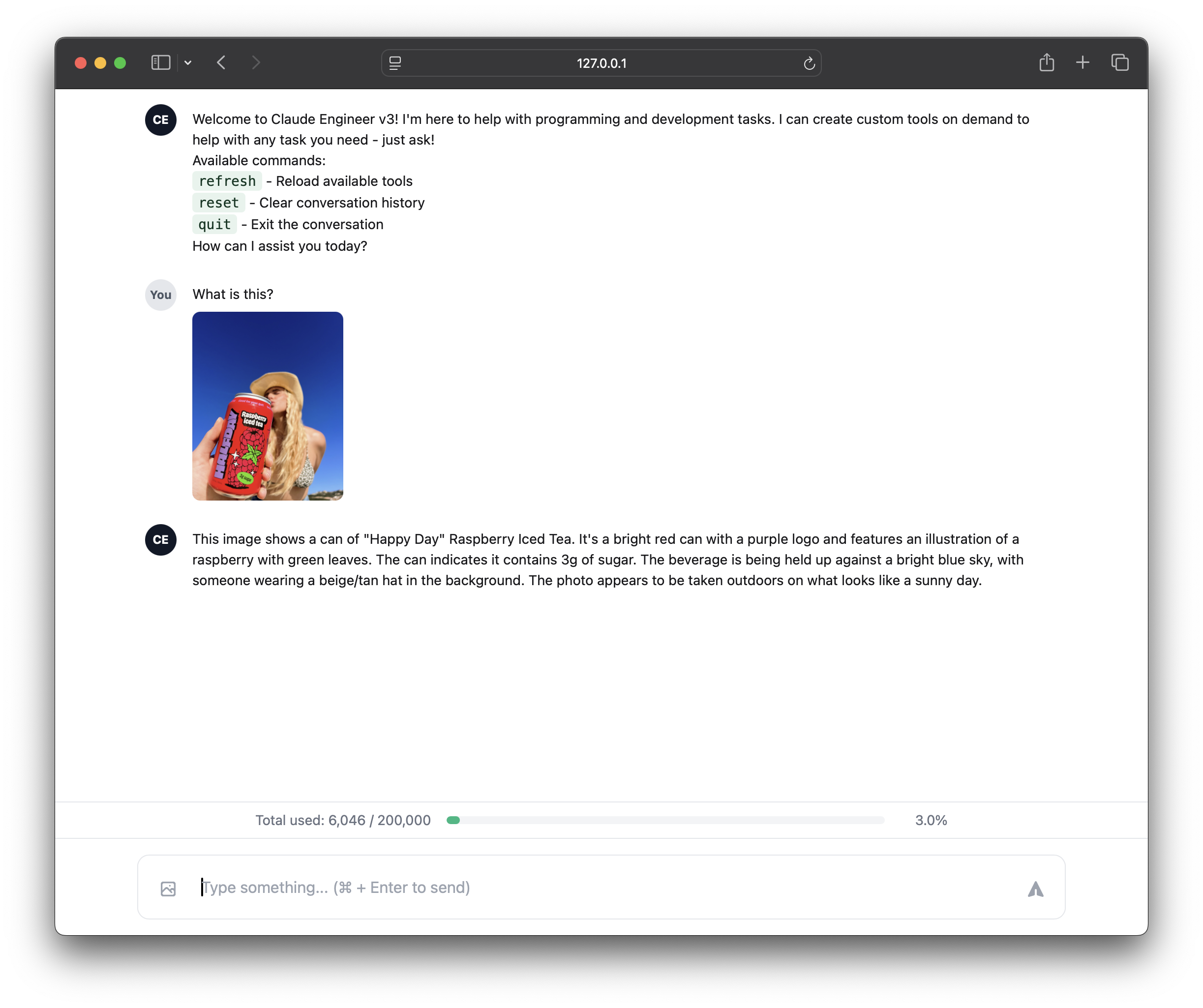
During a conversation, Claude can identify a missing capability, design a new tool for it using the built-in Tool Creator, and hot-load that tool so it is usable immediately, without restarting the app.What's different between the web UI and CLI?The web UI adds image upload/analysis with Claude Vision, a visual token-usage progress bar, and Tailwind-styled markdown rendering, while the CLI offers a rich terminal interface with an ASCII token bar and direct, debug-friendly tool interaction — both share the same Assistant engine.
The web UI adds image upload/analysis with Claude Vision, a visual token-usage progress bar, and Tailwind-styled markdown rendering, while the CLI offers a rich terminal interface with an ASCII token bar and direct, debug-friendly tool interaction — both share the same Assistant engine.How is this different from Claude Engineer v2?V3 upgrades to the Claude 3.5 Sonnet model, adds Anthropic's token-counting API for precise usage tracking, introduces autonomous/self-improving tool creation, and removes the need for a separate 'automode' since Claude now decides when to run tools on its own.
V3 upgrades to the Claude 3.5 Sonnet model, adds Anthropic's token-counting API for precise usage tracking, introduces autonomous/self-improving tool creation, and removes the need for a separate 'automode' since Claude now decides when to run tools on its own.What are similar projects?Raven, qwen-code, hive, fixing-smartass-opus-5, hermes-agent, headroom, billion-context, opencode
Raven, qwen-code, hive, fixing-smartass-opus-5, hermes-agent, headroom, billion-context, opencodeWhich topics is it in?self-improving, assistant, token-usage, screenshot, web-scraping, sandbox, anthropic, coding-agent, claude, markdown, ai-agent, framework
self-improving, assistant, token-usage, screenshot, web-scraping, sandbox, anthropic, coding-agent, claude, markdown, ai-agent, framework