Что это?
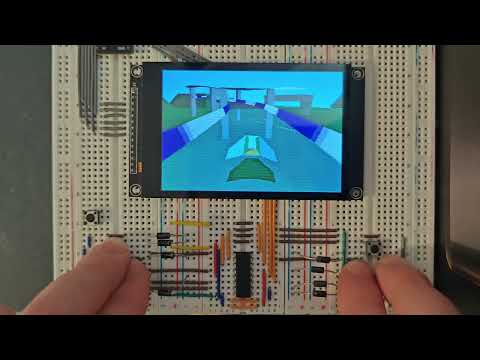
 Jet — это крошечный программный 3D-растеризатор с фиксированным набором функций на C++17, без внешних зависимостей, созданный для встраиваемых чипов с малым объёмом CPU и RAM, таких как ESP32 и STM32; он также работает на настольных ПК и Raspberry Pi.
Jet — это крошечный программный 3D-растеризатор с фиксированным набором функций на C++17, без внешних зависимостей, созданный для встраиваемых чипов с малым объёмом CPU и RAM, таких как ESP32 и STM32; он также работает на настольных ПК и Raspberry Pi.Это готовый игровой движок или библиотека, на которой я напишу свой рендерер?Это библиотека, а не движок: ваше приложение предоставляет фреймбуфер, драйвер дисплея и главный цикл, а для отрисовки сцены в каждом кадре нужно просто вызвать scene->render().
Это библиотека, а не движок: ваше приложение предоставляет фреймбуфер, драйвер дисплея и главный цикл, а для отрисовки сцены в каждом кадре нужно просто вызвать scene->render().Как добавить его в свой проект?Добавьте Jet как поддиректорию CMake или компонент ESP-IDF, скопируйте src/JetConfig.example.hpp в JetConfig.hpp в свой include-путь, настройте его под себя, а затем вызывайте scene->render() из собственного цикла.
Добавьте Jet как поддиректорию CMake или компонент ESP-IDF, скопируйте src/JetConfig.example.hpp в JetConfig.hpp в свой include-путь, настройте его под себя, а затем вызывайте scene->render() из собственного цикла.В чём подвох — он заменит видеокарту?Нет — Jet рендерит на процессоре через конвейер с фиксированным набором функций, без аппаратного ускорения, поэтому реальная производительность зависит от сложности вашей сцены, размера треугольников и включённых возможностей.
Нет — Jet рендерит на процессоре через конвейер с фиксированным набором функций, без аппаратного ускорения, поэтому реальная производительность зависит от сложности вашей сцены, размера треугольников и включённых возможностей.Могу ли я использовать его в коммерческом проекте?Да — Jet распространяется по лицензии MIT, так что его можно использовать в проектах с открытым или закрытым кодом, включая коммерческие продукты, без отдельной лицензии или оплаты; нужно лишь сохранить уведомления об авторских правах и разрешениях.
Да — Jet распространяется по лицензии MIT, так что его можно использовать в проектах с открытым или закрытым кодом, включая коммерческие продукты, без отдельной лицензии или оплаты; нужно лишь сохранить уведомления об авторских правах и разрешениях.Почему целочисленная математика и 16-битный RGB565 вместо чисел с плавающей запятой?Потому что цель — микроконтроллеры и небольшие встраиваемые дисплеи: Jet выполняет целочисленные вычисления в самом горячем участке растеризации и выдаёт нативный 16-битный RGB565, что подходит для ограниченных ресурсов CPU и памяти чипов вроде ESP32.
Потому что цель — микроконтроллеры и небольшие встраиваемые дисплеи: Jet выполняет целочисленные вычисления в самом горячем участке растеризации и выдаёт нативный 16-битный RGB565, что подходит для ограниченных ресурсов CPU и памяти чипов вроде ESP32.Есть ли поддержка эффектов постобработки?Да — CRT-сканлайны и cel-shading работают без дополнительного буфера, а FXAA, bloom, размытие в движении, хроматическая аберрация и пикселизация доступны как буферизованные эффекты на платформах с большим объёмом RAM.
Да — CRT-сканлайны и cel-shading работают без дополнительного буфера, а FXAA, bloom, размытие в движении, хроматическая аберрация и пикселизация доступны как буферизованные эффекты на платформах с большим объёмом RAM.Конвейер полностью фиксированный, или я могу добавить свои эффекты?Конвейер с фиксированным набором функций, но есть точка входа для пользовательских шейдеров, чтобы его расширять, а также специальные режимы вроде WATERREFLECT для анимированной воды и ADDITIVE для неоновых вывесок и ореолов взрывов.
Конвейер с фиксированным набором функций, но есть точка входа для пользовательских шейдеров, чтобы его расширять, а также специальные режимы вроде WATERREFLECT для анимированной воды и ADDITIVE для неоновых вывесок и ореолов взрывов.Можно ли урезать его для совсем маленького устройства?Да — переключатели времени компиляции в JetConfig.hpp позволяют отключать возможности, чтобы снизить расход CPU, RAM и флеш-памяти; скопируйте src/JetConfig.example.hpp и выключите то, что ваша плата не потянет.
Да — переключатели времени компиляции в JetConfig.hpp позволяют отключать возможности, чтобы снизить расход CPU, RAM и флеш-памяти; скопируйте src/JetConfig.example.hpp и выключите то, что ваша плата не потянет.Which topics is it in?renderer, stm32, shader, microcontroller, esp32, zero-dependency, embedded-systems, game-engine, cmake, optimization, lightweight, low-level
renderer, stm32, shader, microcontroller, esp32, zero-dependency, embedded-systems, game-engine, cmake, optimization, lightweight, low-level