Table of contents
Features
As (yet another) process/system visualization and management application, bottom supports the typical features:
Graphical visualization widgets for:
with support for zooming in/out the current time interval displayed.
Widgets for displaying info about:
A process widget for displaying, sorting, and searching info about processes, as well as support for:
Cross-platform support for Linux, macOS, and Windows, with more planned in the future.
Customizable behaviour that can be controlled with command-line options or a config file, such as:
- Custom and built-in colour themes
- Customizing widget behaviour
- Changing the layout of widgets
- Filtering out entries in some widgets
And more:
You can find more details in the documentation.
Support
Official
bottom officially supports the following operating systems and corresponding architectures:
- macOS (
x86_64, aarch64)
- Linux (
x86_64, i686, aarch64)
- Windows (
x86_64, i686)
These platforms are tested to work for the most part and issues on these platforms will be fixed if possible.
Furthermore, binaries are built and tested using the most recent version of stable Rust at the time.
For more details on supported platforms and known problems, check out the documentation.
Unofficial
bottom may work on a number of platforms that aren't officially supported. Note that unsupported platforms:
- Might not be tested in CI to build or pass tests (see here for checked platforms).
- Might not be properly tested by maintainers prior to a stable release.
- May only receive limited support, such as missing features or bugs that may not be fixed.
Note that some unsupported platforms may eventually be officially supported (e.g., FreeBSD).
A non-comprehensive list of some currently unofficially-supported platforms that may compile/work include:
- FreeBSD (
x86_64)
- Linux (
armv6, armv7, powerpc64le, riscv64gc, loongarch64)
- Android (
arm64)
- Windows (
arm64)
- NetBSD (
x86_64)
For more details on unsupported platforms and known problems, check out the documentation.
Installation
Cargo
Installation via cargo can be done by installing the bottom crate:
# You might need to update the stable version of Rust first.
# Other versions might work, but this is not guaranteed.
rustup update stable

# Install the binary from crates.io.
cargo install bottom --locked

# If you use another channel by default, you can specify
# the what channel to use like so:
cargo +stable install bottom --locked

# --locked may be omitted if you wish to not use the
# locked crate versions in Cargo.lock. However, be
# aware that this may cause problems with dependencies.
cargo install bottom
Alternatively, you can use cargo install using the repo as the source.
# You might need to update the stable version of Rust first.
# Other versions might work, but this is not guaranteed.
rustup update stable

# Option 1 - Download an archive from releases and install
curl -LO https://github.com/ClementTsang/bottom/archive/0.14.9.tar.gz
tar -xzvf 0.14.9.tar.gz
cargo install --path . --locked

# Option 2 - Manually clone the repo and install
git clone https://github.com/ClementTsang/bottom
cd bottom
cargo install --path . --locked

# Option 3 - Install using cargo with the repo as the source
cargo install --git https://github.com/ClementTsang/bottom --locked

# You can also pass in the target-cpu=native flag to try to
# use better CPU-specific optimizations. For example:
RUSTFLAGS="-C target-cpu=native" cargo install --path . --locked
Alpine
bottom is available as a package for Alpine Linux via apk:
apk add bottom
Packages for documentation (bottom-doc) and completions for Bash (bottom-bash-completion), Fish (bottom-fish-completion), and Zsh (bottom-zsh-completion) are also available.
Arch Linux
bottom is available as an official package that can be installed with pacman:
sudo pacman -S bottom
If you want the latest changes that are not yet stable, you can also install bottom-git from the AUR:
# Using paru
paru -S bottom-git

# Using yay
yay -S bottom-git
Debian / Ubuntu
A .deb file is provided on each stable release and
nightly builds for x86, aarch64, and armv7.
Some examples of installing it this way:
# x86-64
curl -LO https://github.com/ClementTsang/bottom/releases/download/0.14.9/bottom_0.14.9-1_amd64.deb
sudo dpkg -i bottom_0.14.9-1_amd64.deb

# ARM64
curl -LO https://github.com/ClementTsang/bottom/releases/download/0.14.9/bottom_0.14.9-1_arm64.deb
sudo dpkg -i bottom_0.14.9-1_arm64.deb

# ARM
curl -LO https://github.com/ClementTsang/bottom/releases/download/0.14.9/bottom_0.14.9-1_armhf.deb
sudo dpkg -i bottom_0.14.9-1_armhf.deb

# musl-based
curl -LO https://github.com/ClementTsang/bottom/releases/download/0.14.9/bottom-musl_0.14.9-1_amd64.deb
sudo dpkg -i bottom-musl_0.14.9-1_amd64.deb
Exherbo Linux
bottom is available as a rust package that can be installed with cave:
cave resolve -x repository/rust
cave resolve -x bottom
Fedora / CentOS / AlmaLinux / Rocky Linux
COPR
[!WARNING]
atim/bottom seems to be unmaintained and may be outdated (relevant issue)
bottom is available on COPR:
sudo dnf copr enable atim/bottom -y
sudo dnf install bottom
Terra
bottom is also available via Terra:
sudo dnf install --repofrompath 'terra,https://repos.fyralabs.com/terra$releasever' --setopt='terra.gpgkey=https://repos.fyralabs.com/terra$releasever/key.asc' terra-release
sudo dnf install bottom
RPM
.rpm files are also generated for x86 in the releases page.
For example:
curl -LO https://github.com/ClementTsang/bottom/releases/download/0.14.9/bottom-0.14.9-1.x86_64.rpm
sudo dnf install ./bottom-0.14.9-1.x86_64.rpm
Gentoo
Available in the official Gentoo repo:
sudo emerge --ask sys-process/bottom
Nix
Available in Nixpkgs as bottom:
nix profile install nixpkgs#bottom
bottom can also be installed and configured through the home-manager module:
{
  programs.bottom.enable = true;
}
openSUSE
Available in openSUSE Tumbleweed:
zypper in bottom
Snap
bottom is available as a snap:
sudo snap install bottom

# To allow the program to run as intended
sudo snap connect bottom:mount-observe
sudo snap connect bottom:hardware-observe
sudo snap connect bottom:system-observe
sudo snap connect bottom:process-control
Solus
Available in the Solus repos:
sudo eopkg it bottom
Void
Available in the void-packages repo:
sudo xbps-install bottom
Homebrew
The formula is available here:
brew install bottom
MacPorts
Available here:
sudo port selfupdate
sudo port install bottom
Chocolatey
Chocolatey packages are located here:
choco install bottom
Scoop
Available in the Main bucket:
scoop install bottom
winget
The winget package can be found here:
winget install bottom

# If you need a more specific app id:
winget install Clement.bottom
You can uninstall via Control Panel, Options, or winget --uninstall bottom.
Windows installer (MSI)
You can manually install bottom as a Windows program by downloading and using the .msi file from the latest release.
Conda
You can install bottom using conda with this conda-smithy repository:
# Add the channel
conda config --add channels conda-forge
conda config --set channel_priority strict

# Install
conda install bottom
gah
bottom can also be installed on Linux or macOS using gah:
gah install bottom
ghr
bottom can be installed using ghr like so:
ghr install clementtsang/bottom
mise
bottom is available via mise:
mise use -g bottom@latest
Pre-built binaries
You can also use the pre-built release binaries:
To use, download and extract the binary that matches your system. You can then run by doing:
./btm
or by installing to your system following the procedures for installing binaries to your system.
Auto-completion
The release binaries in the releases page are packaged with
shell auto-completion files for Bash, Zsh, fish, Powershell, Elvish, Fig, and Nushell. To install them:
- For Bash, move
btm.bash to $XDG_CONFIG_HOME/bash_completion or /etc/bash_completion.d/.
- For Zsh, move
_btm to one of your $fpath directories.
- For fish, move
btm.fish to $HOME/.config/fish/completions/.
- For PowerShell, add
_btm.ps1 to your PowerShell profile.
- For Elvish, the completion file is
btm.elv.
- For Fig, the completion file is
btm.ts.
- For Nushell, use
btm.nu.
The individual auto-completion files are also included in the stable/nightly releases as completion.tar.gz if needed.
Usage
You can run bottom using btm.
- For help on flags, use
btm -h for a quick overview or btm --help for more details.
- For info on key and mouse bindings, press
? inside bottom or refer to the documentation page.
You can find more information on usage in the documentation.
Configuration
bottom accepts a number of command-line arguments to change the behaviour of the application as desired.
Additionally, bottom will automatically generate a configuration file on the first launch, which can be changed.
More details on configuration can be found in the documentation.
Troubleshooting
If some things aren't working, give the troubleshooting page
a look. If things still aren't working, then consider asking a question
or filing a bug report if you think it's a bug.
Documentation
The main documentation page can be found at https://bottom.pages.dev, using Cloudflare Pages. If needed, a mirror hosted using
Github Pages is also available at https://clementtsang.github.io/bottom.
Contribution
Whether it's reporting bugs, suggesting features, maintaining packages, or submitting a PR, contribution is always welcome! Please read
CONTRIBUTING.md for details on how to contribute to bottom.
Contributors
Thanks to all contributors:



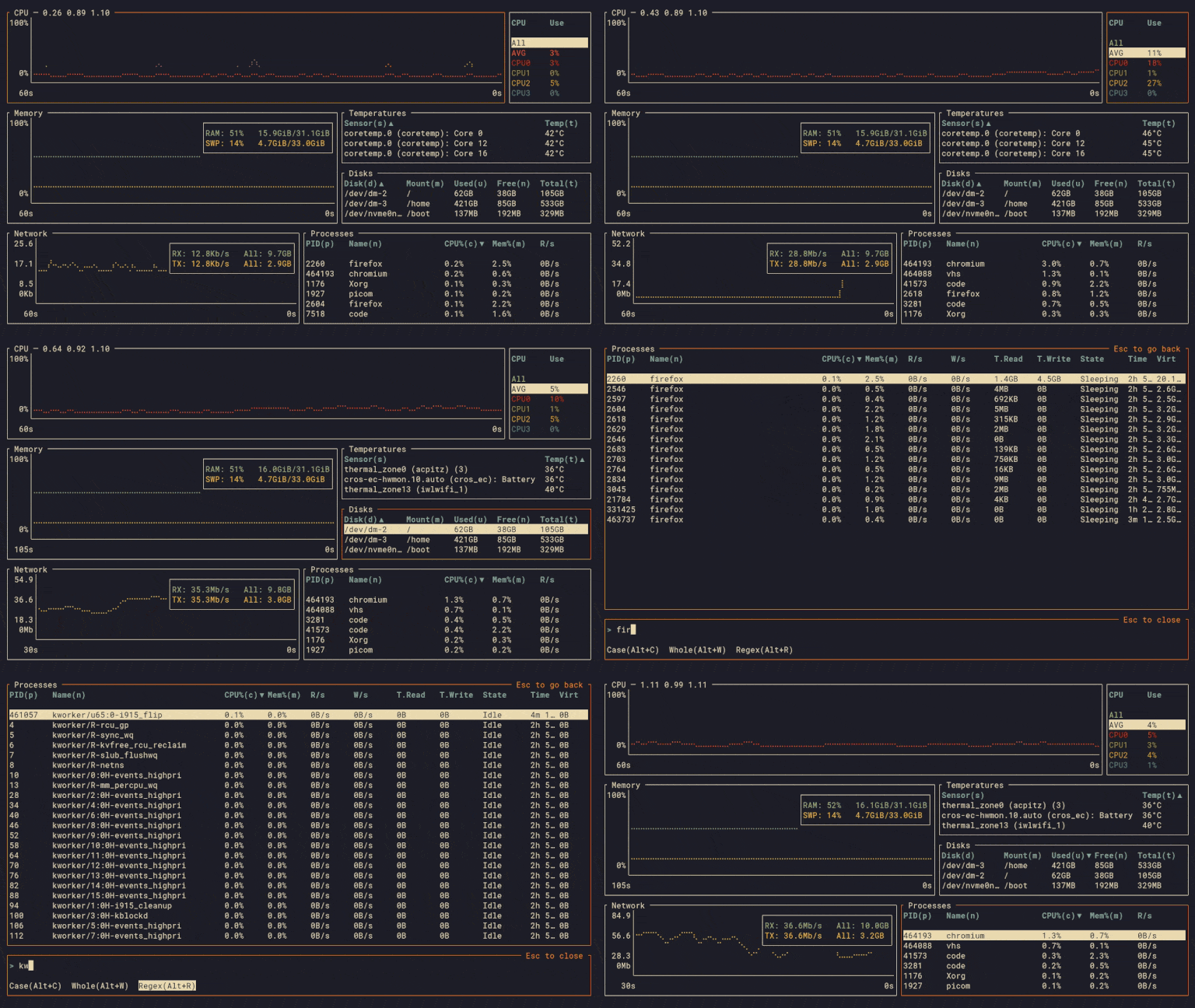


 bottom (btm) — это настраиваемый графический монитор процессов и системы, который работает прямо в терминале. Он показывает графики в реальном времени: загрузку процессора, памяти, сети, дисков и температуру, и работает на Linux, macOS и Windows.