Write conversation tests for your phone agents, including Dialogflow CX and CX Agent Studio agents,
run them from Claude Code or CI, and have real phone calls graded by an AI caller.
Open source, and free to run with no API keys.
Test. An agent's tests are plain YAML: what the caller says (or a model
playing the caller), and what must happen: which steps the call reaches, what
the agent must or must never say, which tools it calls. vk test runs them on
Lampline, or against a live Dialogflow CX or CX Agent Studio agent, and tells
you exactly what went wrong:
$ vk test agents/front-desk
PASS  billing question goes to the billing team  (2 turn(s), 0.8s)  Greeting → Router → Billing → Transfer to staff
PASS  emergency gets the 911 instruction  (1 turn(s), 0.7s)  Greeting → Router
FAIL  caller asks about Saturday hours  (1 turn(s), 0.8s)  Greeting → Router
      - expected to reach 'Hours and location'; steps were Greeting → Router
      - expected the agent to say 'noon'
A starter template run against Lampline's stand-in test model, which is why one test fails.
Fix and review from your coding agent. Lampline ships skills for Claude
Code, Cursor and Codex that build an agent with tests, fix failing tests
without breaking passing ones, test your Dialogflow agents, and review a change
before it goes live (set up).
Run it. The same agents take real calls on hardware you control: a
drag-and-drop builder where LLM steps and scripted pages mix, HTTP and MCP
tools, records and document search, and phone calls over Twilio, Telnyx or any
SIP trunk through jambonz. Import from Dialogflow CX and CX Agent Studio, or
export back, whenever you like. Built on Pipecat.
🏠 Local first One command on a laptop, a GPU box or an on-prem server. No cloud account needed.
🔒 Private by default No telemetry, bound to localhost, a key on every request, and keys never in your agents or the repo.
🧠 Any model Claude, OpenAI, Gemini, Vertex AI, Azure OpenAI, Bedrock, Groq, Mistral, DeepSeek, Grok and more, or Ollama on your own hardware.
🧩 Agents as code Every agent is a folder of YAML and Markdown: reviewed in git, tested with vk, exported back to Google's tools whenever you like.
🚀 Quick start
Just the tests (Python 3.10+; no Docker, no clone):
pipx install lampline                                     # the vk command
vk templates install front-desk --dir agents/front-desk   # a starter agent with tests
vk lint agents/front-desk                                 # offline checks
The whole platform (builder, test calls, phone calls). Needs Docker with
Compose v2 (Docker Desktop is fine). No API keys or accounts:
git clone https://github.com/C4rohan/lampline && cd lampline
scripts/docker-up.sh --free          # everything on this computer: Ollama, Moonshine and Kokoro
--free runs the model (Qwen3 4B in Ollama) and speech (Moonshine listening,
Kokoro speaking) on your own computer. The first start downloads about 3 GB and
shows progress; after that it starts in seconds. Replies are slower and simpler
than a cloud model's, and you can switch to any provider on the Integrations
page whenever you like. On a Mac, the native route is faster, because Ollama
uses the GPU outside Docker: install Ollama, then
scripts/engine-up.sh --free.
Have API keys? Run scripts/docker-up.sh without --free. Either way it prints
a link like http://localhost:7860/#/?key=…: open it once and the page
remembers the key. Pick your model and voice on the Integrations page (or put keys like ANTHROPIC_API_KEY, GEMINI_API_KEY, DEEPGRAM_API_KEY in
.env; see .env.example). Your agents are in ./agents (edit them, keep them
in git) and everything else the engine keeps, settings with your keys, records,
knowledge and downloaded models, is in ./.vpe-data.
scripts/docker-up.sh --down stops it; --logs follows its log. Plain
docker compose up -d --build works too once .env has VPE_DOCKER_API_KEY.
Details: engine/README.md.
Prefer no Docker? scripts/engine-up.sh runs the engine natively (Python 3.11+)
at http://localhost:7860, which also lets browser calls reach it directly.
Free, private speech: Integrations → Whisper and Kokoro → Download models,
or Moonshine for listening, which transcribes while the caller talks.
📋 Test any phone agent for free
Lampline's Evals tab phones a voice agent over a real phone line, plays the
caller with an AI Test Caller, and grades the call against what should
happen. It works on any agent with a phone number: one built in Lampline,
Dialogflow CX, CX Agent Studio, Vapi, Retell, or your IVR.
Free calls through Google Voice. The Lampline Phone Bridge extension (Chrome or Edge) connects the call's audio to the Test Caller inside the browser: no cables, Windows or Mac. Or use any phone on speaker.
Graded, with reasons. You write who is calling, what they want and what must happen; your model grades the transcript, check by check. A call that heard nothing shows Didn't run, never Failed.
Tough callers. Background noise, accents, interruptions, long pauses, hesitant or rambling speech.
The agent's speed, as callers hear it. Typical and p95 response time, phone line included.
Bring your test scripts. Paste Hammer, Cyara or spreadsheet tests and they become runnable cases. Replay any failed call.
Improve an agent from its failures. Lampline runs your test cases as text chats, rewrites the prompts of the steps where checks failed, and keeps a change only if more checks pass and nothing that passed breaks. You review the before and after, then apply.
Only call agents you own or are allowed to test. You press Call yourself:
Google Voice doesn't allow automated dialing.
🤖 Use it from Claude Code, Cursor or Codex
Lampline agents are plain files (agent.yaml and prompts/*.md), and vk
lints and tests them from the terminal, so a coding agent can build, test and
review a phone agent for you. Four skills teach it how:
voice-agent-builder: asks what the agent should do, writes the tests
first, builds the folder, and runs vk lint and vk test until they pass
voice-agent-fixer: makes failing tests pass by changing only the
prompts or routes behind them, and keeps a change only if more tests pass
and none breaks
dialogflow-tester: writes tests for an existing Dialogflow CX or CX
Agent Studio agent and runs them against it live, or side by side with its
Lampline copy
voice-agent-reviewer: checks a change before it goes live: lint, the
diff, the tests, and a privacy review, then asks you to approve
Claude Code, from the plugin marketplace in this repo:
On Claude Code 2.1.275 or later, one line does both:
/plugin install lampline --marketplace C4rohan/lampline.
Cursor, Codex and other agents read AGENTS.md. To copy the
skills into a project instead, run vk skills install --target claude
(or --target agents, --target gemini).
Claude Desktop, Cursor and other MCP clients:vk mcp serves your agent
folders as tools: list, lint, run tests, read and change a step's prompt, and
see which real calls failed their checks
(set up).
Then ask, for example: "Build a phone agent for a dental office that books
cleanings, with tests", "Make the failing tests in agents/front-desk pass",
"Write regression tests for my Dialogflow CX agent", or "Review my change
to agents/front-desk before it goes live".
🔁 Bring your Dialogflow CX and CX Agent Studio agents
Export an agent from Google's console, drop the .zip on New agent → Import, and
it opens in the builder: flows, pages, forms, routes, playbooks and tools carried
over, with a report of anything to check before it takes calls. It works the
other way too: Export writes any agent back as a Dialogflow CX package or a
CX Agent Studio app.
📥 Import. A Dialogflow CX package or a CX Agent Studio app (JSON or YAML). The conversion runs on your computer and never runs code from the export.
✏️ Ready to edit. Pages become scripted pages, playbooks become LLM steps, flows group them, and webhooks and OpenAPI tools become tools.
From Dialogflow CX
Becomes
Flows and pages
Flows of scripted pages: entry messages said word for word
Form parameters, entity types
Form fields with their types, choices and synonyms, patterns and keypad input
Intent and condition routes, no-match handlers
Transfers the model decides, rules, and "no match" transfers
Playbooks
LLM steps with their goal, guidelines and steps
Webhooks, OpenAPI tools, data store tools
Tools (webhooks answer with a mock until connected) and local knowledge search
From CX Agent Studio
Becomes
Root agent and child agents
A root agent with sub-agents and transfers both ways
Global instruction, variables
Global instructions and context variables
OpenAPI toolsets, Python tools, data stores
HTTP tools, tools with example answers, and local knowledge search
From the terminal: vk import auto export.zip and vk export dfcx|ces agents/<name>.
The full mapping, both ways, and what doesn't carry over yet:
cli/README.md.
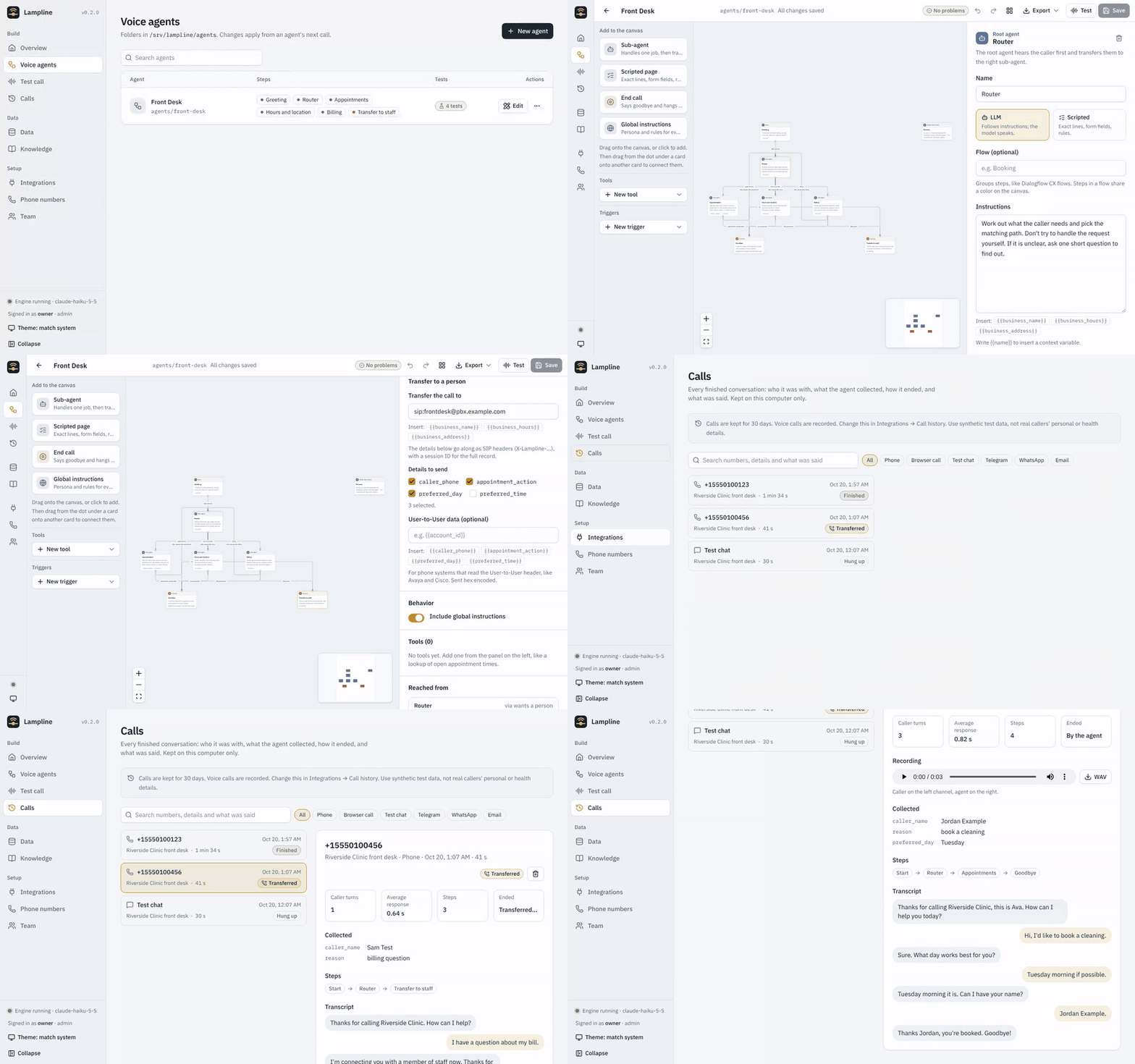
👀 A quick tour
Sample data only.
🧪 Test calls. Chat or talk through your microphone. The steps light up as the call moves, and every collected detail shows on the right.
🧠 20 model providers. Pick one, paste a key, press Test connection. Speech runs in the cloud or free on your own computer.
📞 Phone calls and SIP. Twilio, Telnyx, or your own SIP trunk, PBX or SBC through jambonz. Genesys, Avaya, Cisco and more are coming.
🗄️ Data of its own. Collections agents look up and save during calls, and document search over your FAQs, all on your machine.
Screenshots use the bundled sample agents and made-up data.
🏠 Where it runs
Status
Local and on-prem
✅ Available
One Docker container, or the engine natively, on any machine you control
Google Cloud
🔜 Coming soon
A one-command deployment to your own Google Cloud project
🧠 Models
Pick one on the Integrations page; each starts on a sensible default model you
can change, and Test connection checks the key.
Provider
Key
Claude (Anthropic)
ANTHROPIC_API_KEY
OpenAI, or any OpenAI-compatible endpoint
OPENAI_API_KEY, VPE_LLM_BASE_URL
Gemini
GEMINI_API_KEY
Gemini on Vertex AI
GOOGLE_CLOUD_PROJECT plus a service account key or this computer's Google credentials
Azure OpenAI
AZURE_OPENAI_API_KEY, AZURE_OPENAI_ENDPOINT
Amazon Bedrock
AWS keys, or this computer's AWS credentials
Groq, Mistral, DeepSeek, Grok (xAI), Together AI, Fireworks AI, OpenRouter, Cerebras, NVIDIA NIM, Qwen, SambaNova, Nebius, Novita AI
each provider's API key
Ollama
none: open models on this computer or your own server
📞 Phone calls and SIP
Twilio
a Twilio number rings your agent; outbound calls from triggers
any SIP trunk, PBX or session border controller: point a jambonz application at the engine
The Phone numbers page has the webhook to copy and the steps for each.
Details: engine/README.md.
🏢 Contact centers (coming soon)
Genesys Cloud, Avaya, Cisco Webex Contact Center, Cisco UCCE and PCCE, Amazon
Connect, NICE CXone, Five9 and Twilio Flex show on the Integrations page as
coming soon. Until each lands, most of them can already send calls to your
agents over a SIP trunk through jambonz. The plan for each:
docs/ROADMAP.md.
The engine reads the agent folders on every call, so a change is live on the
next call. Settings and keys live in a chmod 600 file outside the repo.
💰 What a voice-agent call actually costs
Monthly totals for 4-minute calls at list prices (October 2026). Staff time is
not included. Reproduce or change any assumption with python3 costs/cost_model.py.
Deployment
10k calls/mo
50k calls/mo
200k calls/mo
CX Agent Studio (list price, baseline)
$5,000
$25,000
$100,000
On-prem server (no GPU) + Google model APIs
$1,384
$6,235
$24,426
On-prem GPU servers + self-hosted models
$681
$1,363
$3,748
Cloud Run + Google model APIs (coming soon)
$1,423
$6,356
$24,908
GKE production + mixed vendors: Deepgram, Claude Haiku, Fish Audio (coming soon)
$1,105
$3,612
$13,037
GKE production + self-hosted models on L4 GPUs, 3-yr CUD (coming soon)
$1,054
$1,675
$3,888
What the numbers say:
📉 Hosting is the small part. Model APIs are almost the whole bill, so the model choice matters far more than local vs. cloud.
🖥️ Self-hosted models are where the big savings are, but they rest on two assumptions nobody has published good data for: concurrent calls per GPU, and whether an 8B open model is good enough for your flows. Help measure them.
Every row, per-call figures and assumptions: costs/COSTS.md.
🧩 Agents as code (vk)
Build and change agents from a terminal or an AI coding agent as well as the
builder. Each agent is a folder: agent.yaml for the graph and one Markdown
file per prompt, so changes are reviewable in git.
pipx install lampline               # installs the `vk` command (from a clone: pip install -e cli)
vk templates install front-desk     # start from a ready-made agent
vk lint agents/front-desk           # graph checks + a scan for real-looking patient data
vk test agents/front-desk           # runs tests/*.yaml conversations on the engine
vk import dfcx export.zip           # bring an agent over from Dialogflow CX or CX Agent Studio
vk skills install --target claude   # the four coding-agent skills (or install the Claude Code plugin, above)
CI runs on every push and pull request to dev, qa and prod:
the vk CLI test suite
the engine test suite: flows, extraction, text chat, evals, every model provider's setup, Twilio, Telnyx and jambonz calls, the voice pipeline and a real WebRTC handshake, on fake models
the web app builds, and the committed build matches its source
the Docker image builds, starts as a non-root user, answers health and refuses requests without its key
shellcheck, and a check that COSTS.md matches the cost model
a scan of every commit for keys and tokens (gitleaks)
Lampline is created and maintained by Rohan Salvi. If you use it in a
project, product, paper or talk, please credit "Lampline by Rohan Salvi" and
link this repository. GitHub's Cite this repository button (from
CITATION.cff) gives APA and BibTeX:
@software{salvi_lampline_2026,
  author  = {Salvi, Rohan},
  title   = {Lampline: open-source, self-hosted voice agents},
  year    = {2026},
  version = {0.3.0},
  url     = {https://github.com/C4rohan/lampline}
}
If you redistribute Lampline or build on it, the Apache-2.0 licence requires
you to keep the NOTICE file, which carries this attribution.
📄 License
Apache-2.0. The engine uses Pipecat (BSD-2-Clause), installed from PyPI;
other credits are in NOTICE. Not affiliated with Google or any
provider named here. Prices are list-price estimates that change often; check
them before budgeting.
Lampline (C4rohan/Lampline)
Выберите тег — он появится здесь. Пока теги не выбраны, показаны все проекты каталога.
Ищем в базе…
Выберите тег — он появится здесь. Пока теги не выбраны, показаны все проекты каталога.
Что это такое?Lampline — это проект с открытым исходным кодом для создания, тестирования и запуска телефонных ИИ-агентов на вашем собственном компьютере. В него входят конструктор с перетаскиванием, CLI (vk) и бесплатный AI Test Caller, который звонит вашему агенту и выставляет оценку разговору.
Это фреймворк или облачный сервис, на который нужно зарегистрироваться?Это программа, которую вы разворачиваете у себя: движок и интерфейс конструктора запускаются самостоятельно через Docker или напрямую через Python. Каждый агент — это обычная папка с файлами YAML и Markdown, которую вы храните в git.
Как это запустить?Выполните scripts/docker-up.sh --free для полностью локальной установки без аккаунтов (при первом запуске скачивается около 3 ГБ локальных моделей) или scripts/docker-up.sh без --free, если у вас уже есть ключи API. Вариант без Docker — scripts/engine-up.sh.
Нужен ли мне ключ API или какое-то особое ПО, чтобы попробовать?Для режима --free ключ API не нужен, всё работает локально. Достаточно Docker с Compose v2 (или Python 3.11+ для запуска без Docker). Ключи API для Claude, OpenAI, Gemini и других необязательны, их можно добавить позже на странице Integrations.
В чём подвох у бесплатного режима без ключей?Бесплатный режим использует небольшую локальную модель и локальные речевые модули, поэтому ответы медленнее и проще, чем у облачного провайдера. Позже можно перейти на любого платного провайдера на странице Integrations.
AI Test Caller работает на любом компьютере?Расширение Phone Bridge для браузера (Chrome или Edge) подключает тестовые звонки без каких-либо кабелей на Windows или Mac; сам движок работает на любом компьютере через Docker или напрямую на macOS, Linux и Windows.
Программа «звонит домой» или отправляет данные моих агентов куда-то?Нет. В движке нет телеметрии, он привязан к localhost, требует ключ в каждом запросе и никогда не хранит ключи ваших моделей внутри агентов или в репозитории.
Можно ли импортировать существующего агента Dialogflow CX или CX Agent Studio?Да. Перетащите экспортированный файл .zip в раздел New agent → Import, и агент откроется в конструкторе с перенесёнными потоками, страницами, формами и инструментами; также можно экспортировать агента Lampline обратно в любой из этих форматов.
Как AI Test Caller на самом деле тестирует моего агента?Вы пишете, кто звонит и что должно произойти, а он играет роль звонящего в настоящем телефонном звонке (или в чате), оценивает расшифровку разговора по каждой проверке и может даже переписать неудачные промпты, оставив исправление только в том случае, если ничего из ранее успешно пройденного не сломалось.
Что делают навыки Claude Code, Cursor и Codex?Четыре навыка (voice-agent-builder, voice-agent-fixer, dialogflow-tester, voice-agent-reviewer) позволяют ИИ-агенту для программирования создать агента с тестами, исправить упавшие тесты, протестировать агента Dialogflow по его копии в Lampline и проверить изменение перед тем, как оно уйдёт в работу.
Как звонки вообще попадают к агенту?Через номера Twilio или Telnyx, либо через любой SIP-транк, АТС или пограничный контроллер сессий (SBC), подключённый через jambonz; интеграции с контакт-центрами, такими как Genesys и Avaya, помечены как «скоро».












 Lampline — это проект с открытым исходным кодом для создания, тестирования и запуска телефонных ИИ-агентов на вашем собственном компьютере. В него входят конструктор с перетаскиванием, CLI (vk) и бесплатный AI Test Caller, который звонит вашему агенту и выставляет оценку разговору.