






ConvertX README

The project's README from github.com/C4illin/ConvertX. As one markdown file: README.md.

ConvertX

ConvertX

Docker ghcr.io Pulls Docker Pulls GitHub Release GitHub commits since latest release GitHub repo size Docker container size

C4illin%2FConvertX | Trendshift

A self-hosted online file converter. Supports over a thousand different formats. Written with TypeScript, Bun and Elysia.

Features

Converters supported

Converter Use case Converts from Converts to
Inkscape Vector images 7 17
libjxl JPEG XL 11 11
resvg SVG 1 1
Vips Images 45 23
libheif HEIF 2 4
XeLaTeX LaTeX 1 1
Calibre E-books 26 19
LibreOffice Documents 41 22
Dasel Data Files 5 4
Pandoc Documents 43 65
msgconvert Outlook 1 1
VCF to CSV Contacts 1 1
dvisvgm Vector images 4 2
ImageMagick Images 245 183
GraphicsMagick Images 167 130
Assimp 3D Assets 77 23
FFmpeg Video ~472 ~199
Potrace Raster to vector 4 11
VTracer Raster to vector 8 1
Markitdown Documents 6 1
pdftops Documents 1 2

Any missing converter? Open an issue or pull request!

Deployment

[!WARNING] If you can't login, make sure you are accessing the service over localhost or https otherwise set HTTP_ALLOWED=true

# docker-compose.yml
services:
  convertx:
    image: ghcr.io/c4illin/convertx
    container_name: convertx
    restart: unless-stopped
    ports:
      - "3000:3000"
    environment:
      - JWT_SECRET=aLongAndSecretStringUsedToSignTheJSONWebToken1234 # will use randomUUID() if unset
      # - HTTP_ALLOWED=true # uncomment this if accessing it over a non-https connection
    volumes:
      - ./data:/app/data

or

docker run -p 3000:3000 -v ./data:/app/data ghcr.io/c4illin/convertx

Then visit http://localhost:3000 in your browser and create your account. Don't leave it unconfigured and open, as anyone can register the first account.

If you get unable to open database file run chown -R $USER:$USER path on the path you choose.

Environment variables

All are optional, JWT_SECRET is recommended to be set.

Name Default Description
JWT_SECRET when unset it will use the value from randomUUID() A long and secret string used to sign the JSON Web Token
ACCOUNT_REGISTRATION false Allow users to register accounts
HTTP_ALLOWED false Allow HTTP connections, only set this to true locally
ALLOW_UNAUTHENTICATED false Allow unauthenticated users to use the service, only set this to true locally
AUTO_DELETE_EVERY_N_HOURS 24 Checks every n hours for files older then n hours and deletes them, set to 0 to disable
WEBROOT The address to the root path setting this to "/convert" will serve the website on "example.com/convert/"
FFMPEG_ARGS Arguments to pass to the input file of ffmpeg, e.g. -hwaccel vaapi. See https://github.com/C4illin/ConvertX/issues/190 for more info about hw-acceleration.
FFMPEG_OUTPUT_ARGS Arguments to pass to the output of ffmpeg, e.g. -preset veryfast
HIDE_HISTORY false Hide the history page
LANGUAGE en Language to format date strings in, specified as a BCP 47 language tag
UNAUTHENTICATED_USER_SHARING false Shares conversion history between all unauthenticated users
MAX_CONVERT_PROCESS 0 Maximum number of concurrent conversion processes allowed. Set to 0 for unlimited.
PORT 3000 Application listen port

Docker images

There is a :latest tag that is updated with every release and a :main tag that is updated with every push to the main branch. :latest is recommended for normal use.

The image is available on GitHub Container Registry and Docker Hub.

Image What it is
image: ghcr.io/c4illin/convertx The latest release on ghcr
image: ghcr.io/c4illin/convertx:main The latest commit on ghcr
image: c4illin/convertx The latest release on docker hub
image: c4illin/convertx:main The latest commit on docker hub

Release image size Dev image size

Tutorial

[!NOTE] These are written by other people, and may be outdated, incorrect or wrong.

Tutorial in french: https://belginux.com/installer-convertx-avec-docker/

Tutorial in chinese: https://xzllll.com/24092901/

Tutorial in polish: https://www.kreatywnyprogramista.pl/convertx-lokalny-konwerter-plikow

Screenshots

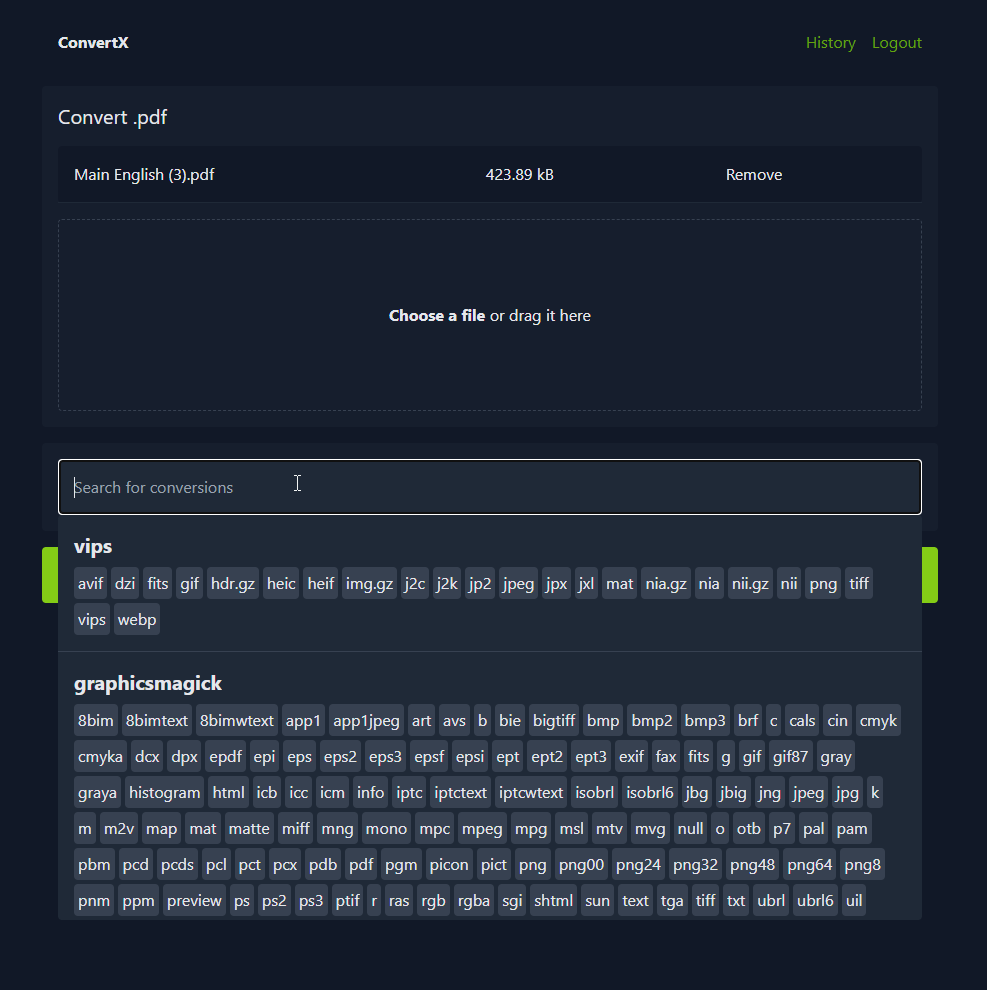
ConvertX Preview

Development

  1. Install Bun and Git
  2. Clone the repository
  3. bun install
  4. bun run dev

Pull requests are welcome! See open issues for the list of todos. The ones tagged with "converter request" are quite easy. Help with docs and cleaning up in issues are also very welcome!

Use conventional commits for commit messages.

Contributors

Image with all contributors

Alt

Star History

Star History Chart

ConvertX (C4illin/ConvertX)

Searching Database…

19.1K ·GitHub
这是什么?ConvertX 是一个可自建部署的在线文件转换工具:你把它运行在自己的服务器上,就能直接在浏览器里在 1000 多种格式之间转换文件。
它是桌面软件,还是部署在服务器上运行的东西?它是一个服务器端网页应用,不是桌面程序:基于 Bun 和 Elysia 框架构建的 TypeScript 服务,通常用 Docker 部署,然后在浏览器里使用。
我怎么把它跑起来?运行 Docker 镜像 ghcr.io/c4illin/convertx(Docker Hub 上也有;:latest 标签是稳定版)——它默认监听 3000 端口——然后在浏览器中打开并创建第一个账号。刚部署的实例不要在未配置的情况下暴露在外网。
背后真正负责转换的是什么?它把 20 多个开源转换工具整合到一个界面后面:FFmpeg 处理视频,ImageMagick 处理图片,LibreOffice 和 Pandoc 处理文档,Calibre 处理电子书,Assimp 处理 3D 模型,Inkscape 处理矢量图等等——所以只需要那个 Docker 镜像就够了。
登录方面有什么坑吗?有:登录只能通过 localhost 或 HTTPS 进行;如果是纯 HTTP,就必须显式设置 HTTP_ALLOWED=true(仅限本地使用)。另外,任何能访问到新实例的人都可以注册第一个账号,所以要尽快创建你自己的账号。
我的文件会留在我的服务器上吗?会保留多久?所有东西都留在你自己的硬件上,而且工作文件会自动清理:默认情况下,超过 24 小时的文件都会被删除,你也可以完全关闭这个功能。
可以让多人共用一个实例吗?可以——它支持多个账号并带密码保护。新用户注册默认是关闭的,可以开启,或者你也可以通过环境变量允许本地免登录使用。
它能用硬件加速来加快视频转换吗?可以,针对 FFmpeg:通过 FFMPEG_ARGS 传入 -hwaccel vaapi 之类的参数,再用 FFMPEG_OUTPUT_ARGS 调整输出端(比如 -preset veryfast)。
为什么用这个而不用在线转换网站?因为它运行在你自己控制的硬件上,文件不会上传给任何第三方,而且在 AGPL-3.0 许可证下,1000 多种格式完全免费。
Creator
C4illin
Size
2.9 MB
Stars
19.1K
Age
2y
Commits · 90 Days